Computer-Use Agents as Judges for Generative User Interface
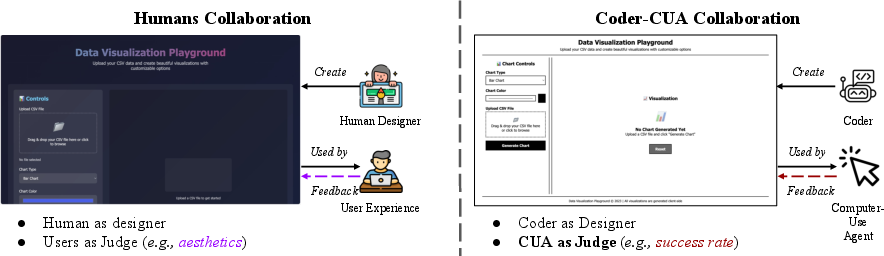
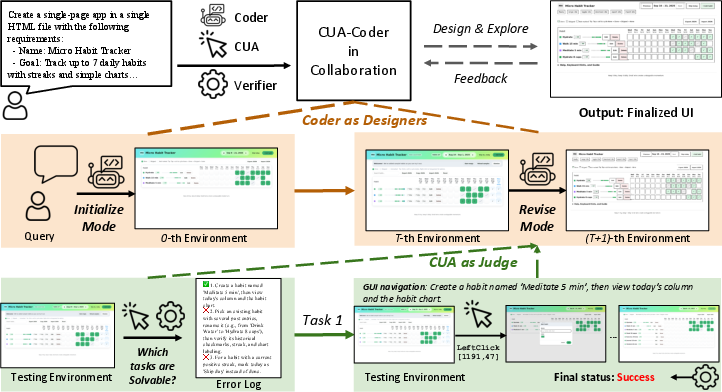
Abstract: Computer-Use Agents (CUA) are becoming increasingly capable of autonomously operating digital environments through Graphical User Interfaces (GUI). Yet, most GUI remain designed primarily for humans--prioritizing aesthetics and usability--forcing agents to adopt human-oriented behaviors that are unnecessary for efficient task execution. At the same time, rapid advances in coding-oriented LLMs (Coder) have transformed automatic GUI design. This raises a fundamental question: Can CUA as judges to assist Coder for automatic GUI design? To investigate, we introduce AUI-Gym, a benchmark for Automatic GUI development spanning 52 applications across diverse domains. Using LLMs, we synthesize 1560 tasks that simulate real-world scenarios. To ensure task reliability, we further develop a verifier that programmatically checks whether each task is executable within its environment. Building on this, we propose a Coder-CUA in Collaboration framework: the Coder acts as Designer, generating and revising websites, while the CUA serves as Judge, evaluating functionality and refining designs. Success is measured not by visual appearance, but by task solvability and CUA navigation success rate. To turn CUA feedback into usable guidance, we design a CUA Dashboard that compresses multi-step navigation histories into concise visual summaries, offering interpretable guidance for iterative redesign. By positioning agents as both designers and judges, our framework shifts interface design toward agent-native efficiency and reliability. Our work takes a step toward shifting agents from passive use toward active participation in digital environments. Our code and dataset are available at https://github.com/showlab/AUI.

Paper Prompts
Sign up for free to create and run prompts on this paper using GPT-5.
Top Community Prompts
Explain it Like I'm 14
Explaining “Computer-Use Agents as Judges for Generative User Interface”
What is this paper about? (Brief overview)
This paper asks a simple but powerful question: If we let AIs that use computers (called Computer-Use Agents, or CUAs) judge and help redesign websites, can we make websites that AIs can use more easily and reliably?
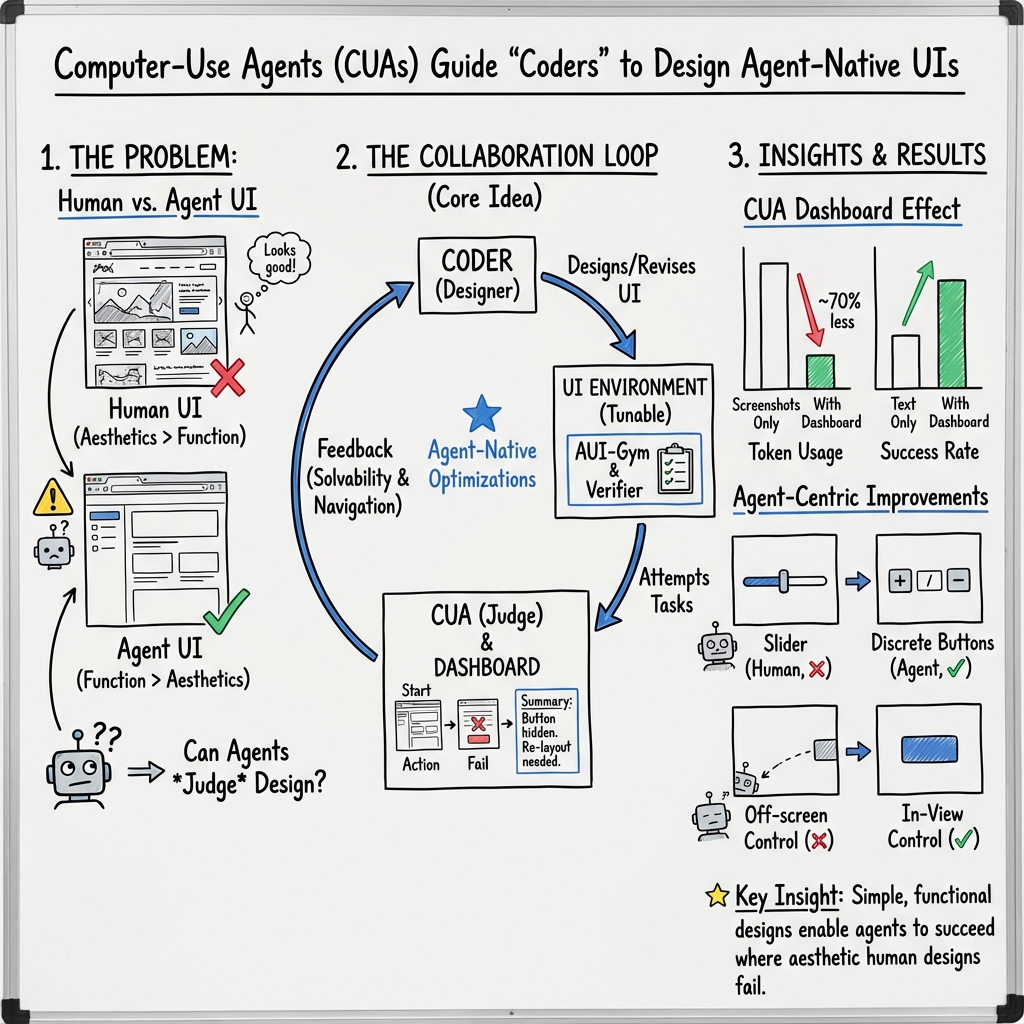
Today, most apps and websites are made for humans: they’re pretty, animated, and designed for our eyes and hands. But AIs don’t need fancy animations or colorful themes—they just need clear, simple layouts to finish tasks. The authors build a new “playground” called AUI-Gym where:
- one AI (“Coder”) builds or edits websites,
- another AI (“CUA”) tries to use them and judges what works or not,
- and the website gets improved based on the CUA’s feedback.
What were the main goals? (Key objectives)
The researchers wanted to:
- Create a big test area (AUI-Gym) where AIs can automatically build and test full websites across many types of apps (like tools, games, and landing pages).
- Make a teamwork system where a “Coder” AI designs the website and a “CUA” AI judges how well it works for completing tasks.
- Find out what design choices actually help AIs complete tasks faster and more reliably.
How did they do it? (Methods in simple terms)
Think of this like building a video game level and then letting a player test it:
- The “Coder” AI is the builder: It creates or updates the website.
- The “CUA” AI is the player and judge: It tries to do tasks on the website (like “add a habit,” “upload a file,” or “play a game level”) by clicking, typing, and scrolling.
Here’s the approach, step by step:
- AUI-Gym: The team built 52 different apps (websites) across 6 categories, then created 1,560 realistic tasks (like mini-missions) for those apps.
- Task generator and checker: They used a strong AI to suggest many tasks for each app. Then they made an automatic “checker” (tiny rules in code) for each task to confirm whether the task is actually possible on that website and whether the CUA completed it. Think of this like a referee who says, “Yes, you scored,” or “No, that move doesn’t count.”
- Two ways of judging progress:
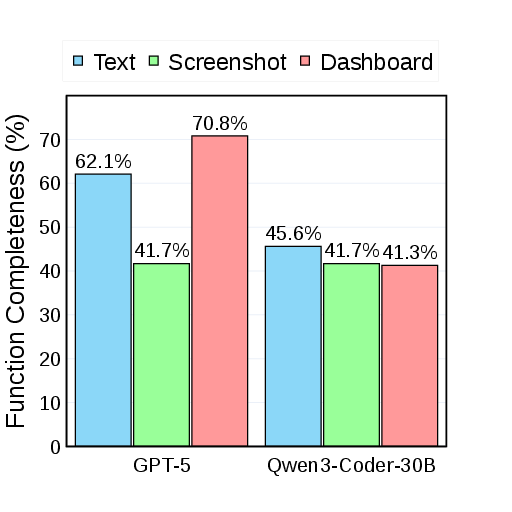
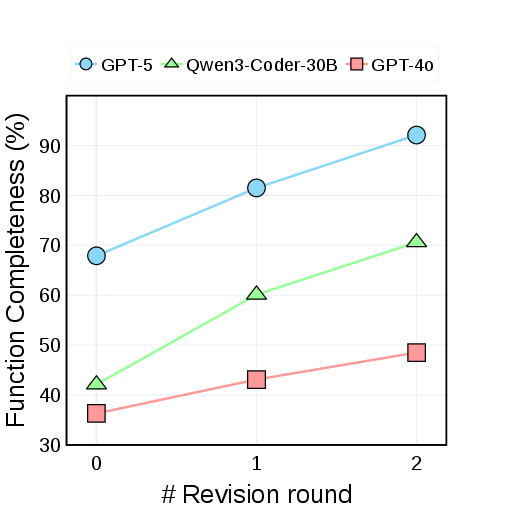
- Function Completeness: Does the website even have what’s needed to do the task? (For example, if the task says “upload a CSV,” does the site actually have an upload button?)
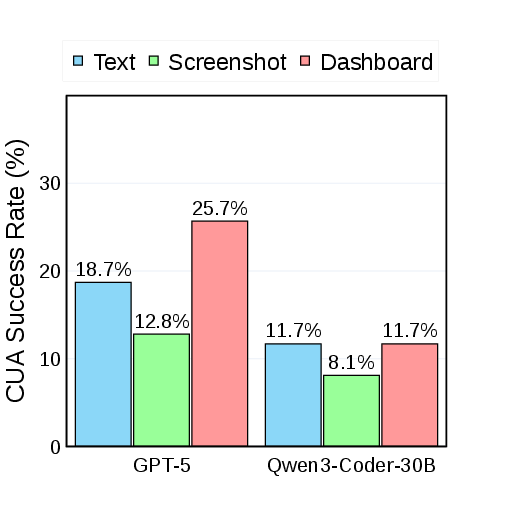
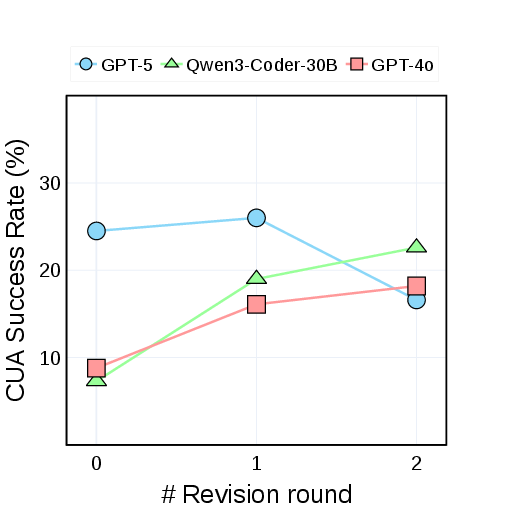
- CUA Success Rate: Can the CUA actually finish the task by clicking and typing through the site?
- Coder–CUA teamwork loop:
- Round 1: Coder builds the site.
- CUA tries tasks. If a task is impossible, that’s a “missing feature.” If it’s possible but the CUA fails, that’s a “navigation problem.”
- The system summarizes what went wrong and tells the Coder.
- The Coder updates the site to fix missing features or make it easier for the CUA to navigate.
- CUA Dashboard (the “highlight reel”): A CUA’s test run can be long and messy (many clicks and screenshots). So the team compresses the whole attempt into one clear image that shows the most important steps and where things went wrong. This cuts out about 76% of the visual clutter while keeping the key moments—like a sports highlight reel.
What did they find? (Main results and why they matter)
The researchers found several important things:
- Making tasks possible is step one: Many initial websites looked fine to humans but were missing key features the tasks needed. Listing and fixing those missing features boosted how many tasks the sites could support.
- Navigation is the big bottleneck: Even when features existed, CUAs often failed because the site was too busy, too stylish, or too complex.
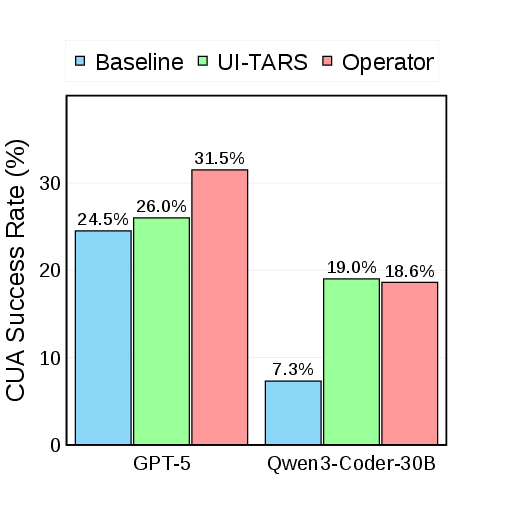
- Simple designs help AIs succeed: When sites were redesigned using CUA feedback—by reducing fancy styles, increasing contrast, simplifying layouts, and adding clear buttons—the CUA success rate improved.
- The teamwork loop works best when both kinds of feedback are used:
- “Task solvability” feedback tells the Coder what features to add.
- “Navigation” feedback tells the Coder how to simplify the design so the CUA can actually get through the steps.
In numbers (high level):
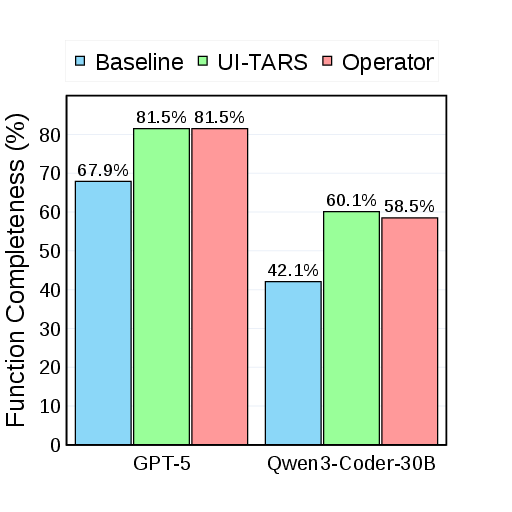
- Function Completeness (whether tasks are even supported) rose a lot—up to around 81% for the strongest Coder after iterative fixes.
- CUA Success Rate (whether the agent actually finishes tasks) also improved, especially for weaker Coders. This shows the method can help even when the AI coder isn’t the best.
Why does this matter? (Implications and impact)
This research flips the usual idea of AI and interfaces:
- Instead of training AIs harder to handle human-centric designs, the authors design the websites to be “agent-friendly” from the start.
- This could lead to faster, more reliable software testing and development, because AIs can help design, test, and improve interfaces without constant human supervision.
- In the long run, it hints at a future where AIs are not just users, but active partners in building digital environments—making apps that are robust, easy for machines to operate, and potentially more accessible and consistent for everyone.
In short: Letting AI “players” judge and shape the “game level” (the website) makes the whole system stronger. It’s a practical step toward digital worlds designed not just for humans, but also for the AIs that increasingly help us use and build them.
Knowledge Gaps
Knowledge gaps, limitations, and open questions
The following list identifies specific missing pieces, uncertainties, and unexplored directions that future work could concretely address:
- Benchmark realism: AUI-Gym constrains apps to single HTML files and largely synthetic tasks; evaluate on multi-page, SPA/MPA frameworks (React/Vue), back-end dependencies, authentication flows, state persistence, and real third-party integrations to reflect real-world web complexity.
- Task representativeness: Tasks are GPT-generated and human-filtered; quantify coverage and realism via expert annotation, taxonomy alignment (e.g., CRUD, navigation, async interactions), and comparison to logs from real user workflows.
- Verifier reliability: GPT-generated rule-based JS checkers are unvalidated at scale; measure precision/recall against human judgments, analyze false positives/negatives, and publish an adversarial test suite to stress dynamic states, async events, and edge cases.
- Checker gaming: Coders can potentially “hack” checkers (e.g., hidden elements, spoofed IDs); introduce adversarial evaluation, randomized DOM IDs, runtime instrumentation, and semantic/behavioral checks to mitigate Goodharting.
- Semantic validity of success: Current checks are DOM-state based; add semantic verification (e.g., data consistency, constraints satisfaction, output correctness) and cross-modal validation (vision + DOM + event traces) to ensure tasks are truly completed.
- Closed-model dependence: Heavy reliance on GPT-5 (task proposer, verifier, coder, commenter) risks circularity and bias; replicate with open models and diverse judge ensembles to assess robustness and reduce vendor lock-in.
- Data contamination risk: Using the same (or related) foundation models for designing, proposing, and verifying tasks may inflate scores; perform cross-model, cross-provider evaluations and leakage diagnostics.
- Reproducibility and variance: Stochastic LLM behavior, missing seeds, and unspecified prompts/parameters hinder replication; release full prompts, seeds, sampling parameters, and report variance with confidence intervals.
- Statistical rigor: Report effect sizes, confidence intervals, and significance tests for improvements (SR, FC), and conduct sensitivity analyses over step limits, viewport sizes, and agent configurations.
- Cost and scalability: The framework invokes multiple LLMs per iteration; quantify computational cost, latency, and economic feasibility for large-scale or continual design loops.
- CUA action modality: Agents use only coordinate-based actions; evaluate DOM-based and accessibility-tree-based policies and measure how UI redesigns generalize across perception/action modalities.
- Limited agent diversity: Only two CUAs (one closed) were tested; systematically benchmark across a wider set of open/closed CUAs, different training paradigms (imitation vs. RL), and differing capabilities.
- Cross-agent generalization: UIs may overfit to a specific tester; measure whether designs that help one CUA also help others, and develop agent-agnostic design principles.
- Efficiency metrics: Beyond SR and FC, track steps-to-success, time-to-completion, input actions per success, error recovery, and sample efficiency across iterations to capture usability for agents.
- Robustness and perturbations: Test robustness to visual noise, layout shifts, color themes, scaling/responsiveness, dynamic content changes, latency, and cross-browser differences (Chromium/Firefox/WebKit).
- Accessibility trade-offs: Agent-friendly de-stylization may harm human accessibility; evaluate WCAG compliance and human usability to quantify trade-offs and co-optimization strategies.
- Human usability impacts: The paper claims agent-centric benefits but does not test human performance; run user studies to assess whether agent-optimized UIs degrade or enhance human UX.
- Dashboard faithfulness: The CUA Dashboard compresses trajectories, but its fidelity is unquantified; measure information loss, inter-annotator agreement on error localization, and ablate cropping policies.
- Commenter validity: VLM-as-commenter quality is unverified; benchmark commenter outputs for correctness, specificity, and actionability, and compare against human-written critiques.
- Iterative convergence: The “Markov Design Process” is introduced but not analyzed; study convergence properties, stability, and sample complexity of iterative redesign loops under different feedback and optimizers.
- Algorithmic alternatives: Current revision is prompt-driven; explore program synthesis constraints, search over design spaces, constrained optimization, and reinforcement learning for code revisions with explicit rewards.
- Failure taxonomy: Provide a systematic taxonomy of CUA failure modes (perception, grounding, affordance, control, planning) and map them to UI fixes to guide targeted redesign.
- Measurement of design principles: Claims (e.g., higher contrast, simpler layouts help) are qualitative; quantify the causal impact of specific design factors via controlled UI perturbations and factorial experiments.
- Security and sandboxing: Executing arbitrary generated HTML/JS in Playwright poses security risks; document sandboxing, CSP, and isolation practices, and evaluate generated code for common vulnerabilities.
- Persistence and storage: Several tasks require “saving” state; clarify and test persistence across sessions (localStorage/indexedDB) and include verifiers for durable correctness.
- Multi-language and i18n: All tasks appear in English; evaluate multilingual prompts, RTL scripts, locale-aware formatting, and internationalization resilience in both design and verification.
- Non-web GUIs: The framework is web-centric; extend to desktop/mobile apps (Win32, macOS, Android, iOS) and measure portability of design and judge principles across platforms.
- Multi-user and concurrency: Single-agent, single-user assumptions simplify dynamics; study multi-user sessions, concurrent edits, and locking to assess scalability of agent-optimized UIs.
- Ethical considerations: Agent-native redesigns might reduce human agency or transparency; develop guidelines and audits for fairness, explainability, and user control when UIs are optimized for machines.
- Generalization beyond synthetic apps: Many apps originate from coding examples; validate on production-grade OSS web apps and internal enterprise workflows to test external validity.
- Checker timing and async events: Verifiers may miss timing-dependent states; add event-driven probes, timeouts, and state watchers to accurately judge async transitions and animations.
- Sensitivity to step limits: A fixed 20-step cap may bias SR; conduct sensitivity studies and adaptive budgeting to understand how step limits influence comparative results.
- Preventing regression: Iterative revisions may improve FC while harming SR (observed in some rounds); introduce multi-objective optimization and regression tests that preserve past successes.
- Code quality and maintainability: Generated UIs may accrue technical debt; evaluate code modularity, readability, and maintainability metrics and enforce linting/tests in the loop.
- Licensing and content safety: Generated UIs may include unlicensed assets or unsafe content; integrate license checks and content safety filters into the design pipeline.
- Open-sourcing assets: While code/dataset are released, GPT-based artifacts (tasks, verifiers) may not be fully reproducible; provide frozen snapshots of tasks, verifiers, and UI versions for stable benchmarking.
Practical Applications
Immediate Applications
Below are near-term, deployable use cases that can be implemented with the paper’s released code, dataset, and described workflows (Coder–CUA collaboration, AUI-Gym, Verifier, and CUA Dashboard).
- Agent-friendly QA and continuous integration for web apps (Software)
- Use the Verifier to auto-generate task-specific functional checkers and the CUA to run navigation tests in CI, surfacing solvability gaps and multi-step bottlenecks before release.
- Tools/products/workflows: Playwright-based test runner; “Agent-as-Judge” CI job; CUA Dashboard artifacts attached to pull requests; SR/FC metrics reported in build status.
- Assumptions/dependencies: Availability of a capable CUA (e.g., Operator, UI-TARS) and LLM Coder (e.g., GPT-5/Qwen3-Coder); access to test environments; reliability of rule-based checkers; single-page HTML or instrumented apps.
- RPA bot success-rate uplift via agent-centric UI refactoring (Software, Finance, Operations)
- Apply de-stylization, higher contrast, and simplified layouts guided by CUA navigation feedback to improve bot reliability in workflows such as invoice processing, reconciliation, internal dashboards.
- Tools/products/workflows: “Agent-Ready Design Review” powered by CUA Dashboard; Coder proposes code-level refactors; before/after SR/FC tracked.
- Assumptions/dependencies: Existing RPA/clicker bots rely on visual/coordinate actions; permission to modify UIs; potential trade-offs with human aesthetics.
- Synthetic user stories to executable tests (Software engineering)
- Convert feature descriptions/user stories into a set of executable tasks with programmatic success checks (FC), reducing manual test authoring effort.
- Tools/products/workflows: Task Proposer → Verifier → checker generation; plug into test management systems.
- Assumptions/dependencies: LLM reliability for task scope; domain-specific principles to filter trivial/invalid tasks.
- Agent-readiness audits for e-commerce and customer portals (E-commerce, Customer Support)
- Evaluate and fix common friction points (hidden state, ambiguous labels, scroll-dependent affordances) that impede agent automation of checkout, returns, ticket creation.
- Tools/products/workflows: “Agent Lighthouse” report with CUA Dashboard evidence; prioritized remediation list for product teams.
- Assumptions/dependencies: Access to staging environments; ethical constraints on automated navigation in production.
- Accessibility proxy improvements via agent-centric redesign (Education, Public-facing services)
- Many agent-friendly changes (contrast, clear boundaries, fewer animations) also improve human accessibility and cognitive load; use CUA feedback as a proxy to prioritize changes.
- Tools/products/workflows: Agent-informed accessibility linting; templates emphasizing clarity and affordances.
- Assumptions/dependencies: Not a replacement for formal WCAG audits; balance between human visual appeal and agent clarity.
- Benchmarking and vendor evaluation of CUAs and Coders (Procurement, Academia)
- Use AUI-Gym SR/FC to compare CUAs (open vs. closed) and Coders across domains (apps, games, tools), informing tool selection and research baselines.
- Tools/products/workflows: Standardized leaderboard; reproducible playbooks; per-domain performance reports.
- Assumptions/dependencies: Model/API costs; stable benchmarks; reproducibility across versions.
- Course labs and research scaffolding in HCI/AI (Academia)
- Teach agent-centric interface design and automated software testing using AUI-Gym tasks, Verifier, and Coder–CUA loop.
- Tools/products/workflows: Assignments on task solvability vs. navigation; dashboard analysis exercises; ablation studies.
- Assumptions/dependencies: LLM API access; compute budgets; institutional data policies.
- Agent-friendly component library and design tokens (Software design systems)
- Package patterns that boost CUA success (e.g., explicit labels, deterministic controls, non-animated transitions, “clickable” region clarity).
- Tools/products/workflows: React/Vue component kits; “Agent-first” CSS tokens for contrast/spacing; lint rules.
- Assumptions/dependencies: Integration with existing design systems (Material/Fluent); human UX alignment.
- Internal operations dashboards optimized for automation (Finance, Logistics, HR)
- Redesign internal dashboards (approvals, scheduling, reconciliation) to be agent-navigable, enabling hybrid human+agent teams.
- Tools/products/workflows: Agent-ops pipeline; SR/FC monitoring over time; iterative Coder–CUA revisions every release cycle.
- Assumptions/dependencies: Governance for agent actions; role-based access; audit logs.
- Personal productivity microtools built and refined by agents (Daily life)
- Use the Coder to generate simple single-page tools (e.g., CSV-to-charts, checklists) and iterate with CUA feedback for reliable automation (macro workflows).
- Tools/products/workflows: Local “Design–Judge” loop; CUA Dashboard to spot failures quickly.
- Assumptions/dependencies: Basic web hosting; LLM costs; scope limited to lightweight apps.
Long-Term Applications
The following use cases require further research, standardization, scaling, or integration beyond the current prototype capabilities.
- Agent-native UI standards and compliance programs (Policy, Standards)
- Develop W3C-like guidelines and certification for “Agent-Ready” UIs (clear affordances, deterministic state, verifier-friendly instrumentation).
- Tools/products/workflows: Compliance badge; standardized checkers; public registries.
- Assumptions/dependencies: Multi-stakeholder consensus; measurable criteria; liability frameworks.
- Agent-centric design systems integrated into major frameworks (Software)
- Extend Material/Fluent/CMS templates with agent affordances, metadata hooks, and built-in verifiers for task solvability.
- Tools/products/workflows: Design tokens for agents; component APIs exposing state to Verifiers; IDE plugins.
- Assumptions/dependencies: Ecosystem adoption; backward compatibility; human UX trade-offs.
- Continuous agent A/B optimization and Ops (“AgentOps”) (Software, MLOps)
- Run live A/B tests where CUAs judge alternative UIs; close the loop with automated code revisions to maximize SR while maintaining human UX.
- Tools/products/workflows: Telemetry pipelines; SR/FC dashboards; rollback/guardrails; privacy-preserving logs.
- Assumptions/dependencies: Robust observability; data privacy; safe autoupdate mechanisms.
- Autonomous regression triage and patching (Software maintenance)
- Agents detect functional regressions via Verifier/CUA runs and propose code fixes that developers review and merge.
- Tools/products/workflows: “Agent Patch Proposals” with CUA Dashboard evidence; human-in-the-loop approval.
- Assumptions/dependencies: Secure code generation; supply-chain security; change management.
- OS/browser-level agent affordance layers (beyond ARIA) (Software, Standards)
- Define a native abstraction layer exposing explicit, machine-centric affordances to CUAs for robust interaction independent of styling.
- Tools/products/workflows: New DOM attributes; browser APIs; standardized semantic maps.
- Assumptions/dependencies: Vendor buy-in; security review; compatibility with accessibility stacks.
- Sector-specific co-pilots with agent-optimized UIs (Healthcare, Finance, Education)
- - Healthcare: EMR/ordering UIs designed for agent navigation to automate repetitive charting/order sets while preserving HIPAA compliance.
- Finance: KYC/case management UIs with deterministic flows for agent automation of documentation checks.
- Education: LMS that exposes agent-friendly pathways for grading, content organization, and accommodations.
- Tools/products/workflows: Domain-specific checkers; compliance-aware Verifiers; audit trails.
- Assumptions/dependencies: Regulatory approvals; secure data handling; robust failure modes.
- Marketplace of “agent-ready” templates and apps (Software ecosystem)
- Distribute pre-verified, agent-native templates for common workflows (CRM, ticketing, analytics), with SR/FC scores as quality signals.
- Tools/products/workflows: Template store; continuous verification; usage analytics.
- Assumptions/dependencies: Community curation; trust and provenance; maintenance burden.
- Security and robustness research for agent-targeted UIs (Policy, Security)
- Study adversarial patterns (e.g., bait elements, misleading affordances) and build defenses; certify robustness against manipulation.
- Tools/products/workflows: Red-teaming protocols; robustness benchmarks; defense libraries.
- Assumptions/dependencies: Access to diverse CUAs; formal threat models; coordinated disclosure norms.
- Cross-platform expansion (mobile, desktop, multi-window) (Software)
- Generalize Verifier and CUA Dashboard to mobile/desktop apps and multi-window workflows, ensuring reliable agent navigation beyond web single-page apps.
- Tools/products/workflows: Instrumentation SDKs for native apps; model grounding on accessibility trees; flexible checkers.
- Assumptions/dependencies: OS accessibility APIs; model capabilities for non-web UIs; evaluation infrastructure.
- Privacy-preserving agent evaluation frameworks (Policy, Compliance)
- Build methods to run Verifier/CUA tests without exposing sensitive content; synthetic data generation and on-prem LLMs.
- Tools/products/workflows: Differential privacy for logs; local LLM deployments; secure sandboxes.
- Assumptions/dependencies: On-prem model performance; legal requirements; operational overhead.
- Human–agent co-design practices (Academia, Industry UX)
- Formalize collaborative workflows where human designers and agent judges iterate toward UIs that balance aesthetics with automation efficiency.
- Tools/products/workflows: Mixed-method design reviews; shared dashboards; consensus metrics (SR/FC + human UX measures).
- Assumptions/dependencies: New design pedagogy; organizational buy-in; metric alignment.
Cross-cutting assumptions and dependencies
- Model availability and cost: Many workflows assume access to capable Coders (e.g., GPT-5, Qwen3-Coder) and CUAs (e.g., Operator, UI-TARS); API stability and pricing affect feasibility.
- Checker reliability: Rule-based functional checkers must accurately reflect success conditions; domain-specific tuning may be required.
- Generalization limits: Current experiments focus on single-page HTML with coordinate-based actions; performance may vary on complex, dynamic, or native applications.
- Governance and safety: Automated redesigns should be gated by human review; privacy and compliance constraints (HIPAA, PCI, GDPR) govern agent interactions with sensitive systems.
- Human UX trade-offs: Agent-native refactors (simplification, de-stylization) must balance human usability and brand requirements.
- Infrastructure: Requires test environment access, telemetry (SR/FC), and secure storage of dashboards/logs; CI/CD integration effort is non-trivial.
Glossary
- Accessibility layers: Structural annotations that expose UI elements to assistive technologies for automation and accessibility. "accessibility layers, ARIA tags, and declarative interface frameworks (e.g., React Native, Flutter)"
- Accessibility trees: Hierarchical representations of interface components used by accessibility APIs to describe UI structure. "accessibility trees"
- Affordances: Visual or structural cues indicating possible interactions an agent can perform. "missed affordances"
- Agent-centric paradigm: A design approach that focuses on enhancing agent performance rather than fitting human-optimized environments. "agent-centric paradigm"
- Agent-native success: Performance measured on interfaces optimized specifically for autonomous agents’ interaction patterns. "agent-native success"
- ARIA tags: Accessible Rich Internet Applications attributes that add semantic meaning to web elements for assistive tools. "ARIA tags"
- Atomic actions: Minimal, indivisible operations in UI navigation such as clicks, typing, or scrolling. "atomic actions such as clicks or typing"
- AUI-Gym: A benchmark and testbed for automatic GUI development and agent-centric evaluation across diverse apps and tasks. "AUI-Gym"
- Coder--CUA collaboration framework: A design loop where coding models generate/refine UIs and computer-use agents judge functionality and usability. "Coder--CUA collaboration framework"
- Computer-Use Agents (CUA): Agents capable of autonomously operating digital environments via graphical user interfaces. "Computer-Use Agents (CUA)"
- Coordinate-based Computer Use actions: Interactions executed by specifying screen coordinates rather than semantic UI element references. "coordinate-based Computer Use actions"
- CUA Dashboard: A single-image visual summary that compresses multi-step agent trajectories into key interactive regions for redesign guidance. "CUA Dashboard"
- CUA Success Rate (SR): A metric quantifying the proportion of tasks that CUAs successfully complete within the UI environment. "CUA Success Rate (SR)."
- Declarative interface frameworks (e.g., React Native, Flutter): UI frameworks where developers specify desired outcomes, with the system managing state and rendering. "declarative interface frameworks (e.g., React Native, Flutter)"
- De-stylization: Reducing decorative or complex styling to make interfaces clearer and more navigable for agents. "de-stylization"
- Embodied AI environments: Simulated or physical settings designed for agents to interact with and learn from embodied tasks. "embodied AI environments (e.g., ALFRED~\citep{alfred}, Habitat~\citep{habitat}, MineDojo~\citep{minedojo})"
- Failure-driven functional summarization: Aggregating unsolved tasks to infer missing features and guide functional UI revisions. "failure-driven functional summarization"
- Function Completeness (FC): A metric indicating whether the website functionally supports the task independent of agent navigation. "Function Completeness (FC)."
- Functional checker: A programmatic test (often JavaScript) that validates task success by inspecting element states and properties. "a functional checker exists for task "
- Human-facing loops: Interface design processes optimized for human users, not for agent-native interaction. "human-facing loops"
- Human demonstration trajectories: Recorded sequences of human interactions used to train or guide agents in UI tasks. "human demonstration trajectories"
- In-context human trajectory examples: Providing examples of human interaction sequences within the agent’s prompt to steer behavior. "in-context human trajectory examples"
- Markov Design Process: A formalization of iterative UI redesign where the state is the current UI and actions are design updates, guided by feedback rewards. "Markov Design Process"
- Multi-step trajectories: Long sequences of observations and actions taken by an agent while navigating a UI. "multi-step trajectories"
- Multimodal foundation models: Large models that jointly process text and visual inputs (e.g., screenshots) to understand and act in UIs. "multimodal foundation models"
- Optical Character Recognition: Techniques for extracting text from images or screenshots to aid UI understanding. "Optical Character Recognition"
- Playwright: An automation framework for controlling browsers to evaluate agent interactions and UI behavior. "Playwright"
- Rule-based functional checker: A task-specific, scripted verification function generated at test time to determine task feasibility and success. "rule-based functional checker"
- Set of Masks: A representation using segmentation masks to denote interactive regions or elements within a UI. "Set of Masks"
- Task Solvability: Whether a task can be implemented and executed on the current UI, given available elements and states. "Task Solvability"
- Verifier: A GPT-5–powered module that analyzes a GUI and produces task-specific checkers to confirm feasibility and success. "Verifier"
- Vision-LLM as Judge (VLM-as-Judge): Using a multimodal model to assess task success in place of rule-based verification. "VLM-as-Judge"
- Visual tokens: Units of visual information (e.g., cropped regions) used as model input; reducing them cuts redundancy while preserving cues. "visual tokens"
Collections
Sign up for free to add this paper to one or more collections.