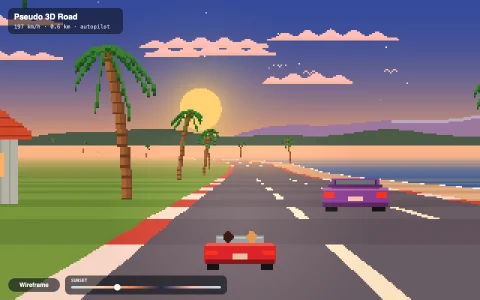
A cozy pixel town where every house, car and tree is a pile of flat slices.
Every object here is a stack of flat pixel images, one per layer of height, baked from tiny voxel functions in code. To draw one, each slice is rotated by the same angle and placed one pixel above the last; the edges of the lower slices peek out underneath and read as walls, so the whole town turns with the camera and keeps its volume with no 3D math at all. Shading is baked per voxel (open tops bright, walls darker, occlusion toward the ground), and shadows are the same slices drawn as black silhouettes on the ground, each pushed further along the sun direction by its height, which is a true parallel projection. Night retints the slice sheets by the ambient light while windows, lamps and headlights keep emissive colors, and everything renders at about 320 x 200 before being scaled up with hard pixels.
Try it. Drive the red car with the arrow keys or WASD, or hold the pointer down to drive toward it. Drag to orbit and tilt the camera, Q and E rotate it, click any object to see its slices in the inspector, and press Exploded view (X) to pull its layers apart. The slider and T change the time of day; F toggles the follow camera.
Paste this into Claude Code, Codex or any coding agent to get a simple version running, then take it wherever you like.
Build a sprite stacking demo, the pixel art trick that makes flat images look 3D, with JavaScript and the HTML canvas element. Put everything in a single index.html file with no libraries or build step, so I can open it directly in a browser.

Start simple:
- Render into a small offscreen canvas (about 320 x 200) and draw it scaled up to fill the window with imageSmoothingEnabled = false, so pixels stay crisp.
- Describe a model as a voxel function f(x, y, z) that returns a color or nothing, for example a 14 x 8 x 6 car: wheels at the bottom, a body, a cabin with windows on top.
- Bake it into slices: for each z, paint a w x d image of that layer and store all the layers in one tall canvas.
- To draw the model at a position and angle, loop z from 0 up: translate to the position minus z pixels vertically, rotate by the angle, and draw slice z centered. The edges of the lower slices peek out and read as walls.
- Rotate the angle with the arrow keys and watch the car turn in 3D.

Once that works, make it beautiful:
- Shade while baking: a voxel with nothing above it is a top and stays bright, the rest are walls and get darker.
- Add a house, a tree and a few more models, place many of them on a grass and road ground image, rotate the whole world around the camera, and sort objects by their screen y each frame so nearer ones draw last.
- Draw shadows by painting each slice as a black silhouette on the ground, shifted along the sun direction by its height, into a separate layer that you composite at partial opacity.

Explain the key ideas in short code comments. When you're done, tell me how to open it and suggest three directions I could take it next, such as a drivable car with a follow camera, a day and night cycle with glowing windows, or an exploded view that pulls the slices apart.