CUAWright: A Minimal Unified Interface for Digital Agents
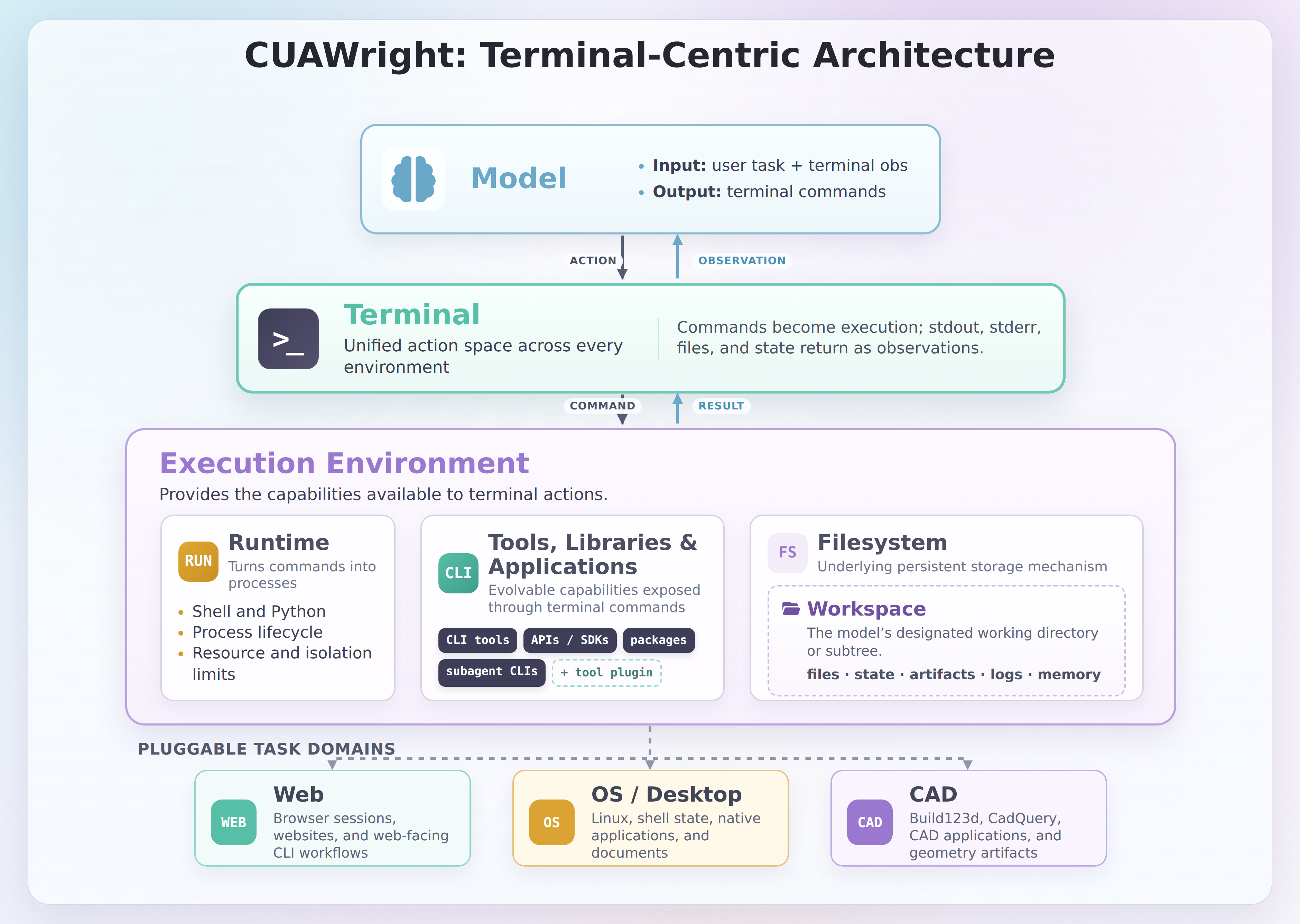
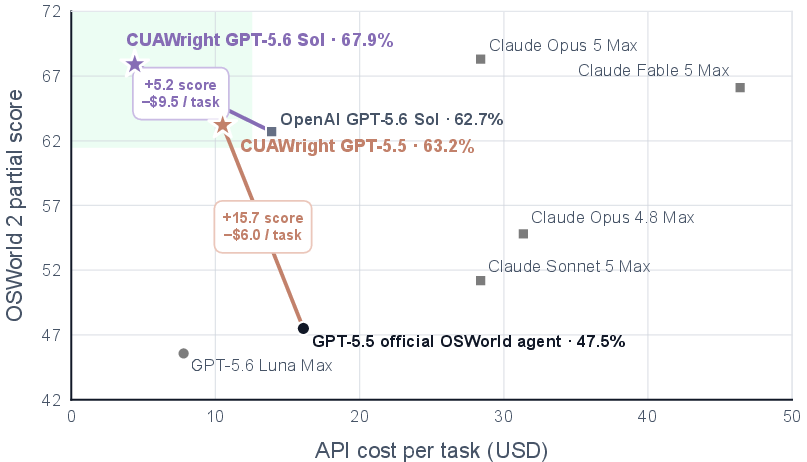
Abstract: The prevailing approach to computer-use agents couples a model with a domain-specific harness: a browser or desktop environment equipped with human engineered tools that are fixed before task execution. As models' coding capabilities improve, the GUI native and static harness prevents them from direct programmatic operation on system state, as well as flexible construction of tools. To this end, we introduce CUAWright, a minimal terminal harness of roughly 3K lines of code that uses bash commands as its sole action interface, and a file system as its evolvable space for dynamically creating tools and managing the context. We conduct comprehensive experiments across a wide range of digital tasks, and demonstrate that by giving the agent a minimal, programmable interface, it achieves substantially stronger results compared to their GUI or hybrid CLI interface across a wide range of tasks. On OSWorld 2.0, CUAWright delivers a 33.2% relative improvement in partial reward while reducing estimated cost by 37.5% compared with the published GPT-5.5 baseline. On Online-Mind2Web and the long horizon Odysseys benchmark, CUAWright substantially outperforms GUI native harness by 4.7% and 44.0% in success rate, respectively. Furthermore, we found the gains extend to CAD applications that require accurate visual understanding and CLI interaction: on CADGenBench and BenchCAD, our unified harness yields 8.1%-41.6% relative improvements over other CLI based harnesses with GPT-5.5. Together, these results suggest digital environments are far more programmable than their GUI interfaces imply, and a minimal terminal-focused harness is the key for better performance and efficiency.
Paper Prompts
Sign up for free to create and run prompts on this paper.
Top Community Prompts
Explain it Like I'm 14
1. What is this paper about?
This paper introduces CUAWright, a way for AI agents to control computers.
An AI computer-use agent is a program that can perform tasks such as:
- Using a web browser
- Editing files
- Working in desktop applications
- Creating 3D computer-aided design (CAD) models
Most existing agents use a computer like a human: they look at screenshots and move a mouse or press keys. CUAWright takes a different approach. It gives the agent a terminal, where it can type commands such as Bash or Python instructions.
The main idea is:
Instead of forcing an AI to click through every screen, let it write and run programs that control the computer directly.
The system is small—about 3,000 lines of code—but it gives the AI a powerful workspace where it can save information and create its own helpful tools.
2. What questions did the researchers ask?
The researchers wanted to find out whether a simple, command-based interface could be better than traditional graphical interfaces.
Their main questions were:
- Can one terminal interface work for many kinds of tasks? For example, can the same system help with websites, desktop programs, and 3D design?
- Does typing commands work better than clicking buttons and dragging a mouse?
- Can the AI create its own small programs while working? For example, could it write a script to search many files more quickly?
- Does saving information in a file help the AI remember what it has done?
- Can the terminal approach reduce the cost of using an AI model? Screenshots contain a lot of information, so sending them to the AI repeatedly can be expensive.
- Does the AI need several separate helper agents, or can one agent do the job well by itself?
3. How did the researchers test CUAWright?
Traditional computer-use agents
A traditional computer-use agent usually works like this:
- It receives a screenshot of the screen.
- It decides where to click or what to type.
- The computer performs the action.
- The agent receives another screenshot.
- It repeats the process many times.
This is similar to asking someone to complete a puzzle while only showing them a photograph after every move.
This method can be slow and error-prone. A small mistake, such as clicking the wrong button, may cause later steps to fail.
CUAWright’s approach
CUAWright uses the terminal as its main interface. The agent sends commands such as:
1 |
python search_files.py |
or:
1 |
mkdir project |
The computer runs the command and sends back the text result.
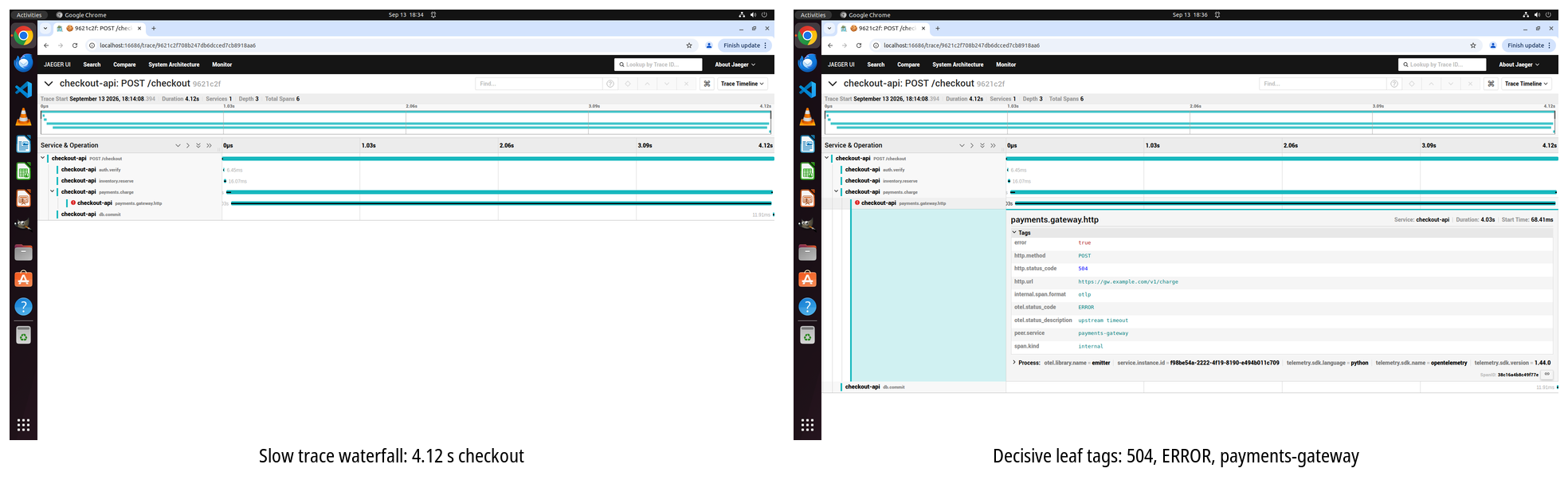
The agent can still use screenshots when needed, but images are not automatically shown after every action. This is called vision on demand. The agent asks for a screenshot only when visual information is important.
The file system as memory
CUAWright gives the agent a workspace on the computer. The agent can use files to store:
- Notes
- Search results
- Plans
- Progress reports
- Error messages
- Programs it has written
This works like giving a student a notebook. Instead of trying to remember everything in their head, the student can write down useful information and check it later.
Creating tools during a task
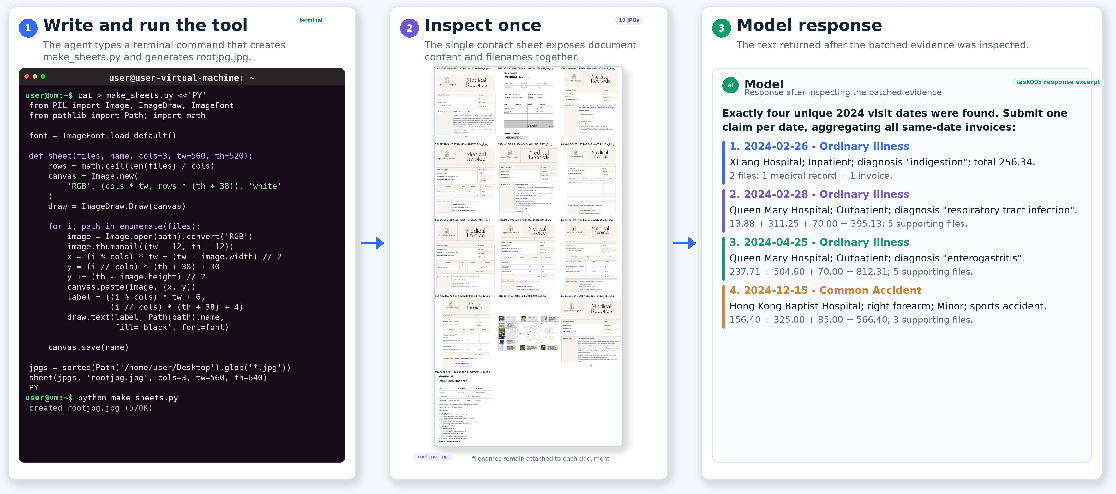
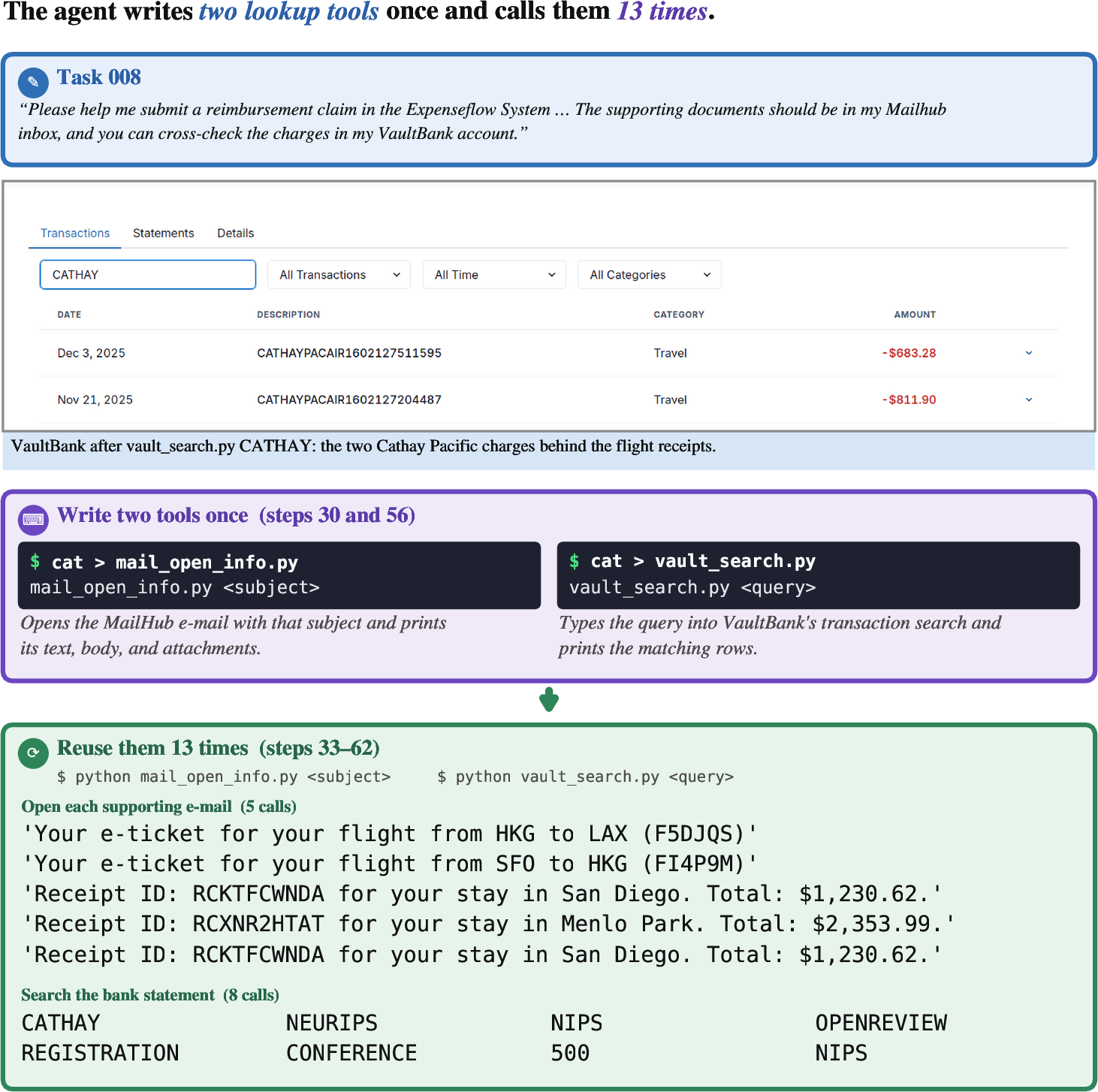
The agent can also write its own programs. For example, suppose it needs to inspect hundreds of images. Rather than opening each image one by one, it might create a program that combines the images into one large picture.
The agent can then:
- Write the program.
- Run it.
- Check whether it works.
- Fix it if necessary.
- Use it again later.
This is different from systems that only provide a fixed collection of tools before the task begins.
The experiments
The researchers tested CUAWright on several collections of computer tasks, called benchmarks. A benchmark is like a standardized exam for AI systems.
The tests included:
- Online-Mind2Web: tasks on real websites
- Odysseys: long, complicated web tasks
- OSWorld 2.0: tasks in desktop applications
- WeaveBench: long desktop and workplace tasks
- BenchCAD: creating 3D objects from images
- CadGenBench: creating and editing mechanical 3D models
The researchers compared CUAWright with systems that mainly use screenshots, mouse movements, keyboard actions, or fixed tools.
4. What did the researchers discover?
CUAWright often completed more tasks successfully
On the web benchmarks, CUAWright performed better than the screenshot-based systems.
For example:
- On Online-Mind2Web, CUAWright reached an overall success rate of 88.1%, compared with 83.4% for the graphical-user-interface baseline.
- On the long-horizon Odysseys benchmark, CUAWright reached 77.5%, compared with only 33.5% for the graphical approach.
A long-horizon task is a task with many steps, such as searching several websites, collecting information, and then filling out a final form. CUAWright’s ability to save notes and write programs seemed especially helpful for these tasks.
It performed well on desktop tasks while costing less
On OSWorld 2.0, one CUAWright setup achieved a partial score of 63.2%, compared with 47.5% for the official GPT-5.5 system.
It also cost about $10.10 per task**, while the comparison system cost about **$16.10.
A partial score gives credit for completing some parts of a task even if the entire task is not perfect. The stricter score requires the whole task to be completed correctly.
The results suggest that CUAWright could be both:
- More accurate
- Less expensive
It worked well for 3D design
CUAWright also improved performance on CAD tasks.
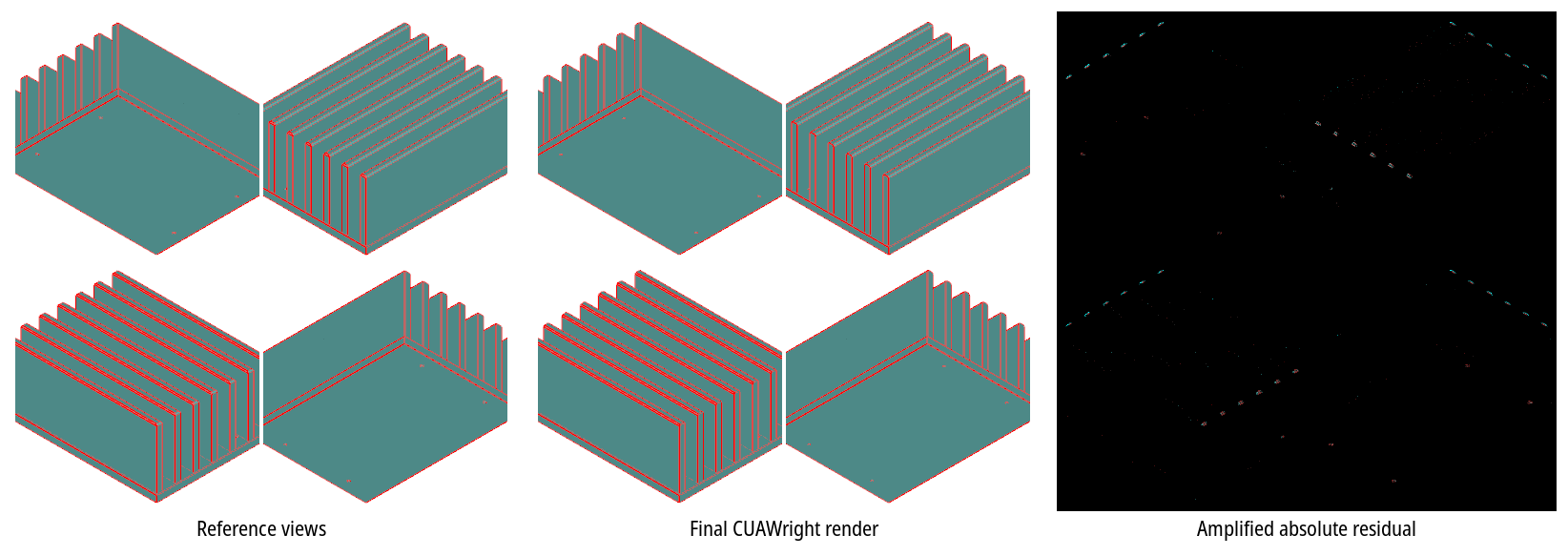
On the BenchCAD test, the system achieved a score of 79.0% when given tools for creating and checking designs. The reported comparison score was 55.8%.
For CAD generation, the AI must turn an image or written description into a 3D computer model. This requires both visual understanding and programming. The results suggest that a terminal-based system can help the AI repeatedly create, test, and improve its design.
The file system was very important
When the researchers prevented the AI from directly using the file system, its performance dropped sharply.
For one experiment, performance fell by about 12 percentage points. This shows that the file system was not just a minor convenience. It acted as:
- External memory
- A place to store useful results
- A workshop for creating programs
- A way to recover from mistakes
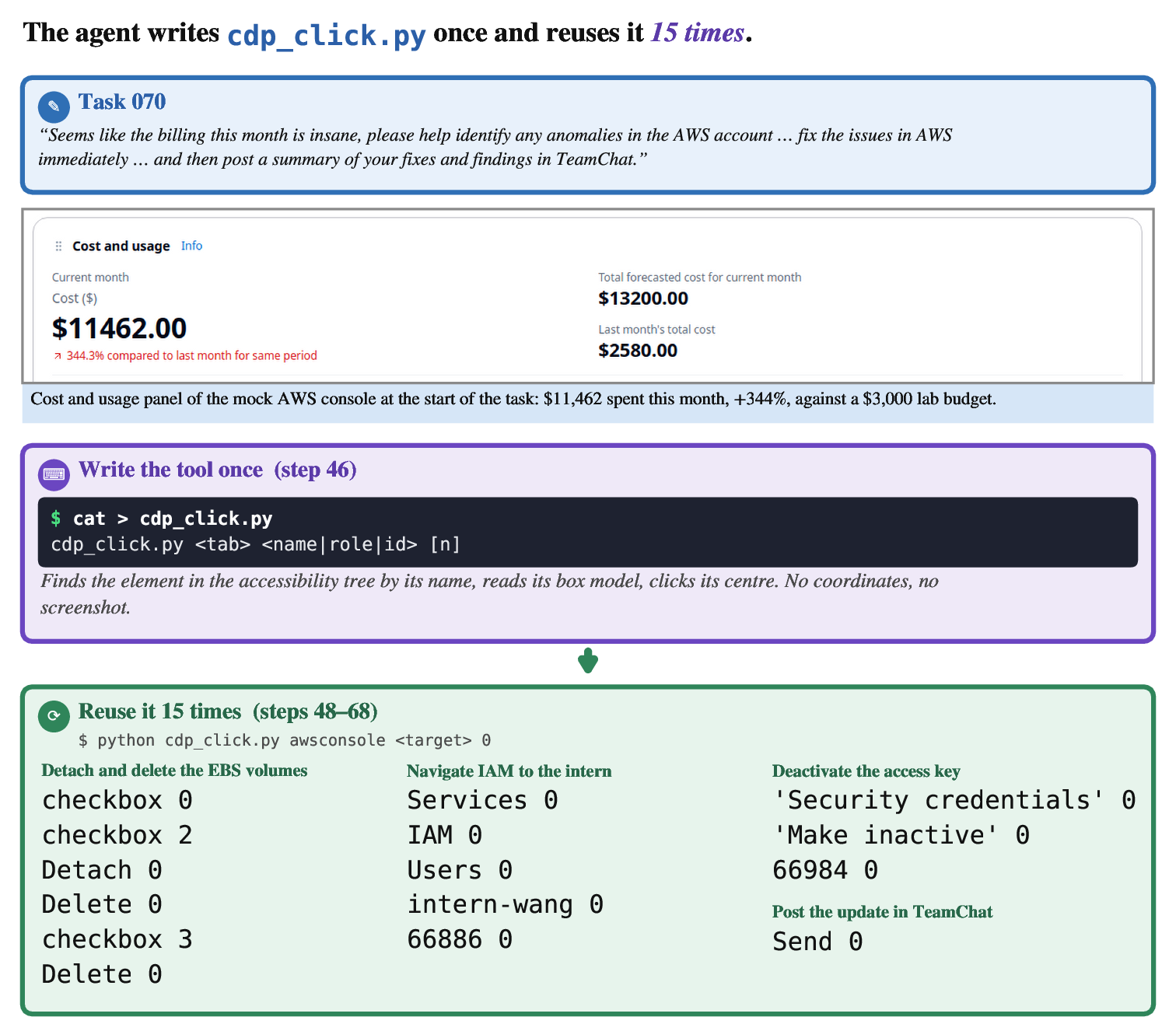
The AI frequently created its own tools
In the OSWorld experiments, the GPT-5.6 agent created at least one saved program or code file in 89 out of 105 tasks.
In total, it created 776 executable files, and about one-quarter of them were reused later.
This suggests that the AI was not simply following a fixed list of actions. It was sometimes inventing new ways to solve problems, much like a person writing a shortcut or calculator to make repeated work easier.
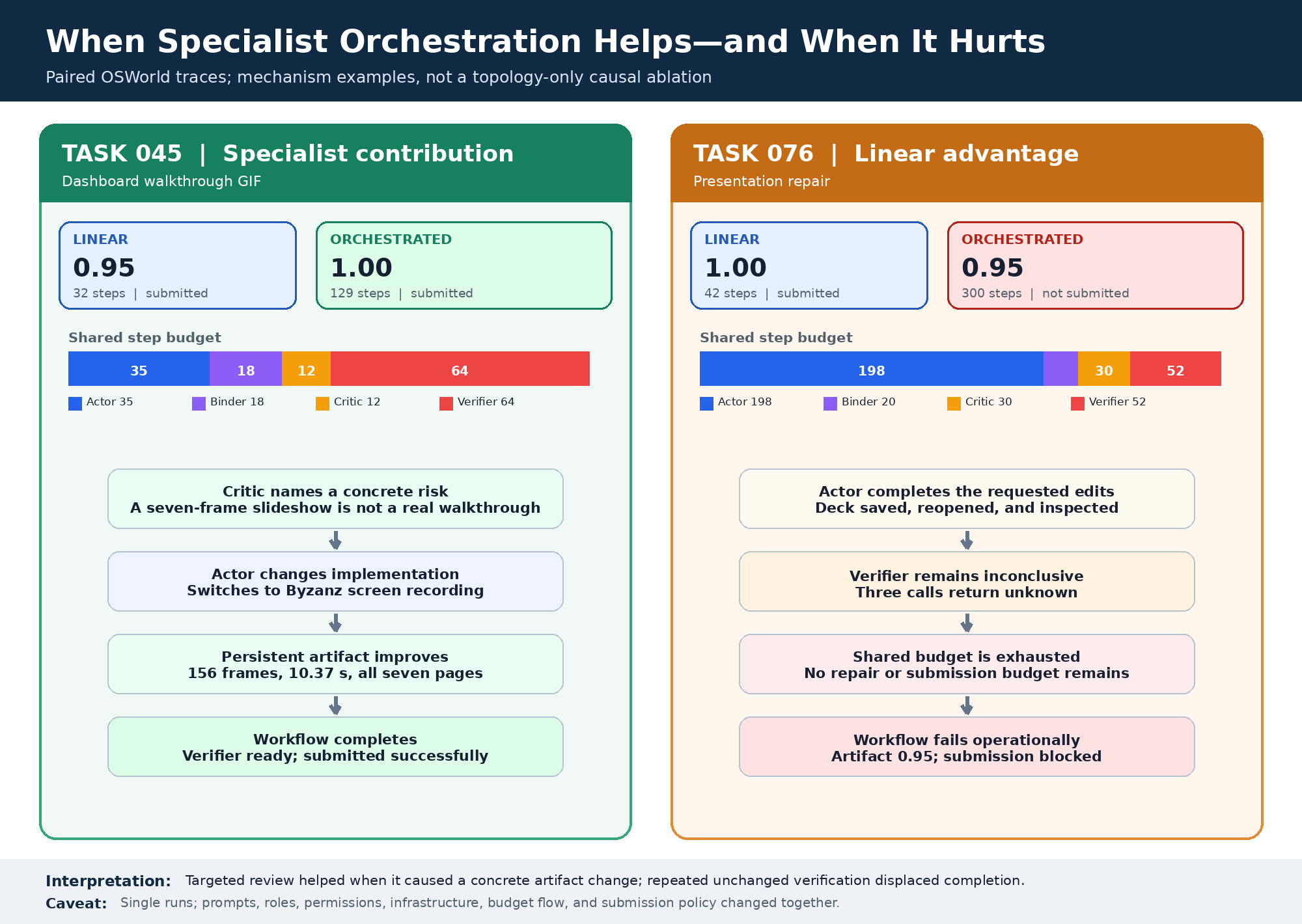
One agent was often enough
The researchers also tested a system with multiple agents:
- A planning agent
- A main task-solving agent
- A checking agent
However, the single-agent version performed about as well as the multi-agent version in many tests. The multi-agent setup also used more steps.
The researchers believe newer AI models can often plan and check their own work without needing separate agents.
5. Why are these findings important?
The paper argues that computer environments are more programmable than they appear.
A graphical interface may show only buttons, menus, and windows. But underneath, the computer often has files, commands, APIs, and programs that can do the same work more directly.
For example, clicking through 100 files one at a time might be slow. A short script could search all 100 files in seconds.
CUAWright gives the AI access to this deeper layer. Instead of treating the computer only as a picture to click on, it treats the computer as a programmable machine.
6. Possible impact and limitations
If the results hold up, CUAWright could lead to AI assistants that are:
- Better at completing complicated computer tasks
- Faster at handling large amounts of information
- Cheaper to operate
- More flexible across different applications
- Better at remembering information during long tasks
- Able to create useful tools for themselves
This could help with activities such as data analysis, office work, software development, web research, and 3D design.
However, the approach also has challenges. Terminal commands can be powerful, so a mistake could accidentally delete files or change important computer settings. The AI must also know when to use text commands and when it needs to look at a screenshot. In addition, the experiments were performed on selected benchmarks, so real-world performance may be different.
Conclusion
CUAWright shows that an AI computer agent may work better when it is allowed to write commands and programs, rather than being limited to clicking and typing like a human.
Its terminal gives the agent one general way to control many kinds of software. Its file system acts like a notebook and toolbox, allowing the agent to save information, create programs, and reuse successful solutions.
The paper’s main message is simple: giving an AI a small but programmable interface may be more useful than giving it a complicated collection of fixed buttons and tools.
Knowledge Gaps
Knowledge Gaps, Limitations, and Open Questions
The paper leaves the following issues unresolved:
- Causal attribution of performance gains: The experiments do not isolate how much of CUAWright’s improvement comes from the terminal interface, filesystem persistence, on-demand vision, dynamic tool creation, prompt design, or the underlying model’s coding ability.
- Fairness of baseline comparisons: Several comparisons use published leaderboard results rather than freshly reproduced runs under identical software versions, prompts, API settings, hardware, step limits, and evaluation pipelines.
- Limited model diversity: Most experiments rely on GPT-5.4, GPT-5.5, or GPT-5.6, leaving it unclear whether CUAWright benefits weaker, open-weight, non-OpenAI, or multimodal models to the same extent.
- Dependence on frontier coding capability: The paper does not determine the minimum coding, shell-use, and debugging capability required for an agent to benefit from a terminal-native interface.
- Incomplete ablation of visual input: The study compares screenshot-heavy and terminal-first interaction, but does not systematically vary screenshot frequency, image resolution, accessibility-tree access, image-loading cost, or visual context quality.
- Unclear contribution of the filesystem: The “without file system” condition primarily forbids programmatic filesystem operations through prompting, but still permits indirect GUI-based file manipulation. This does not fully distinguish persistent memory, tool construction, artifact storage, and direct state access.
- No controlled evaluation of dynamic tool creation: The paper reports how often tools are created and reused, but does not compare performance with tool creation disabled, tools automatically generated, or a fixed library of equivalent tools.
- Quality and safety of generated tools remain unexplored: The study does not measure tool correctness, maintainability, security, resource consumption, or the frequency with which generated scripts introduce irreversible errors.
- Security risks of unrestricted shell access: The consequences of granting agents broad terminal and filesystem permissions—such as data exfiltration, destructive commands, privilege escalation, prompt injection, and supply-chain attacks—are not evaluated.
- Insufficient analysis of sandboxing requirements: The paper does not specify which permissions, isolation mechanisms, network restrictions, or recovery procedures are necessary for safe deployment outside benchmark environments.
- Weak evidence for generality beyond selected benchmarks: The evaluated tasks are concentrated in web browsing, desktop applications, and CAD. It remains unclear how CUAWright performs on software engineering, scientific computing, data analysis, multimodal content creation, mobile platforms, or enterprise systems with restricted APIs.
- Limited real-world deployment evidence: All reported results come from benchmark or controlled execution environments; robustness under noisy networks, changing application versions, authentication workflows, rate limits, and real user data is untested.
- Benchmark coverage and selection limitations: BenchCAD uses only 212 of 17,900 samples, and some OSWorld tasks are excluded. The effects of subset selection, task difficulty, and excluded failure modes on the conclusions are not quantified.
- Statistical uncertainty is not reported: The paper provides point estimates but omits confidence intervals, run-to-run variance, random seeds, significance tests, and the number of independent trajectories per condition.
- Evaluator reliability is unresolved: Several benchmarks use LLM-based or privately hosted judges. The paper does not analyze evaluator agreement with human judgments, sensitivity to artifacts, or whether terminal-generated files and logs create evaluation-specific advantages.
- Potential benchmark contamination is not fully addressed: Although CadGenBench uses a private evaluator, the paper does not establish that the models or generated tools have not seen benchmark tasks, websites, task templates, or related solutions during training or execution.
- Cost analysis is not comprehensive: Reported API cost does not appear to include engineering effort, environment provisioning, tool installation, compute for screenshots and CAD rendering, failure recovery, or the operational cost of maintaining a terminal-based infrastructure.
- Latency and resource usage are underreported: The paper emphasizes cost and step counts but does not evaluate wall-clock latency, CPU/GPU usage, disk growth, network traffic, or the scalability of long-running filesystem workspaces.
- Terminal command reliability is not characterized: The study does not quantify failures caused by shell quoting, asynchronous processes, timeouts, environment differences, package conflicts, path errors, or command-output truncation.
- Long-horizon degradation remains uncertain: Although Odysseys and WeaveBench are long-horizon benchmarks, the paper does not analyze performance as a function of trajectory length, context compaction frequency, workspace size, or the number of intermediate artifacts.
- Workspace organization is not studied: It remains unknown whether agents need standardized directory structures, metadata, version control, naming conventions, cleanup policies, or automatic indexing to use persistent workspaces reliably.
- Recovery from incorrect external state is underexplored: The paper does not evaluate how agents detect and recover from corrupted files, partially executed commands, stale artifacts, failed application states, or incorrect self-generated memories.
- Single-agent versus multi-agent conclusions are narrow: The multi-agent ablation uses only a planner and verifier configuration on OSWorld. Other coordination strategies, specialist agents, parallel execution, and independent verification methods are not compared.
- Verification quality is insufficiently measured: The paper reports that frontier models often self-verify, but does not quantify false-positive and false-negative verification rates or compare self-verification with independent evaluators and formal checks.
- GUI fallback limitations are not systematically mapped: The paper identifies mixed terminal/GUI tasks as more difficult but does not determine which visual interaction types—dragging, focus changes, canvases, games, dialogs, or accessibility-limited interfaces—cause the largest degradation.
- Accessibility and usability implications are missing: The work does not assess whether terminal-native agents can support users with disabilities, operate applications lacking stable APIs, or preserve the usability benefits of graphical interfaces.
- Cross-platform portability is unclear: The implementation and results appear centered on Linux-like environments and command-line tooling; Windows, macOS, mobile operating systems, and heterogeneous shell environments are not evaluated.
- Interaction with authentication and confidential information is unexplored: The paper does not address credential handling, multi-factor authentication, secrets management, privacy-preserving observations, or policies for preventing sensitive data from entering model context or workspace files.
- Robustness to adversarial websites and prompt injection is unknown: Browser tasks may expose agents to malicious page content, deceptive instructions, or hostile downloads, but no security or prompt-injection stress tests are reported.
- The universal-action-space claim lacks formal boundaries: The paper does not identify which classes of digital tasks cannot be adequately represented through shell commands, nor when domain-specific tools or GUI-native actions outperform a terminal-only interface.
- Human intervention and recoverability are not evaluated: The work does not measure how easily a human can inspect, pause, correct, resume, or audit an agent operating through arbitrary commands and persistent files.
- Reproducibility is incomplete: The paper does not provide sufficient detail on prompts, system configurations, installed packages, command wrappers, screenshot tools, trajectory filtering, retry policies, or exact evaluation scripts to independently reproduce all results.
Practical Applications
Immediate Applications
The paper’s central practical contribution is a terminal-first computer-use architecture: an AI agent interacts through shell commands, uses the filesystem as persistent memory, requests visual input only when necessary, and can create reusable scripts during execution. The following applications are plausible with existing software infrastructure, provided they are deployed in controlled environments.
- Software engineering and DevOps automation (software, cloud, IT operations) Organizations can deploy CUAWright-like agents in sandboxed repositories or containers to inspect codebases, run tests, modify configuration files, install dependencies, generate reports, and execute deployment checks. The persistent workspace can store test logs, intermediate patches, and reusable diagnostic scripts. Potential products/workflows: terminal-native coding assistants, automated issue-resolution bots, CI/CD repair agents, environment-setup assistants, and infrastructure troubleshooting tools. Dependencies: repository and shell access, reliable test suites, permission controls, container isolation, secret management, and human approval before production changes. The paper’s results do not establish that autonomous production deployment is safe.
- Web-based knowledge-work automation (enterprise software, customer operations, finance, procurement) The agent could automate multi-step browser workflows such as collecting information from several websites, updating records, preparing forms, reconciling data, and producing a final report. Programmatic browser control through debugging protocols can replace brittle coordinate-based clicking, while screenshots are reserved for visually ambiguous pages. Potential products/workflows: procurement comparison agents, CRM data-entry assistants, travel and expense processing, market-research collectors, and customer-support back-office automation. Dependencies: stable website APIs or browser debugging access, authentication and consent, handling of CAPTCHAs and anti-bot systems, website-layout changes, and strict controls for transactions or personally identifiable information.
- Desktop-office task automation (business operations, education administration, public administration)
In controlled virtual desktops, agents can manipulate spreadsheets, documents, presentations, email clients, and file-management tools using shell commands, application APIs, and GUI fallback tools such as
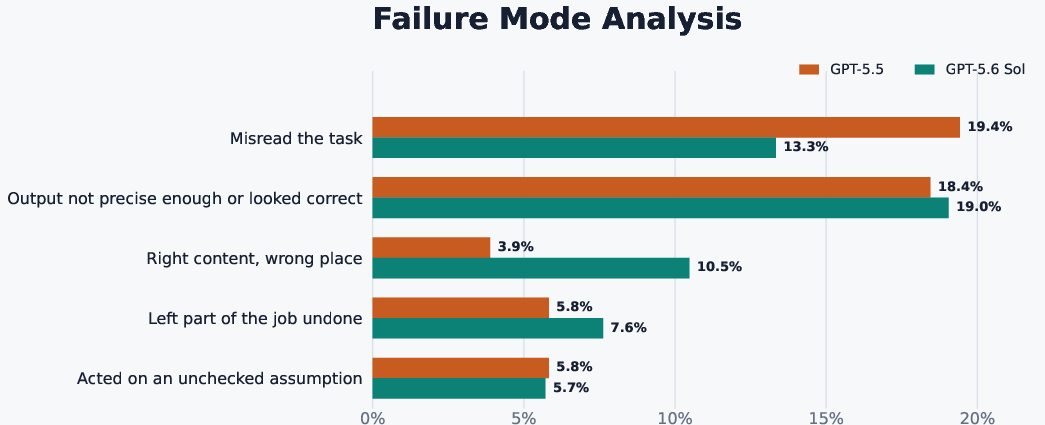
xdotoolorpyautogui. Potential products/workflows: spreadsheet cleaning, document conversion, batch renaming, presentation generation, administrative form completion, and automated evidence collection for audits. Dependencies: application-specific command-line or scripting interfaces, desktop sandboxing, access to the relevant files, and verification of exact output locations and formatting. The paper reports failures involving imprecision, incomplete tasks, and correct content placed in the wrong location, so automated validation remains necessary. - Local file and document intelligence (healthcare administration, legal services, research, records management) A CUAWright-style agent can search large directories, extract structured information, summarize files, and create intermediate artifacts. The paper gives an example in which the agent creates a composite-image tool to inspect many medical-record images more efficiently than opening them individually. Potential products/workflows: records triage, document classification, evidence indexing, invoice extraction, literature-file organization, and compliance preparation. Dependencies: local processing or approved secure infrastructure, OCR and multimodal model quality, data-protection compliance, access auditing, and human review for medical, legal, or financial conclusions. Such systems should assist rather than independently diagnose or adjudicate.
- Batch media and data-processing tools generated at runtime (analytics, media, research computing) Agents can write small scripts for tasks such as combining images, extracting metadata, converting file formats, validating datasets, or aggregating results, then reuse those scripts across a task. This is immediately feasible in Python- or shell-enabled workspaces. Potential products/workflows: ad hoc data-cleaning assistants, research-data preparation pipelines, media cataloguing tools, and one-off business automation. Dependencies: executable libraries, input-format compatibility, sandbox restrictions, resource quotas, and code review. Generated tools should be treated as untrusted code until tested.
- CAD assistance and parametric design iteration (manufacturing, engineering, architecture) The system can generate and revise CAD programs through a terminal, render intermediate geometry, inspect visual outputs, and invoke a CAD kernel through ordinary shell commands. The BenchCAD and CadGenBench results indicate that this workflow can improve reconstruction and editing performance compared with fixed tool interfaces. Potential products/workflows: image-to-CAD prototyping, mechanical-part reconstruction, parametric model editing, design-variant generation, and automated geometry validation. Dependencies: access to reliable CAD kernels and libraries, accurate visual interpretation, geometric tolerances, domain-specific constraints, and engineering sign-off before fabrication.
- Cost-efficient agent deployment through vision-on-demand (AI infrastructure, enterprise automation) Systems can reduce inference cost and context growth by using terminal output as the default observation and loading screenshots only when needed. The reported OSWorld results suggest meaningful price-performance gains relative to screenshot-heavy interfaces. Potential products/workflows: lower-cost browser agents, longer-running desktop assistants, and high-volume back-office automation services. Dependencies: terminal output must expose enough state, screenshot acquisition must be reliable, model pricing must remain favorable, and task success must not degrade when visual observations are sparse.
- Research and teaching infrastructure for agentic systems (academia and education) Universities can use the minimal harness as an experimental platform for studying memory, tool creation, planning, self-verification, and long-horizon interaction. Students can inspect executable traces and build task-specific tools without implementing a new GUI action schema for every domain. Potential products/workflows: graduate-course laboratories, reproducible agent benchmarks, shell-based agent simulators, and experiments comparing single-agent and multi-agent systems. Dependencies: reproducible environments, licensing for models and applications, benchmark validity, logging of all commands, and safeguards against treating benchmark performance as evidence of general reliability.
- Policy and public-sector workflow pilots (government digital services) Agencies can pilot agents for low-risk, reversible activities such as searching public information, organizing case files, checking form completeness, and preparing draft summaries. A terminal-native interface can operate across heterogeneous legacy systems more flexibly than a fixed GUI toolset. Dependencies: procurement and data-governance requirements, accessibility obligations, audit logs, records-retention policies, human authorization, and explicit exclusion of high-impact autonomous decisions.
- Personal productivity and household file management (daily life) Individuals could use a local agent to organize downloads, rename and deduplicate files, convert documents, summarize personal notes, prepare spreadsheets, and automate repetitive browser tasks. Persistent workspace files can retain preferences and task progress across sessions. Dependencies: local-only execution or trustworthy privacy controls, explicit confirmation for deletion or purchases, protection of passwords and personal documents, and clear recovery mechanisms such as backups and dry-run modes.
Long-Term Applications
The following applications require broader validation, stronger safety mechanisms, better tool ecosystems, or scaling beyond the paper’s controlled benchmark settings.
- General-purpose enterprise operating agents (cross-sector enterprise software) A mature CUAWright-like platform could serve as a universal agent layer across browsers, desktop applications, databases, APIs, and internal tools. The agent would translate natural-language objectives into shell programs, reuse learned utilities, and maintain durable task state across days or weeks. Required development: identity and authorization management, transactional rollback, provenance tracking, multi-user workspaces, robust recovery from partial failure, and standardized interfaces for enterprise applications. The assumption that all important digital environments can be safely controlled through a terminal must be tested rather than presumed.
- Autonomous end-to-end business processes (finance, healthcare administration, logistics, insurance) Agents could complete entire workflows such as claims intake, invoice reconciliation, appointment coordination, supply ordering, or regulatory-report preparation, combining web access, local files, and desktop applications. Required development: formal approval gates, deterministic validation, segregation of duties, compliance monitoring, secure handling of sensitive data, and calibrated uncertainty estimates. The paper’s task-completion rates and failure analysis indicate that incorrect assumptions and apparently correct but imprecise outputs remain significant obstacles.
- Safety-critical technical design automation (aerospace, automotive, energy, robotics) CAD-capable agents could progress from benchmark reconstruction to constrained engineering design, simulation, optimization, and manufacturing preparation. A generated model might be checked against mechanical specifications, finite-element simulations, material constraints, or production rules. Required development: certified geometry and simulation validation, domain-specific constraint solvers, versioned design provenance, adversarial testing, and professional approval. Benchmark IoU scores alone are insufficient evidence of manufacturability, structural safety, or regulatory compliance.
- Embodied robotics and laboratory automation (robotics, science, manufacturing) The terminal could become a unified interface for issuing commands to robots, laboratory instruments, simulators, and vision systems, while the filesystem stores experiment plans, sensor data, calibration records, and recovery scripts. Required development: real-time guarantees, hardware abstraction, safe motion planning, sensor uncertainty handling, emergency stops, and integration with robotics middleware. The paper evaluates digital environments, not physical systems; transferring the approach requires substantially stronger safety and timing guarantees.
- Self-improving libraries of agent-created tools (AI platforms and developer ecosystems) Reusable scripts generated during tasks could be versioned, tested, ranked, and shared across agents, producing an evolving library of domain skills for document processing, application control, CAD, and verification. Required development: code provenance, dependency scanning, sandboxed execution, regression tests, permissions, and mechanisms to prevent malicious or incorrect tools from propagating. The paper shows that agents frequently create executable artifacts, but reuse rates and correctness do not yet justify unrestricted autonomous tool publication.
- Adaptive public-service and accessibility assistants (education, disability services, civic technology) Agents could operate legacy portals and desktop systems on behalf of users with limited technical or motor ability, using programmatic actions where possible and visual or input-device fallback where necessary. They could also help teachers and public employees manage repetitive administrative workflows. Required development: accessibility co-design, transparent user control, multilingual and multimodal support, protection against unauthorized actions, and legal evaluation of delegated consent. GUI fallback is especially important for systems that lack usable APIs.
- Long-horizon personal digital assistants (daily life and consumer software) A future assistant could maintain a structured personal workspace, monitor ongoing projects, update files, plan purchases or travel, and resume tasks after context-window limits or interruptions. This extends the paper’s finding that filesystem state can function as external memory. Required development: durable user memory with selective deletion, privacy-preserving storage, conflict resolution, explainable action histories, reversible operations, and reliable preference learning. Persistent memory can also amplify errors or expose sensitive information if not governed carefully.
- Standardized terminal-native agent interfaces and policy frameworks (academia, industry standards, regulation) The results motivate research standards in which agents interact with heterogeneous digital environments through a common command interface, with explicit measurement of cost, visual dependence, filesystem use, tool creation, recovery, and security. Policymakers could use such standards to require auditability for autonomous software agents. Required development: common capability and risk taxonomies, reproducible environments, realistic evaluations beyond curated benchmarks, logging standards, red-team protocols, and tests for prompt injection, data exfiltration, destructive commands, and privilege escalation.
- Secure agent-managed computing environments (cybersecurity and cloud platforms) Cloud providers could offer isolated workspaces in which agents are allowed to create and execute tools but are restricted by capability-based permissions, network policies, resource quotas, and approval checkpoints. This would make the paper’s dynamic-tool-construction paradigm more practical at scale. Required development: secure-by-default containerization, command-level policy enforcement, secrets isolation, malware and dependency scanning, rollback snapshots, and monitoring for prompt-injection-driven behavior. Without these controls, a universal shell interface creates a large attack surface.
- More efficient multi-agent orchestration (AI research and enterprise automation) The ablation results suggest that adding planner and verifier agents does not automatically improve performance and can substantially increase task turns and cost. A longer-term system could therefore route planning, execution, and verification adaptively rather than using fixed multi-agent pipelines. Required development: learned decisions about when verification is valuable, independent evidence-based evaluators, cost-aware orchestration, and recovery policies for ambiguous tasks. The paper’s findings support selective orchestration, not the assumption that more agents always produce better outcomes.
Glossary
- Accessibility tree: A structured representation of an interface’s accessible elements and their properties. “accessibility information such as DOM or accessibility tree”
- Ablation study: An experiment that removes or changes one component to measure its contribution to system performance. “We conduct extensive ablation studies between single agent and multi-agent settings”
- Artifact: A file or other persistent output produced during computation or interaction. “including the agent workspace and artifacts created during interaction”
- Bash: A Unix command-line shell and scripting language used to execute system commands. “uses bash commands as its sole action interface”
- CAD kernel: The computational geometry engine that performs modeling operations in a computer-aided-design system. “both of them leverage the same computer-aided design kernel”
- CLI (command-line interface): A text-based interface through which users or agents execute commands. “a minimal terminal harness”
- Codex CLI: A command-line harness or tool interface for an automated coding agent. “we replace Codex CLI with CUAWright to evaluate its performance”
- Computer-aided design (CAD): The use of computer systems to create, modify, analyze, or optimize designs. “computer aided design (CAD) tasks”
- Context compaction: The reduction or summarization of an agent’s active context to fit within a model’s context-window limits. “files remain available after context compaction”
- Context window: The bounded amount of text or other information that a LLM can process at one time. “The workspace is also independent of the model's active context window”
- DOM (Document Object Model): A tree-structured programmatic representation of the elements in a web page. “observe screenshots or DOM tree of web pages”
- Docker: A platform for packaging and running applications in isolated software containers. “In the docker environment”
- Emergent behavior: A capability or pattern that arises from system operation without being explicitly programmed as a separate rule. “Detailed analysis shows emergent behaviors of frontier models”
- Execution environment: The software and system context in which programs, commands, and tasks are run. “the underlying execution environment contains a runtime”
- Externalized memory: Information stored outside the model’s internal active context, typically in files or another persistent medium. “information that the agent wishes to retain can be externalized directly into ”
- Frontier model: A highly capable model representing the current leading edge of performance in its field. “frontier models like GPT-5.5 and GPT-5.6 Sol”
- Ground truth: The reference answer or objectively validated result used to evaluate a system. “privately hosted ground truth evaluator”
- GUI (graphical user interface): An interface that enables interaction through visual elements such as windows, buttons, menus, a mouse, and a keyboard. “GUI native and static harness”
- Harness: Software infrastructure that connects an agent or model to an execution environment and controls evaluation or interaction. “We introduce CUAWright, a minimal terminal harness”
- Hybrid interface: An interaction design that combines multiple action modalities, such as GUI operations and programmatic commands. “More recent works explored hybrid interfaces”
- IoU (intersection over union): A similarity measure equal to the intersection of two regions divided by their union. “We report the IoU score”
- LLM-as-a-Judge: An evaluation method in which a LLM assesses an agent’s output or task completion. “with an LLM-as-a-Judge evaluator for assessing task completion”
- Long-horizon task: A task requiring many sequential actions, sustained planning, and retention of intermediate information. “realistic, long-horizon browsing tasks”
- MCP (Model Context Protocol): A protocol for connecting LLMs to external tools and data sources. “registered Build123d-MCP tools”
- Markov decision process (MDP): A mathematical model of sequential decision-making in which transitions depend on the current state and action. “We formulate the digital agent task as a partially observable Markov decision process”
- Multi-agent system: A system in which multiple autonomous agents cooperate or divide responsibilities. “the effect of single v.s. multi-agent”
- Orthographic view: A two-dimensional projection of a three-dimensional object without perspective distortion. “reconstruct a 3D solid from four orthographic views”
- Partial reward: An evaluation score that grants credit for partial completion rather than requiring total task success. “CUAWright delivers a 33.2\% relative improvement in partial reward”
- Partially observable Markov decision process (POMDP): A sequential decision model in which the agent cannot directly observe the complete environment state. “We formulate the digital agent task as a partially observable Markov decision process”
- Persistent workspace: A storage area whose contents remain available across multiple interaction steps. “Persistent workspace as external state.”
- Primitive action: A low-level operation, such as a mouse movement or keypress, used to control an interface. “How far can agents go without relying on primitive actions?”
- Programmatic access: The ability to inspect or manipulate a system through executable code rather than manual interface actions. “direct and programmatic access to file system”
- Runtime: The software environment and execution mechanisms required to run programs. “the runtime, a file system and an expandable set of tools and libraries”
- Self-verification: An agent’s process of checking whether its own actions or results satisfy task requirements. “create criteria for the self-verification before submission”
- Screenshot-based agent: An agent that relies on captured visual displays as its primary observations for choosing actions. “a conventional screenshot-based agent setting”
- State space: The set of all possible states an environment can occupy in a formal decision process. “environment state space ”
- Terminal action space: The set of executable command-line actions available to an agent. “terminal action space $\mathcal{A}_{\mathrm{term}$”
- Terminal-native: Designed so that command-line interaction is the primary or exclusive control mechanism. “we propose a terminal native harness”
- Tool construction: The process by which an agent creates executable utilities during task execution. “Dynamic tool construction in the workspace.”
- Trajectory: The ordered sequence of observations, actions, and states generated during an agent’s interaction with an environment. “Files remain available after context compaction and can be explicitly read again when needed.”
- Voxel: A volumetric pixel representing a value in a regular three-dimensional grid. “voxel intersection-over-union”
- Voxel intersection-over-union: An IoU similarity measure applied to three-dimensional voxelized objects. “The resulting geometry is compared with the ground-truth solid using voxel intersection-over-union.”