OSInsert: Towards High-authenticity and High-fidelity Image Composition
Abstract: Generative image composition aims to regenerate the given foreground object in the background image to produce a realistic composite image. Some high-authenticity methods can adjust foreground pose/view to be compatible with background, while some high-fidelity methods can preserve the foreground details accurately. However, existing methods can hardly achieve both goals at the same time. In this work, we propose a two-stage strategy to achieve both goals. In the first stage, we use high-authenticity method to generate reasonable foreground shape, serving as the condition of high-fidelity method in the second stage. The experiments on MureCOM dataset verify the effectiveness of our two-stage strategy. The code and model have been released at https://github.com/bcmi/OSInsert-Image-Composition.
Paper Prompts
Sign up for free to create and run prompts on this paper using GPT-5.
Top Community Prompts
Explain it Like I'm 14
Explaining “OSInsert: Towards High-authenticity and High-fidelity Image Composition”
What is this paper about?
This paper is about a way to insert an object into a photo so it looks completely real. Imagine placing a picture of a toy car into a street photo. You want the car to:
- Look like it truly belongs there (right angle, lighting, size, and perspective).
- Still look exactly like the original car (same color, texture, and unique details).
Most existing tools are good at one of these, but not both at the same time. The paper introduces a method called OSInsert that aims to do both: make the object fit the scene and keep its original look.
What are the goals and questions?
The researchers focus on two main goals:
- Authenticity: Does the inserted object look natural in the background? Is its angle, lighting, and size matched to the scene?
- Fidelity: Does the inserted object keep its original details, like exact colors, patterns, and textures?
Their key question: Can we avoid the trade-off (having to choose one goal over the other) by splitting the task into two stages?
How does the method work?
The team uses a simple, two-stage approach that combines the strengths of two existing tools.
Before that, here are a few terms explained:
- Foreground: The object you want to insert (like a cup or a car).
- Background: The photo or scene where you want to place the object.
- Bounding box: A rectangle that marks where the object should go in the background.
- Mask: A cut-out that precisely outlines the object, like tracing its edges so you know exactly where it is.
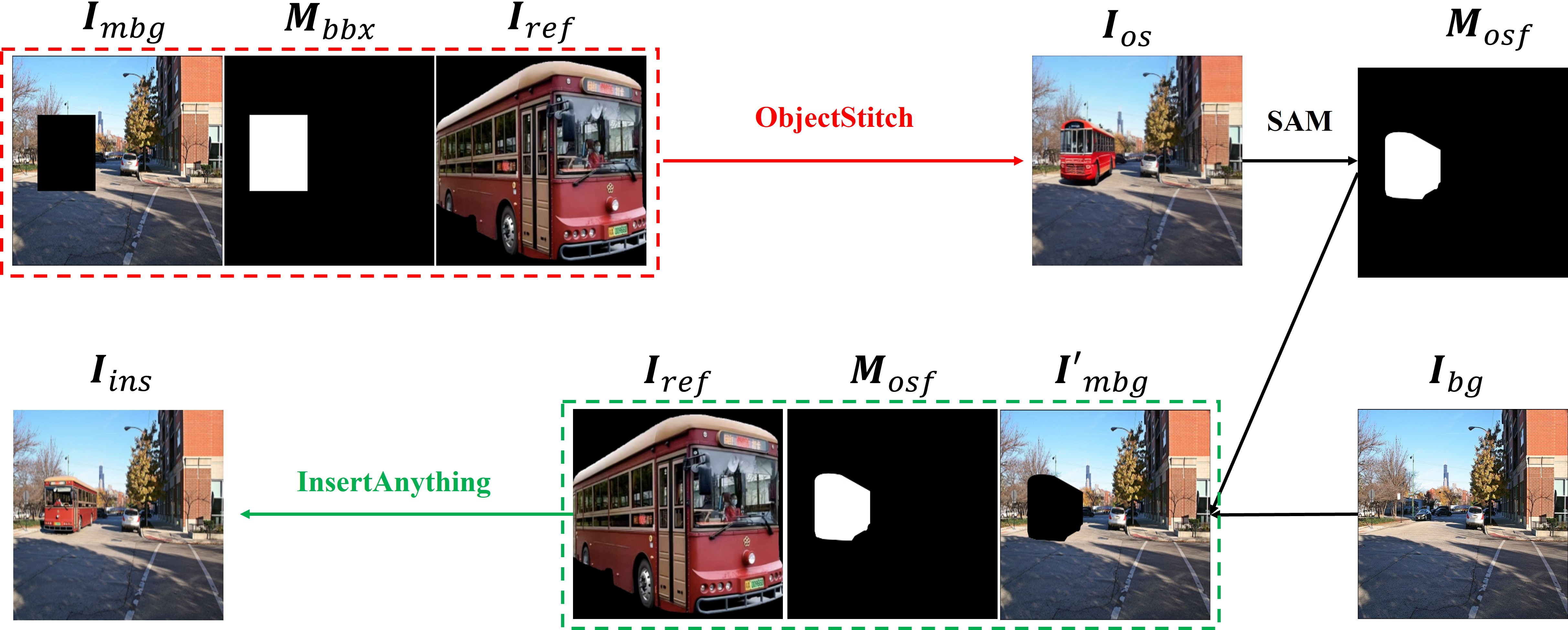
Here’s the two-stage pipeline:
- Stage 1 — Make it fit (Authenticity)
- Tool used: ObjectStitch (a “diffusion model” image tool that can generate and adjust pictures step-by-step).
- What it does: It places the object in the right spot and changes its angle, size, and lighting so it looks natural with the background.
- How it’s guided: The system first “blanks out” the area inside the bounding box in the background (like clearing a space on the photo canvas) so the model knows where to generate the object.
- Result: The object fits the scene well, but some fine details (like tiny textures or exact colors) might be lost.
- Bridge between stages — Get the exact outline
- Tool used: SAM (Segment Anything Model).
- What it does: SAM creates a precise mask for the object in the composite result from Stage 1, so the system knows exactly where the object is—pixel by pixel.
- Stage 2 — Restore the details (Fidelity)
- Tool used: InsertAnything (an image tool that is great at keeping the original look and details).
- What it does: Using the mask from SAM, it fills only the object region with the exact appearance from the original reference image (the object’s source photo), preserving colors, textures, and patterns.
- Important: It doesn’t change the object’s pose or the background—only the surface details are restored.
Analogy: Stage 1 is like carefully placing a sticker so it lines up perfectly with the scene. Stage 2 is like repainting the sticker’s surface so it looks exactly like the original high-quality design.
What did they find and why is it important?
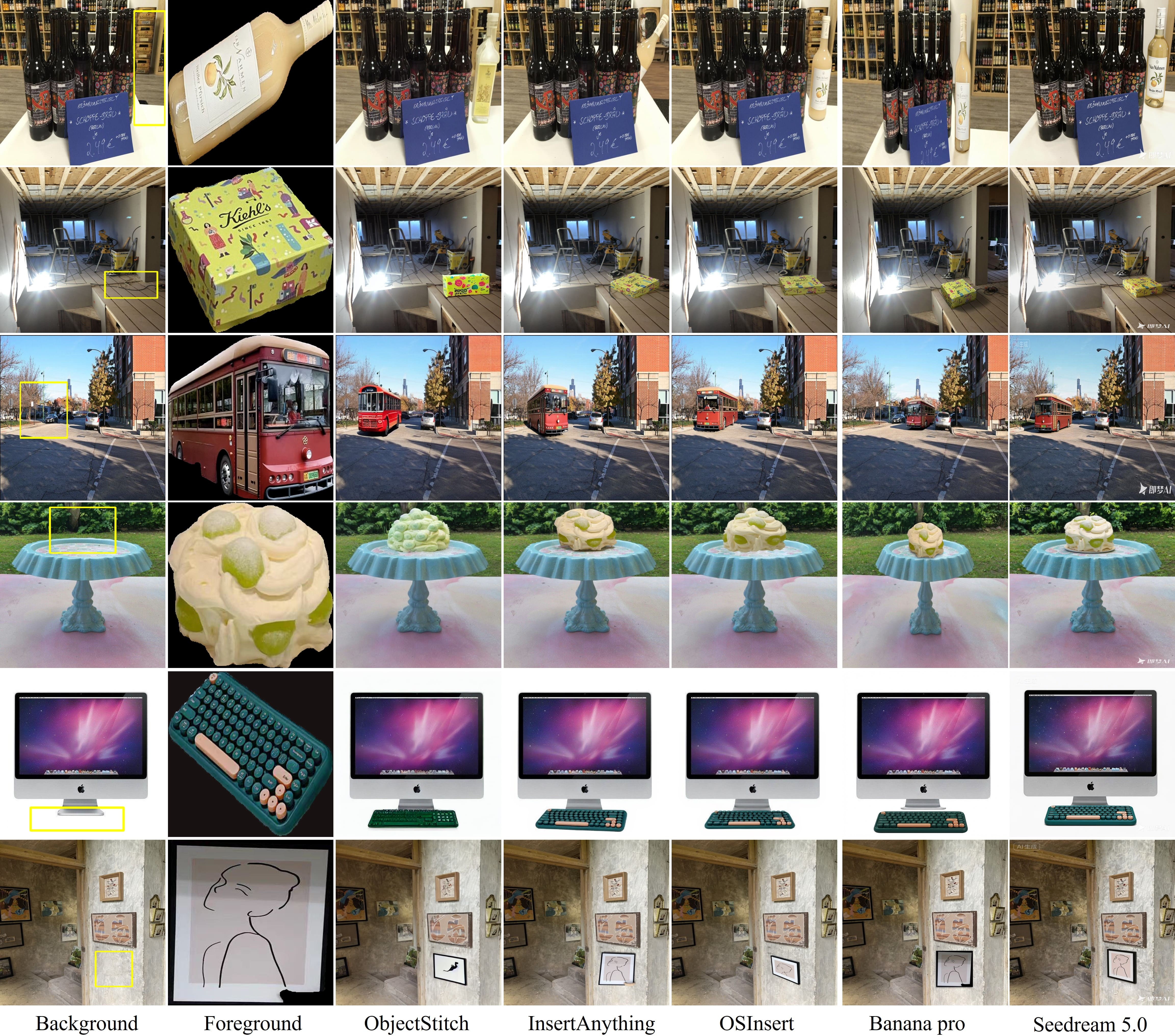
- Dataset used: MureCOM, a benchmark with many scenes, different objects, and challenging differences in viewpoints and poses.
- Compared against:
- High-authenticity methods (good at fitting the scene but often blur details).
- High-fidelity methods (keep details but often look like copy-and-paste, with wrong angle or lighting).
- Commercial models (Banana pro and Seedream 5.0).
Main results:
- OSInsert successfully combines both strengths: the object looks naturally integrated (correct angle/lighting/scale) and retains its original fine details (exact textures/colors).
- It also did better at obeying the placement box and not changing the background’s look.
- Some commercial tools did well overall but sometimes misplaced the object slightly or changed the background’s tone, which reduces realism.
Why it matters:
- This two-stage design avoids the usual trade-off and gives a more reliable, realistic result.
What is the impact of this research?
- Practical uses: E-commerce (placing products into different scenes), movie and TV post-production (adding digital props), AR/VR, and social media content creation.
- Technical impact: Shows that breaking the problem into two stages—first fit the object to the scene, then restore its details—is a simple and effective strategy.
- Accessibility: The code and models are open-sourced, so others can build on it.
- Big picture: It’s a step toward more trustworthy image editing, where objects look real and keep their identity, which is important for creative work and for avoiding misleading visuals.
Knowledge Gaps
Knowledge gaps, limitations, and open questions
Below is a focused list of concrete gaps, uncertainties, and unexplored aspects that future work could address to strengthen and extend the paper’s contributions.
- Quantitative evaluation is missing: define and report explicit authenticity and fidelity metrics (e.g., pose/view alignment scores, lighting consistency measures, LPIPS/SSIM for detail preservation, background difference metrics, user studies with statistical significance).
- Dataset generalization is untested: validate OSInsert beyond MureCOM (e.g., COCO, OpenImages, in-the-wild photos) to assess robustness under broader scene diversity and object categories.
- Ablation studies are absent: quantify the contribution of each component (ObjectStitch, SAM, InsertAnything), the two-stage order, and the sensitivity to hyperparameters (e.g., SAM prompt type, mask thresholds, bounding box size).
- SAM dependency and failure modes are not analyzed: characterize performance when SAM struggles (thin structures, transparency, reflections, camouflage), and evaluate alternative segmentation/matting solutions (e.g., alpha matting) or post-processing to mitigate mask errors.
- Illumination/color harmonization is under-specified: the second stage may reintroduce reference appearance inconsistent with background lighting adjusted in stage one; test and add explicit relighting/color transfer controls or constraints.
- Physical plausibility is not modeled: contact, support, and cast shadows are not explicitly handled; explore depth estimation, shadow synthesis, and 3D/physics-aware constraints for realistic object–scene interactions.
- Occlusion handling is missing: address cases where background objects partially occlude the inserted object using depth maps, layered compositing, or learned occlusion reasoning.
- Boundary blending artifacts are not evaluated: quantify and mitigate seams/halos at mask boundaries; investigate soft masks, matting, or Poisson blending for seamless integration.
- Error propagation from stage one is unaddressed: analyze how incorrect geometry/viewpoint from ObjectStitch affects final fidelity, and consider feedback loops or shape refinement before detail filling.
- Background preservation claims need verification: provide metrics and visual analyses of background integrity (e.g., pixel-wise diffs outside masks, luminance/chroma histograms, structural similarity) and guard-band strategies near boundaries.
- Precise placement adherence is not quantified: measure alignment to the given bounding box (e.g., IoU/offset/scale errors) and compare against baselines to substantiate spatial precision claims.
- Multi-object insertion scalability is unexplored: determine how the pipeline handles multiple objects (ordering, mutual occlusions, consistent lighting) and whether stages interact adversely at scale.
- Automatic placement and scaling are unsupported: investigate methods to predict optimal placement, scale, and orientation from background context rather than relying on user-specified bounding boxes.
- Use of multiple reference views is unclear: the figure shows several references, but the method uses a single reference; explore multi-view fusion, selection strategies, or 3D canonicalization to improve fidelity across viewpoints.
- Joint training/end-to-end optimization is not considered: study whether fine-tuning components jointly (or adding a consistency loss across stages) improves lighting compatibility and detail mapping without breaking geometry.
- Computational efficiency and resource footprint are not reported: benchmark latency, memory, and throughput vs single-stage baselines, and explore model distillation or caching to reduce pipeline cost.
- Robustness to extreme viewpoint mismatches is untested: assess how faithfully stage two maps details onto significantly altered shapes/poses and introduce constraints to prevent semantic/detail distortion.
- Domain robustness is unknown: test under low-light, motion blur, noise, extreme weather, and stylistic backgrounds (e.g., paintings) to evaluate out-of-distribution performance.
- User control is limited: add controls for orientation, scale, relighting strength, material-specific handling (transparent/reflective), and text/semantic prompts to guide composition outcomes.
- Fairness of commercial comparisons is not established: detail prompts, settings, and metrics used for Banana pro/Seedream to ensure reproducible and comparable evaluations.
- Failure case analysis is missing: provide systematic categories of failures (geometry, lighting, detail loss, boundary artifacts) with visual examples and diagnostic tools to guide future improvements.
- Video extension is not addressed: explore temporal consistency for object insertion in video sequences (mask tracking, temporal smoothing, consistent lighting and shadows across frames).
Practical Applications
Immediate Applications
The following items describe concrete, deployable use cases that can be implemented now, along with suggested tools/workflows and noted dependencies.
- E-commerce product staging at scale (Retail, Advertising): Insert catalog products into diverse lifestyle scenes while preserving brand colors/textures and achieving scene-consistent pose, viewpoint, and illumination.
- Tools/products/workflows: OSInsert-API integrated into a CMS; template-driven bounding boxes; batch processing pipeline using ObjectStitch → SAM → InsertAnything; post-checks for background integrity.
- Assumptions/dependencies: High-resolution reference images; accurate bounding boxes from layout templates; GPU inference capacity; model licenses; minimal occlusion in target region; domain generalization beyond MureCOM.
- Marketing creative variation generation (Advertising, Design Software): Rapidly produce campaign variations by placing brand assets into multiple backgrounds with reliable detail preservation and realistic integration.
- Tools/products/workflows: Photoshop/Figma plugin wrapping OSInsert; creatives specify bounding boxes; automated A/B testing asset generation; QA step ensuring unchanged background.
- Assumptions/dependencies: Asset rights and brand compliance; compute budget for batch runs; SAM mask accuracy for thin/transparent objects.
- Real estate virtual staging for photos (Real Estate): Insert furniture and decor into empty or sparsely furnished room photos with correct perspective and precise material/texture fidelity.
- Tools/products/workflows: Staging SaaS using OSInsert; standardized room layout templates provide bounding boxes; curated furniture asset library; human-in-the-loop approval.
- Assumptions/dependencies: Sufficient visual cues in background for pose/view; high-quality furniture reference images; segmentation robustness for complex edges and shadows.
- Film/TV and post-production stills (Media/VFX): Fast previsualization or key art composition by placing props or CG stand-ins into plate images while maintaining photorealistic detail and spatial plausibility.
- Tools/products/workflows: Nuke/After Effects scripts calling OSInsert for still frames; artists define bounding boxes; layer-based compositing with non-destructive background preservation checks.
- Assumptions/dependencies: Still-image workflows (video sequences require additional research; see long-term); occlusion handling is manual; consistent lighting cues in the plate.
- AR/VR static scene prototyping (XR, Software): Create marketing visuals or concept boards by inserting planned virtual objects into real-world scene photos to validate scale and placement.
- Tools/products/workflows: Unity/Unreal editor extension for 2D concept generation; OSInsert-assisted asset libraries; design iteration over bounding box placements.
- Assumptions/dependencies: Static images only; bounding boxes derived from scene planning tools; compute access for designers.
- Retail planogram visualization (Retail Operations): Visualize shelf layouts by inserting product facings into shelf photos to assess merchandising with accurate packaging detail and shelf-level alignment.
- Tools/products/workflows: Planogram software adds OSInsert node; bounding boxes come from planogram coordinates; batch render SKUs across stores; shelf compliance review.
- Assumptions/dependencies: Consistent camera viewpoint in store photos; reliable shelf detection or pre-annotated boxes; SKU asset quality.
- Synthetic dataset augmentation for perception models (Robotics/Autonomy, CV R&D): Generate photorealistic composite scenes by inserting labeled objects into varied backgrounds to diversify training data while retaining canonical object details.
- Tools/products/workflows: Data pipeline that logs SAM masks as segmentation labels; stratified sampling of backgrounds; domain shift evaluation; train/val splits.
- Assumptions/dependencies: Label propagation correctness via SAM; avoidance of unrealistic physics (shadows/occlusions); relevance to target domain; compute/storage for large batches.
- Research baseline and teaching (Academia): Use OSInsert as a reproducible baseline to study authenticity–fidelity decoupling, ablation of mask precision, and evaluation protocols on MureCOM-like benchmarks.
- Tools/products/workflows: Course lab assignments; reproducibility packages; metric suites separating spatial compatibility and detail fidelity; integration with existing diffusion model toolchains.
- Assumptions/dependencies: Access to the released code/models; GPU availability; dataset licenses; clear experimental protocols.
- Responsible-use guardrails in creative teams (Policy/Compliance, Corporate Governance): Immediate internal guidance to pair OSInsert outputs with provenance tags and disclosure for composites used in advertising or editorial.
- Tools/products/workflows: Embed C2PA Content Credentials post-generation; internal review checklists; documented bounding box placements; asset-rights verification.
- Assumptions/dependencies: Adoption of provenance standards; workflow updates; storage of audit metadata; stakeholder training.
Long-Term Applications
The following items are feasible but require additional research, engineering for scale, or new capabilities (e.g., video, multi-object reasoning).
- Temporally consistent video object insertion (Media/VFX, XR): Extend OSInsert from stills to video with consistent pose, lighting, and detail across frames, including motion blur and occlusions.
- Tools/products/workflows: Sequence-level pipelines with optical flow/mask tracking; per-shot pose planning; temporal diffusion or recurrent modules; render-time QA.
- Assumptions/dependencies: New model components for temporal coherence; robust motion-aware segmentation; significantly higher compute; scene-specific tuning.
- Multi-object composition with occlusion and physics (Advertising, E-commerce, Robotics): Insert multiple interacting objects with correct ordering, shadows, contact points, and mutual occlusions.
- Tools/products/workflows: Placement solver that plans bounding boxes/order; shadow/render consistency modules; physics-informed priors; compositing orchestration.
- Assumptions/dependencies: 3D scene understanding or depth estimation; illumination/shadow models; extended SAM-like multi-object masks; higher annotation burden.
- 3D-aware and illumination-consistent composition (Design, Architecture, XR): Incorporate estimated scene geometry and lighting to improve authenticity (shadows, reflections) while preserving fidelity.
- Tools/products/workflows: Hybrid inverse rendering and diffusion; environment map estimation; material-aware detail restoration; integration with 3D DCC tools.
- Assumptions/dependencies: Accurate geometry/lighting estimation; material models; extra sensors or multi-view inputs in some cases; model redesign.
- Automated placement and pose planning (Software, E-commerce, Retail): Predict optimal bounding boxes and poses from scene context (e.g., shelf detection, room layout), then run OSInsert.
- Tools/products/workflows: Scene understanding models (layout estimation, affordance detection); LLM-assisted design rules; auto-generated bounding boxes fed to Stage-1.
- Assumptions/dependencies: Reliable detectors for scene elements; learned design heuristics; acceptance of automated placements by human reviewers.
- Real-time AR try-on and scene insertion (Consumer XR, Mobile): On-device insertion of objects into live camera feeds with plausible pose and preserved asset details.
- Tools/products/workflows: Model distillation/optimization (mobile-friendly); streaming SAM-like segmentation; hardware acceleration; latency-aware pipelines.
- Assumptions/dependencies: Significant optimization beyond current diffusion inference; robust tracking; privacy-safe on-device processing; battery constraints.
- Cross-domain synthetic data for specialized fields (Healthcare imaging, Industrial inspection): Carefully validated composites to augment training where ground-truth data is scarce while preserving critical fine-grained features.
- Tools/products/workflows: Domain calibration of OSInsert; expert-in-the-loop validation; strict data governance; bias/diagnostic integrity checks.
- Assumptions/dependencies: Ethical review and regulatory constraints; domain-specific fidelity metrics; risk of harmful artifacts; limited initial scope.
- Scalable content factories (SaaS, Cloud): High-throughput pipelines generating millions of composite images with SLAs on background integrity and asset fidelity.
- Tools/products/workflows: MLOps orchestration (queuing, autoscaling, monitoring); caching of frequently used assets/backgrounds; automated QA with anomaly detectors; cost controls.
- Assumptions/dependencies: Cloud GPU availability and cost; robust failure handling; dataset curation; throughput vs. quality trade-offs.
- Provenance and detection co-design (Policy, Trust & Safety): Build watermarking/detection features tailored to high-authenticity high-fidelity composites to mitigate misuse (deepfakes, deceptive ads).
- Tools/products/workflows: Integrated C2PA signing at generation; watermarking in diffusion latent space; detectors trained on OSInsert-like artifacts; auditability dashboards.
- Assumptions/dependencies: Standardization across industry; collaboration with platforms; evolving regulatory frameworks; adversarial robustness.
- Interactive design assistants (Design Software, Education): Systems that suggest object placements and generate composites while explaining authenticity/fidelity trade-offs to learners and designers.
- Tools/products/workflows: UI that visualizes Stage-1 spatial alignment and Stage-2 detail restoration; explainable prompts; iterative refinement loops with user feedback.
- Assumptions/dependencies: Human-centered tooling; model introspection features; user training; integration with existing creative ecosystems.
Glossary
- AnyDoor: A zero-shot object-level image customization method for inserting objects into backgrounds while preserving details. "AnyDoor~\cite{anydoor} is a zero-shot object-level image customization method"
- axis-aligned bounding box: A rectangle aligned with image axes that specifies the target region for placing the foreground. "a pre-specified axis-aligned bounding box "
- Banana pro: A close-source commercial generative image model used as a baseline for image composition. "Banana pro~\cite{team2024gemini}"
- binary spatial mask: A 0/1 image-sized map indicating regions of interest, such as where to insert content. "a binary spatial mask "
- bounding box: A rectangular region specifying where the foreground object should be placed in the background. "the foreground placement bounding box "
- bounding box mask: The binary mask derived from a bounding box that marks the insertion region. "the bounding box mask "
- copy-and-paste effect: A visible artifact where the inserted object appears pasted without proper spatial adaptation. "resulting in an obvious copy-and-paste effect"
- controllable image composition: A generation approach that uses explicit control signals to guide compositing. "ControlCom~\cite{zhang2023controlcom} is a controllable image composition method based on diffusion models"
- control signals: External guidance inputs that condition the generative model to achieve desired outputs. "uses control signals to guide the generation of the foreground"
- ControlCom: A diffusion-based controllable image composition method guiding generation via control signals. "ControlCom~\cite{zhang2023controlcom}"
- decoupling design: A strategy that separates conflicting objectives (e.g., authenticity and fidelity) into distinct stages. "two-stage decoupling design"
- detail-aware object insertion: Insertion that explicitly preserves fine-grained appearance features of the foreground. "to realize detail-aware object insertion"
- Diffusion Transformer (DiT): A diffusion model architecture that uses transformer blocks for image generation tasks. "InsertAnything is a Diffusion Transformer (DiT) based image insertion method"
- diffusion model: A generative model that synthesizes images by iteratively denoising from noise. "is a diffusion model-based generative object compositing method"
- erasure operation: Setting pixels in a target region to zero to prompt the model to generate new content there. "The erasure operation is implemented by setting all pixel values in the masked region to $0$ (black)"
- exemplar-based image editing: Editing guided by an example/reference image’s style and content. "realizes exemplar-based image editing"
- foundation model: A large, general-purpose model adaptable to many tasks, such as segmentation. "a foundation model for universal image segmentation"
- foreground mask: A precise binary mask isolating the foreground object region for targeted processing. "extract a high-precision foreground mask"
- foreground reference image: The image providing the object and its details to be inserted into the background. "the foreground reference image "
- functional mapping: A formulation expressing a model’s input-output relation as a function. "is simplified as the following functional mapping:"
- generative image composition: The task of inserting or synthesizing objects into backgrounds to produce realistic composites. "Generative image composition (object insertion) is an important research direction"
- generative inpainting: Filling missing or erased regions using a generative model. "for generative inpainting"
- generative object compositing: Synthesizing and integrating objects into scenes via generative methods. "generative object compositing"
- geometric alignment: Consistency of an inserted object’s pose and geometry with the background scene. "geometric alignment with the background"
- high-authenticity methods: Approaches emphasizing spatial compatibility (pose/view/illumination) with the background. "High-authenticity methods (e.g., ObjectStitch~\cite{objectstitch}, Paint by Example~\cite{PBE})"
- high-fidelity methods: Approaches prioritizing preservation of the foreground’s fine-grained details. "High-fidelity methods (e.g., InsertAnything~\cite{song2025insert}, AnyDoor~\cite{anydoor}, ControlCom~\cite{zhang2023controlcom})"
- in-context editing: Conditioning a model on both background and reference images to guide detailed edits. "a cutting-edge high-fidelity in-context editing method"
- InsertAnything: A high-fidelity, in-context diffusion method for detail-preserving object insertion. "InsertAnything~\cite{song2025insert} is a state-of-the-art high-fidelity method"
- intermediate composite image: The first-stage output where spatially compatible but detail-poor foreground is generated. "the intermediate composite image "
- mask extraction: The process of deriving a precise object mask from an image, often via a segmentation model. "mask extraction task"
- masked background image: A background image with the insertion region erased to prompt generative filling. "the masked background image "
- MureCOM dataset: A benchmark dataset tailored for evaluating generative image composition. "We conduct all experiments on the MureCOM dataset~\cite{lu2023dreamcom}"
- ObjectStitch: A diffusion-based high-authenticity method for generating spatially compatible foregrounds. "ObjectStitch~\cite{objectstitch} is a representative high-authenticity method"
- Paint by Example: A diffusion-based high-authenticity exemplar editing method for style/content transfer. "Paint by Example~\cite{PBE} is another high-authenticity method"
- pixel-level precision: Segmentation or masking accuracy at the level of individual pixels. "with pixel-level precision"
- pre-trained model: A model trained beforehand on large data and then used or adapted for a specific task. "pre-trained SAM model"
- Segment Anything Model (SAM): A general-purpose image segmentation model with strong zero-shot performance. "Segment Anything Model (SAM)~\cite{kirillov2023segment}"
- Seedream 5.0: A close-source commercial generative image model used as a baseline. "Seedream 5.0~\cite{seedream2025seedream}"
- spatial compatibility: The alignment of an inserted object’s pose, viewpoint, and illumination with the scene. "spatial compatibility (authenticity)"
- spatial constraint: A mask or rule restricting generation to a specified region. "serves as a critical spatial constraint for the second stage"
- zero-shot capability: The ability to perform tasks without task-specific training examples. "with strong zero-shot capability"
Collections
Sign up for free to add this paper to one or more collections.

