Thinking in Boxes: 3D Editing in Real Images Made Easy
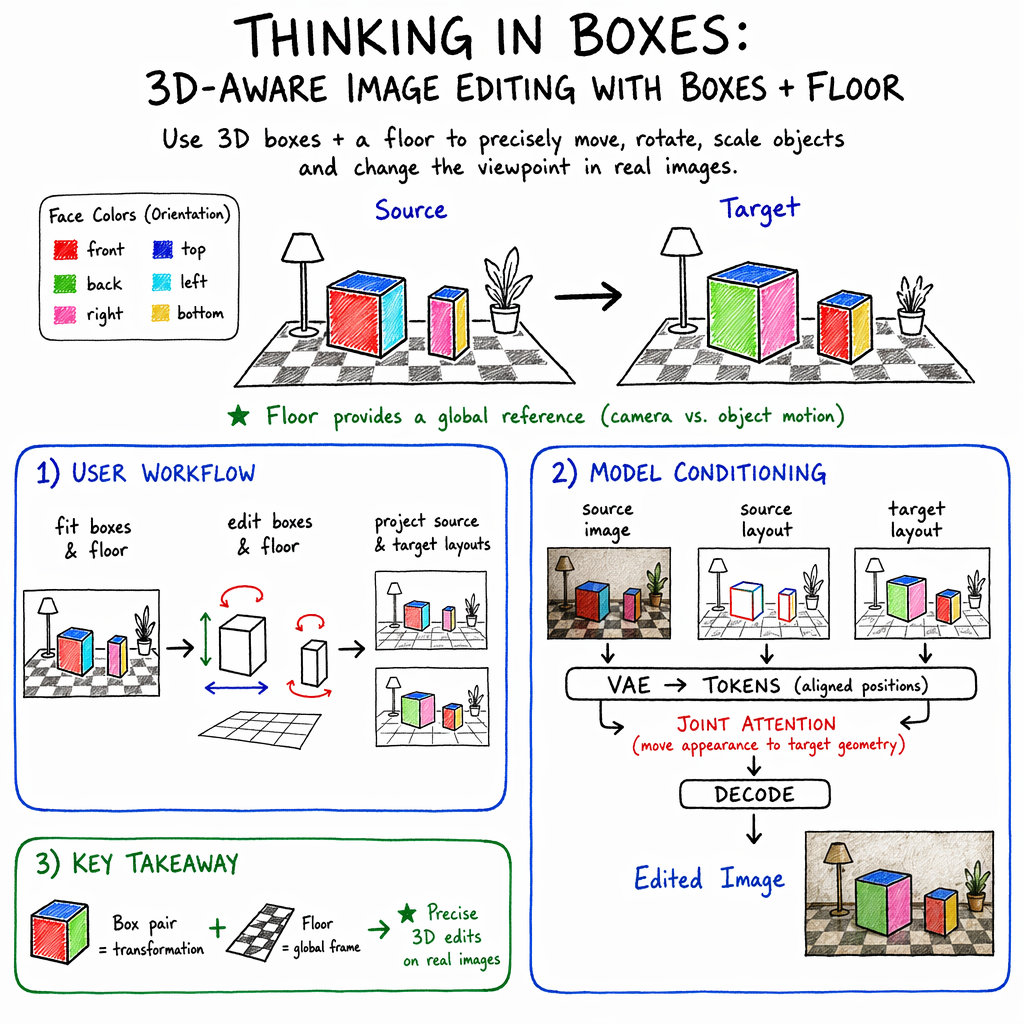
Abstract: Text and 2D-conditioning interfaces provide weak, ambiguous control over spatial transformations in image editing -- particularly under large object motions and camera changes. Prior work has used 3D primitives such as boxes, but only as loose conditioning signals indicating approximate object location rather than specifying the transformation. We instead use 3D boxes as structured specifications: the user provides the input and output boxes of the edit, casting editing as a well-posed geometry problem. This ``thinking in boxes'' interface, where each box face is color-coded to convey 3D orientation, gives precise control over translation, rotation, scaling, and viewpoint changes in real images while preserving scene and object identity, and recovering previously unseen object regions. To ground transformations in scene appearance, we introduce a depth-aligned planar floor as a global reference frame, shaded with depth-aware cues. Conditioned on this structure, an image generator produces consistent results under large transformations. Trained in two stages -- on synthetic multi-object scenes and a small set of real-world videos from Objectron -- the system generalizes to complex, in-the-wild real images. Our method operates directly on real photographs and substantially outperforms recent state-of-the-art methods on large 3D edits.
Paper Prompts
Sign up for free to create and run prompts on this paper using GPT-5.
Top Community Prompts
Explain it Like I'm 14
What is this paper about?
This paper shows a simple, hands-on way to edit real photos in 3D. Instead of typing prompts or drawing rough 2D boxes, you place colorful 3D boxes around objects in a picture and move those boxes—just like sliding and rotating toy boxes on a chessboard. The system then updates the photo so the objects actually move, rotate, resize, or even show new sides you couldn’t see before, while keeping the scene realistic.
What questions were the researchers trying to answer?
The researchers focused on three easy-to-understand questions:
- How can we give people precise, predictable control over 3D changes in a single photo (like moving a chair or turning a bottle around)?
- How can we avoid confusion between “the object moved” and “the camera moved” when we only have one picture?
- Can a simple, user-friendly setup (3D boxes and a floor) guide a smart image model to make big, realistic edits—even revealing parts of objects not visible in the original photo?
How does their method work?
Think of the process like staging a small play on a checkered floor:
- You place a 3D box around each object you want to edit.
- Each face of the box has a specific color, so the system knows which way the object is facing (like a Rubik’s cube with fixed colors).
- A checkered “floor” is added to the scene as a reference so the system can tell if the object moved or if the “camera” view changed.
Here’s the idea step by step:
- 3D boxes as simple controls
- Each object gets a 3D box that captures its position, size, and direction.
- The box faces are color-coded (for example: red front, blue top). The visible colors tell the system which way the object is pointing.
- A shared “floor” to avoid confusion
- The system adds a flat, checkered floor that lines up with the scene’s depth (near vs far).
- This floor acts like a clear coordinate system. If boxes shift relative to the floor, the object moved; if the whole layout shifts together, the camera moved. No guessing needed.
- Four kinds of edits you can do by dragging the boxes
- Move (translation): slide a box to a new spot.
- Rotate: spin a box so a different colored face is visible (showing a new side of the object).
- Scale: make a box (and the object) bigger or smaller.
- Change the camera view: rotate the whole scene’s viewpoint (boxes and floor) to see the scene from another angle.
- A smart image model fills in the details
- Once you set the “before” boxes and the “after” boxes, a trained image generator updates the photo to match your changes.
- Because it understands the boxes and the floor, it keeps lighting, shadows, and textures consistent and can reveal parts of objects that were hidden before.
- How they trained it (in simple terms)
- First, they created many synthetic (computer-made) scenes with 3D objects on a floor, then rendered pairs of images showing objects moved, rotated, or resized.
- Then they fine-tuned with a smaller set of real-world video frames, where the camera moves around real objects.
- This teaches the model to follow box instructions and keep edits realistic in real photos.
What did they find, and why is it important?
- Precise control without confusion
- Using colored 3D boxes and a checkered floor gives clear instructions for where and how objects should move or rotate, and whether the camera is changing. This reduces guesswork and messy results.
- Realistic edits—even big ones
- The system can handle large moves and rotations, keep object identity (it’s the same chair, not a different one), and maintain scene details like lighting and shadows.
- It can show parts of objects that weren’t visible before (like the back of a bottle) when you rotate them, which is very hard for many editors.
- Works well on real photos
- Even though it was mostly trained on synthetic scenes, the method generalizes to “in-the-wild” photos (ordinary images people take).
- In comparisons and a user study, people preferred the results from this method over several recent alternatives, especially for keeping objects and background consistent and following the requested layout.
- The floor and color coding really matter
- Tests (ablation studies) show that removing the checkered floor makes positioning less accurate.
- Making all box faces the same color makes orientations less accurate.
- Together, floor + color-coded faces are key to clean, predictable edits.
Why this matters: With a simple “box-and-floor” interface, people can reliably edit photos as if they were moving 3D objects on a stage—no complex tools or lengthy prompts required. It’s a practical step toward easy, accurate 3D-aware photo editing.
What could this change in the future?
- Easier creative work: Designers, students, and hobbyists could rearrange scenes, tweak product photos, or explore different camera angles in minutes.
- Better tools for education and storytelling: Teachers or creators can visually demonstrate how objects look from new angles without needing 3D modeling skills.
- More reliable editing: Because the instructions are structured (boxes + floor), results are less ambiguous than text prompts or 2D hints, making edits more consistent and controllable.
Limitations to keep in mind:
- If multiple objects look very similar or share similar-sized boxes, the system can get confused about which one you meant to move and may do nothing.
- Like many image editors, it can introduce small, unwanted changes in the background. Fully isolating edits from the rest of the photo is still challenging.
In short, this paper introduces a simple, box-based way to tell an AI exactly how to change a photo in 3D. It gives users clear, hands-on control and produces realistic, consistent results—bringing powerful 3D editing closer to everyday use.
Knowledge Gaps
Knowledge gaps, limitations, and open questions
Below is a concise list of unresolved issues that future work could address to strengthen, generalize, and stress-test the proposed “thinking in boxes” approach.
- Disambiguation in multi-object edits: When multiple objects could satisfy a target box configuration, the method can default to identity edits. How can instance-specific constraints (e.g., box IDs, per-object tokens, text references) be incorporated to robustly resolve object-to-box assignment?
- Planar-floor assumption: The approach relies on a single depth-aligned planar floor. How does it extend to scenes with multiple support planes (tables, shelves), non-planar/tilted terrains (hills, stairs), or environments without a discernible ground plane?
- Automatic floor estimation: The floor is “estimated automatically” but the algorithm, reliability, and failure modes are unspecified. What is the concrete method, how accurate is it, and how does performance degrade with floor-estimation errors?
- Objects not supported by the floor: Many real scenes include hanging lamps, wall-mounted items, or objects on counters/tables. How can per-object support planes or multi-plane scene layouts be inferred and conditioned to maintain contact and shadows?
- Camera calibration and metric control: Edits operate through projected boxes and a floor without explicit intrinsics/extrinsics at test time, so metric scale is ambiguous. Can camera parameters be estimated to enable physically meaningful controls (e.g., “move 30 cm”) and more predictable perspective changes?
- Orientation encoding limits: Orientation is communicated only via face colors. How robust is this under symmetries (e.g., cylinders, spheres) or small face visibility, and would alternative encodings (normals, arrows, 3D axes overlays) reduce ambiguity?
- Articulation and non-rigid edits: Box primitives cannot express joint angles or deformations. How can the interface be extended (e.g., skeletons, part boxes) to edit articulated and deformable objects without identity drift?
- Lighting, shadows, and reflections: The method does not explicitly model re-lighting or shadow re-projection after object motion/camera change. How can physically grounded relighting/shadow casting be integrated to improve realism and consistency on complex materials and reflective surfaces?
- Occlusion/disocclusion fidelity: Newly revealed regions are synthesized from priors without guarantees of identity preservation. How can uncertainty-aware synthesis, multi-view constraints, or retrieval-based priors improve faithfulness of disoccluded content?
- Background preservation and leakage: The paper notes unintended background alterations. What mechanisms (layered compositing, scene decomposition, edit masks with geometry-aware constraints, background locking losses) best enforce strict background consistency?
- Scalability to many objects: Training scenes contain two objects; scaling behavior with 5–20+ objects, deep occlusion chains, and dense clutter is untested. What are the memory/runtime trade-offs and quality limits as object count grows?
- Robustness to box-fitting errors: Real users and detectors will misplace boxes. How tolerant is performance to translation/scale/orientation noise, and can the system provide feedback or auto-correction for ill-posed box inputs?
- Automatic oriented box fitting: Dependence on external 3D box detectors and manual refinement is a usability bottleneck. Can oriented box fitting be learned end-to-end from a single image, with reliability on open-world categories?
- Multi-plane and layered conditioning: A single layout image mixes all objects and the floor. Would layered (per-object) conditioning or depth-ordered layouts reduce attention confusion and improve occlusion reasoning?
- Sequential and iterative edits: Do identities and textures remain stable over long edit sequences (e.g., translate → rotate → scale → camera move)? A systematic evaluation of cumulative drift and compounding errors is missing.
- Video editing and temporal coherence: The method is evaluated on image pairs; temporal stability in videos is unaddressed. How can the approach be extended to consistent multi-frame edits without retraining per video?
- High-resolution performance: Training and results are at 512×512. What is the quality/runtime behavior at 1–4K resolutions, and are tiling or latent upscaling strategies needed to preserve details and avoid seams?
- Runtime, memory, and deployment: Inference latency, GPU memory, and throughput are not reported. What are the practical constraints for interactive editing and how do they scale with scene complexity?
- Evaluation metrics for 3D fidelity: Current metrics (DINO/DIFT/IoU) are 2D- or feature-based proxies. Can 3D-aware metrics (e.g., pose/depth consistency via monocular estimators, multi-view re-rendering checks) provide more faithful assessments of spatial correctness?
- Camera vs. object motion edge cases: The floor helps disambiguate motion types, but extreme FOV changes, strong perspective effects, and rolling-shutter distortions are untested. How robust is the disambiguation under these conditions?
- Category and domain generalization: Finetuning uses limited real data (Objectron). How does the method generalize to categories absent from Objaverse/Objectron, to stylized domains (paintings, cartoons) at scale, and to complex outdoor clutter or adverse weather?
- Failure detection and user guidance: The system lacks uncertainty estimates or warnings in underdetermined scenarios. Can it expose confidence maps, suggest additional constraints, or request user disambiguation interactively?
- Conditioning architecture design space: Only LoRA on attention matrices was explored. Would alternative conditioning routes (cross-attention adapters, spatial FiLM, modulation of positional encodings) or stronger joint training improve controllability and robustness?
- Beyond boxes: Are other primitives (cylinders, generalized boxes, convex parts) or hybrid controls (text + boxes + keypoints) beneficial for shape-specific edits while preserving the simplicity of the interface?
- Physical plausibility and collisions: The system does not enforce contact, non-penetration, or gravity consistency after edits. How can lightweight physics priors or learned contact predictors reduce implausible object-scene interactions?
- Transparent/reflective and thin structures: Robustness on glass, mirrors, wireframes, or hair-like structures is not analyzed. How do edits behave in these challenging regimes, and what conditioning signals could help?
- Floor appearance mismatch: The checkerboard floor used for conditioning may not resemble the real floor. What is the impact of this domain gap, and could conditioning be derived from scene geometry cues that better match the image (e.g., estimated planes with textures sampled from the scene)?
- Data scaling and composition: The mix and scale of synthetic vs. real training data were not ablated. What is the minimal real data required for strong generalization, and how does data composition (object diversity, HDRIs, materials) affect performance?
- Reproducibility and ablation depth: Details of the floor estimator, sensitivity to positional encodings, and exact LoRA configurations are limited. More exhaustive ablations would clarify which components are essential and where headroom remains.
Practical Applications
Immediate Applications
Below are concrete, deployable use cases that can be implemented with the paper’s current method, models, and UI paradigm.
- 3D-aware photo editing plugins for creative suites — Software, Media/Advertising
- What it enables: Precise object translation, rotation, scaling, and viewpoint changes in a single photo while preserving identity and context; fills in previously occluded regions.
- Tools/products/workflows: “Thinking-in-Boxes” plugin for Adobe Photoshop, Affinity, GIMP; simple point-and-click box fitting + edit; integrates auto-initialization via a 3D box detector (e.g., WildDet‑3D) and floor auto-estimation; FLUX‑Kontext-based backend with LoRA weights.
- Assumptions/dependencies: GPU inference; availability/licensing of a FLUX‑Kontext editor and LoRA; scenes benefit from a dominant ground plane; minor background artifacts possible; ambiguous layouts with similar boxes can fail.
- E‑commerce product imagery refinement and variant generation — Retail/E‑commerce, Digital Marketing
- What it enables: Repositioning/rotating products in lifestyle shots; creating multiple viewpoints from a single hero image for product pages and ads; quick A/B layout variants.
- Tools/products/workflows: Shopify/BigCommerce app or web tool for merchandisers; batch processing to output gallery angles; integration with DAM systems.
- Assumptions/dependencies: Best on mostly rigid objects; hallucinated unseen sides may differ slightly from reality (requires human QA and disclosure); ground-plane estimation should be plausible; provenance logging recommended.
- Virtual staging and layout edits in listing photos — Real Estate, Interior Design
- What it enables: Moving or reorienting furniture, adjusting room composition, or previewing camera angles without 3D models; consistent shadows/contacts via floor reference.
- Tools/products/workflows: Web-based staging assistant; plugins for SketchUp/Revit/Blender workflows to rapidly iterate on still photos before full 3D.
- Assumptions/dependencies: Works best with a single dominant floor plane; complex multi-level or non-planar floors reduce reliability; background may change subtly; human review needed for sales materials.
- Previsualization and compositing aids — Film/TV, VFX, Games
- What it enables: Rapid previs of blocking in a live-action plate; consistent rotation and translation of props for compositional exploration; fewer manual inpaint passes.
- Tools/products/workflows: Nuke/After Effects plugin for box-controlled object edits; storyboard and previs pipelines testing blocking without full 3D match-moves.
- Assumptions/dependencies: Single frames only (video consistency requires future work); proper floor anchoring; provenance required for editorial pipelines.
- Social media and mobile photo tools (“Move & Rotate”) — Consumer Apps
- What it enables: Intuitive, face-colored box UI on phones to move/turn objects post-capture; fun, practical edits for creators.
- Tools/products/workflows: iOS/Android app with on-device or cloud GPU inference; easy “fit boxes → drag/rotate → share”.
- Assumptions/dependencies: Latency and compute constraints on device; privacy-safe cloud options; clear labeling for manipulated images.
- Robotics and CV dataset augmentation with controlled 3D transforms — Robotics, Autonomous Systems, Computer Vision R&D
- What it enables: Generate additional “views” of objects from single images to diversify pose and viewpoint distributions while keeping context consistent.
- Tools/products/workflows: Data augmentation modules for detection/pose datasets; targeted transformation scripts (rotate 30°, translate 0.5m) for balancing training sets.
- Assumptions/dependencies: Hallucinated unseen regions may shift appearance details; label propagation requires careful validation; best for synthetic augmentation and ablation studies rather than ground-truth “truth” data.
- Technical documentation and product manuals — Manufacturing, Industrial Design
- What it enables: Reorient machinery or parts in existing photos to make diagrams clearer without reshoots; maintain consistent style across views.
- Tools/products/workflows: In-house doc tooling with box edit UI; export annotated images with overlayed transformation metadata.
- Assumptions/dependencies: For safety-critical docs, edits must be labeled non-photographic; rigid objects preferred.
- Education modules for perspective and 3D reasoning — Education (STEM, Art/Design)
- What it enables: Teach perspective, pose, and camera motion using color-coded box faces; students directly manipulate object/camera with immediate visual feedback.
- Tools/products/workflows: Classroom web app; assignments: “rotate to a side view,” “simulate a 30° camera pan,” etc.
- Assumptions/dependencies: Stable internet/GPU; curated images where floor estimates make sense.
- Editorial and advertising compliance with edit provenance — Media, Policy/Compliance
- What it enables: Automatic export of edit logs (source/target box specs, camera moves) and embedding C2PA provenance in edited images to disclose spatial manipulations.
- Tools/products/workflows: Build a “box-transform ledger” that is attached to outputs; newsroom and agency pipelines add labels for spatial edits.
- Assumptions/dependencies: Integration with C2PA/CAI; organization policies that mandate disclosure.
- Dataset curation and annotation bootstrapping — Academia, CV/ML Tooling
- What it enables: Semi-automatic 3D box annotations from stills with human-in-the-loop refinement; generate source/target box pairs for training geometry-aware editors.
- Tools/products/workflows: Annotation UIs that start from WildDet‑3D proposals; export color-coded box projections + images for supervised learning.
- Assumptions/dependencies: Quality of initial box detector; annotator training; consistent floor estimation across sets.
Long-Term Applications
These opportunities require further research (e.g., video consistency, broader scene priors), scaling, or productization.
- Temporally consistent 3D video editing — Software, Media/Advertising, VFX
- Vision: Extend box-driven edits across frames with trackers and temporal attention, enabling moving objects/camera in full clips.
- Needed: Video-conditioned training, temporal stabilization, per-object tracks; improved floor/scene estimation beyond single-plane assumptions.
- AR/XR live scene editing on-device — AR/VR, Social, Creative Tools
- Vision: Real-time “box control” for live camera feeds to preview reoriented objects or virtual product placement; interactive camera pans in situ.
- Needed: Low-latency diffusion or distilled models; robust multi-plane layout; hardware acceleration on mobile headsets/phones.
- Single-image to 3D asset bootstrapping via pseudo-views — 3D Content Creation, Digital Twins
- Vision: Use generated viewpoint variations to assist NeRF/mesh reconstruction or to seed textured proxies for quick prototyping.
- Needed: Consistency regularizers across generated views; verification filters for hallucinated geometry; integration with reconstruction pipelines.
- Turntable-style catalog imagery from one hero shot — Retail/E‑commerce
- Vision: Produce multi-angle “360-like” sequences without a 3D scan; consistent identity across frames.
- Needed: Pose scheduling and consistency constraints; human QA; explicit disclaimers for synthetic views.
- Physics-aware interior layout optimization from photos — Architecture, Interior Design, Real Estate
- Vision: “Drag furniture logically” assistants with collision, weight, and clearance constraints; export proposed arrangements.
- Needed: Contact/shadow reasoning beyond a checkerboard floor; learned or rule-based physics constraints; multi-object disambiguation UI.
- Synthetic scenario generation for autonomy — Robotics, AV, Drones
- Vision: Create rare pose/view situations, viewpoint sweeps, and occlusion cases from real backgrounds to harden perception models.
- Needed: Domain-gap studies; automated label validation; tools to quantify and control hallucination risk.
- Consistent character/object across panels for storytelling/comics — Media, Publishing, Games
- Vision: Box-driven multi-view consistency tied to a personalized subject, enabling sequential art with coherent poses.
- Needed: Personalization modules (e.g., embeddings) fused with box control; cross-panel consistency losses.
- Forensics and insurance visualization (exploratory) — Public Safety, Insurance
- Vision: Explore alternative viewpoints of a scene to reason about visibility/occlusions during incident analysis and training (not evidentiary).
- Needed: Strong provenance, disclaimers, and policies; calibrated uncertainty; guardrails to prevent misuse as “ground truth.”
- Urban signage and street furniture planning — Urban Planning, Civil Engineering
- Vision: Assess new placements and orientations in site photos to study sightlines and visual clutter before field trials.
- Needed: Outdoor scene layout modeling (slopes, multiple planes); dynamic shadow/lighting controls; stakeholder approval workflows with provenance.
- Content authenticity ecosystems with geometric edit logs — Policy, Standards, Trust & Safety
- Vision: Standardize “box-level diffs” and camera move logs in C2PA; tools for auditors to inspect geometric manipulations.
- Needed: Cross-industry agreement on schemas; integration with major editors and CMS; detection APIs to surface edits to end users.
Cross-cutting assumptions and dependencies
- Scene assumptions: The method relies on a depth-aligned planar floor as a global frame. Performance may degrade in scenes without a clear ground plane, with multi-level surfaces, or in aerial/underwater contexts.
- Ambiguity and UI design: Similar-sized boxes for multiple objects can create ambiguous instructions, leading to identity edits being ignored. Improved UI disambiguation (naming/locking objects) is beneficial.
- Object type: Works best for predominantly rigid objects; deformable objects may introduce identity/geometry inconsistencies under extreme transforms.
- Compute and licensing: Requires diffusion-based inference (GPU/accelerators) and access to a compatible editor (e.g., FLUX‑Kontext) plus LoRA weights. Commercial deployment must address licenses for models and any 3D assets used in training.
- Provenance and compliance: For consumer and commercial use, especially in advertising and news, embed edit provenance (e.g., C2PA) and disclose spatial edits to meet emerging policies.
- Human oversight: Generated disoccluded regions are plausible but not guaranteed accurate; professional workflows should include review/approval steps, particularly when edits communicate factual product properties or safety-critical details.
Glossary
- 3D box: A cuboid representation used to encode an object’s position, orientation, and scale in 3D. "We represent each object of interest as a 3D box with position, orientation, and scale."
- 3D box detector: A model that automatically predicts 3D bounding boxes for objects in images. "To reduce manual effort further, off-the-shelf 3D box detectors~\citep{wilddet3d} produce an initial set of boxes that the user refines."
- 3D convex primitives: Simple 3D shapes (e.g., convex blocks) used to represent scene elements for controllable generation. "Generative blocks world~\cite{gbw} represent scene elements as 3D convex primitives and enable control during generation by geometrically manipulating primitives."
- 3D primitives: Basic geometric elements (e.g., boxes) used to structure or control 3D-aware image editing. "Prior work has used 3D primitives such as boxes, but only as loose conditioning signals indicating approximate object location rather than specifying the transformation."
- Ablation: An experimental analysis that removes or alters components to assess their impact. "We ablate design choices of our box conditioning:"
- Angular Error: A metric that measures the difference in orientation between target and generated objects. "Angular Error, between target and generated orientations."
- Blender Cycles: A physically based path-tracing renderer used to produce photorealistic images for training/testing. "Blender Cycles renders both configurations, producing paired RGB images and color-coded 3D box visualizations along with camera intrinsics, extrinsics, and per-object material parameters."
- Camera extrinsics: Parameters defining the camera’s position and orientation in the world. "Blender Cycles renders both configurations, producing paired RGB images and color-coded 3D box visualizations along with camera intrinsics, extrinsics, and per-object material parameters."
- Camera intrinsics: Internal camera parameters (e.g., focal length) defining the projection from 3D to 2D. "Blender Cycles renders both configurations, producing paired RGB images and color-coded 3D box visualizations along with camera intrinsics, extrinsics, and per-object material parameters."
- Canonical orientation: A fixed reference orientation used to consistently color-code box faces. "color-coded by their canonical orientation."
- Checkered floor (Checkerboard): A textured planar floor rendered with depth-aware shading to serve as a global spatial reference. "a depth-aligned planar floor, rendered as a checkerboard with depth-aware shading."
- ControlNet: An auxiliary network that conditions diffusion models on structural inputs for controllable generation. "LooseControl~\cite{loosecontrol} leverages the depth of 3D bounding boxes and trains a ControlNet~\cite{controlnet} to condition for 3D-aware generation."
- Cross-attention maps: Attention tensors that link conditioning inputs (e.g., text) to image features during diffusion denoising. "editing is performed by manipulating the cross-attention maps~\cite{hertz2022prompt,masa-ctrl,ye2023ip,avrahami2025stable} during denoising."
- Depth-aligned planar floor: A planar surface aligned with scene depth that anchors object and camera motion disambiguation. "we introduce a depth-aligned planar floor as a global reference frame"
- Depth proxy: An intermediate depth-based representation used to lift 2D features into 3D for editing. "lifting diffusion activations or attention maps to 3D via the depth proxy~\citep{geodiffuser, diffusion-handles,loosecontrol};"
- DIFT: A method for dense image-feature matching used here to compute correspondence-based errors. "Mean Distance, the pixel error between DIFT~\cite{dift} semantic correspondences computed from source-to- and source-to-reference;"
- DINOv3-ViT-B/16: A self-supervised vision transformer used to compute feature-similarity metrics for consistency evaluation. "masked DINOv3-ViT-B/16~\cite{dinov3} feature similarity"
- Diffusion inversion: The process of mapping a real image into the latent trajectory of a diffusion model for editing. "inverting real images into the latent space using diffusion inversion~\cite{song2020denoising,kawar2023imagic,mokady2023null}"
- Disocclusion: Newly visible regions revealed after object or camera movement. "the depth-only representation is brittle under large transformations and significant disocclusion,"
- FLUX-Kontext: A diffusion-based image editor capable of multimodal conditioning used as the base model. "We build upon FLUX-Kontext~\citep{flux-kontext, sd3} image editor that operates on multimodal token streams."
- HDRI: High Dynamic Range Images used for realistic environment lighting during rendering. "Each scene contains two objects placed on a planar floor under a sampled HDRI."
- IoU: Intersection-over-Union; measures overlap between predicted and target regions. "IoU, the intersection-over-union between the SAM3~\cite{sam3} mask of the generated object and the target bounding box;"
- Joint attention: An attention mechanism jointly applied across concatenated conditioning and image latent streams. "Joint attention inside FLUX-Kontext applies to the image latents -- mapping the source latent to the target latent under box-pair conditioning."
- Latent tokens: Encoded vectors representing images or layouts in a model’s latent space. "the image , projected source layout and projected target layout are first encoded into latent tokens using the VAE"
- LoRA: Low-rank adaptation technique for efficiently fine-tuning large models by injecting small trainable matrices. "We fine-tune FLUX-Kontext with LoRA~\citep{lora} layers injected into the attention matrices, leaving the rest of the model frozen."
- Mean Distance: A metric measuring pixel error between semantic correspondences across images. "Mean Distance, the pixel error between DIFT~\cite{dift} semantic correspondences computed from source-to- and source-to-reference;"
- MMDiT: A multimodal diffusion transformer architecture where different token streams attend to each other. "Internally to MMDiT, each stream attends to the others."
- Objectron: A dataset of real-world videos with 3D bounding boxes used for fine-tuning and evaluation. "a small set of real-world videos from Objectron"
- Objaverse: A large-scale 3D asset repository used to populate synthetic training scenes. "Objects are drawn from the Objaverse~\cite{objaverse-xl} pool"
- Occlusion: The blockage of parts of objects by other objects, handled during image edits. "The same procedure handles translation, rotation, occlusion, and viewpoint changes"
- Oriented-box overlay: A visualization of 3D boxes with face colors indicating orientation, overlaid on images. "a corresponding oriented-box overlay, where the visible faces of each object's 3D box are color-coded by their canonical orientation."
- Per-image inversion: Performing inversion separately for each image to enable editing in diffusion-based methods. "and the methods require per-image inversion or optimization."
- Positional encoding: A scheme that injects spatial position information into token sequences for alignment. "All three streams have the same positional encoding, so there is an alignment between image region and the box that covers it."
- PSNR: Peak Signal-to-Noise Ratio; an image quality metric comparing similarity to a reference. "For image quality, we report PSNR\,, SSIM~\cite{SSIM}\,, LPIPS~\cite{LPIPS}\,, and DreamSim~\cite{dreamsim}\,."
- SAM3: A segmentation model variant used to extract masks for quantitative evaluation. "the SAM3~\cite{sam3} mask of the generated object"
- SSIM: Structural Similarity Index; a perceptual image quality metric. "For image quality, we report PSNR\,, SSIM~\cite{SSIM}\,, LPIPS~\cite{LPIPS}\,, and DreamSim~\cite{dreamsim}\,."
- VAE: Variational Autoencoder; encodes images and layouts into a latent representation and decodes edited outputs. "encoded into latent tokens using the VAE and then concatenated along the spatial dimension"
- Viewpoint change: A shift in camera orientation or position that changes the perspective of the scene. "and a camera viewpoint change."
- Warp Error: A masked L1 difference metric comparing edited and reference images after warping. "Warp Error, the masked difference between and a reference target;"
- WildDet-3D: A dataset with 3D bounding box annotations for in-the-wild images, used for evaluation. "For object editing, we use {WildDet-3D}~\cite{wilddet3d}, which provides 3D bounding box annotations on in-the-wild images."
Collections
Sign up for free to add this paper to one or more collections.