DuoTouch: Passive Two-Footprint Attachments Using Binary Sequences to Extend Touch Interaction
Abstract: DuoTouch is a passive attachment for capacitive touch panels that adds tangible input while minimizing content occlusion and loss of input area. It uses two contact footprints and two traces to encode motion as binary sequences and runs on unmodified devices through standard touch APIs. We present two configurations with paired decoders: an aligned configuration that maps fixed-length codes to discrete commands and a phase-shifted configuration that estimates direction and distance from relative timing. To characterize the system's reliability, we derive a sampling-limited bound that links actuation speed, internal trace width, and device touch sampling rate. Through technical evaluations on a smartphone and a touchpad, we report performance metrics that describe the relationship between these parameters and decoding accuracy. Finally, we demonstrate the versatility of DuoTouch by embedding the mechanism into various form factors, including a hand strap, a phone ring holder, and touchpad add-ons.


Paper Prompts
Sign up for free to create and run prompts on this paper using GPT-5.
Top Community Prompts
Explain it Like I'm 14
What this paper is about (in simple terms)
This paper introduces DuoTouch, a tiny add-on for phones, tablets, and touchpads that gives you new ways to control your device using the screen you already have. It doesn’t need batteries or special apps. Instead, it uses two small conductive “footprints” on the screen and a clever pattern of on/off touches to understand actions like pressing a button, sliding a slider, or turning a dial—while keeping most of the screen visible.
The big questions the researchers asked
- Can we use only two on-screen touch points to support many different actions (like buttons and sliders) without covering the screen?
- Can this work on normal devices using only the standard touch data (no special hardware or secret system access)?
- What sizes and speeds make it reliable, and how can designers pick the right dimensions for different devices?
How DuoTouch works
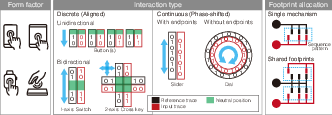
Think of a capacitive touchscreen like a surface that notices when something conductive (like your finger or a small metal piece) touches it. DuoTouch attaches two small conductive “footprints” to the screen. From each footprint, a thin path (a “trace”) runs under a moving part you control—like a slider knob or a dial. Parts of each trace are conductive and parts are insulating, arranged like a tiny barcode.
As you move the knob along the path:
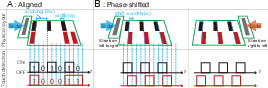
- Each footprint reports either “touch” (1) when the moving part sits over a conductive segment, or “no touch” (0) when it’s over a gap.
- Over time, that creates a pattern of 1s and 0s—a binary sequence—that the device can read through normal touch events.
DuoTouch has two ways to set up these two traces:
- Aligned configuration (for discrete commands)
- Analogy: It’s like scanning a barcode to read a short code. The first trace sets the beat (like a metronome), and the second trace provides the bits (1s and 0s) in sync with that beat.
- Use it for actions like “press a button,” “toggle on/off,” or choosing a direction (like arrow keys).
- Phase-shifted configuration (for continuous control)
- Analogy: Imagine two blinking lights. If the red light blinks slightly before the black light, you know you’re moving forward; if it blinks after, you’re moving backward. Counting how many blinks tells you how far you moved.
- Use it for controls like a slider (volume/brightness) or a dial (zoom/rotation).
Key point: This all works with the normal touch data your device already provides. No firmware hacks, no custom drivers.
What they tested
To check reliability, the team:
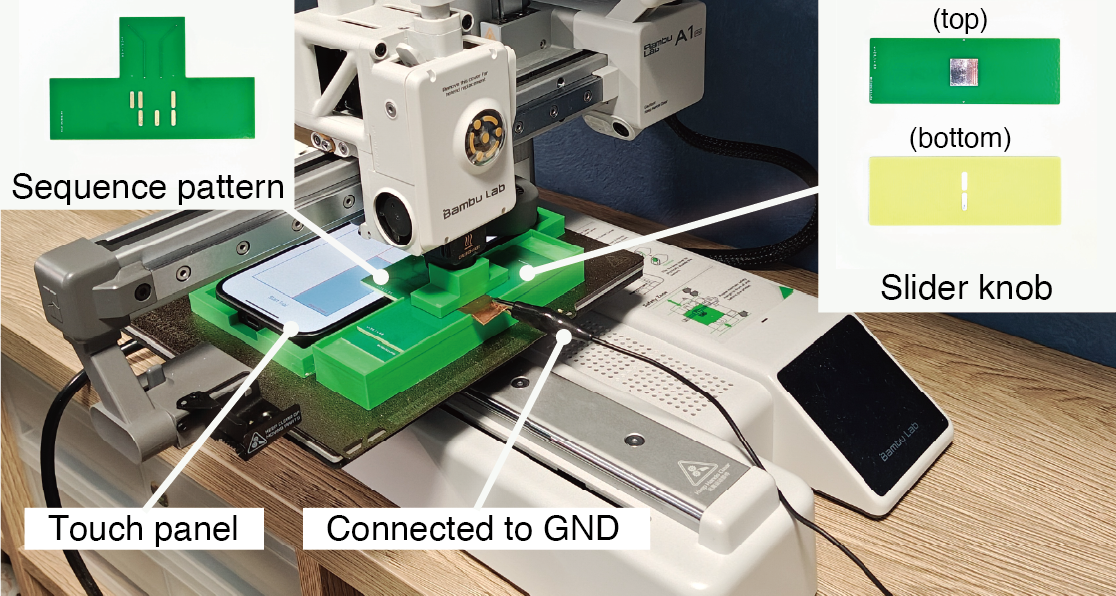
- Tried DuoTouch on two common devices:
- A smartphone at about 60 Hz touch sampling (how many times per second it reads touch)
- A touchpad at about 90 Hz
- Varied the width of the conductive segments (from 1.5 mm to 3.0 mm)
- Moved the slider at different speeds (20–200 mm per second)
- Used a precise 3D printer to move the slider steadily and repeated each test many times
- Measured how often the system decoded the binary patterns correctly
The main results and why they matter
- There’s a simple speed limit rule
- The maximum reliable movement speed depends on:
- How wide the conductive segments are (w, in mm)
- How often the device samples touch (f_s, in Hz)
- The rule of thumb is:
- Example: With 3.0 mm wide segments on a 60 Hz phone, the safe top speed is about 180 mm/s (3 × 60).
- Example: With 2.5 mm at 90 Hz, it’s about 225 mm/s (2.5 × 90).
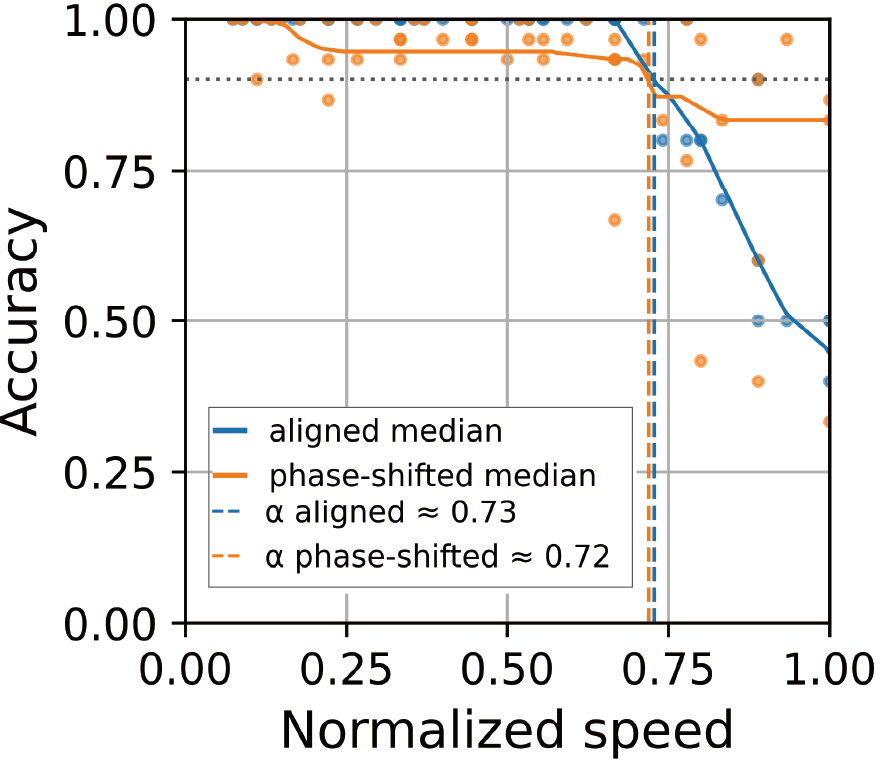
Why this happens: If you move too fast or make the segments too narrow, the screen doesn’t get enough samples during each on/off “bit,” so it can’t read the pattern reliably.
- Wider segments and faster sampling help
- Bigger widths (like 2.5–3.0 mm) and higher sampling rates (90 Hz) keep accuracy high even at higher speeds.
- The aligned (discrete) setup was generally a bit more accurate near the speed limit; the phase-shifted (continuous) setup needs slightly more margin because it uses timing differences to decide direction.
- It works on normal devices, with minimal screen blockage
- Using only two footprints means less screen is covered, and the hardware is simple.
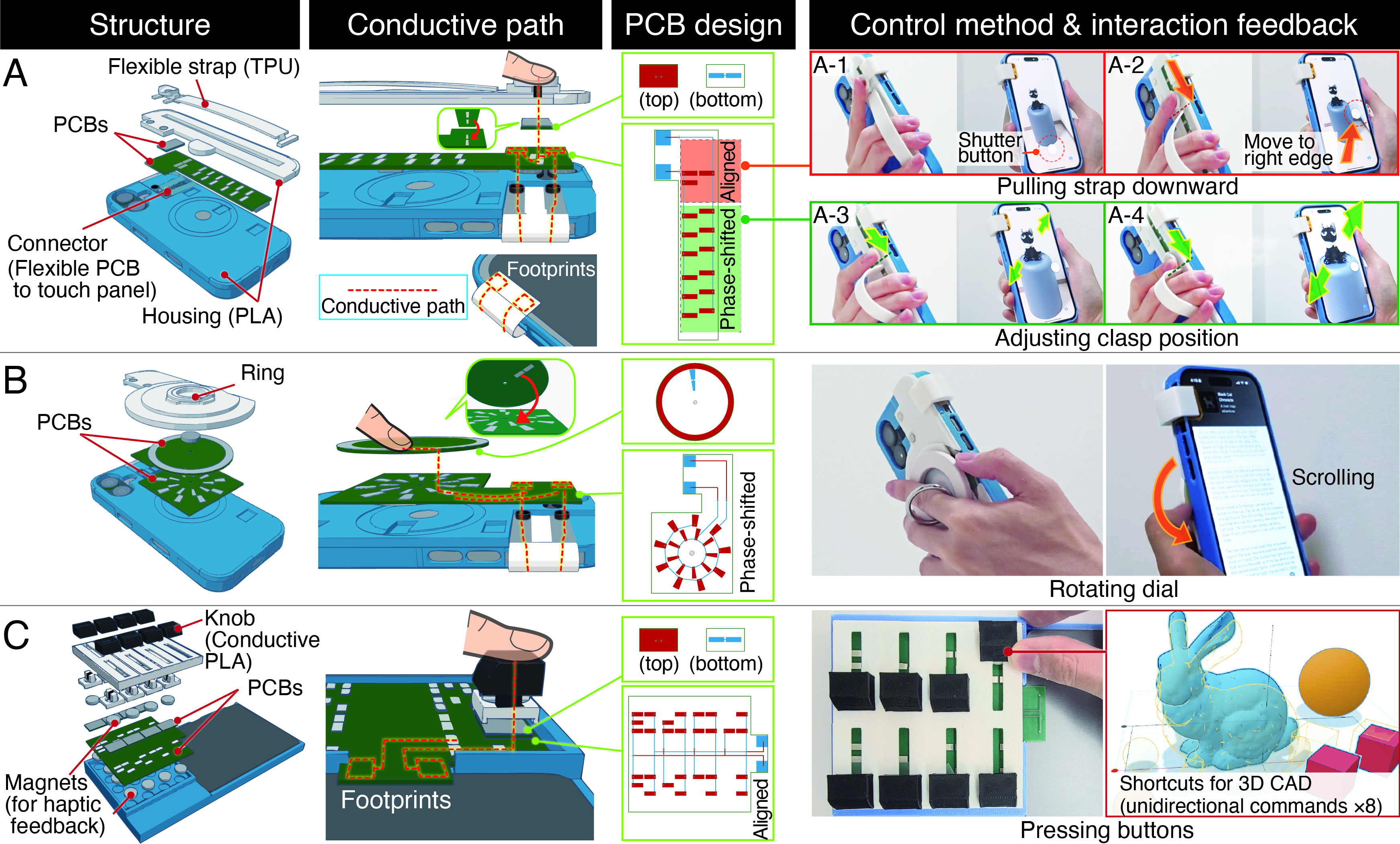
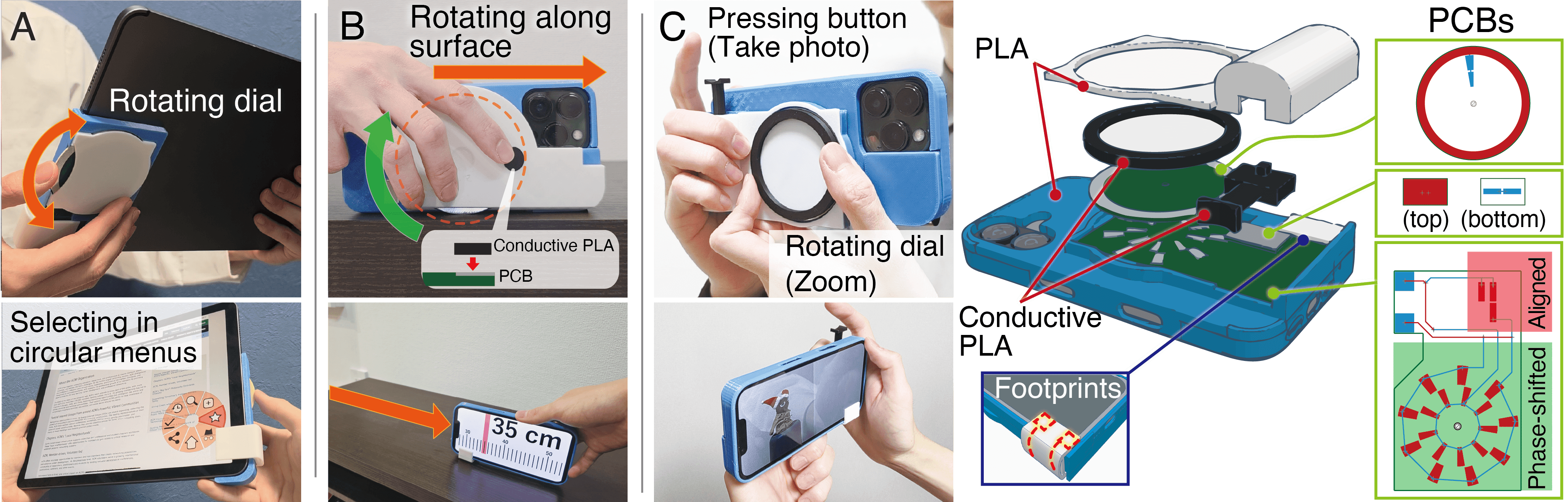
- The team built several real examples: a phone hand strap, a ring holder, and touchpad add-ons.
Practical design tips (simplified)
Here are a few straightforward rules the paper distilled for designers and makers:
- Match width to speed and device: If users will move fast, use wider segments or a device with a higher sampling rate. Use the rule as a guide.
- For typical finger speeds (about 100–130 mm/s):
- On 60 Hz phones/tablets, 3.0 mm segments are a safe default.
- On 90 Hz touchpads, 2.0–2.5 mm often works well; 3.0 mm is even safer.
- Choose the mode that fits the task:
- Aligned configuration for buttons, toggles, and direction taps.
- Phase-shifted configuration for sliders and dials.
- For discrete codes, avoid palindromes (patterns that read the same forward and backward), because they won’t tell you which direction the user moved.
- If multiple controls share the same two footprints, make sure only one control can be moved at a time to avoid mixed-up signals.
- Place the two footprints where they won’t cover important on-screen buttons or content.
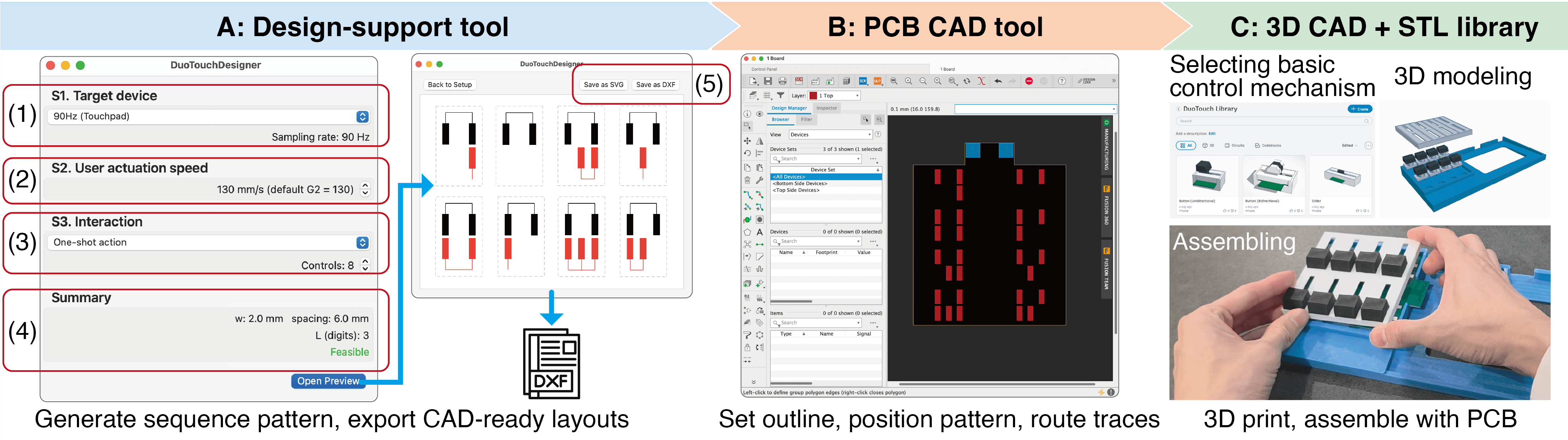
The authors also made a design tool that:
- Asks for your device type and expected max speed
- Suggests a safe segment width and layout
- Generates ready-to-use patterns you can export for PCB and 3D printing
Why this is useful
DuoTouch shows that you can add rich, tangible controls to today’s touch devices:
- Cheaply and simply (no power, no custom electronics)
- Without blocking much of the screen
- While using the phone or laptop’s normal touch input
This could help:
- Accessibility (easier physical controls)
- Mobile gaming (tactile sliders or triggers)
- Media and creative apps (quick dials for volume, zoom, scroll)
- DIY makers and product designers (fast prototyping with a provided tool)
Takeaway
By turning simple on/off touch patterns at two small spots into meaningful commands and movements, DuoTouch makes new types of physical controls possible on the screens we already use. The paper explains how to build these controls, how to keep them reliable (using the speed–width–sampling rule), and provides tools and examples that make it practical to try in real products.
Knowledge Gaps
Knowledge gaps, limitations, and open questions
The paper introduces DuoTouch and evaluates it technically on two devices, but several aspects remain uncertain or unexplored. The following list enumerates concrete gaps to guide future research:
- Real-world usability and ergonomics: No controlled human-subject studies on learnability, comfort, fatigue, error recovery, or task performance compared to baseline touch or competing tangibles.
- Occlusion and interaction interference: The claim of minimized occlusion is not quantitatively validated; effects on content visibility, target acquisition, and interference with direct finger touch are unmeasured.
- Generalizability across device ecosystem: Evaluation uses a single smartphone (60 Hz) and a single touchpad (90 Hz). Variability across touch controllers, OS versions, event coalescing, palm rejection, multi-touch arbitration, and vendor-specific filtering remains uncharacterized.
- Runtime variability in sampling rate: Many devices dynamically change (e.g., ProMotion 120/240 Hz, power-saving modes). The decoders’ robustness and adaptation strategies under changing at runtime are not evaluated.
- Environmental robustness: Effects of moisture, sweat, temperature, gloves, screen protectors, cases, and differing grounding conditions (vs. simulated ground via copper tape) on decoding accuracy are unknown.
- Material and contact mechanics: Long-term reliability of sliding contacts, choice of conductive materials (rubber vs. copper), wear, friction, and risk of scratching or degrading screen coatings are not assessed.
- Mechanical integration and durability: Attachment methods, tolerance to shock/vibration, repeated cycles, and housing/PCB failures over time are not tested; guidance for maintenance or replacement is absent.
- Safety and device impact: Potential for electrostatic discharge, damage to oleophobic layers, or unintended force on the display is not considered; power implications of persistent touches on device battery are unmeasured.
- Multi-mechanism sharing of footprints: The decoder assumes “one-at-a-time” actuation without methods for concurrency detection, arbitration, or mechanical interlocks to prevent overlapping sequences.
- Error handling and user feedback: Ambiguous-bit handling (wildcards) issues commands only on unique matches, but the UX for ambiguity, timeouts, corrective prompts, or redo strategies is unspecified.
- Codebook design and scalability (aligned mode): Only a 6-bit code is tested; capacity, error rates, and user performance for longer codes, structured codebooks, or error-correcting encodings are unexplored.
- Phase-shifted accuracy and stability: Lower and more variable accuracy near the sampling bound is observed but not decomposed into causes (e.g., timing jitter, event coalescing, per-frame integration). Strategies like signal conditioning, predictive filters, or alternative geometries are not studied.
- Trace geometry optimization: The gap-to-width ratio is fixed to $3w$. Systematic exploration of pitch, spacing, and electrode shape to balance dwell times, increase SNR, or reduce edge-transition failures is missing.
- Physical signal model: Beyond the sampling limit , there is no quantitative model linking overlap area, dwell time, controller integration window, and detection thresholds to predict accuracy or inform materials and dimensions.
- Interaction vocabulary breadth: Continuous controls (sliders/dials) and discrete actions are demonstrated, but mappings for complex gestures, multi-step operations, or hierarchical commands (and their user performance) are not evaluated.
- Human-speed variability: Tests use constant-velocity machine actuation; performance under human-like speed profiles with accelerations, micro-pauses, and reversals is not measured.
- Electrode size and shape effects: Electrode height is fixed at 8 mm; sensitivity to footprint size, aspect ratio, and placement (including proximity to device electrode grid patterns) is unknown.
- Multi-touch interference: Interactions between the two footprints and concurrent finger touches, system gestures (e.g., edge swipes), and app-level recognizers are not mapped; mitigation strategies are absent.
- Cross-platform design tool readiness: The macOS design-support tool’s usability, correctness, and DFM (design-for-manufacturing) checks are not validated; cross-platform support and integration into common PCB CAD workflows are unspecified.
- Manufacturing tolerances: Sensitivity to PCB trace width/spacing variation, assembly errors, or 3D-print dimensional inaccuracies is not characterized; required tolerances to ensure decoding reliability are not provided.
- Application-level benefits: Demonstrations (hand strap, ring holder, touchpad add-ons) lack task-level evaluations (e.g., throughput, error rate, user preference) against alternatives like on-screen gestures or commercial attachments.
- Accessibility and handedness: Implications for left/right-handed use, motor impairments, and visual accessibility (e.g., footprint placement, tactile affordances) are not addressed.
- Security and false-trigger risks: Potential for unintended touches due to incidental contact, variable grounding, or bystanders is not examined; mechanisms for lockout, confirmation, or secure activation are unstudied.
- Extensibility beyond two footprints: Whether adding more traces/footprints can increase capacity or robustness, and how complexity scales (wiring, decoding) under such extensions, remains an open design question.
Practical Applications
Immediate Applications
Below are actionable, real-world use cases that can be deployed now using the paper’s validated designs, decoders, and design-support tool. Each item lists likely sectors, potential products/workflows, and feasibility assumptions.
- Smartphone accessories for tangible controls
- Sectors: Consumer electronics, mobile software, accessibility
- Use cases:
- Camera strap or phone ring holder with a DuoTouch slider/dial for zoom, exposure, or mode toggles (aligned for discrete modes; phase-shifted for zoom/focus).
- Media control ring/strap for volume, track scrubbing, play/pause, and skip.
- Gaming “cross key” or trigger add-ons that map to in-game actions with low visual occlusion.
- Tools/products/workflows:
- Use the macOS design-support tool to generate CAD-ready sequence patterns per device sampling rate and target speeds.
- Export patterns to PCB CAD + 3D print housings (provided STL library) and assemble passive attachments.
- Ship an app-side decoder library that maps DuoTouch events to app controls via standard touch APIs (iOS/Android).
- Assumptions/dependencies:
- Standard touch APIs are available in the foreground app; no firmware changes required.
- On-screen footprints avoid system UI zones to reduce accidental triggers (G6).
- Width and speed obey v ≤ w·fs and follow G1–G3 defaults (e.g., 60 Hz smartphone: w ≥ 3.0 mm for 100–130 mm/s).
- Reliable grounding through the user (strap/ring maintains skin contact); gloves may require conductive patches or alternative grounding.
- Touchpad add-ons for laptops and desktops
- Sectors: Productivity software, creative tools, audio/video
- Use cases:
- Clip-on slider/dial for timeline scrubbing, zooming, brush size control, or track volume/pan.
- Tools/products/workflows:
- Phase-shifted configuration for continuous control; aligned codes for “one-shot” shortcuts (e.g., cut/copy/paste).
- Cross-platform app plugins that decode touch events and forward them to host apps (DAWs, NLEs, CAD).
- Assumptions/dependencies:
- Touchpad sampling rate (e.g., 90 Hz) supports intended speeds and widths; adhere to G1–G3.
- Accessibility grips that add tactile, low-occlusion controls
- Sectors: Accessibility, assistive technology
- Use cases:
- Grip-mounted dials/sliders for users with tremor or low vision to adjust system brightness, text size, or invoke screen reader toggles.
- Tools/products/workflows:
- Aligned codes for “toggle” and “one-shot” actions; phase-shifted dials for fine control.
- Assumptions/dependencies:
- Decoder integrates with accessibility services; app or OS shortcut mapping enabled.
- One-at-a-time actuation if multiple mechanisms share footprints (G5).
- Retrofits for kiosks, tablets, and point-of-sale (POS)
- Sectors: Retail, public kiosks, hospitality
- Use cases:
- Two-footprint overlays that add tangible back/confirm controls or a slider for numeric entry without modifying kiosk firmware.
- Tools/products/workflows:
- Laminated overlay with integrated DuoTouch traces; app-level decoder maps to form controls.
- Assumptions/dependencies:
- App control over front-end UI; stable grounding through a bezel, a tether, or user contact.
- Footprint placement avoids kiosk navigation hot zones (G6).
- Maker/education kits for HCI and digital fabrication
- Sectors: Education, STEM, HCI research
- Use cases:
- Classroom labs demonstrating binary sequences, sampling limits, and passive capacitive interaction.
- Rapid prototyping kits for student UX projects (buttons, sliders, dials) using commodity phones/tablets.
- Tools/products/workflows:
- Provide lesson plans using the included design guidelines (G1–G6) and pattern generator.
- Assumptions/dependencies:
- Access to basic PCB services and 3D printers; macOS access for the current design tool.
- Rapid UX prototyping for mobile and touch UIs
- Sectors: UX research, product design
- Use cases:
- Quickly test tangible mappings (e.g., a dial vs. slider) without hardware/firmware changes.
- Tools/products/workflows:
- Apply the parameter-selection workflow (W1–W5), generate codebooks (aligned), and deploy decoders in prototype apps.
- Assumptions/dependencies:
- Screen real estate for two footprints; minimal occlusion is acceptable.
- Creative performance controllers for music and visuals
- Sectors: Music tech, live performance, creative coding
- Use cases:
- Passive dial for filter cutoff/tempo; slider for crossfades; discrete codes for scene changes.
- Tools/products/workflows:
- Phase-shifted decoding for continuous control and aligned codes for triggers; map to MIDI/OSC via app middleware.
- Assumptions/dependencies:
- Device sampling rate and width sized to desired gestural speed; user grounding maintained during performance.
Long-Term Applications
These opportunities may require further research, standardization, scaling, or OS/ecosystem support before broad deployment.
- Standardized DuoTouch accessory profile and SDKs across platforms
- Sectors: Mobile OS vendors, accessory certification programs
- Potential:
- A recognized “two-footprint passive accessory” profile with OS-level mappings for common controls (volume, zoom, accessibility).
- Cross-platform SDKs (iOS/Android/Windows/macOS) and UI guidelines to prevent conflicts with system gestures.
- Dependencies/assumptions:
- Coordination with platform teams; background listener permissions; stable reporting of touch timestamps.
- Mass-produced cases and straps with embedded DuoTouch
- Sectors: Consumer hardware manufacturing
- Potential:
- Phone/tablet cases integrating DuoTouch traces and dials with durable materials (flex PCBs, coatings) and standardized footprint positions.
- Dependencies/assumptions:
- Industrial design to ensure adhesion, durability, and cleaning; validated placement that avoids critical UI; consistent grounding solutions within cases.
- Accessible public infrastructure retrofits (healthcare, government, transport)
- Sectors: Public services, healthcare, transportation
- Potential:
- Tablet-based kiosks with tactile dials/sliders for motor or low-vision accessibility, disinfectable and low-maintenance.
- Dependencies/assumptions:
- Policy and procurement guidelines for passive attachments; standardized layouts; cleaning protocols; anti-tamper housings.
- Automotive and appliance HMI via tablet/phone docks
- Sectors: Automotive, smart appliances
- Potential:
- In-vehicle or appliance-mounted dials/sliders on a docked tablet/phone, offering tactile control without CAN/bus integration.
- Dependencies/assumptions:
- Compliance with safety/distraction standards; mechanical retention; EMI considerations; grounding when the user is not directly touching the device.
- Robust multi-mechanism sharing and arbitration
- Sectors: HCI research, embedded UI tooling
- Potential:
- Advanced mechanical designs and decoders that permit safe, reliable sharing of the two footprints among several mechanisms, with actuation locks and software arbitration.
- Dependencies/assumptions:
- Mechanisms that physically enforce one-at-a-time actuation (G5) or decoders with conflict detection/recovery; error-tolerant codes.
- Error-correcting codebooks and adaptive decoding
- Sectors: HCI/Signal processing research, software tools
- Potential:
- Code families with Hamming distance constraints for aligned configurations; adaptive decoders that learn device-specific timing jitter; improved robustness under high speeds or narrow widths.
- Dependencies/assumptions:
- Expanded empirical datasets across devices, rates (60/90/120 Hz+), and materials; integration into the design-support tool.
- Wearables and small-form-factor devices (watches, AR controllers)
- Sectors: Wearables, XR
- Potential:
- DuoTouch on small screens for gesture-lite tangible input; ring/dial controls for AR launcher panels using watch touchscreens.
- Dependencies/assumptions:
- Higher sampling rates or carefully chosen widths due to small geometries; ergonomic grounding via bands/straps; placement to avoid bezel occlusion.
- Secure confirmation gestures for finance/enterprise apps
- Sectors: Finance, enterprise IT
- Potential:
- “Physical” confirmation via a short DuoTouch code (aligned) to reduce accidental taps in high-stakes actions (e.g., trade execution, equipment control).
- Dependencies/assumptions:
- Not a cryptographic factor; serves as a human-in-the-loop safeguard only; requires additional authentication for security.
- Smart home controllers using commodity tablets
- Sectors: Smart home, energy management
- Potential:
- Tablet wall panels with a passive dial for lighting/temperature and sliders for scene control; retrofits without new powered sensors.
- Dependencies/assumptions:
- Long-term adhesion, household grounding strategies (e.g., metal bezel path or frequent user contact), and UI coexistence with system gestures.
- Integrated haptics and materials research
- Sectors: Materials, haptics, industrial design
- Potential:
- Tactile feedback (detents, textures) aligned with binary segments to improve accuracy and eyes-free operation; robust coatings for sweat/oils and cleaning agents.
- Dependencies/assumptions:
- Co-design of mechanical detents with segment pitch; long-term wear testing; manufacturability at scale.
Cross-cutting dependencies and assumptions for feasibility
- Sampling and geometry: Designs must satisfy the sampling-limited bound v ≤ w·fs. Use normalized speed s = v/(w·fs) and the paper’s thresholds (≈0.72–0.73 for ≥90% accuracy) to size widths.
- Grounding: A reliable path through the user body (e.g., strap contact) is required; insulating gloves may require conductive patches or alternative paths.
- API and app control: Decoding occurs via standard touch APIs within the active app. Background or system-wide interception may require OS support.
- Placement: Two on-screen footprints should avoid critical system UI regions; screen protectors and curved edges can affect adhesion and detection.
- Single-mechanism actuation: If multiple mechanisms share footprints, ensure only one can be actuated at a time, or add mechanical locks and software arbitration.
- Fabrication: Current workflow uses PCBs and 3D-printed parts; assembly quality (flatness, trace exposure, smooth travel) affects reliability.
- Environment: Moisture, oils, and temperature can influence contact; choose materials and finishes accordingly.
These applications build directly on the paper’s validated decoders (aligned and phase-shifted), the sampling-bound design rules, and the end-to-end toolchain that outputs CAD-ready sequence patterns and STL housings, enabling both immediate prototyping and a pathway to scalable products.
Glossary
- Actuation speed: The rate at which the user-actuated component moves along the pattern, typically measured in mm/s. "actuation speed along the sequence pattern"
- Aligned configuration: A layout in which the input and reference traces are aligned so motion maps to fixed-length binary codes for discrete commands. "an aligned configuration that maps fixed-length codes to discrete commands"
- Analytical characterization: A formal analysis that relates system variables to performance and bounds. "An analytical characterization that links input speed, electrode width, and sampling rate into a sampling-limited bound that explains the operating envelope."
- Binary sequences: Ordered patterns of on/off touch events used to encode interaction. "encodes motion as binary sequences"
- CAD-ready formats: Exportable design file formats suitable for fabrication in CAD tools. "exports them in CAD-ready formats"
- Capacitive images: Raw sensor frames from touch controllers showing per-electrode capacitance, often non-public. "non-public capacitive images or modalities"
- Capacitive touch panels: Touch surfaces that detect contact via changes in capacitance. "capacitive touch panels"
- Code classifier: A decoder component that identifies which discrete code was produced by the input sequence. "a code classifier for discrete commands"
- Conductive trace: A narrow conductive path that carries the touch signal between a footprint and the mechanism. "two conductive traces"
- Dwell: The time a moving contact spends overlapping an electrode segment, affecting signal strength. "shortens the dwell on each electrode"
- Electrode width: The physical width of a conductive electrode segment, impacting detection and speed limits. "We varied electrode width"
- Finite-state machines: Computation models with discrete states used to recognize patterned sequences. "maps cleanly to finite-state machines"
- Firmware: Low-level device software that may need modification for non-standard sensing. "do not require kernel or firmware changes"
- Footprint allocation: The strategy of routing multiple mechanisms to the same touch-contact areas. "Footprint allocation."
- Grounded conductive objects: Electrically grounded conductors that capacitive panels detect as touches. "grounded conductive objects (e.g., metal or conductive rubber)"
- Impedance to ground: The electrical opposition to current flow to ground, which can be modulated for sensing. "modulate impedance to ground"
- Interleaved geometry: A layout where successive transitions occur at half-pitch offsets to increase resolution. "in interleaved geometry"
- Near-field: The close-range region near the device used for sensing via audio or other channels. "probe the near-field via the speaker-microphone path"
- Normalized speed: A dimensionless speed defined by motion relative to electrode width and sampling rate. "a normalized speed measure"
- Palindromic sequence: A bit pattern that reads the same forward and backward, unsuitable for direction discrimination. "a palindromic sequence such as 0110"
- Phase-shifted configuration: A layout where traces are offset in phase to infer direction and distance from timing. "a phase-shifted configuration that estimates direction and distance from relative timing"
- Quadrature timing model: A method using two signals 90° out of phase to encode direction and displacement. "quadrature timing model"
- Sampling-limited bound: The theoretical limit on resolvable motion given width and sampling rate. "sampling-limited bound"
- Sampling period: The time between sensing frames, equal to the inverse of the sampling rate. "sampling period, $T_s = 1/f_{\mathrm{s}$ [s]"
- Sampling rate: The touch sensing frame rate, in Hertz, governing temporal resolution. "sampling rate (touch sensing frame rate) [Hz]"
- Sensing stack: The hardware/firmware pathway that integrates charge to produce per-sample measurements. "The sensing stack integrates charge over a finite per-sample window."
- Sequence pattern: The patterned arrangement of conductive and insulating segments that produce the binary timing signal. "sequence pattern"
- Touch controller: The subsystem that scans electrodes and reports touch events to software. "touch controller"
- Touch-down and touch-up events: Binary transitions for contact onset and release used in decoding. "touch-down and touch-up events"
- Wiring scaling: How wiring complexity grows with the number of on-screen footprints. "Wiring scaling indicates the asymptotic growth of wiring as a function of the on-screen footprint count"
Collections
Sign up for free to add this paper to one or more collections.

