ShowUI-Aloha: Human-Taught GUI Agent
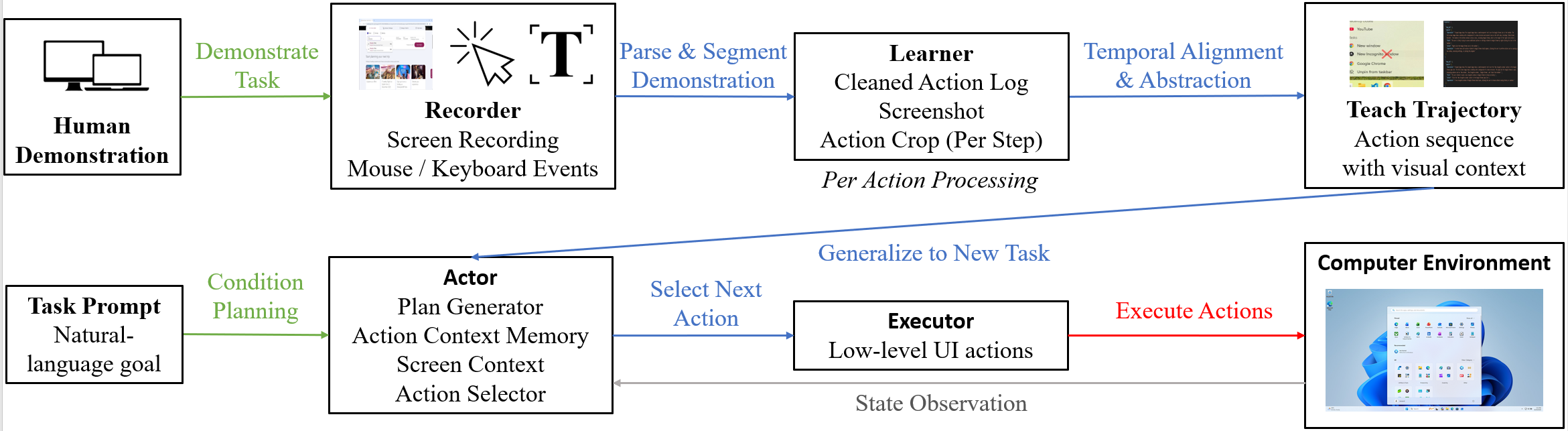
Abstract: Graphical User Interfaces (GUIs) are central to human-computer interaction, yet automating complex GUI tasks remains a major challenge for autonomous agents, largely due to a lack of scalable, high-quality training data. While recordings of human demonstrations offer a rich data source, they are typically long, unstructured, and lack annotations, making them difficult for agents to learn from.To address this, we introduce ShowUI-Aloha, a comprehensive pipeline that transforms unstructured, in-the-wild human screen recordings from desktop environments into structured, actionable tasks. Our framework includes four key components: A recorder that captures screen video along with precise user interactions like mouse clicks, keystrokes, and scrolls. A learner that semantically interprets these raw interactions and the surrounding visual context, translating them into descriptive natural language captions. A planner that reads the parsed demonstrations, maintains task states, and dynamically formulates the next high-level action plan based on contextual reasoning. An executor that faithfully carries out these action plans at the OS level, performing precise clicks, drags, text inputs, and window operations with safety checks and real-time feedback. Together, these components provide a scalable solution for collecting and parsing real-world human data, demonstrating a viable path toward building general-purpose GUI agents that can learn effectively from simply observing humans.

Paper Prompts
Sign up for free to create and run prompts on this paper using GPT-5.
Top Community Prompts
Explain it Like I'm 14
Overview
This paper introduces ShowUI-Aloha, a “human-taught” computer helper (an AI agent) that can use desktop apps like a person does. Instead of learning only from instructions or rules, it watches real human screen recordings, understands what the person did and why, and then repeats similar tasks on its own. The goal is to make an AI that can handle complex, multi-step computer tasks by learning directly from everyday human behavior.
What questions does the paper ask?
The paper focuses on three simple questions:
- Can a computer learn to use software by watching how humans do it, like a student learning from a teacher?
- How can we turn messy, long screen recordings into clear, step-by-step “teaching guides” for the AI?
- Will an AI that follows these human-taught guides perform better than agents that try to figure everything out on their own?
How did they do it?
Think of ShowUI-Aloha like turning a cooking video into a recipe the AI can follow. The system has four main parts that work together.
Before the list below, here’s a quick note: the system first records what a person does on their computer, then cleans and explains those actions in simple language, and finally plans and executes the same kind of steps on new tasks.
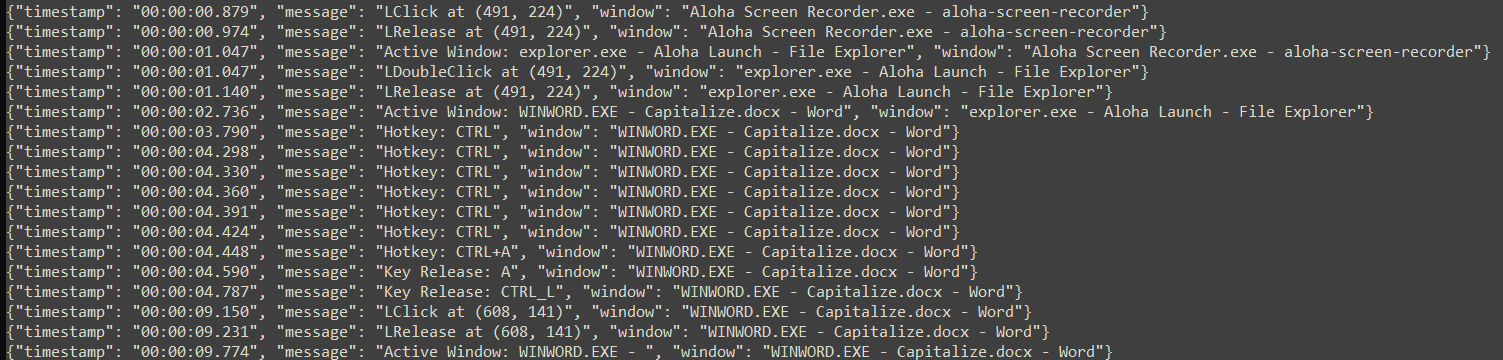
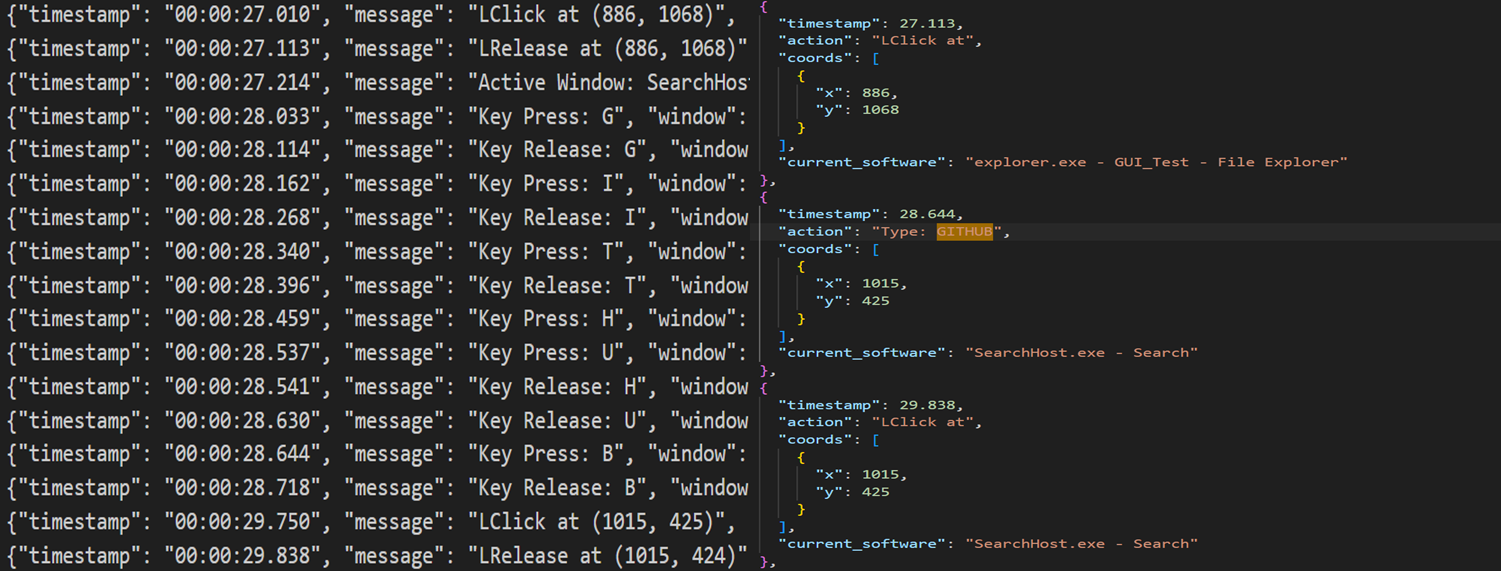
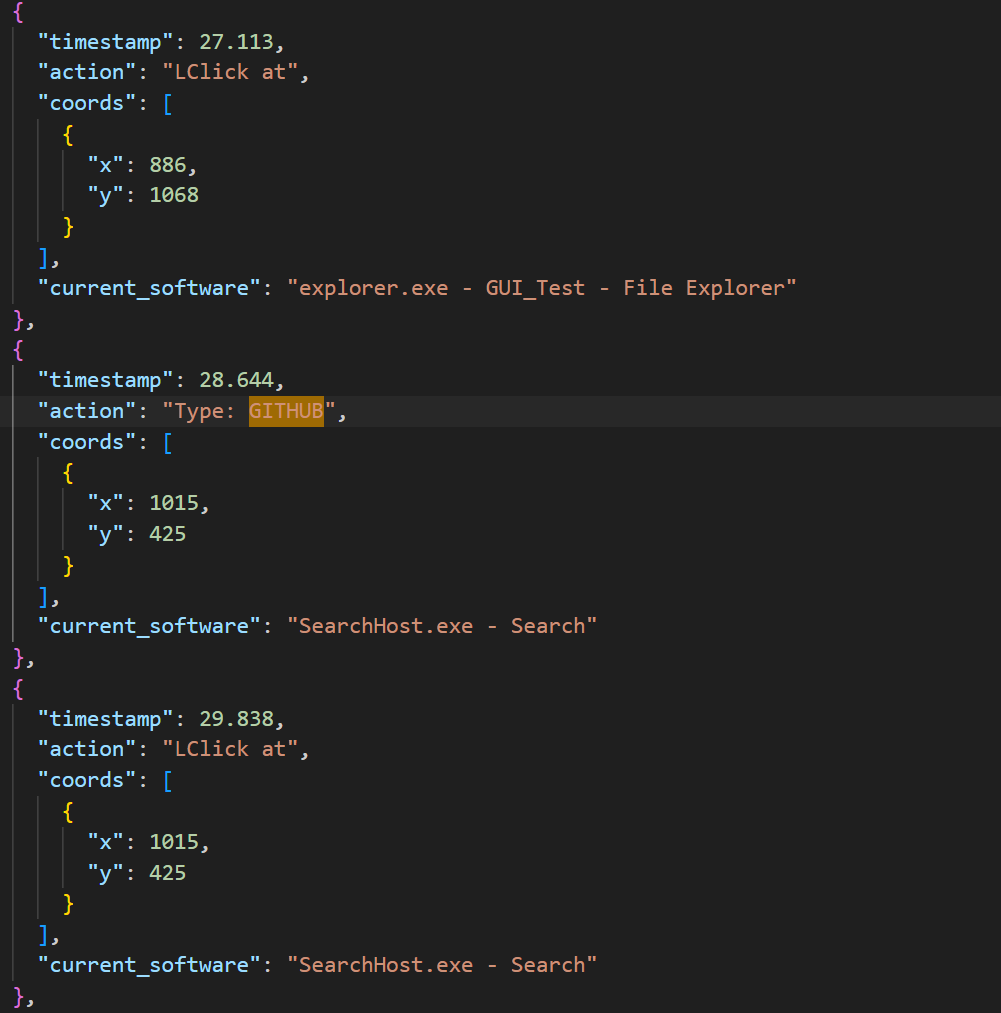
- Recorder: Like a screen recorder that captures both video and detailed actions (mouse clicks, typing, scrolling) with timestamps. This gives the raw “what happened.”
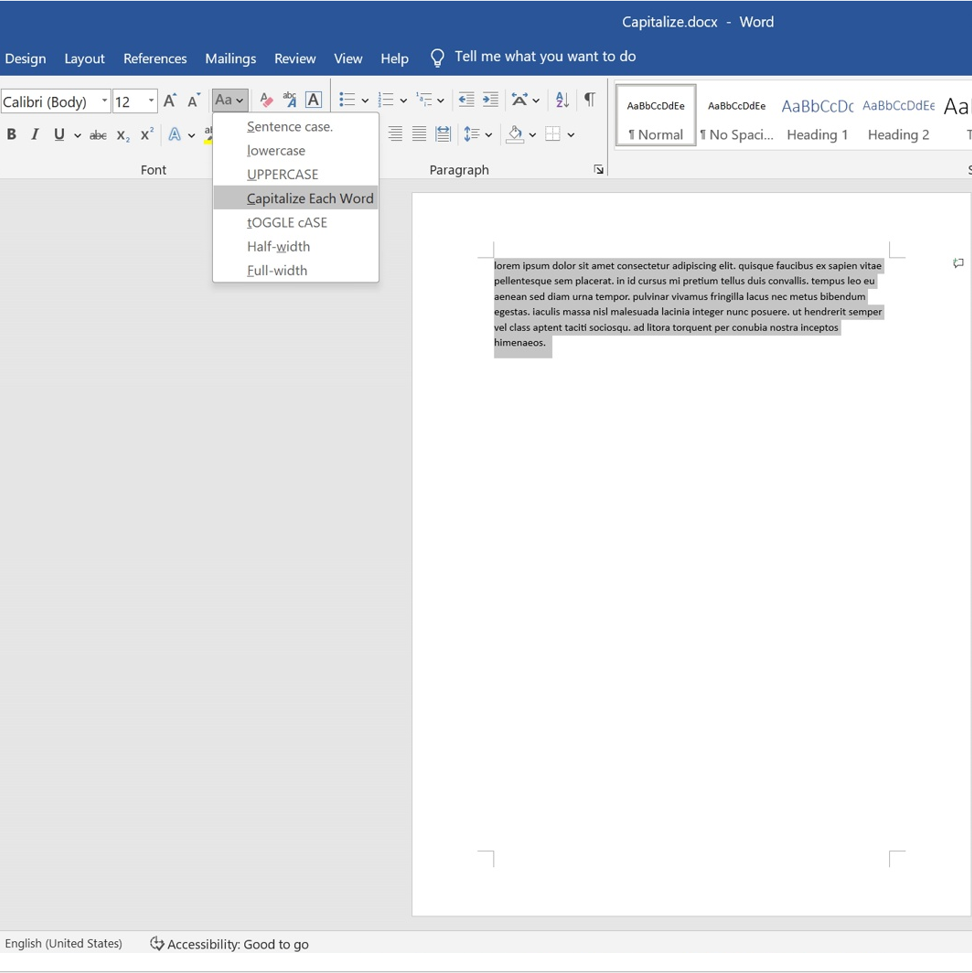
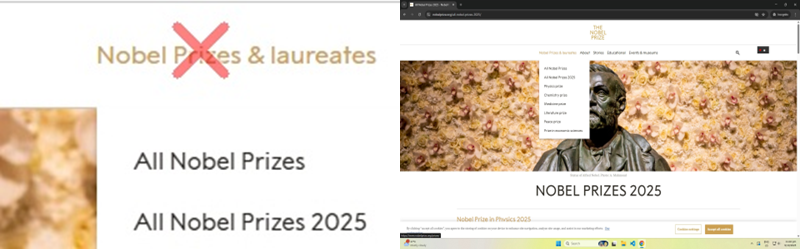
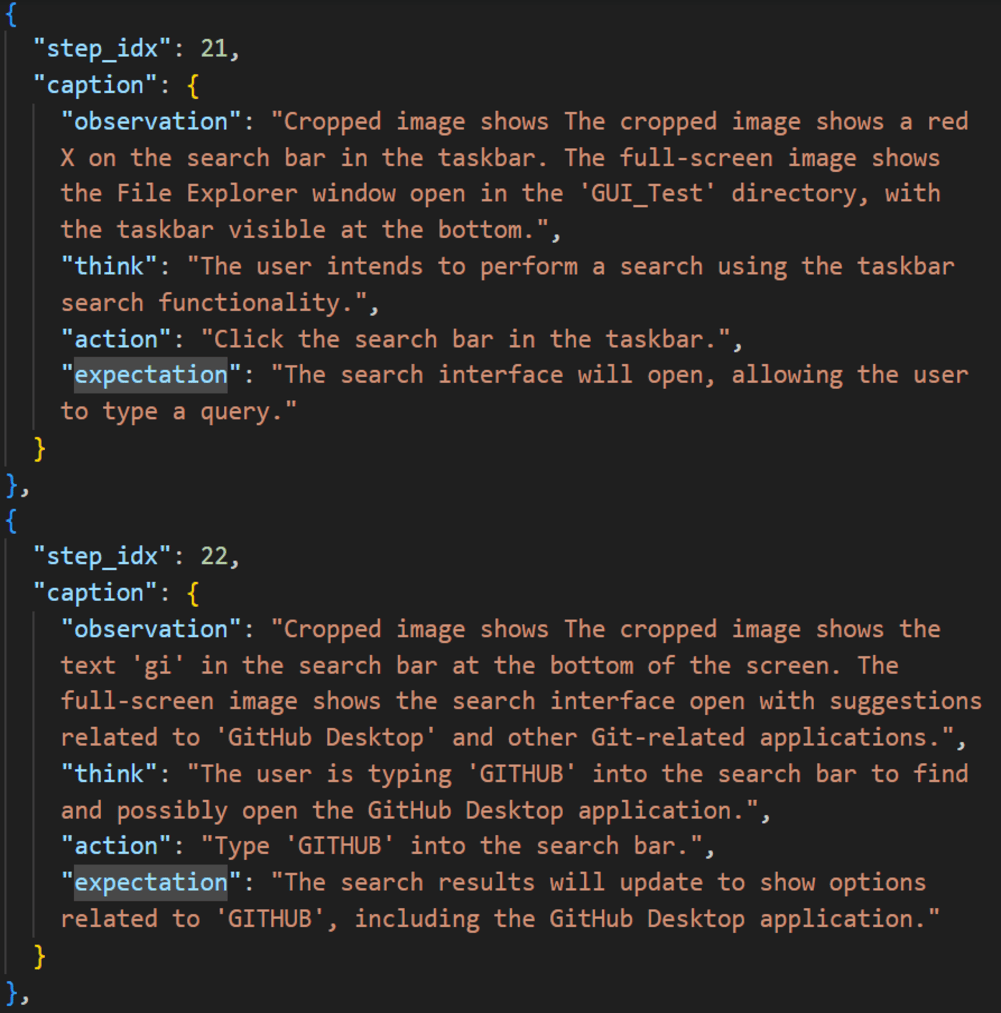
- Learner: Cleans up the noisy action log and adds helpful visuals (like a red X on where a click happened). Then, using an AI that understands images and text, it writes a simple, step-by-step description of each action: what the person saw, what they did, and what they expected to happen next. These are the “teaching traces.”
- Planner (part of the Actor): Reads the teaching trace and looks at the current computer screen. It decides the next smart step to take, adapting to changes like different window layouts or surprise pop-ups. It’s like following a recipe while cooking in a different kitchen.
- Executor: Carries out the planned steps (clicks, drags, types) safely and precisely on the real computer, even across multiple monitors. It also checks results and reports back so the planner can adjust if needed.
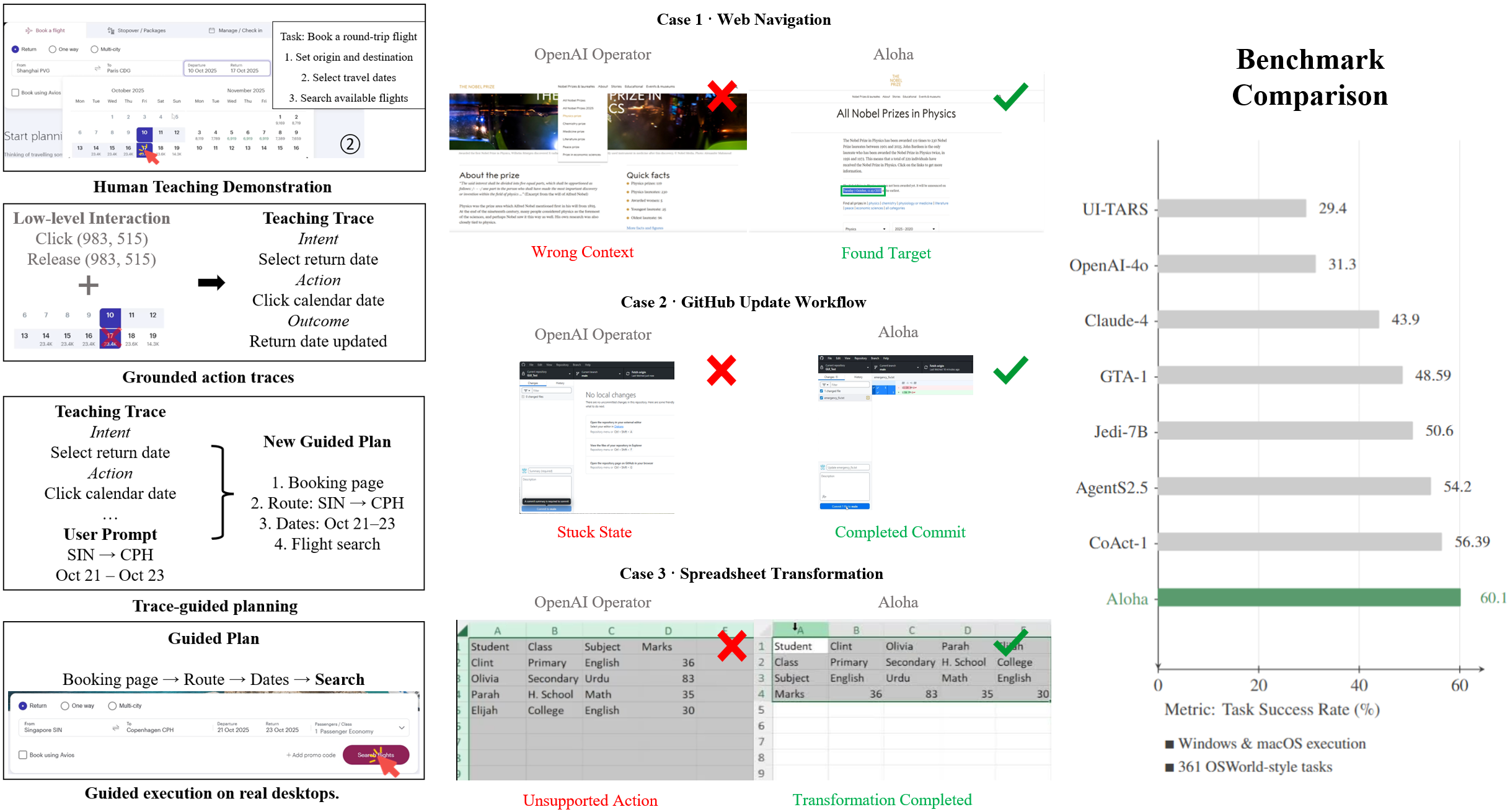
To test the system, the authors used hundreds of real desktop tasks (from the OSWorld benchmark) on both Windows and macOS. For each task, a human gave one demonstration, and then Aloha tried to complete the task by using that demo as guidance.
What did they find, and why is it important?
Here are the key results, introduced by a brief sentence for clarity:
- Aloha successfully completed 217 out of 361 tasks (about 60.1%), which is strong for end-to-end desktop automation.
- It did especially well in common apps like web browsers (around 91% success in Chrome) and general OS operations (about 83%).
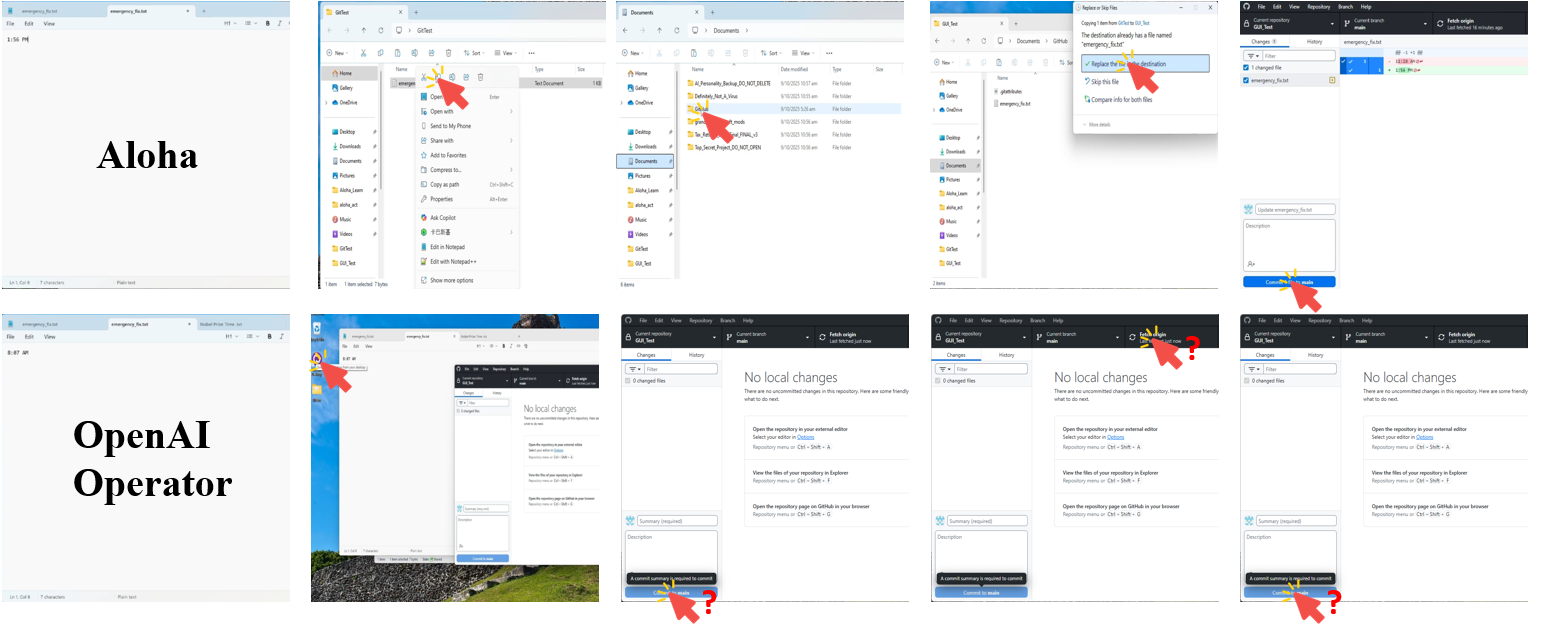
- Compared to powerful “unguided” agents (systems that try to solve tasks without seeing a human demo), Aloha achieved higher end-to-end success. The human-taught approach helps avoid common mistakes like clicking the wrong icon or getting stuck in loops.
- In an ablation study (turning features off to test importance), removing the human teaching trace caused the biggest drop in performance. This shows that learning from a demonstration is the main reason Aloha is reliable on multi-step tasks. Removing planner memory also hurt performance, meaning remembering previous steps is important for staying on track.
Why this matters:
- Many GUI tasks are tricky because apps look different, buttons move, and small mistakes (like dragging slightly off) can break a workflow. Aloha’s human-taught approach gives the AI practical, step-by-step knowledge that general models often lack.
- This method can scale because people already produce tons of natural desktop interactions—it’s like tapping into a huge library of everyday “how-to” examples.
Implications and potential impact
In simple terms, this research shows a practical way to teach computers to use other software by watching people. If developed further, this could:
- Save time on routine computer tasks (file management, form filling, content editing).
- Help users who struggle with complex interfaces by automating multi-step workflows.
- Provide a foundation for reliable “computer copilots” that handle long, detailed tasks across different apps and operating systems.
The authors also note some current limits: the AI can confuse look-alike icons in crowded toolbars, and precise text selections (dragging to highlight) can be finicky. It still needs at least one good demonstration per type of workflow. Future work includes better icon understanding, smarter text editing, and learning from fewer demos—or even none at all.
Overall, ShowUI-Aloha is an open-source step toward AI that learns computer skills the way people do: by watching, understanding, planning, and doing.
Knowledge Gaps
Unresolved gaps, limitations, and open questions
Below is a concise, actionable list of what remains missing, uncertain, or unexplored in the paper that future researchers could address.
- Data scale and release: The paper releases the framework but does not report the size, diversity, or distribution of a released human demonstration dataset; it is unclear whether a large, representative corpus of in-the-wild traces will be available to train and benchmark models beyond OSWorld-style tasks.
- Trace correctness validation: There is no quantitative evaluation of the Aloha Learner’s action-cleaning and trace-generation accuracy against ground-truth annotations (e.g., step alignment errors, semantic misinterpretations), leaving uncertainty about the fidelity of the teaching traces.
- Synchronization reliability: The temporal alignment between recorded actions and screenshots (especially during rapid UI changes) is not validated, raising the risk of mismatched visual context during trace generation and execution.
- Generalization beyond per-task demonstrations: The agent is taught per task, but the extent of generalization from a single demonstration to multiple variants or unseen tasks is not quantified (e.g., how many task variants can one demo cover, and under what UI shifts?).
- Few-shot or demonstration-free efficacy: While proposed as future work, there is no empirical study of few-shot learning or demonstration-free generalization, nor an analysis of how many demonstrations are needed per workflow family to reach given success targets.
- Cross-application transfer: It is claimed that “a single demonstration often generalizes to an entire task group,” but the paper does not provide controlled experiments quantifying cross-application transfer (e.g., from LibreOffice to Microsoft Office analogs).
- Locale and internationalization: Performance on non-English, right-to-left languages, or locale-specific UIs (date formats, number formats, fonts) is not studied; the approach’s reliance on visual markers and LLMs may not translate well under these conditions.
- Accessibility signals: The system does not leverage OS accessibility APIs (e.g., UI trees, semantic roles, labels), which could improve icon disambiguation and text-field detection; the benefit of integrating accessibility metadata remains unexplored.
- Linux and other platforms: Evaluation excludes Linux and virtualized/remote desktop environments, leaving cross-platform robustness and differences in windowing systems (X11/Wayland) as an open question.
- Dynamic and adversarial UIs: Robustness to dynamic content (ads, pop-ups, modal dialogs), transient notifications, or adversarially confusing UI elements (near-identical icons) is not stress-tested or benchmarked.
- Large toolbars and dense icon ambiguity: Failures in dense toolbars (e.g., GIMP, Impress) suggest missing semantic icon grounding; the efficacy of icon-level pretraining, template libraries, or structured metadata integration is an open direction.
- Precise text selection: Drag-based text editing is a major failure mode; the paper does not evaluate specialized strategies (e.g., programmatic text operations, clipboard synchronization, accessibility text selection) to improve precision.
- Recovery policies and uncertainty: The actor’s recovery and replanning strategies are heuristic; there is no formal treatment of uncertainty estimation, confidence-aware action selection, or systematic recovery policies with guarantees.
- Safety and sandboxing: Safety checks are mentioned but not specified; there is no analysis of preventing destructive actions (e.g., file deletion, settings changes), sandboxed execution, permission boundaries, or rollback mechanisms.
- Privacy and compliance: Collecting full-resolution screen recordings and keystrokes raises privacy concerns; the paper does not detail PII detection, redaction, consent workflows, secure storage, or compliance with data protection regulations.
- Evaluation comparability: Aloha uses a binary success metric, while OSWorld baseline scores are graded; there is no calibrated comparison or mapping to partial-credit metrics, limiting interpretability and fair benchmarking relative to official OSWorld results.
- Repeatability and variance: Single execution per task without reporting variance or confidence intervals leaves uncertainty about reliability; repeated trials under controlled perturbations (layout changes, delays) would quantify stability.
- Cost and latency: The runtime overhead (VLM calls per step, token costs, end-to-end latency) is not reported; practical deployment requires profiling and optimization targets (e.g., acceptable latency budgets for multi-step tasks).
- Proprietary dependencies: Experiments rely on GPT-4o and OpenAI Computer Use API; performance with fully open-source VLMs and actuators is not studied, limiting reproducibility and vendor-neutral deployment guidance.
- Planner memory limits: The planner summarizes up to three previous steps; there is no exploration of longer memory contexts, forgetting mechanisms, or the impact of memory window size on long-horizon tasks.
- Multi-monitor and resolution heterogeneity: While coordinate normalization is described, there is no quantitative evaluation across diverse monitor arrangements (DPI scaling, window occlusion, high-DPI retina displays).
- Error attribution granularity: Failure breakdown is high-level; per-category, per-action-type, and per-UI-pattern analyses are missing, which would support targeted improvements (e.g., specific toolbar patterns, dialog workflows).
- Benchmark representativeness: OSWorld-style tasks were adapted (filenames/paths changed); it is unclear whether these modifications systematically alter difficulty, and there is no audit ensuring equivalence of complexity relative to the original tasks.
- Human demonstration variability: The impact of demonstrator skill, style, and noise on trace quality and execution success is not analyzed; inter-annotator agreement and robustness to suboptimal demonstrations remain open.
- Action coverage completeness: The executor supports clicks, drags, typing, and hotkeys, but it is unclear how reliably it handles complex interactions (context menus, window management edge cases, file dialogs, drag-and-drop across applications) across OS variations.
- Goal specification and alignment: The method for linking a new task prompt to an existing demonstration-derived guidance trajectory is not formalized; failure cases where prompt-task mismatch leads to incorrect plan selection are not characterized.
- Structured OS introspection: The system relies on screenshots for state; integration of application-specific APIs (e.g., Git clients, office suites) or system introspection (file system queries, process state) could improve plan verification but is not explored.
- Learning from traces: The paper proposes turning structured traces into compact vision–language–action models but provides no training recipes, data scale requirements, or comparative studies showing benefits over pure agentic approaches.
- Robustness to authentication flows: Handling workflows with credentials, 2FA, and secure fields is not addressed; risk mitigation (e.g., masked inputs) and policy for sensitive interactions remain open.
- Human-in-the-loop corrections: The potential performance boost from occasional human corrections or approvals (interactive teaching) is not quantified; protocols for minimal supervision and correction frequency are unexplored.
- Task duration limits: A fixed 50-step budget may constrain longer workflows; the relationship between step budget, success rate, and task complexity is not analyzed.
- Cross-task curriculum: There is no methodology for building a curriculum where traces from simpler tasks bootstrap performance on more complex, composite workflows; its effectiveness remains unknown.
- Debuggability and telemetry: While traces are logged, there is no standardized telemetry or diagnostic toolkit (e.g., failure replay, action attribution, confidence visualization) to speed iterative improvement.
- Robust cropping and markers: The effectiveness and potential failure of the visual overlays (red “X”, drag polylines) under different themes, UI scaling, and dark modes are not evaluated; alternative encodings may be needed.
- Comparison against guided baselines: Prior agents adapted to demonstration learning (e.g., SFT on demos) are not compared under the same guided regime, leaving the relative merits of Aloha’s record–parse–plan–execute pipeline vs. fine-tuned models unclear.
- Security posture: The implications of granting OS-level control to agents (privilege escalation, unintended actions) and associated mitigations (permissions gating, dry-run mode) are not specified.
- Data lifecycle management: Procedures for secure storage, anonymization, versioning, and provenance of collected demonstrations are not detailed, impeding reproducible, privacy-preserving dataset curation.
- Formal specification of expectations: The “Expectation” field is not validated against a formal state-checking mechanism; research is needed on automatic verification of UI state transitions to enable robust failure detection and recovery.
Glossary
- Action Cleaning: A data-processing stage that consolidates dense low-level input events into concise, semantic user actions. "Action Cleaning."
- Agent S2.5: A prior agentic pipeline baseline used for unguided GUI task execution. "Agent S2.5 w/ o3~\cite{agashe2025s2}"
- Agentic: Pertaining to autonomous, tool-integrated behavior in AI agents. "This agentic capability has naturally extended to the digital GUI automation~\cite{gui_survey,gui_survey_2,gui_survey_3}."
- Aloha Actor: The orchestrating component that couples task-level reasoning with reliable GUI execution. "Aloha Actor is the central orchestrator of the Aloha automation framework, coupling task-level reasoning with reliable GUI execution."
- Aloha Executor: The execution core translating planned actions into precise OS-level interactions. "Aloha Executor serves as the embodied control core of the Aloha framework, responsible for translating high-level agent intentions into precise, verifiable physical interactions on the screen."
- Aloha Learner: The module that converts raw human demonstrations into structured, semantic GUI action traces. "Aloha Learner converts raw human demonstrations into structured, semantic GUI action traces that can be executed and generalized by downstream modules."
- Aloha Planner: The planning component that interprets goals, screenshots, and demonstration cues to output next-step plans. "Aloha Planner."
- avfoundation: A macOS multimedia framework used by FFmpeg to capture screen video. "FFmepg(avfoundation on MacOS as replacement)"
- Claude 4 Sonnet: A general-purpose LLM baseline compared against Aloha. "Claude 4 Sonnet~\cite{anthropic2025claude}"
- closed-loop: A system that continuously plans, acts, verifies, and adapts during execution. "Together, they form a closed-loop system that plans, acts, verifies, and adapts—substantially beyond the capabilities of single-call or replay-based LLM agents."
- CoAct-1: An agentic model baseline used for unguided comparisons. "CoAct-1~\cite{song2025coact1}"
- Computer Tool: A platform-independent GUI control module that performs mouse/keyboard operations and utility actions. "The Computer Tool encapsulates platform-independent GUI control, automatically handling coordinate scaling, multi-monitor bounding boxes, and interaction animation."
- Computer Use API: An actuator interface (e.g., OpenAI) that executes primitive OS-level operations for agents. "Action execution is carried out through the OpenAI Computer Use API, which serves as a lightweight, perception-assisted actuator."
- Coordinate Grounding: The process of converting relative action coordinates to absolute global screen positions with safety checks. "Coordinate Grounding and Safety."
- ddagrab: An FFmpeg filter used to capture full-screen video on Windows. "the ddagrab filter in FFmpeg is triggered to capture and record the full-screen in full-resolution in 30 FPS (frame per second)."
- delta: A prompt addition providing action-type–specific priors about clicks, drags, scrolls, modifier keys, or typing. "an action-type–specific “delta” that injects concise priors about clicks, drags, scrolls, modifier keys, or typing"
- demonstration-guided regime: An execution setting where the agent is explicitly taught the task via structured trajectories before acting. "Aloha operates in a demonstration-guided regime, where the agent is explicitly taught the task procedure through a structured trajectory before execution."
- foundation-model computer-use systems: Existing general-purpose systems that provide low-level GUI actuators but not task reasoning. "Aloha is deliberately built above existing foundation-model computer-use systems, not as a replacement for them."
- GTA-1-7B: A recent agentic pipeline baseline coordinating reasoning and tool use. "GTA-1-7B w/ o3~\cite{yang2025gta1}"
- Guidance Trajectory: A demonstration-derived, step-aligned cue sequence that informs planning. "the demonstration-derived Guidance Trajectory."
- grounded action traces: Semantically linked action sequences aligned with visual context and UI elements. "Human-taught demonstrations are converted into grounded action traces, which are lifted into trace- and prompt-guided plans and executed on real desktop environments."
- Jedi-7B: An agentic baseline model used for unguided comparisons. "Jedi-7B w/ o3~\cite{xie2025scaling}"
- Marked Screenshot Generation: A process of producing full-screen and zoomed-in crops annotated with overlays to encode action semantics. "Marked Screenshot Generation."
- OpenAI CUA 4o: A specialized GUI vision–action model baseline for unguided tasks. "OpenAI CUA 4o~\cite{openai2025o3}"
- OSWorld: A benchmark of real desktop tasks and evaluation protocols for GUI agents. "Because ShowUI-Aloha operates in a human-taught setting, the official closed-loop OSWorld~\cite{xie2025osworld} evaluation pipeline cannot be applied directly."
- perception–planning–action chain: The integrated pipeline linking visual understanding, decision-making, and execution. "It forms the final link in the perception–planning–action chain, taking structured action commands from the Aloha Actor and turning them into actual mouse, keyboard, and window operations across heterogeneous desktop environments."
- perception-assisted actuator: An execution backend that uses minimal perception to localize targets while performing primitive actions. "Action execution is carried out through the OpenAI Computer Use API, which serves as a lightweight, perception-assisted actuator."
- per-monitor offset system: A normalization mechanism converting relative coordinates to global ones across multi-monitor setups. "unify coordinates into absolute screen positions through a per-monitor offset system."
- PlannerMemory: The planner’s temporal memory mechanism that conditions actions on prior steps. "the role of the planner’s temporal memory (PlannerMemory)"
- Quartz: A macOS API used to query display information for coordinate grounding. "screeninfo on Windows/Linux and Quartz on macOS"
- screeninfo: A cross-platform library for retrieving monitor geometry used in coordinate grounding. "screeninfo on Windows/Linux and Quartz on macOS"
- semantic priors: Prior knowledge provided by an LLM to guide planning without direct UI grounding. "which provides semantic priors but lacks intrinsic grounding of GUI states or demonstration structure."
- Supervised Fine-Tuning (SFT): A training method using labeled demonstrations to refine model behavior. "using demonstration learning and straightforward Supervised Fine-Tuning (SFT)"
- TeachTrace: The human demonstration trace used to guide Aloha’s planning and execution. "the role of human demonstration traces (TeachTrace)"
- temporal memory: The capability of the planner to maintain task-state over sequences of actions. "the planner’s temporal memory (PlannerMemory)"
- UI drift: Changes in UI layout or state that can cause agents to lose context during execution. "robustness to UI drift, layout changes, and unexpected system states."
- UI topology: The structural arrangement of UI elements used to resolve ambiguous detections. "using demonstration priors, UI topology, or deterministic heuristics."
- UI-TARS-1.5-7B: A specialized GUI vision–action model baseline. "UI-TARS-1.5-7B~\cite{qin2025uitars}"
- vision–LLM (VLM): A model that jointly processes visual inputs and text for reasoning and action. "this module leverages a visionâLLM (VLM) to jointly interpret the marked crop, the full-screen context, and the recent execution history"
- vision–language–action models: Models trained to map visual inputs and instructions directly to GUI actions. "progressed toward unified GUI vision-language-action models."
- zero-shot setting: A scenario where agents operate using general knowledge without task-specific training or demonstrations. "These methods typically operated in a zero-shot setting, relying entirely on the general knowledge encoded in LLMs"
Practical Applications
Immediate Applications
The following applications can be deployed now using the released ShowUI-Aloha components (Recorder, Learner, Planner/Actor/Executor), especially for single-app or browser workloads where the paper reports high success rates.
- Teach-and-repeat desktop workflows for knowledge workers [industry, daily life; software, productivity]
- What: Record a single human demonstration and convert it into a robust, drift-resilient macro for common tasks (file organization, renaming/moving assets, form filling, email triage, browser tasks).
- Tools/workflows: “Demonstration-to-macro” compiler built from Aloha Learner + Actor; a personal “teach mode” to create reusable automations without scripting.
- Assumptions/dependencies: Works best on Windows/macOS GUIs similar to the demonstration; requires access to a VLM/LLM (e.g., GPT-4o) and an execution backend (e.g., OpenAI Computer Use API); avoid sensitive screens unless redaction is in place; human-in-the-loop oversight recommended for cross-application tasks.
- Augmented RPA that is robust to UI layout drift [industry; software, operations]
- What: Use semantic teaching traces to make enterprise RPA (UiPath, Power Automate, Automation Anywhere) less brittle than template/selector-only bots.
- Tools/workflows: Aloha as a planning/execution layer feeding existing RPA tools; trace-to-RPA-node converter; fallback to hotkeys when visual localization is uncertain.
- Assumptions/dependencies: Stable access to screenshots and keyboard/mouse control; governance for screen capture; API rate limits/costs for model calls; demonstrator quality impacts reliability.
- Help desk issue reproduction and resolution capture [industry; IT support, customer success]
- What: Record user-perceived bugs and translate them into stepwise, semantic traces for exact reproduction, triage, and resolution.
- Tools/workflows: Aloha Recorder packaged with secure upload; semantic trace as a canonical repro script; one-click “rerun on clean VM” harness for support engineers.
- Assumptions/dependencies: Privacy-safe capture (redaction/blurring); company policy for handling PII; VM/sandbox for safe replay.
- GUI QA/regression testing with semantic oracles [industry, academia; software engineering]
- What: Turn golden-path demonstrations into deterministic test cases that verify expected post-action states (Expectation field) instead of brittle pixel comparison.
- Tools/workflows: CI job that replays traces on nightly builds; differential screenshots and expectation checks; flaky-test detection via Actor retries.
- Assumptions/dependencies: Repeatable environments; baseline GUIs not drastically re-skinned; headful test runners; cost of LLM/VLM calls budgeted.
- Auto-generated tutorials and SOPs from real demonstrations [industry, education; documentation, training]
- What: Convert demonstrations into stepwise, narrated procedures with Observations, Actions, and Expected outcomes, ready for onboarding/training.
- Tools/workflows: Trace-to-doc/video generator; side-by-side crop/full-screen visuals; embedding in knowledge bases or LMS.
- Assumptions/dependencies: Demonstrations cover canonical procedures; consent and IP policies for recorded content; periodic refresh when UIs change.
- Accessibility: user-created assistive macros [daily life, policy; accessibility tech]
- What: Enable users with motor/cognitive challenges to create custom, natural-language-labeled shortcuts for multi-step GUI tasks.
- Tools/workflows: Voice-triggered execution of traces; simplified “teach mode” UI; safe-guarded text entry and click targets.
- Assumptions/dependencies: Accessibility permissions on OS; robust text-selection remains a known weakness (paper’s error analysis); medical/assistive compliance where applicable.
- Scalable data collection for GUI research [academia; datasets, benchmarking]
- What: Use the open-source Recorder and Learner to build large, high-quality GUI corpora with semantically grounded traces for training and evaluation.
- Tools/workflows: Institutional data pipelines; de-identification modules; OSWorld-style evaluation harness; crowd-sourced or lab-collected traces.
- Assumptions/dependencies: IRB/ethics approvals; storage and retention controls; platform diversity (Windows/macOS) to increase generalizability.
- Classroom labs for HCI/AI courses [academia; education]
- What: Hands-on exercises where students collect demos, generate traces, and compare planning/execution variants or ablations (e.g., with/without PlannerMemory).
- Tools/workflows: Course kits with prebuilt configs; small OSWorld subsets; evaluation scripts for binary success and qualitative error analysis.
- Assumptions/dependencies: Compute budget for VLM/LLM; institutional accounts for APIs; classroom devices with screen-capture permissions.
- Browser and email automation bundles [industry, daily life; software, communications]
- What: Automate Chrome/Thunderbird tasks (the paper reports ~91% and ~80% success) like web form submission, basic scraping-by-vision, inbox cleanup/rules setup.
- Tools/workflows: Domain-specific “starter trace packs” (e.g., travel booking, newsletter unsubscribe, invoice download).
- Assumptions/dependencies: Login/2FA handling and secrets management; site anti-bot measures; tasks should remain within vision-based reliability bounds.
- Developer productivity macros [industry; software development]
- What: Automate repetitive IDE and repo-management steps (e.g., VS Code task scaffolding, project setup, PR prep) using teach-once traces.
- Tools/workflows: VS Code extension wrapping Aloha Actor; “dev setup” trace catalogs; integration with Git clients.
- Assumptions/dependencies: IDE updates may shift UI; credentials and signing operations demand careful sandboxing; human confirmation for destructive actions.
Long-Term Applications
These opportunities need further research, scaling, safety work, or productization, particularly around fine-grained localization, precise text editing, privacy, and few-shot generalization.
- General-purpose computer-use agent with few-shot/few-demo transfer [industry; software, productivity]
- What: A widely deployable desktop copilot that learns a family of workflows from a handful of demonstrations and generalizes across apps and layouts.
- Tools/workflows: Library of transferable “workflow primitives”; adaptive re-planning over unexpected dialogs; semantic selectors beyond pixels.
- Assumptions/dependencies: Improved icon-level grounding and text-selection precision (paper’s top failures); robust memory and recovery; strong evaluation on multi-app tasks (currently ~37.6% success).
- On-device, privacy-preserving automation [industry, policy; healthcare admin, finance back-office]
- What: Run the full Aloha stack locally to keep PHI/PII on device while automating clerical workloads in EHRs or financial systems.
- Tools/workflows: Local VLM/LLM substitutions; secure enclaves; redaction at capture-time; attestations for compliance (HIPAA, GDPR).
- Assumptions/dependencies: Sufficient edge compute; vetted local models; risk assessments and audit trails acceptable to regulators.
- Enterprise process automation from SOP ingestion [industry; operations]
- What: Convert written SOPs and a few demonstrations into executable, monitored automations with KPIs and rollback.
- Tools/workflows: SOP-to-trace compiler; human-in-the-loop validators; observability dashboards with semantic step logs.
- Assumptions/dependencies: Strong doc-to-action grounding; change management; identity and secrets governance; versioning of traces per app release.
- Compliance-grade audit and explainability for automations [industry, policy; governance, risk, and compliance]
- What: Use Observations/Actions/Expectations as immutable, human-readable audit logs of every step taken by an automation.
- Tools/workflows: Signed trace ledgers; diff views for expectation mismatches; regulator-facing reports demonstrating procedural controls.
- Assumptions/dependencies: Tamper-evident storage; organizational policies for retention; mapping to existing control frameworks (SOC 2, ISO 27001).
- Assistive copilots for motor/cognitive impairments with proactive help [daily life, public sector; accessibility]
- What: From user-taught traces, suggest the next step or auto-complete long workflows, adjusting to layout changes and unanticipated dialogs.
- Tools/workflows: Gaze/voice/alternative input triggers; per-user personalization; safety interlocks.
- Assumptions/dependencies: Robustness in fine-grained text selection and icon disambiguation; clinical/usability validation.
- Training compact vision–language–action models from amassed traces [academia, industry; ML tooling]
- What: Distill ShowUI-Aloha’s data into smaller, fast inference VLA models that reduce runtime dependence on large external APIs.
- Tools/workflows: Pretraining on marked screenshot pairs and semantic traces; curriculum over increasingly complex workflows; test-time adapters.
- Assumptions/dependencies: Large, diverse, de-identified corpora; benchmarks for generalization and safety; sustained compute and curation.
- Secure screen-recording infrastructure with redaction and policy controls [industry, policy; IT, security]
- What: Enterprise-grade capture pipelines that automatically redact sensitive regions and enforce per-app/role capture rules.
- Tools/workflows: DLP-integrated Recorder; redaction ML; policy-as-code for “where/when” recording permitted.
- Assumptions/dependencies: Integration with identity and endpoint management; acceptance by legal and works councils; negligible latency overhead.
- Human–machine teaming for high-stakes GUIs (EHRs, trading, SCADA/HMI) [industry, public sector; healthcare, finance, energy]
- What: Operator-in-the-loop agents that draft GUI actions and wait for confirmation, reducing workload but maintaining human control.
- Tools/workflows: Dual-control UIs; escalation on uncertainty; sandboxed dry-runs; scenario rehearsal using traces.
- Assumptions/dependencies: Safety certification, incident response plans; rigorous testbeds; resistance to adversarial UI changes.
- Cross-application “workflow routers” that recover from tool changes [industry; productivity platforms]
- What: If a required app is unavailable or a menu moved, the agent selects an alternative path (e.g., uses system preview vs. a specific editor) while honoring the user’s intent captured in the trace.
- Tools/workflows: Capability graphs of installed apps; semantic goal matching; policy constraints (licensed tools only).
- Assumptions/dependencies: Deeper environment introspection; preference learning; stronger planning with uncertainty.
- Standardized benchmarks and evaluation suites beyond OSWorld [academia; benchmarking]
- What: Community-curated, open evaluations for multi-app and enterprise tasks, with shared scoring harnesses for end-to-end success and safety.
- Tools/workflows: Dataset hubs for de-identified traces; failure-mode taxonomies; leaderboards for few-shot generalization.
- Assumptions/dependencies: Contributor agreements; reproducible environment configs; sustainable hosting and governance.
Common Assumptions and Dependencies (affecting both horizons)
- Technical: Access to VLM/LLM planning and a computer-use actuator; reliable screenshot capture and input control; multi-monitor handling; network connectivity and API quotas/costs unless fully local.
- Data/Privacy: Consent, redaction, and retention policies for screen recordings; compliance with HIPAA/GDPR/industry rules; sandboxing for credentials and destructive actions.
- Task Fit: Best for deterministic workflows; cross-app and fine-grained text editing remain more error-prone; at least one high-quality demonstration per workflow family is currently needed.
- Change Management: UI updates may require trace refresh; governance for safe deployments; monitoring and human-in-the-loop for exceptions.
Collections
Sign up for free to add this paper to one or more collections.