Canvas-to-Image: Compositional Image Generation with Multimodal Controls
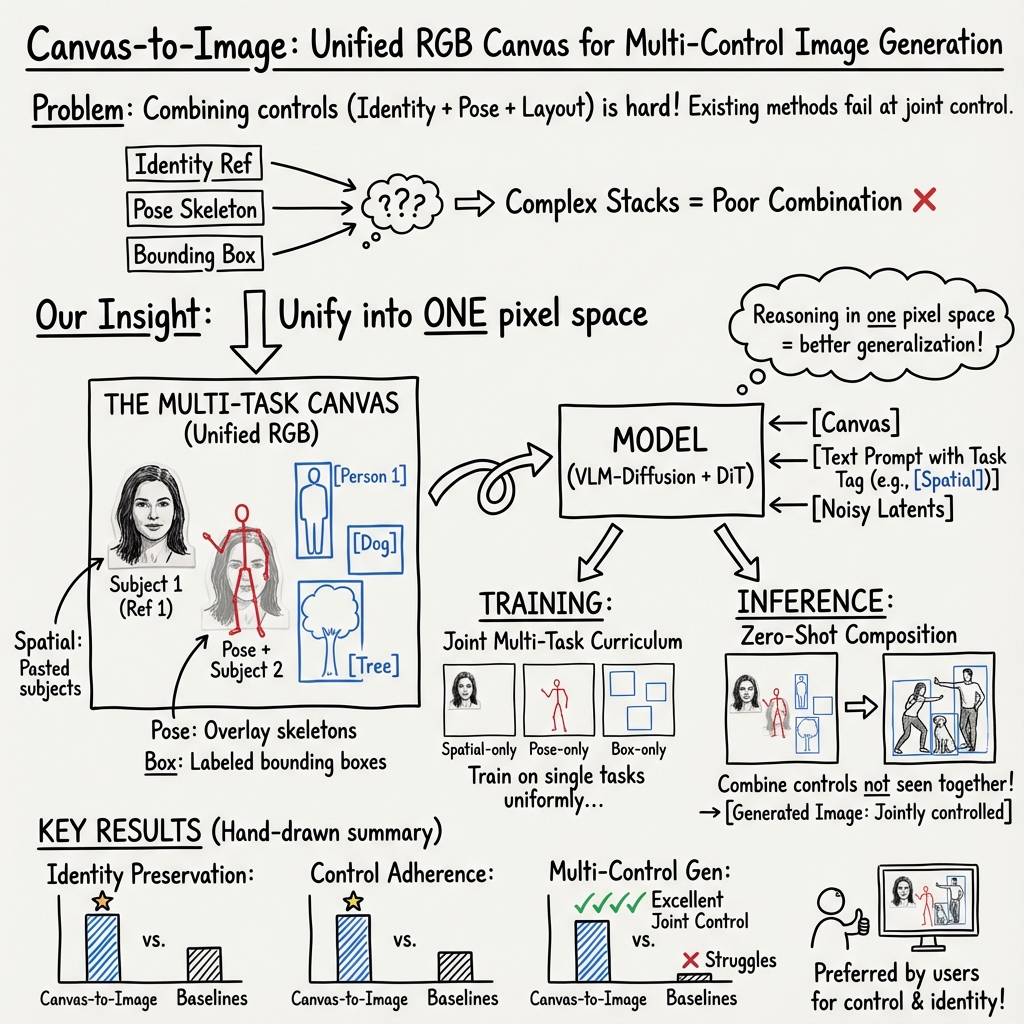
Abstract: While modern diffusion models excel at generating high-quality and diverse images, they still struggle with high-fidelity compositional and multimodal control, particularly when users simultaneously specify text prompts, subject references, spatial arrangements, pose constraints, and layout annotations. We introduce Canvas-to-Image, a unified framework that consolidates these heterogeneous controls into a single canvas interface, enabling users to generate images that faithfully reflect their intent. Our key idea is to encode diverse control signals into a single composite canvas image that the model can directly interpret for integrated visual-spatial reasoning. We further curate a suite of multi-task datasets and propose a Multi-Task Canvas Training strategy that optimizes the diffusion model to jointly understand and integrate heterogeneous controls into text-to-image generation within a unified learning paradigm. This joint training enables Canvas-to-Image to reason across multiple control modalities rather than relying on task-specific heuristics, and it generalizes well to multi-control scenarios during inference. Extensive experiments show that Canvas-to-Image significantly outperforms state-of-the-art methods in identity preservation and control adherence across challenging benchmarks, including multi-person composition, pose-controlled composition, layout-constrained generation, and multi-control generation.
Paper Prompts
Sign up for free to create and run prompts on this paper using GPT-5.
Top Community Prompts
Explain it Like I'm 14
Canvas-to-Image: Explained for a 14-year-old
Overview
This paper is about making image-generating AI more controllable and easier to use. Normally, when you ask an AI to “make a picture of two friends standing in a park, one doing a peace sign and one sitting on a bench,” the AI tries its best, but it often messes up the details: the people’s positions, their poses, or even their faces. The authors introduce “Canvas-to-Image,” a system where you can put all your instructions onto one simple picture—a digital “canvas”—and the AI turns that into a realistic final image that follows your directions closely.
What questions did they ask?
The researchers wanted to solve three everyday problems people have with image AI:
- How can users control several things at once (like who is in the picture, where they are, and what pose they’re making)?
- Can we put different kinds of instructions (text, arrows, rectangles, reference photos) into one place so the AI understands them together?
- Can a single model learn from different types of instructions separately, yet still combine them correctly when asked?
How did they do it?
Think of the system like building a scene on a digital poster. You place pieces and notes on the poster, and the AI turns it into a polished photo that respects your arrangement.
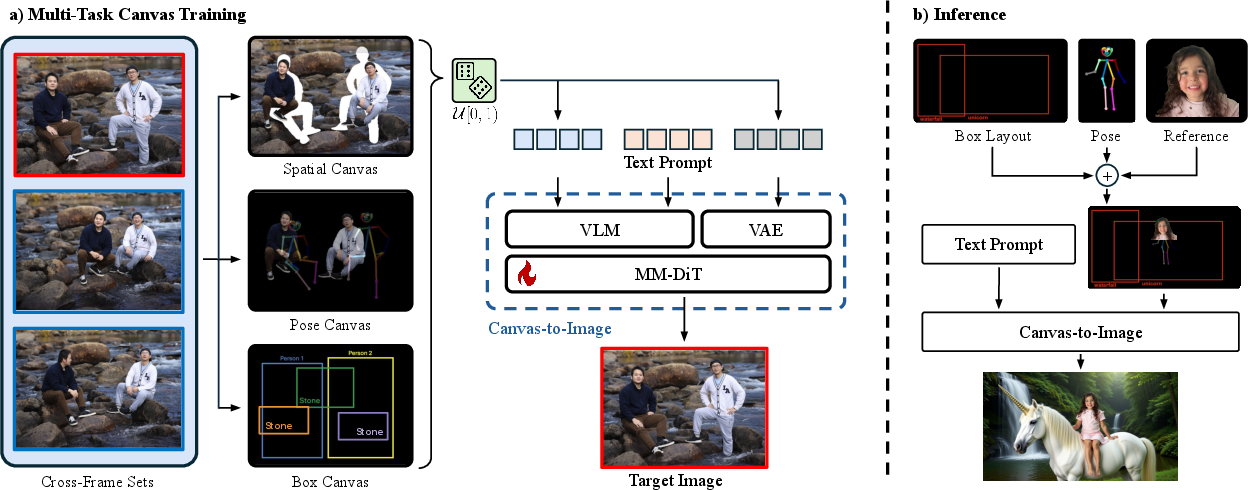
They made one unified “canvas” image that can carry different types of instructions. The AI learns to read this canvas and the text prompt together. There are three main canvas types:
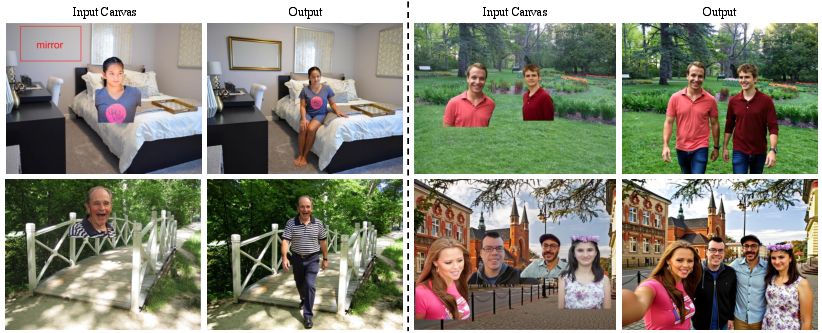
- Spatial Canvas: Imagine you cut out people or objects and paste them onto a background where you want them. The AI sees this collage and knows who should be where.
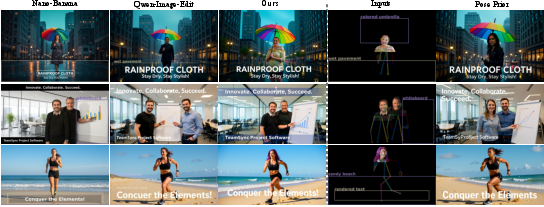
- Pose Canvas: A “stick-figure” skeleton is drawn over the canvas to show how someone’s body should be posed (arms up, sitting, turned sideways, etc.). Sometimes the photo cutouts are removed so the pose alone guides the AI.
- Box Canvas: Rectangles (bounding boxes) with labels like “Person 1” or “Dog” are drawn to say “put this thing here, at this size.” It’s like stage blocking: you mark spots and the AI fills them correctly.
Under the hood:
- A Vision-LLM (VLM) reads both the canvas image (your visual instructions) and your text prompt (your words) to understand what you want.
- A compressor called a VAE turns images into a simpler internal format, like shrinking a big file into a small one the AI can handle easily.
- A diffusion model does the actual image making. It starts from noisy “static” and gradually cleans it up into a clear picture that matches the instructions. A training trick called “flow matching” helps the model learn how to move from noise to the final image step by step.
Training strategy:
- The AI practices one type of canvas at a time (only spatial, or only pose, or only boxes) during training. This helps it master each skill.
- Even though it trains on single tasks separately, when you use it later, it can combine them—like using pose and boxes and photo references all at once—without retraining.
- A small tag like “[Pose]” or “[Box]” is added to the text prompt to tell the model what kind of canvas it’s reading, so it doesn’t get confused.
What did they find and why it matters?
The model was tested on tough scenarios:
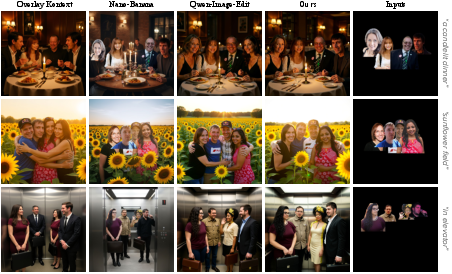
- Multi-person scenes where each person’s identity (face and look) must be preserved and placed correctly.
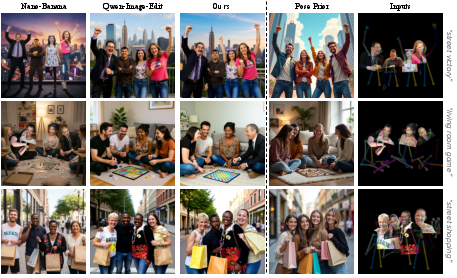
- Pose-controlled scenes where the final image should match the stick-figure skeleton exactly.
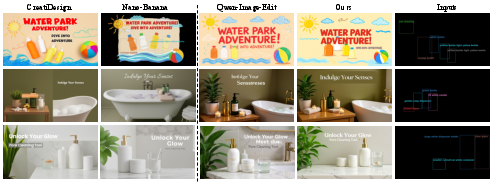
- Layout-guided scenes where objects must fit inside the drawn rectangles.
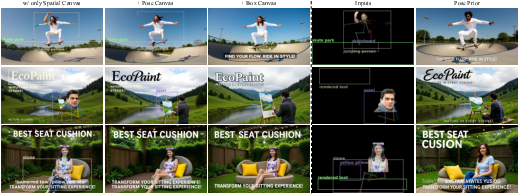
- Mixed-control scenes that combine identity, pose, and layout at the same time.
Results:
- The model better preserves who people are (identity), so the same person looks like themselves in different pictures.
- It follows instructions more accurately, placing people and objects where you asked, and matching poses precisely.
- It performs strongly across different tasks and even beats specialized systems trained for only one job (like just layout).
- Most impressively, it can combine multiple controls at once—even though it only practiced each control separately during training.
Why this matters:
- Creators, designers, and everyday users can make more precise images: “Put person A here doing this pose; put person B over there facing left; include a dog in this box; and make it look like a sunny park.”
- It saves time and reduces frustration because you don’t need different specialized tools for each type of control.
What could this mean for the future?
This “single canvas” idea is a simple, powerful way to guide image AI with many types of instructions at once. It can make creative tools more intuitive: one picture to plan everything, one model to produce it. In the long run, this could:
- Help social apps, games, and design tools let users create complex scenes easily.
- Improve personalized content where faces and styles must be consistent.
- Open doors to richer controls (like more detailed labels or layered instructions) as the canvas concept evolves.
The authors note one limit: the canvas is a regular color image, so there’s only so much information you can pack into it cleanly. Future work may find smarter ways to fit more guidance in or connect multiple canvases. Still, this is a strong step toward making image AI follow your vision exactly, in a way that feels natural and simple.
Knowledge Gaps
Below is a single, focused list of knowledge gaps, limitations, and open questions that remain unresolved in the paper. Each item aims to be concrete and actionable for future research.
- Public reproducibility: The core training data (6M cross-frame human-centric images from 1M identities) is internal and not released; there is no public recipe or surrogate dataset to reproduce Multi-Task Canvas training end-to-end.
- Domain coverage: Training and evaluation are predominantly human-centric; generalization to non-human subjects, complex scenes (e.g., vehicles, animals, indoor layouts), and long-tail categories is not assessed.
- Canvas information capacity: The approach is explicitly bounded by a single RGB canvas; there is no study of information-density limits (e.g., how many subjects, controls, or fine-grained attributes can be reliably encoded before failure).
- Control modality breadth: Only three controls are supported (spatial segments, 2D pose skeletons, bounding boxes with simple text tags); richer or orthogonal controls (depth, segmentation masks, edge/line drawings, camera parameters, lighting, style palettes, material cues, 3D/scene graphs) remain unexplored.
- Pose limitations: Pose guidance uses 2D skeleton overlays with a fixed transparency; there is no handling of 3D pose, depth ordering, self-occlusions, physical plausibility, or contact constraints (e.g., foot-ground, hand-object interactions).
- Layout semantics: Box Canvas encodes coarse bounding boxes with simple labels and left-to-right ordering; rotation, hierarchical grouping, layering/occlusion rules, constraints like “behind/in front of,” or precise shape-based regions and anchors are not supported.
- Identity beyond faces: ArcFace-based identity metrics focus on human faces; identity preservation for non-face subjects or full-body identities (including clothing, hair, accessories) is not rigorously evaluated.
- Control conflict resolution: The system does not specify how it resolves conflicting or inconsistent controls (e.g., pose contradicts bounding box, multiple subjects competing for the same region), nor does it expose user-tunable control weights or priorities.
- Task indicator at inference: The training uses task-indicator prompts ([Spatial], [Pose], [Box]) to avoid interference, but the paper does not clarify how indicators are set when multiple controls are present simultaneously at inference, or whether multiple indicators are required and how they interact.
- Robustness to noisy/partial inputs: There is no analysis of robustness to imperfect canvases (e.g., low-resolution overlays, OCR errors on box text, misdetected or occluded poses, misaligned cutouts, adversarial artifacts).
- Scalability with number of subjects: While the canvas has constant-size compute, empirical scaling with increasing numbers of subjects (e.g., 6, 8, 10+) and dense interactions is not measured.
- Resolution and fidelity: The effect of image resolution (both canvas and output) on control adherence and identity fidelity is not reported; high-resolution generation and any-resolution guarantees are untested.
- Architecture portability: The method is instantiated on Qwen-Image-Edit with LoRA; portability to other diffusion transformers (e.g., SDXL, FLUX, PixArt), LDMs, or encoder-decoder architectures is unverified.
- Training objective choices: The paper adopts flow matching but does not compare against alternative objectives (e.g., EDM, DDPM variants, consistency training, classifier-free guidance schedules) or analyze how these affect control fidelity.
- Curriculum and sampling: Task sampling is uniform across canvas types; the impact of alternative curricula (e.g., progressive mixing, adaptive sampling, difficulty-aware scheduling) on multi-control generalization is not studied.
- Hyperparameter sensitivity: There is no systematic study of LoRA rank, which layers to fine-tune, VLM choice and capacity, pose overlay transparency, font/size/color of box text, or canvas composition parameters on performance and failure modes.
- Interpretability and attribution: The contribution of each control modality to the final image is not quantified (e.g., ablations for control attribution, attention maps, token-level inspection, causal probing).
- Evaluation coverage and rigor: Control adherence relies on an LLM-based Control-QA without reported inter-rater reliability, bias analysis, or statistical significance; standardized metrics for pose accuracy (e.g., OKS), box adherence (IoU/mAP), and spatial alignment are absent.
- Multi-control combination space: The claim of emergent generalization from single-control training is demonstrated on limited combinations; a systematic sweep across diverse multi-control compositions (varying counts, overlaps, occlusions, constraint strengths) is missing.
- Failure case analysis: The paper lacks a thorough taxonomy of failure modes (identity drift, pose misalignment, box boundary violations, artifacts from cutouts) and conditions under which they occur.
- Background control: The method references masked backgrounds and cross-frame pairing to avoid copy-paste artifacts, but there is no explicit mechanism or evaluation for fine-grained background editing, consistency, or style harmonization with inserted subjects.
- Text in-canvas handling: Reliability of reading and grounding textual tags drawn within boxes is not evaluated across font sizes, colors, languages, and occlusions; no OCR robustness tests are provided.
- Ethical and privacy considerations: The internal identity dataset’s consent, privacy, demographic balance, and potential biases are not discussed; risks of misuse (e.g., unauthorized identity injection, deepfake facilitation) and mitigation strategies are absent.
- Generalization beyond images: Extensions to video (temporal consistency, motion constraints), multi-view/3D (geometry-consistent control), or interactive/iterative editing (stepwise canvas refinement) are not explored.
- Latency and efficiency: Inference speed, memory footprint, and interactive responsiveness under multi-control inputs are not reported, limiting practical deployment guidance.
- Comparative breadth: Main comparisons prioritize single-image-interface baselines and exclude multi-module state-of-the-art systems (e.g., ControlNet + IP-Adapter stacks) in the primary results; a broader, standardized comparison protocol would clarify relative advantages.
- Data construction details: Key mechanisms like Cross-Frame Sets, segmentation quality, compositing pipelines, and background masking strategies are deferred to the appendix and not specified in sufficient detail for replication or analysis.
Practical Applications
Immediate Applications
The following applications can be deployed with today’s model capabilities and standard productization effort, leveraging the paper’s unified Multi-Task Canvas (Spatial/Pose/Box), VLM-conditioned diffusion, and LoRA-based fine-tuning workflows.
- Creator-centric compositing and layout-to-image tools (software, creative media)
- What: Drag-and-drop canvas where users place subject cutouts, overlay poses, and draw labeled boxes to generate coherent scenes from a single interface.
- Tools/workflows: Photoshop/Figma/Canva plugins; a WYSIWYG “Canvas-to-Image” editor; API/SDK exposing a single
canvas.png + promptendpoint; task-indicator prompts ([Spatial]/[Pose]/[Box]) managed under the hood. - Assumptions/dependencies: Requires a VLM-diffusion backbone (e.g., Qwen-Image-Edit or equivalent), stable OCR-like text parsing by the VLM for box labels, and consistent canvas preparation guidelines (e.g., font, contrast, resolution).
- Advertising and product placement scene builder (advertising, e-commerce)
- What: Generate ad creatives where products and talent are positioned precisely in pre-defined boxes and poses while preserving identity and brand elements.
- Tools/workflows: “Ad storyboard to image” pipeline; batch A/B variant generation by swapping boxes/poses; brand-asset libraries integrated as subject references.
- Assumptions/dependencies: Requires asset rights/consent and brand safety review; quality depends on the subject reference quality and canvas resolution.
- E-commerce catalog and PDP variant generation (retail, marketplaces)
- What: Produce consistent product scenes across layouts and human models (e.g., “shirt on two models, standing facing left/right, product at box X”).
- Tools/workflows: Layout templates; auto-swap models/products per box; pose overlay for consistent styling; multi-control batch jobs.
- Assumptions/dependencies: Product detail fidelity may require high-res generation and careful prompt engineering; legal review for model identities; robust deduping to avoid “copy-paste artifacts.”
- Storyboarding and comics previsualization (film/animation/publishing)
- What: Convert panel layouts with bounding boxes, character identities, and skeletons into beat boards and comic frames adhering to composition and pose.
- Tools/workflows: “Box-annotated storyboard to frame” generator; iterative refinement by nudging boxes/poses; identity banks for recurring characters.
- Assumptions/dependencies: Scene continuity across panels not guaranteed (single-image method); may need post-hoc curation or style adapters for consistency.
- Game concept art and level blockout (gaming)
- What: Generate character assemblies and scene sketches obeying spatial/pose constraints (e.g., “three NPCs here with these stances”).
- Tools/workflows: Editor plugin for rapid iterations; baked canvases for ideation; export layers/masks for downstream paintovers.
- Assumptions/dependencies: Generalization beyond human-centric content depends on training coverage; custom fine-tunes may be needed for creature/prop-heavy pipelines.
- Social media composition and group photo maker (consumer apps)
- What: Compose multiple friends (with consented references) in arranged positions/poses for shareable content.
- Tools/workflows: Mobile UI enabling “place, pose, and render”; identity libraries; one-tap variations.
- Assumptions/dependencies: Strict consent and safety filters; on-device compute may be insufficient—use server-side inference.
- Interior/furniture layout-to-image (architecture, real estate, retail)
- What: Use labeled boxes to place furniture types and generate room scenes following the layout.
- Tools/workflows: Box Canvas templates keyed by furniture names; prompt+style presets (e.g., Scandinavian, industrial).
- Assumptions/dependencies: Trained model is human-centric; performance for furniture-heavy scenes may require additional fine-tuning/data.
- Brand-compliance assistant for visual guidelines (enterprise marketing)
- What: Enforce “brand zone” placements via Box Canvas and human pose rules (e.g., talent facing logo, product at focal third).
- Tools/workflows: Automated compliance checks plus generation; closed-loop “generate → detect → fix” flows.
- Assumptions/dependencies: Needs alignment between generation and detection metrics (Control-QA-like validators); governance to prevent misuse.
- Synthetic data generation for detection/pose tasks (robotics, AV, CV research)
- What: Generate human-centric scenes with precise bounding boxes and skeletons to augment training sets for detectors/pose estimators.
- Tools/workflows: Programmatic canvas generation; curriculum over poses/layouts; domain randomization.
- Assumptions/dependencies: Gap to real-world distribution must be measured; label correctness validated (pose overlays seed the control but final labels must be checked).
- Art and design education tools (education)
- What: Interactive lessons on composition and gesture—students place boxes/poses and see generated exemplars.
- Tools/workflows: Guided exercises; side-by-side before/after canvases; rubrics tied to Control-QA-like scoring.
- Assumptions/dependencies: Classroom-safe content filters; simplified UI; diverse datasets to avoid biased exemplars.
- “Canvas-to-Image” developer SDK and microservice (software)
- What: Standardized canvas schema (PNG + JSON metadata), client libraries, and cloud inference endpoints for multi-control generation.
- Tools/workflows: REST/gRPC API; thin client for canvas authoring; CI hooks for automated creative generation.
- Assumptions/dependencies: GPU-backed serving; rate limits; versioned model cards and safety controls.
- Real estate and event staging mockups (real estate, events)
- What: Place people/props via boxes and poses to visualize seating, stage blocking, and foot-traffic flows.
- Tools/workflows: Template canvases per venue; exportable visuals for proposals.
- Assumptions/dependencies: May need non-human-heavy fine-tuning; safety review for public-facing renders.
Long-Term Applications
These rely on further research, scaling, or development—e.g., multi-view/video consistency, broader domains beyond human-centric content, on-device efficiency, and policy infrastructure.
- Real-time interactive composition with tight feedback loops (software, creative tools)
- What: Latency-low (<300 ms) adherence to canvas edits (drag/move/rotate) with immediate re-rendering.
- Dependencies: Model distillation/acceleration; streaming diffusion; incremental denoising; UI/UX research.
- Multi-view/3D-consistent compositional generation (AR/VR, VFX, gaming)
- What: Extend the canvas to drive scene-consistent multi-view images or 3D assets while respecting identity/pose/layout.
- Dependencies: 3D-aware diffusion, NeRF/GS integration, camera-aware controls; new 3D “canvas” formats.
- Video generation with multi-control timelines (media, entertainment)
- What: Time-parameterized canvases (per-frame boxes/poses/identity continuity) for previz, choreography, and motion design.
- Dependencies: Video diffusion with temporal consistency; control trajectories; identity persistence across frames.
- Fashion virtual try-on with pose-accurate avatars (fashion, retail)
- What: Person-specific lookbooks and try-on videos respecting garment drape and user pose.
- Dependencies: Garment/body simulation priors; canonicalization of identity embeddings; product-specific fine-tunes.
- Robotics/AV scenario synthesis with controllable human interactions (robotics, autonomous driving)
- What: Safety-critical datasets where pedestrian placements and poses are precisely governed for edge-case testing.
- Dependencies: Domain gap minimization; physics-aware scene priors; systematic coverage metrics.
- Healthcare training and rehab content (healthcare)
- What: Synthetic patient scenarios (e.g., PT exercises) with controlled poses and demographics to expand training materials while preserving privacy.
- Dependencies: Clinical validation; demographic fairness auditing; medically accurate pose/biomechanics modeling.
- Design-to-manufacture visual planning (manufacturing, logistics)
- What: Layout boxes representing workcells, operators, and equipment to generate visual SOPs and training posters.
- Dependencies: Industrial-domain fine-tunes; safety sign/label fidelity; integration with PLM/MES systems.
- Standardization of a “Canvas Markup Language” and provenance (policy, standards)
- What: Open schema for multimodal canvas controls (boxes, text annotations, pose overlays) plus C2PA provenance embedding and redaction/consent tags.
- Dependencies: Cross-industry working groups; tool vendor adoption; robust watermarking and tamper-evidence.
- Bias/stereotype control via constrained generation (policy, responsible AI)
- What: Use box/pose layouts and identity controls to intentionally balance dataset demographics and contexts.
- Dependencies: Auditable pipelines; governance dashboards; fairness objectives during generation.
- Multi-agent collaborative creative systems (software, enterprise)
- What: Roles split across modalities (AD sets layout boxes; photographer supplies identity references; choreographer sets poses), merged into a single canvas for generation.
- Dependencies: Versioned canvas merging; conflict resolution; access control and consent management.
- On-device AR filters and lenses respecting layout/pose (mobile, AR)
- What: Live AR masks and lenses controlled by user-sketched boxes/poses in scene, with stylistic generation.
- Dependencies: Mobile-optimized diffusion; real-time pose tracking; safety gating.
- Cross-domain canvases (beyond humans): CAD, medical, satellite imagery (engineering, healthcare, geospatial)
- What: Box/pose-like controls adapted to segmentation/depth/affordance overlays for specialized domains.
- Dependencies: Domain data, new canvas variants (e.g., depth maps), retraining, and expert validation.
General assumptions and dependencies across applications
- Model/data: The paper’s strongest results are human-centric and rely on a large internal dataset; extending to other domains may require domain-specific data and fine-tuning.
- Interface: The single-RGB “canvas” must encode all controls legibly; VLM must robustly parse embedded text (labels) and skeletons—resolution, font, and contrast matter.
- Compute/latency: Current inference is server-grade; real-time or on-device use cases require model distillation or acceleration.
- Identity and consent: Any identity-preserving generation must enforce explicit consent, usage policies, watermarking, and provenance (e.g., C2PA).
- Safety and governance: Content filters, red-teaming, and misuse prevention are necessary, especially for deepfake risks and demographic representation.
- Evaluation: Control adherence and identity fidelity should be continuously monitored (e.g., Control-QA, ArcFace scores) with human-in-the-loop QA for critical applications.
Glossary
- AdamW: An optimizer that decouples weight decay from gradient updates to improve training stability. "Optimization is performed with AdamW~\cite{AdamW}, using a learning rate of and an effective batch size of 32."
- ArcFace ID Similarity: A metric for identity preservation that measures facial feature similarity using ArcFace embeddings. "We report ArcFace ID Similarity~\cite{ArcFace} for identity preservation, HPSv3~\cite{ma2025hpsv3} for image quality, VQAScore~\cite{VQAScore} for text-image alignment."
- Bounding Boxes: Rectangular regions specifying spatial locations and sizes of objects in an image. "This task trains the model to interpret explicit layout specifications through bounding boxes with textual annotations directly onto the canvas."
- Box Canvas: A canvas variant encoding layout control via bounding boxes annotated with textual identifiers. "Such a ``Box Canvas'' supports simple spatial control with text annotations without reference images as in previous two canvas variants."
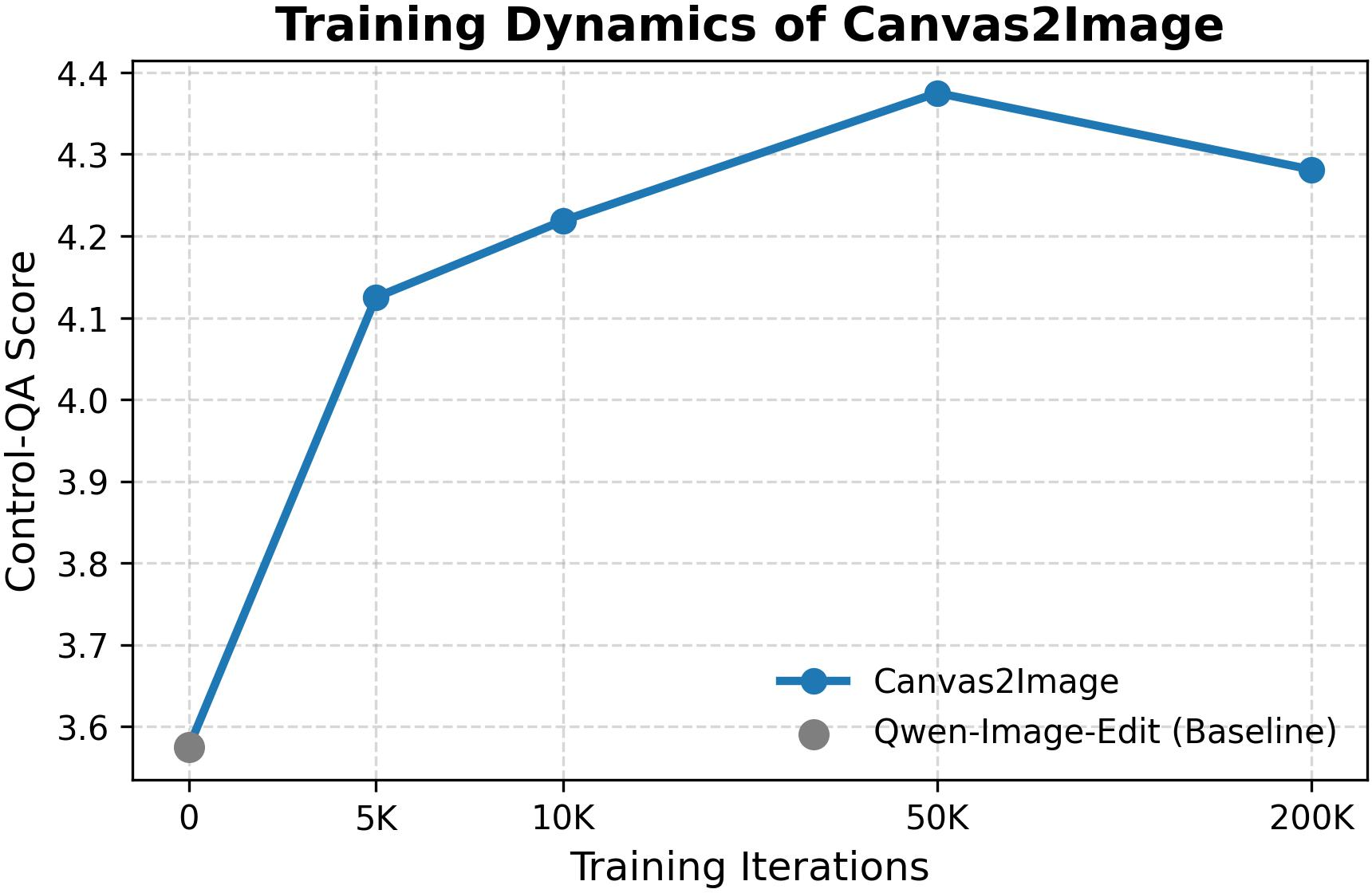
- Control-QA: An LLM-based score that evaluates adherence to specified control signals (e.g., identity, pose, layout). "In addition, to assess the fidelity w.r.t. applied control (e.g. identity, pose, box), we introduce a Control-QA score (evaluated by an LLM)."
- ControlNet: A diffusion add-on that conditions generation on structural inputs like pose or depth maps. "Recent methods such as StoryMaker~\citep{StoryMaker} and ID-Patch~\citep{ID-Patch} demonstrate both subject insertion and spatial control, but rely on complex module combinations, such as ControlNet~\citep{flux_controlnet} and IP-Adapter~\citep{ye2023ip-adapter}, which introduce additional complexity, are limited to face injection, lack bounding-box support, and generalize poorly."
- CreatiDesign: A model and dataset focused on layout-guided generation with bounding-box annotations. "Notably, Canvas-to-Image also surpasses the dedicated state-of-the-art model CreatiDesign~\cite{zhang2025creatidesign}, which was trained specifically for this task in the training set of CreatiDesign evaluation benchmark."
- Cross-Frame Sets: A data construction strategy that pairs subjects and backgrounds from different frames to avoid copy-paste artifacts. "This canvas is constructed using Cross-Frame Sets (\cref{fig:pipeline} left), which allows for pairing subjects and backgrounds drawn in a cross-frame manner."
- Diffusion Transformers: Transformer-based diffusion architectures that improve scalability and quality of generative models. "Diffusion transformers~\citep{peebles2023scalable,esser2024scaling,fluxkontext} have further improved quality and scalability."
- Flow-Matching Loss: A training objective that teaches the model to predict the velocity field between noise and data latents. "The model is optimized using a task-aware Flow-Matching Loss:"
- GLIGEN: A layout-conditioned generation method that interprets bounding boxes to control object placement. "Methods such as GLIGEN~\citep{li2023gligen}, LayoutDiffusion~\citep{zheng2023layoutdiffusion}, and CreatiDesign~\citep{zhang2025creatidesign} finetune the generator to interpret bounding boxes or segmentation masks."
- HPSv3: A human preference score metric that assesses image quality. "We conduct ablation studies to evaluate the effectiveness of our Multi-Task Canvas Training on the Multi-Control Benchmark. We start with a baseline model trained only on the Spatial Canvas and then progressively add the Pose Canvas and Box Canvas tasks to the training curriculum. Quantitative and qualitative results are presented in \cref{tab:ablation} and \cref{fig:ablation-task}, respectively. \cref{tab:ablation} clearly show that as more canvas tasks are incorporated, we observe consistent gains in image quality (HPSv3) and control adherence (Control-QA)."
- ID-Patch: A method combining modules to inject identity while providing spatial control. "Recent methods such as StoryMaker~\citep{StoryMaker} and ID-Patch~\citep{ID-Patch} demonstrate both subject insertion and spatial control, but rely on complex module combinations, such as ControlNet~\citep{flux_controlnet} and IP-Adapter~\citep{ye2023ip-adapter}, which introduce additional complexity, are limited to face injection, lack bounding-box support, and generalize poorly."
- Identity Preservation: The property of maintaining a subject’s appearance consistently across generated images. "Extensive experiments on challenging benchmarks demonstrate clear improvements in identity preservation and control adherence compared to existing methods."
- IP-Adapter: An adapter that injects reference identity features into a frozen base diffusion model. "Recent methods such as StoryMaker~\citep{StoryMaker} and ID-Patch~\citep{ID-Patch} demonstrate both subject insertion and spatial control, but rely on complex module combinations, such as ControlNet~\citep{flux_controlnet} and IP-Adapter~\citep{ye2023ip-adapter}, which introduce additional complexity, are limited to face injection, lack bounding-box support, and generalize poorly."
- LoRA: A parameter-efficient fine-tuning technique that injects low-rank updates into specific layers. "During training, we fine-tune the attention, image modulation, and text modulation layers in each block using LoRA~\cite{hu2022lora} with a rank of 128."
- MM-DiT (Multi-Modal DiT): A diffusion transformer that fuses multimodal inputs (VLM embeddings, VAE latents) to predict denoising velocities. "The Multi-Modal DiT (MM-DiT) receives VLM embeddings, VAE latents, and noisy latents to predict the velocity for flow matching."
- Multi-Control Benchmark: An evaluation set where multiple heterogeneous controls (pose, layout, identity) must be satisfied jointly. "Evaluations are conducted across four distinct benchmarks: (i) 4P Composition via the Spatial Canvas, (ii) Pose-Overlaid 4P Composition via the Pose Canvas, (iii) the Layout-Guided Composition benchmark via the Box Canvas, and (iv) our proposed Multi-Control Benchmark, which is curated from the CreatiDesign benchmark \cite{zhang2025creatidesign} containing humans in prompts and augmented with our Spatial and Pose Canvas for reference subject injection and pose controlling."
- Multi-Task Canvas: A unified RGB input format that consolidates heterogeneous control signals into a single visual interface. "First, we introduce the Multi-Task Canvas, a unified input representation that consolidates diverse control modalities, including background composition, subject insertion, bounding-box layouts, and pose guidance, into a single composite RGB image."
- Personalization: Techniques to generate specific subjects or identities in novel contexts and compositions. "Personalization methods generate specific subjects or identities in novel contexts."
- Pose Canvas: A canvas variant that overlays semi-transparent pose skeletons to constrain articulation, optionally without subject segments. "We overlay a ground-truth pose skeleton (\eg, from \cite{cao2019openpose}) onto the Spatial Canvas using a specific transparency factor, as shown in \cref{fig:pipeline} as "Pose Canvas"."
- Pose Skeleton: A structured set of keypoints and limbs used to represent and control human body configurations. "We overlay a ground-truth pose skeleton (\eg, from \cite{cao2019openpose}) onto the Spatial Canvas using a specific transparency factor"
- Segmentation Masks: Pixel-level labels indicating object regions, used for layout or composition control. "Methods such as GLIGEN~\citep{li2023gligen}, LayoutDiffusion~\citep{zheng2023layoutdiffusion}, and CreatiDesign~\citep{zhang2025creatidesign} finetune the generator to interpret bounding boxes or segmentation masks."
- Spatial Canvas: A canvas variant that composes segmented subject cutouts onto a background to specify spatial arrangement. "The first variant trains the model to render a complete scene based on an explicit composition, as depicted in \cref{fig:pipeline} as ``Spatial Canvas''."
- StoryMaker: A method aiming to unify subject insertion and spatial control via combined modules. "Recent attempts at unification, such as StoryMaker~\citep{StoryMaker} and ID-Patch~\citep{ID-Patch}, rely on complex combinations of separate modules (e.g., ControlNet with IP-Adapter) and are limited to single-type control."
- T2I-Adapter: An adapter that conditions text-to-image diffusion models on structural inputs like pose or depth. "Models like ControlNet~\citep{zhang2023adding} and T2I-Adapter~\citep{mou2023t2i} use structural cues like pose skeletons or depth maps to specify body configurations."
- VAE Latents: Compressed representations produced by a variational autoencoder used as conditioning for diffusion. "This representation is concatenated with the VAE latents of the canvas and provided to the diffusion model as conditional inputs, along with the text prompt embedding and the noisy latents."
- Vision-LLM (VLM): A model that encodes visual and textual inputs into joint embeddings for conditioning generation. "The Vision-LLM (VLM) encodes the unified canvas into a tokenized representation."
- VLM–Diffusion Architecture: An architecture that couples a vision-language encoder with a diffusion generator for multimodal control. "As illustrated in Fig. \ref{fig:pipeline}, Canvas-to-Image builds upon a VLMâDiffusion architecture."
- VQAScore: A metric assessing text-image alignment using image-to-text generation and QA. "We report ArcFace ID Similarity~\cite{ArcFace} for identity preservation, HPSv3~\cite{ma2025hpsv3} for image quality, VQAScore~\cite{VQAScore} for text-image alignment."
Collections
Sign up for free to add this paper to one or more collections.

