SlideTailor: Personalized Presentation Slide Generation for Scientific Papers
Abstract: Automatic presentation slide generation can greatly streamline content creation. However, since preferences of each user may vary, existing under-specified formulations often lead to suboptimal results that fail to align with individual user needs. We introduce a novel task that conditions paper-to-slides generation on user-specified preferences. We propose a human behavior-inspired agentic framework, SlideTailor, that progressively generates editable slides in a user-aligned manner. Instead of requiring users to write their preferences in detailed textual form, our system only asks for a paper-slides example pair and a visual template - natural and easy-to-provide artifacts that implicitly encode rich user preferences across content and visual style. Despite the implicit and unlabeled nature of these inputs, our framework effectively distills and generalizes the preferences to guide customized slide generation. We also introduce a novel chain-of-speech mechanism to align slide content with planned oral narration. Such a design significantly enhances the quality of generated slides and enables downstream applications like video presentations. To support this new task, we construct a benchmark dataset that captures diverse user preferences, with carefully designed interpretable metrics for robust evaluation. Extensive experiments demonstrate the effectiveness of our framework.
Paper Prompts
Sign up for free to create and run prompts on this paper using GPT-5.
Top Community Prompts
Explain it Like I'm 14
Overview
This paper introduces SlideTailor, a smart system that automatically makes presentation slides from scientific papers. Unlike one-size-fits-all tools, SlideTailor learns each user’s style so the slides match what that person likes in both content and looks. It even writes a short speech script to go with each slide, making it easier to turn slides into a video presentation.
Key Objectives and Questions
The paper explores a simple idea: people have different presentation styles, so slide-making tools should adapt to them. The researchers ask:
- Can a system learn your style from examples, without you typing long instructions?
- Can it match both what you want to say (content) and how you want it to look (design)?
- Can it plan slides alongside the speech you’ll give, so everything fits together?
- How do we test whether slides match a user’s preferences and are high quality?
How SlideTailor Works (Methods)
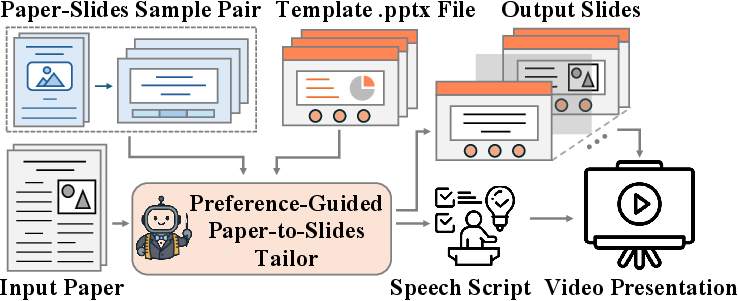
Think of SlideTailor like a personal tailor for slides. Instead of asking you to write down exactly what you want, it looks at two things you can easily provide: an example of slides you like and a PowerPoint template with the design you prefer.
Here are the main steps, explained in everyday terms:
- Learning your content style from examples:
- Input: a “paper-slides sample pair” (one scientific paper plus the slides someone made for it).
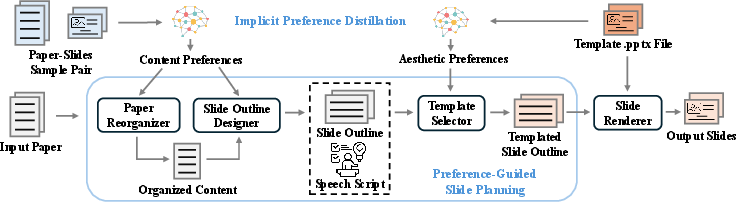
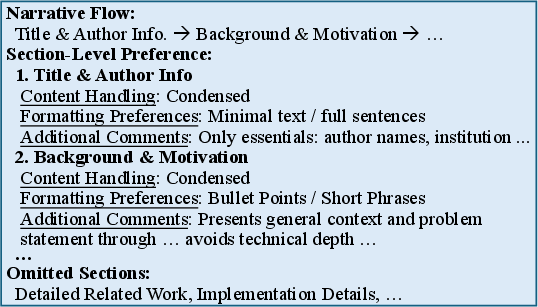
- What it does: it figures out how the example slides were structured—what was emphasized or skipped, how the story flows, and how details are presented (e.g., bullet points vs. paragraphs). This becomes your content preference profile.
- Analogy: like watching how you cook a meal from a recipe to learn your taste—spicy or mild, lots of veggies or more protein.
- Learning your visual style from a template:
- Input: a .pptx template (your preferred layout, colors, fonts, backgrounds).
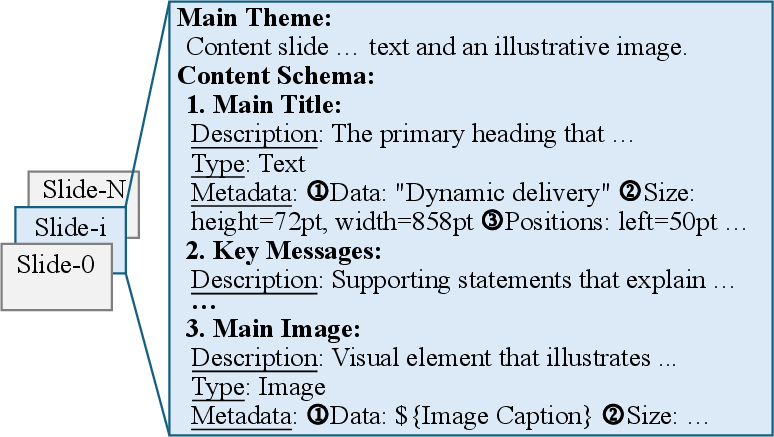
- What it does: it reads the PowerPoint file to understand where titles, text, and images should go, and what the theme looks like. This becomes your aesthetic preference profile.
- Analogy: like choosing fabrics and patterns before the tailor stitches the outfit.
- Planning slides with a “chain-of-speech”:
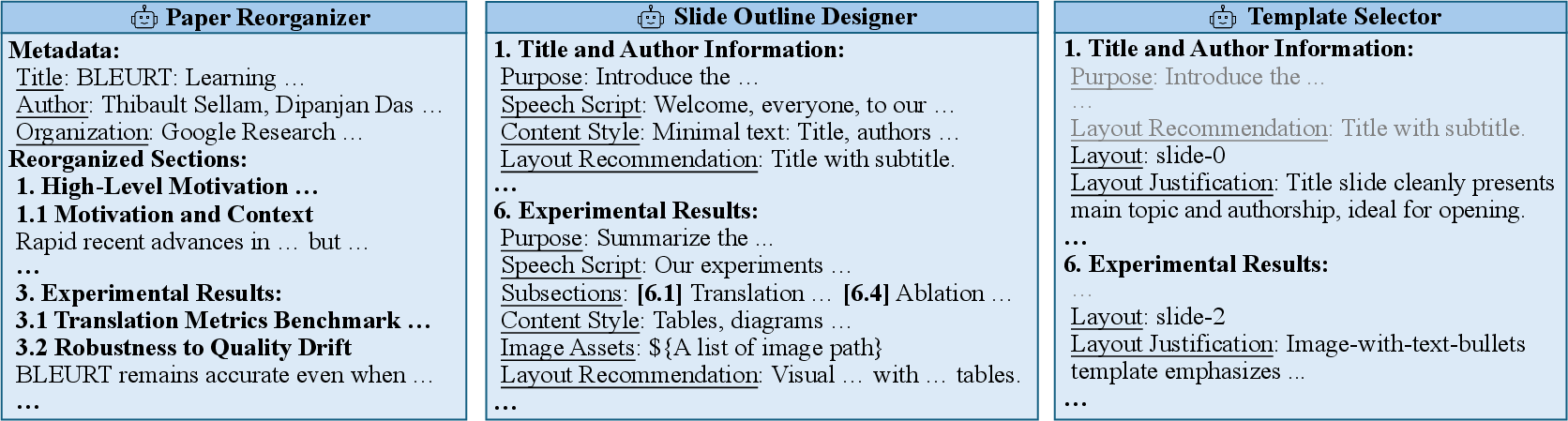
- The system reorganizes the new paper to match your style.
- It creates a slide-by-slide outline and, for each slide, drafts a short speech (the “chain-of-speech”). This makes sure the slide content and what you’d say fit together.
- Analogy: like planning a talk and designing the slides at the same time, so you don’t end up with slides you can’t explain clearly.
- Picking the right layouts:
- For each planned slide, the system chooses the best fitting layout from your template, based on the content (e.g., a slide that needs an image vs. a slide that’s mostly text).
- Building the final editable slides:
- It fills the chosen layouts with titles, bullet points, figures, and tables from the paper.
- You get a standard PowerPoint file (.pptx) you can edit.
- Bonus: auto video presentations
- Because each slide has a speech script, you can use text-to-speech to generate narration and turn your slides into a presentation video.
Simple definitions used in the method:
- LLM: a smart text-based AI that reads, writes, and reasons about language.
- Vision-LLM (VLM): an AI that understands both images and text together.
- Chain-of-speech: planning what you’ll say slide by slide, so the visuals match the spoken words.
Main Findings and Why They Matter
The researchers tested SlideTailor on a new dataset they built, called PSP, which includes:
- 200 target papers to present,
- 50 sample paper-slide pairs showing different content styles,
- 10 templates showing different visual styles,
- Up to 100,000 possible combinations of preferences.
Key results:
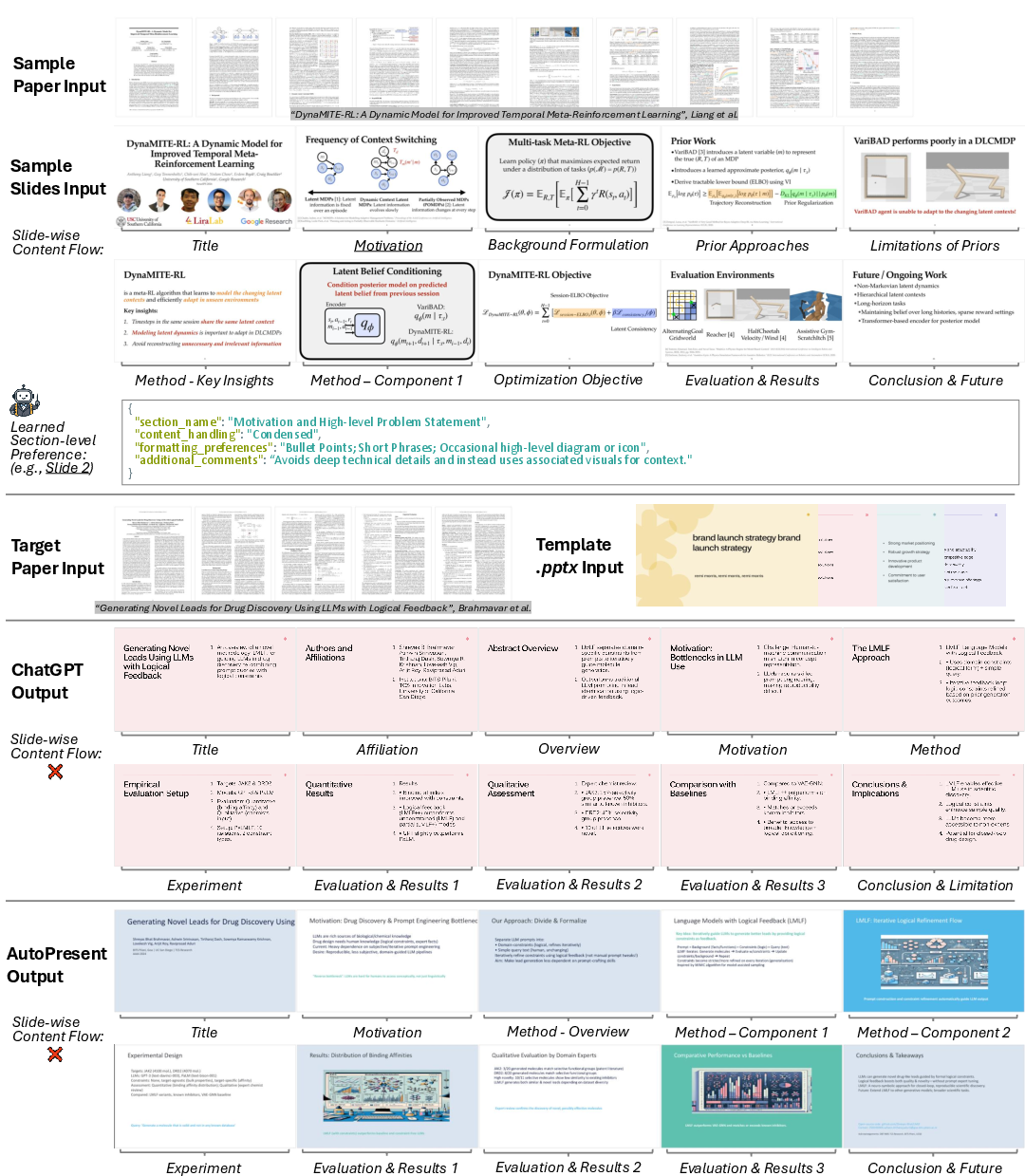
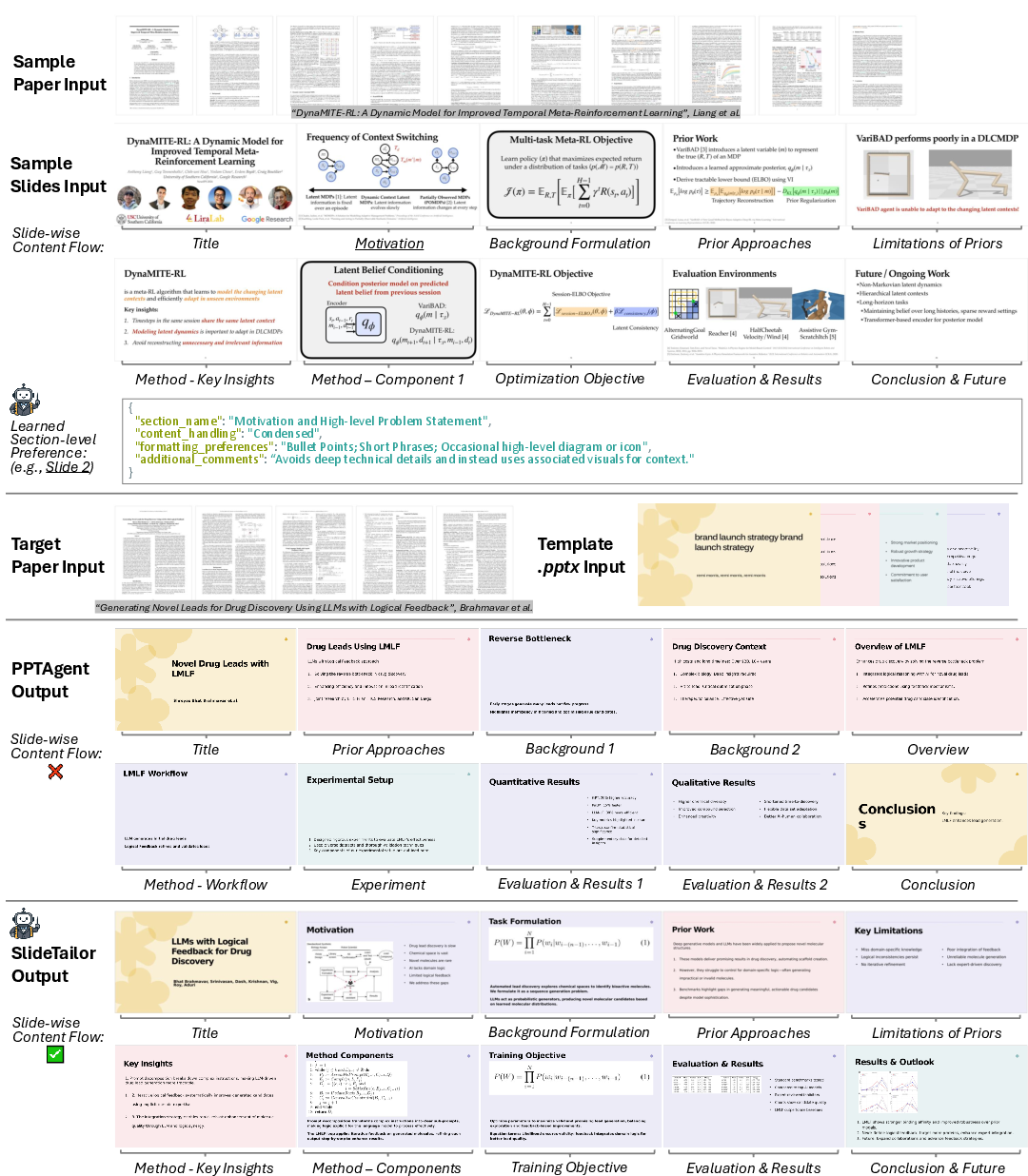
- SlideTailor produced slides that matched user preferences better than strong baselines (like ChatGPT, AutoPresent, and PPTAgent).
- It also made slides that were clearer and more informative overall, not just better styled.
- The chain-of-speech feature significantly improved clarity and content quality.
- Learning content preferences from examples (not just design) was crucial; removing it made results worse.
- Human reviewers preferred SlideTailor most of the time compared to a leading competitor.
Why this matters:
- Personalized slides are more engaging and easier to present.
- Automatic speech scripts save time and help with video talks and remote teaching.
- The system works with both top commercial AIs and open-source models, which is practical and cost-effective.
Implications and Potential Impact
SlideTailor shows a new way to make personalized slides using simple, natural inputs—an example deck and a template—rather than long instructions. This could help:
- Researchers and students quickly create high-quality, style-consistent presentations.
- Teachers prepare lecture slides and recorded video lessons more easily.
- Conferences and labs keep a consistent branding while letting each presenter keep their voice.
Looking ahead:
- The approach could extend beyond scientific papers to business reports, educational materials, and more.
- Training end-to-end models on this task might improve results further.
- Better human-aligned evaluation methods will help judge quality more fairly.
Overall, SlideTailor is like a smart slide-making assistant that learns your style and builds polished, editable presentations (with matching speech) from complex papers, making the whole process faster, more personal, and more effective.
Knowledge Gaps
Knowledge Gaps, Limitations, and Open Questions
Below is a concise, actionable list of what remains missing, uncertain, or unexplored in the paper, aimed at guiding future research.
- Preference distillation robustness: No analysis of how noisy or low-quality paper–slides pairs affect the inferred content preferences; quantify sample complexity (how many example pairs are needed) and sensitivity to mismatched domains.
- Conflict resolution across inputs: The framework does not formalize or evaluate strategies for resolving conflicts between content preferences (from the sample pair) and aesthetic preferences (from the template); no quantitative analysis of “preference harmony.”
- Preference persistence and user modeling: Lacks a longitudinal model of user preferences across multiple decks (e.g., learning a durable “user profile” from several past slide sets) and adaptation to preference drift over time.
- Fine-grained controllability: Beyond implicit preference extraction, there is no mechanism or API for explicit control of length, emphasis, slide count, or stylistic attributes; evaluate user-controllable knobs versus implicit preference inference.
- Multilingual and cross-lingual scenarios: No experiments on non-English papers, multilingual slide generation, or cross-lingual preference transfer (e.g., English sample pair guiding slides for a Chinese paper).
- Domain generalization: Benchmark and methods focus on scientific papers; generalization to other document genres (business, education, marketing) remains untested and may require different content/aesthetic schemas.
- Accessibility compliance: Slides are not evaluated for accessibility (e.g., WCAG-related contrast, font sizes, alt-text for figures, screen-reader compatibility); define metrics and enforcement mechanisms.
- Visual extraction reliability: The paper does not report precision/recall of figure/table extraction from PDFs, nor failure modes (e.g., complex multi-panel figures, vector graphics, equations); propose a standardized visual-content extraction benchmark.
- Template understanding benchmark: No dedicated benchmark or metric for VLM-based template role detection (e.g., accuracy of identifying title, content boxes, image placeholders); evaluate mapping fidelity from semantic roles to pptx elements.
- Generalization to unseen templates: It is unclear how well template parsing and layout selection generalize to templates not seen in the PSP dataset or to complex templates with animations, charts, or custom masters.
- Chain-of-speech validation: Improvements are judged via MLLM scores; no evidence of objective speech–slide synchronization quality (timing, pacing, word-per-minute alignment) or user comprehension outcomes in actual presentations.
- Downstream video quality: The video presentation pipeline is demonstrated but not rigorously evaluated (lip-sync accuracy, identity preservation quality, audience engagement, timing alignment across slides).
- Ethical and consent issues for TTS/identity: Voice cloning raises consent, privacy, and misuse risks; propose safeguards (e.g., opt-in workflows, watermarking, deepfake detection, policy compliance) and measure user perceptions.
- Interactive refinement loops: The system is single-pass; no iterative human-in-the-loop editing or preference feedback is modeled/evaluated (e.g., learning from user corrections to update the preference profile).
- Collaboration and multi-user preferences: Real slides often involve multiple authors; there’s no method for aggregating or reconciling multiple preference profiles or negotiating trade-offs.
- Reliability of pptx editing: The code-generation agent’s success rate, error types (e.g., misplacement, placeholder leakage, broken masters), and cross-software compatibility (PowerPoint, Google Slides, Keynote) are not reported.
- Preference schema standardization: The symbolic representation P = P_C ∪ P_A lacks a formal grammar/taxonomy; propose a standardized, shareable schema to improve reproducibility and cross-system comparison.
- Evaluation bias and reproducibility: Heavy reliance on a single proprietary MLLM-as-judge (GPT‑4.1) risks vendor bias; expand cross-judge protocols, report inter-rater reliability, calibration, and variance across judges/models.
- Human evaluation scale and design: Human study is small (four raters, 60 ratings) and limited in scope; increase sample size, diversify raters, measure agreement (e.g., Cohen’s κ), and include task-specific comprehension tests.
- Coverage/flow metric validity: “Structural topics” via LLM extraction may be unstable; validate these metrics against human annotations, define canonical topic ontologies, and report extraction reliability.
- Dataset diversity and licensing: PSP includes 50 sample pairs and 10 templates; assess whether this adequately captures stylistic diversity, clarify licensing/permissions for slides/templates, and consider expanding to more institutions/styles.
- Preference ground truth: There is no ground truth labeling of preferences; design protocols to elicit explicit preference annotations (content and aesthetic) to train/evaluate supervised or semi-supervised models.
- Training-based alternatives: The paper mentions end-to-end training as future work but lacks concrete proposals (objectives, labels, pretraining tasks) for multimodal preference learning and alignment.
- Baseline fairness and breadth: AutoPresent was adapted to include preferences via concatenated text; evaluate additional baselines tailored for preference conditioning (e.g., persona-aware summarization, controllable generation frameworks) under matched constraints.
- Failure mode taxonomy: Provide a systematic error analysis (e.g., missing figures, layout mismatches, overlong text, blank spaces, template misuse) with frequencies and ablations to target specific weaknesses.
- Robustness to long and complex papers: No stress tests on very long PDFs, supplemental materials, appendices, or heavily mathematical content (LaTeX equations, proofs); define strategies for equation rendering and math readability.
- Slide count constraint: All systems were forced to produce 10 slides; study sensitivity to different slide counts, density, and pacing preferences and how these affect content coverage and aesthetics.
- Privacy and data governance: Using proprietary APIs with user documents raises privacy concerns; investigate privacy-preserving preference distillation and on-device inference, and report data handling policies.
- Brand/style compliance: Many institutions have brand guidelines; evaluate whether generated slides conform to color, typography, and logo rules, and introduce metrics for brand adherence.
- Real-time presentation support: No support for live features (click-to-reveal, animations, presenter notes timing); explore synchronizing speech with progressive slide builds and interactive elements.
- Cross-format support: The pipeline only outputs .pptx; assess portability to Google Slides, Keynote, PDF decks, and web-based slide frameworks (Reveal.js), including layout fidelity.
- Template resilience to edge cases: Test and report performance on templates with complex masters, nested groups, charts, embedded fonts, and non-standard slide sizes or orientations.
- Safety of code agent outputs: Establish guardrails and verification tests for pptx editing code (idempotence, rollback, validation checks) to prevent corrupt files or layout breakage.
- Cost/latency profiling at scale: Provide detailed latency and cost breakdowns across stages for large batches and long papers; investigate caching, streaming, and partial updates to reduce cost.
- User acceptance studies: Beyond quality scores, conduct user studies on satisfaction, edit effort (time-to-fix), and trust, measuring how much manual post-editing is needed to reach publishable quality.
Practical Applications
Practical, Real-World Applications of SlideTailor
Below are actionable applications derived from the paper’s findings, methods, and innovations (preference distillation from a paper–slides pair and .pptx template, agentic slide planning, chain-of-speech, editable .pptx realization, and the PSP benchmark), grouped by deployment horizon. Each item notes sectors, potential tools/workflows, and assumptions or dependencies that impact feasibility.
Immediate Applications
These can be deployed with current large multimodal models (e.g., GPT‑4.1, Qwen2.5‑VL) and existing TTS tools, as demonstrated in the paper.
- Academia: rapid, personalized conference and lecture decks
- Sector: education, research
- Tools/workflows: “Preference Profiler” (distill content style from a prior deck), “Template Planner” (match slide layouts), “Chain‑of‑Speech Studio” (speaker notes), .pptx export for final edits
- Assumptions/dependencies: access to a representative paper–slides pair and a .pptx template; PDF parsing for figures/tables; LLM/VLM API access and cost; rights to reuse content and template
- Research labs and corporate R&D: standardized lab-style presentation kits
- Sectors: software, robotics, energy, biotech
- Tools/workflows: reusable “Preference Profiles” per team; automated weekly update decks from papers; outline + slide + speaker notes in a single run
- Assumptions/dependencies: stable internal templates; data privacy controls; figure extraction from PDFs; reviewers validate factuality
- Healthcare and medical education: journal club and CME decks from clinical papers
- Sector: healthcare
- Tools/workflows: hospital-branded templates; chain-of-speech adapted for non-expert audiences; TTS narration for asynchronous teaching
- Assumptions/dependencies: domain-specific phrasing and caution with clinical claims; HIPAA/privacy if patient examples appear; careful figure licensing
- Policy and government briefings: technical-report-to-brief deck conversion
- Sector: public policy
- Tools/workflows: policy-style templates; slide flow emphasizing executive summaries and recommendations; teleprompter-ready speaker notes
- Assumptions/dependencies: security/redaction; simplification to layperson language; human oversight for sensitive topics
- Finance and investment research: analyst decks from reports
- Sector: finance
- Tools/workflows: firm templates (branding, disclaimers); priority on results/risks; export to .pptx and PDF
- Assumptions/dependencies: compliance review; accurate table/figure extraction; licensing of charts/data
- Publishing and conference organizers: author-ready default decks and talk recordings
- Sectors: academic publishing, events
- Tools/workflows: venue template library; pre-talk deck drafts; auto video presentations (slides + TTS) for remote sessions
- Assumptions/dependencies: template distribution and consent; presenter review; voice cloning requires explicit consent
- Student coursework and reading groups: quick slide decks with speaker notes
- Sector: education, daily life
- Tools/workflows: upload paper PDF + a preferred sample deck; get slides + chain-of-speech; optional TTS video
- Assumptions/dependencies: access to LLM/VLM; style alignment may need light edits; academic integrity and citation practices
- PowerPoint/Google Slides assistant plugins
- Sector: software
- Tools/workflows: “PPTX Editor Agent” inside slide software; “Template Library Manager” to select layouts; “Preference Profile import/export” to share team styles
- Assumptions/dependencies: plugin APIs; authentication to LLM services; local caching for privacy
Long-Term Applications
These require further research, scaling, domain adaptation, improved evaluation, or deeper integrations.
- Cross-domain expansion: beyond scientific papers to business reports, legal memos, grant proposals, and educational materials
- Sectors: enterprise, legal, nonprofits, education
- Tools/workflows: domain-specific preference taxonomies and templates; specialized content controllers
- Assumptions/dependencies: more robust PDF/figure parsing; domain-tuned models; curated benchmarks beyond PSP
- Live adaptive co-presenter: real-time slide and narration co-creation
- Sectors: education, enterprise
- Tools/workflows: latency-optimized “Chain-of-Speech” + teleprompter; audience-adaptive slide morphing; real-time Q&A cue cards
- Assumptions/dependencies: low-latency on-device models; privacy-safe streaming; robust error recovery
- Organizational style learning and governance
- Sectors: enterprise, academia
- Tools/workflows: learning from many historical decks to auto-refine “Preference Profiles”; approval workflows; audit logs
- Assumptions/dependencies: data volume and consent; policy controls; style drift detection
- Fully automated video production pipeline
- Sectors: education, marketing, events
- Tools/workflows: slides + multilingual TTS + captioning + identity-preserving talking head avatars; auto animations and timing
- Assumptions/dependencies: higher-quality voice cloning with consent; lip-sync realism; accessibility (captions, transcripts)
- Accessibility and compliance suite
- Sectors: education, government, finance, healthcare
- Tools/workflows: WCAG checks (contrast, fonts), alt-text generation for visuals, citation tracking, figure license verification
- Assumptions/dependencies: accurate OCR/diagram understanding; legal modules; human-in-the-loop compliance
- Human-aligned evaluation and benchmarking
- Sector: academia, tooling vendors
- Tools/workflows: cross-judge protocols to reduce LLM self-bias; fine-grained rubrics; expanded datasets across domains and audiences
- Assumptions/dependencies: sustained human rating programs; standardized metrics; public leaderboards
- Marketplace and ecosystem for templates and preference profiles
- Sectors: software, design
- Tools/workflows: store/share organizational templates and style profiles; enterprise SaaS with SSO; integrated billing for LLM usage
- Assumptions/dependencies: platform partnerships (Microsoft, Google); IP/licensing frameworks
- Meeting and doc-to-deck autopipelines
- Sectors: software, enterprise productivity
- Tools/workflows: connectors for Notion/Confluence/Jira; turn specs or minutes into slides; automatic rollups for exec reviews
- Assumptions/dependencies: API integrations; access control; governance
- Education at scale: personalized micro-lectures and curriculum materials
- Sector: education/EdTech
- Tools/workflows: student-level preference profiles (pace, detail); learning analytics; auto-generated quizzes aligned to slides
- Assumptions/dependencies: student modeling; privacy and consent; bias mitigation
- Multilingual and cross-cultural communication
- Sectors: global enterprises, NGOs
- Tools/workflows: localized slides and narration; regional aesthetic templates; terminology management
- Assumptions/dependencies: high-quality translation; cultural style validation; domain glossaries
- Regulated-sector compliance decks with auditability
- Sectors: healthcare, finance, government
- Tools/workflows: standardized tones/disclaimers; provenance tracking for figures/tables; review checkpoints
- Assumptions/dependencies: policy engines; secure storage; traceable data lineage
Notes on Core Assumptions and Dependencies
- Technical: reliable PDF parsing and figure/table extraction; access to capable LLM/VLM backbones (e.g., GPT‑4.1 or Qwen2.5‑VL); sufficient context window; cost budgeting.
- Legal/ethical: copyright and licensing for figures; consent for voice cloning and avatars; privacy/security for sensitive documents.
- UX/process: representative paper–slides example and template to encode preferences; light human review to correct domain nuances; accessibility compliance as a first-class goal.
- Evaluation: current MLLM-as-judge metrics show good but imperfect alignment with human ratings; broader benchmarks and human-in-the-loop evaluation will improve trust and reliability.
Glossary
- Ablation studies: Controlled experiments that remove or disable components to assess their contribution to system performance. "Ablation Studies"
- Agentic framework: A system design that orchestrates autonomous agents to accomplish complex tasks. "We propose a human behavior-inspired agentic framework, SlideTailor, that progressively generates editable slides in a user-aligned manner."
- Chain-of-speech mechanism: A prompting strategy that drafts speech alongside slide content to ensure alignment between narration and visuals. "We also introduce a novel chain-of-speech mechanism to align slide content with planned oral narration."
- Conditional summarization: Generating summaries conditioned on auxiliary inputs (e.g., queries, templates, preferences) beyond the source document. "we focus on the conditional summarization of scientific papers for presentation slide generation."
- Identity-preserving talking head: A synthesized video avatar driven by audio that retains the speaker’s facial identity. "an identity-preserving talking head can be synthesized using existing audio-driven generation methods"
- Intersection-over-union (IoU): A similarity metric defined as the area of overlap divided by the area of union between two sets. "compute the intersection-over-union (IoU) between them."
- Latent function: An unobserved mapping inferred from examples that captures underlying preferences or transformations. "as a latent function"
- Layout grounding mechanism: A structured linkage that ties semantic content to specific layout elements to guide template selection. "serves as a layout grounding mechanism that facilitates subsequent template understanding and selection."
- Layout-aware agent: A component that maps planned content to concrete template elements (text boxes, image placeholders) while respecting layout constraints. "A layout-aware agent maps planned content (e.g., titles, text, visuals) to specific elements (e.g., text boxes, image placeholders) in the assigned template."
- LLM-as-a-judge framework: Using a LLM to evaluate outputs according to a rubric for aspects like structure, clarity, and aesthetics. "Using an LLM-as-a-judge framework, the model is instructed to focus on content organization such as pace, level of detail, visual formatting, and slide transitions—while ignoring the actual subject matter."
- LLM-powered agents: Modular processes implemented with LLMs to handle distinct subtasks in a pipeline. "This process is handled by three LLM-powered agents"
- MLLM (Multimodal LLM): A model that jointly processes text and visual inputs for understanding and evaluation. "Each metric is scored using an MLLM-as-a-judge framework"
- Multimodal: Involving multiple data modalities such as text, images, and layout in a single task or model. "inherent multimodal nature of the academic document-to-slides generation task"
- Normalized General Levenshtein Distance (NGLD): A normalized edit-distance variant in [0,1] that measures sequence similarity. "compute the Normalized General Levenshtein Distance (NGLD) between them."
- Preference distillation: Extracting explicit, structured preferences from implicit and unlabeled examples. "The process begins with preference distillation, similar to a human that summarizes and learns multi-aspect user preferences"
- Preference-guided paper-to-slides generation: Creating slides explicitly steered by user-provided preferences for content and aesthetics. "preference-guided paper-to-slides generation"
- Symbolic representation: An interpretable, discrete encoding (e.g., schemas, profiles) of preferences or structure used for conditioning generation. "constitutes a modular, symbolic representation of user preferences."
- Template-aware layout selection: Choosing a slide layout from a template based on the planned content and aesthetic schema. "Template-aware layout selection."
- Vision-LLM (VLM): A model that aligns and interprets visual elements with text to infer roles and layout semantics. "We employ a vision-LLM (VLM) to infer the functional roles of both slide-level components (e.g., title, main content, conclusion) and element-level components (e.g., text boxes, image regions) within each slide."
- Zero-shot setting: Evaluating or generating without task-specific training examples, often relying on generalization from pretraining. "evaluated in a zero-shot setting powered by MLLMs."
- Zero-shot text-to-speech: Synthesizing speech with a new voice without prior training on that voice, typically from a short sample. "using existing zero-shot text-to-speech systems"
Collections
Sign up for free to add this paper to one or more collections.