A Text-Native Interface for Generative Video Authoring
Abstract: Everyone can write their stories in freeform text format -- it's something we all learn in school. Yet storytelling via video requires one to learn specialized and complicated tools. In this paper, we introduce Doki, a text-native interface for generative video authoring, aligning video creation with the natural process of text writing. In Doki, writing text is the primary interaction: within a single document, users define assets, structure scenes, create shots, refine edits, and add audio. We articulate the design principles of this text-first approach and demonstrate Doki's capabilities through a series of examples. To evaluate its real-world use, we conducted a week-long deployment study with participants of varying expertise in video authoring. This work contributes a fundamental shift in generative video interfaces, demonstrating a powerful and accessible new way to craft visual stories.
Paper Prompts
Sign up for free to create and run prompts on this paper using GPT-5.
Top Community Prompts
Explain it Like I'm 14
A simple explanation of “A Text‑Native Interface for Generative Video Authoring”
What is this paper about?
This paper introduces Doki, a new tool that lets you make videos mainly by writing, like you’re working in a regular document. Instead of juggling lots of complicated video apps and timelines, you type your story, and the tool turns your words into images, video clips, and sound. The big idea is to make video creation feel as natural as writing a school essay or a story.
What questions were the researchers asking?
The researchers wanted to know:
- If AI can make video from text, can video-making feel as simple as editing a document?
- Can a writing-based setup keep a story visually consistent—same characters, style, and setting—across many shots?
- Can a simple, text-first interface reduce the confusion of switching between many tools?
- How would beginners and experts use a tool like this in real life? Would it speed them up or change how they work?
How does Doki work?
Think of Doki like a smart, living script. You write the story, and the tool “executes” it into a video.
Here are the key ideas, explained in everyday terms:
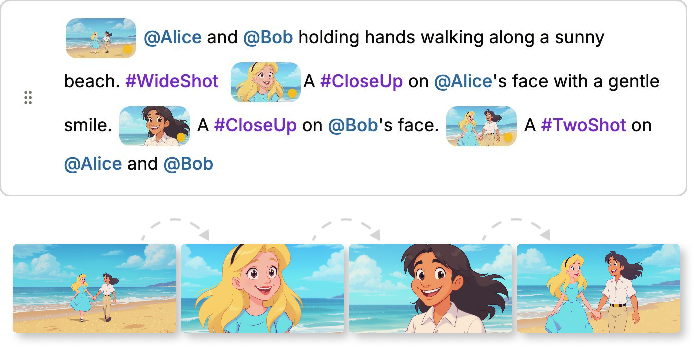
- Document → Video; Paragraph → Scene; Sentence → Shot
- The whole document becomes the video.
- Each paragraph is like a scene or sequence.
- Each sentence (or marked line) becomes a shot (a single camera take).
- Reusable “ingredients” for consistency
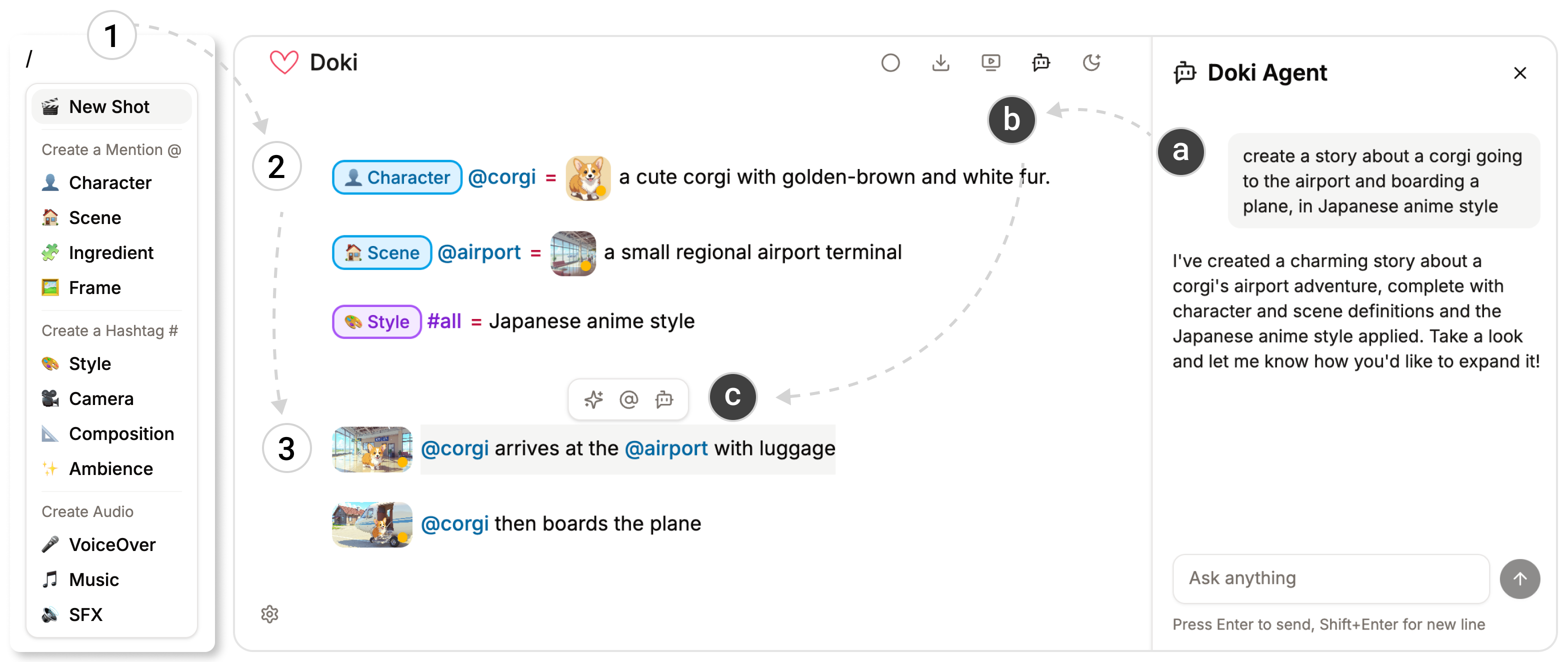
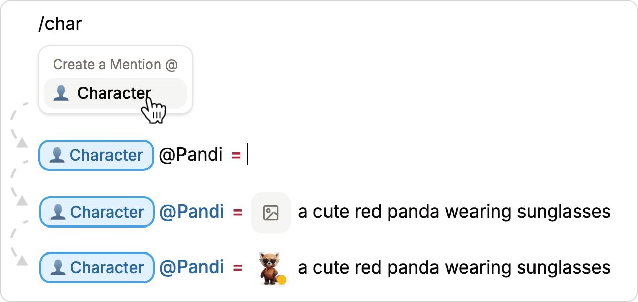
- “@Mentions” work like named nouns (e.g., @corgi for your main character, @airport for the setting).
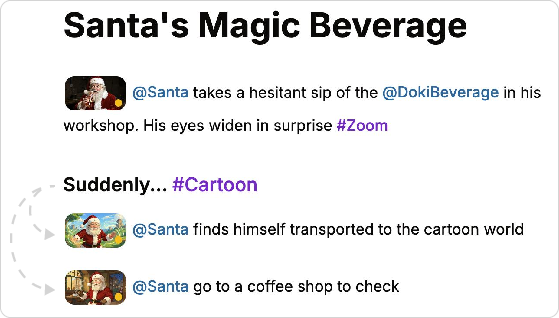
- “#Hashtags” work like adjectives or film terms (e.g., #anime for style, #CloseUp for a camera move).
- If you change a definition (say, @corgi → @cat), every place it’s used updates automatically. This keeps characters and styles consistent across your whole video.
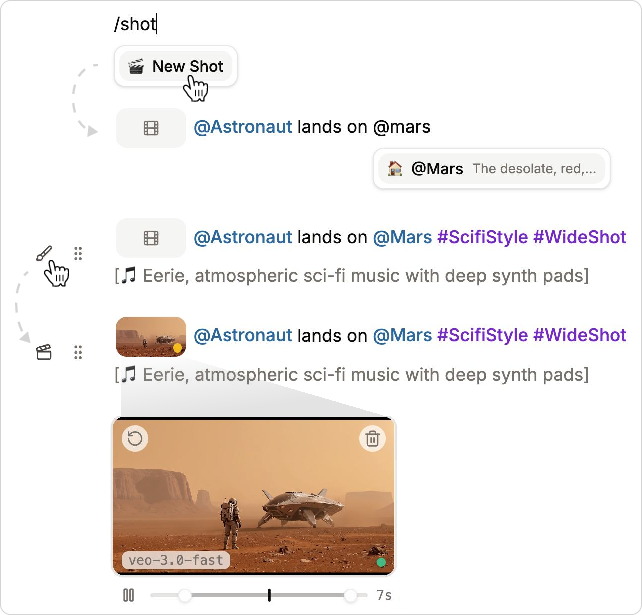
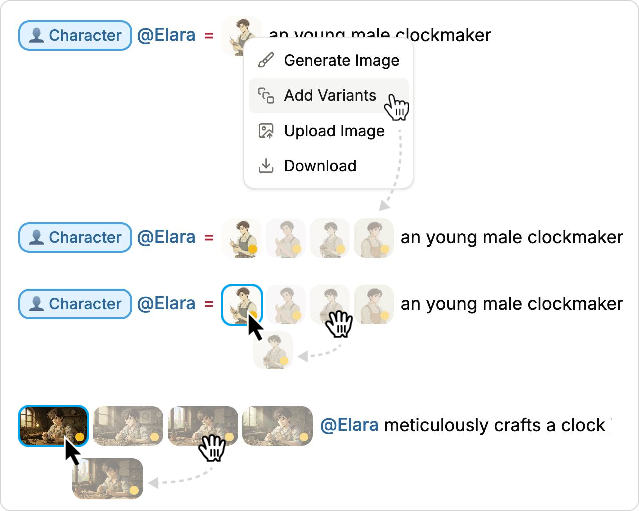
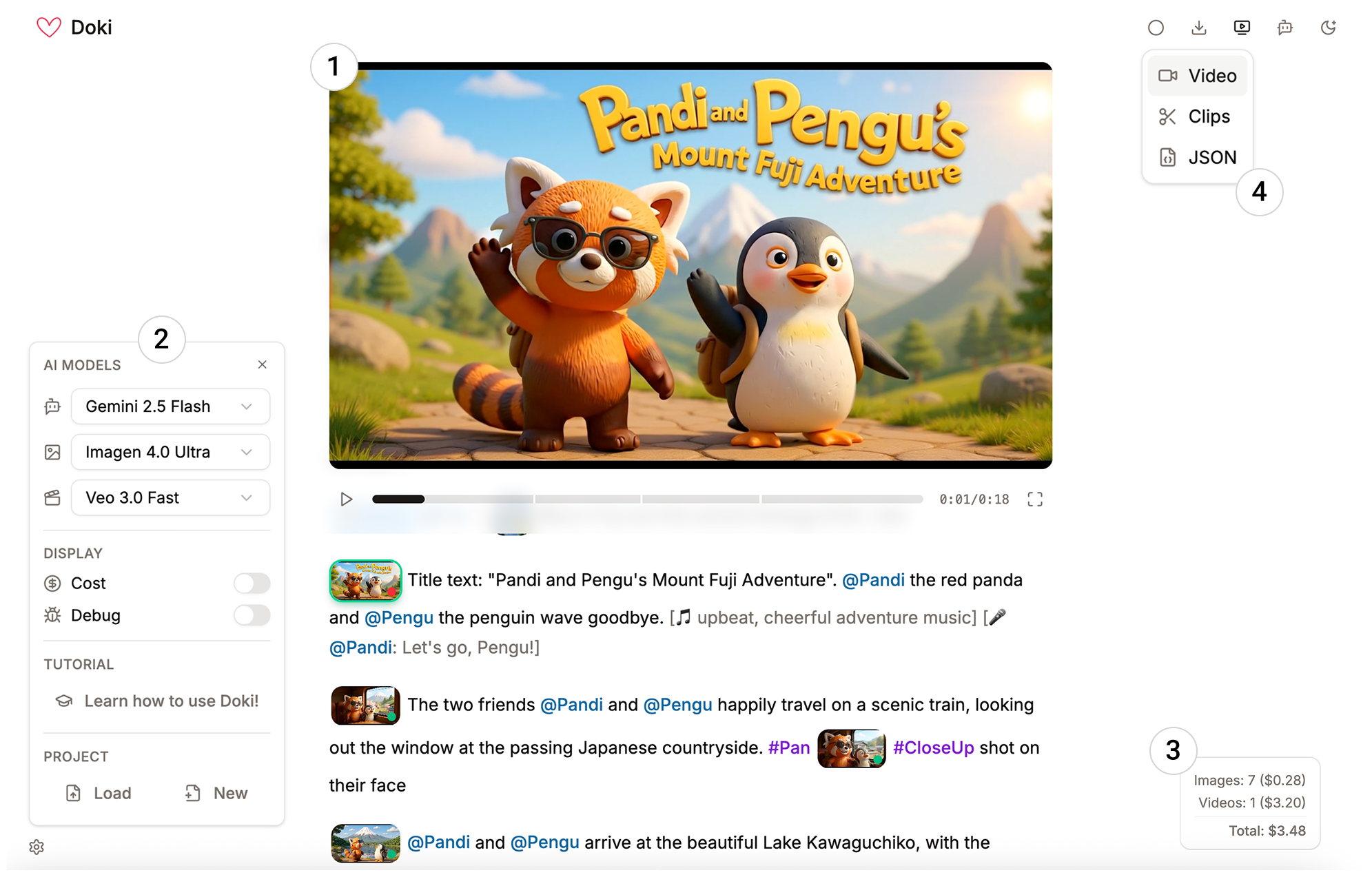
- Inline previews and simple commands As you write, you insert shots using a simple slash menu (typing /). Doki first creates a preview image (cheaper and quicker), then turns that into a video. You can see everything right in the document, click to expand a shot, and generate variants to pick your favorite look.
- Global or section styles You can set a style for the entire document (#all = “photorealistic”) or for a section (like a heading), so all shots under that section inherit that style. It’s like setting a theme for a chapter.
- Audio by writing in brackets You can type audio notes like [soft piano music] or [airport crowd chatter], and Doki adds them to your clips if the video model supports sound.
- Helpful AI assistants
- A sidebar “chat” agent that can draft a script, reorganize pacing, or adjust the tone across your whole document.
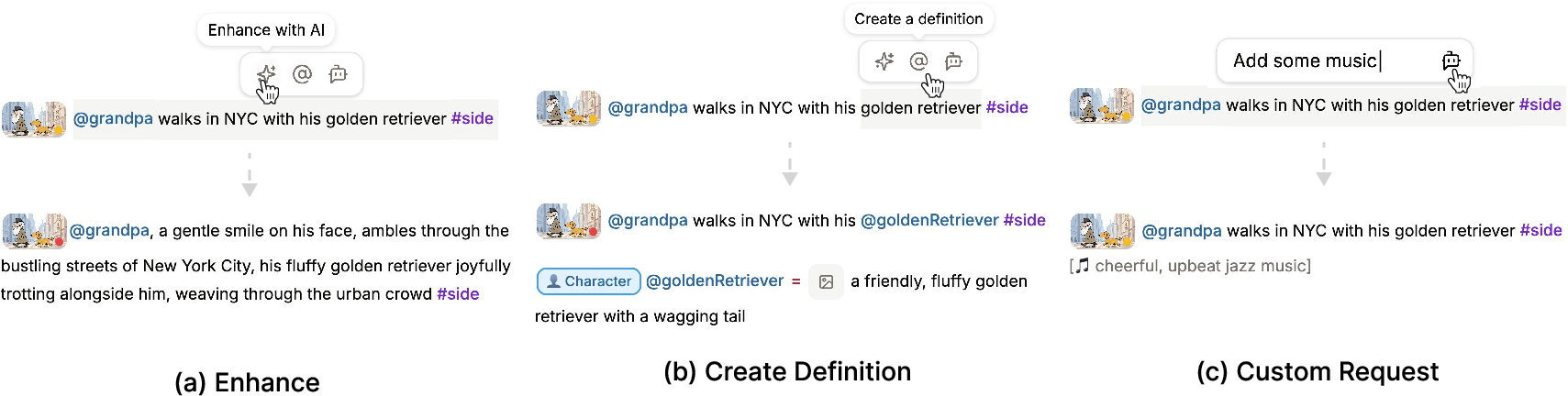
- An inline agent that helps you expand a sentence, turn selected text into a reusable @definition, or make custom edits right where you’re writing.
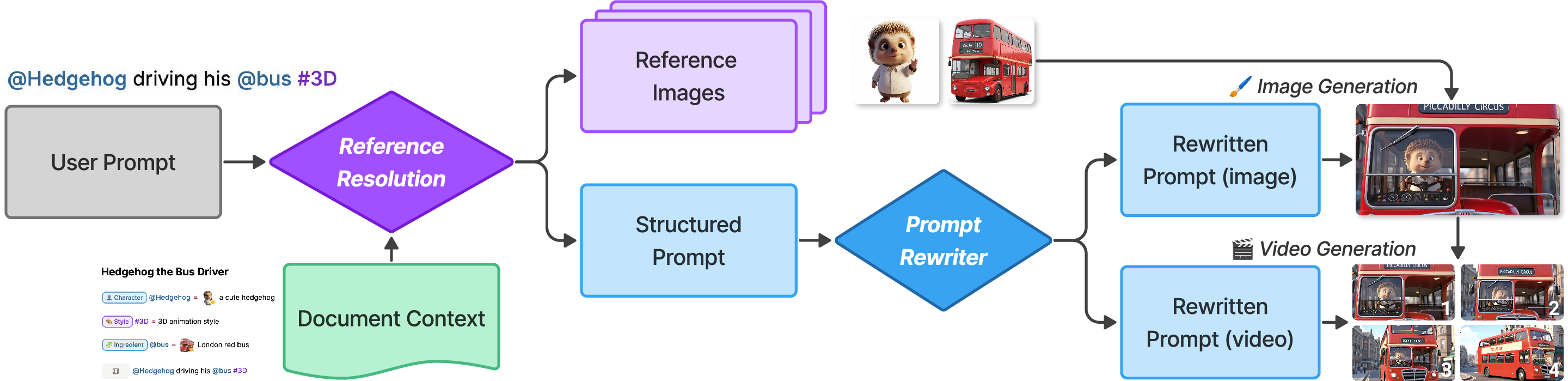
- Under the hood: text → image → video Doki follows a clear pipeline: 1) Your text is read and matched to your @ and # definitions. 2) It generates a preview image for each shot. 3) It turns the chosen image into a short video clip. Later shots in the same paragraph can use earlier ones as context (like continuing the same scene so the character looks consistent).
What did the study find?
The team ran a week‑long “diary study” with 10 people—from complete beginners to experienced filmmakers. Participants made 46 videos and rated Doki’s usability as 81.2 on the System Usability Scale, which counts as “Excellent.” Here’s what they reported:
- Faster idea‑to‑draft flow Because you write directly in one place and get instant previews, it’s quicker to go from a rough idea to a first version of the video.
- Better coherence and consistency The @mentions and #hashtags system helped keep characters, styles, and settings steady across many shots without rewriting the same details over and over.
- Clearer understanding of story structure Seeing the whole video as a document helped people grasp the beginning‑middle‑end flow and make changes more confidently.
- Different benefits for different users
- Beginners felt empowered—they could make videos they wouldn’t attempt before.
- Experts used Doki for rapid brainstorming and storyboarding, then moved to pro tools for final, high‑polish work.
- Limitations that still need work
- Model predictability (AI doesn’t always give exactly what you expect).
- Precise control (fine‑tuning tiny details is harder than in pro editors).
- Timing and motion across longer stretches (“temporal expressivity,” like perfectly syncing complex action over time).
- Human + AI teamwork felt natural People often let the AI handle heavy lifting (like drafting and generating), yet still felt like the “director.” The shared text document made it easy for both human and AI to see, edit, and understand the same plan.
Why does this matter?
Doki shows a new way to make videos: by writing them. This can:
- Lower the barrier for beginners who know how to write but don’t know complex video tools.
- Keep everything—script, visuals, audio, and edits—in one place, so it’s easier to manage and revise.
- Speed up brainstorming and story planning for experienced creators.
- Point the way toward future tools where documents are not just for reading but also for creating rich media.
There are still challenges—like getting perfect control over timing and ensuring the AI behaves predictably. But the approach is promising. If making videos can feel more like writing a story, more people will be able to tell the visual stories they imagine.
Knowledge Gaps
Knowledge gaps, limitations, and open questions
Below is a concise list of what the paper leaves unresolved, focusing on missing evidence, limitations of the approach, and concrete open questions for future work:
- External validity and comparative efficacy
- No controlled comparison against baseline tools (e.g., Runway/Pika-centric workflows, NLEs, transcript-based editors) to quantify speed, cognitive load, or output quality improvements.
- Lack of objective metrics (e.g., task time, NASA-TLX, error rates, coherence measures) beyond a small, week‑long diary study with 10 participants; generalizability to longer or professional productions is unknown.
- Scalability to long-form and complex productions
- Underlying video models generate short clips (e.g., ~8s); how Doki maintains coherence, pacing, and stylistic consistency across minutes-long or episodic content remains untested.
- Open question: strategies for multi-scene narratives (acts, sequences, cross-cutting, parallel storylines) when the primary unit is “paragraph as sequence.”
- Fine-grained temporal expressivity and control
- Users reported limitations in precise temporal control; Doki lacks mechanisms comparable to keyframing, timing constraints, transitions, or beat-synced edits.
- Open question: how to reconcile text-native authoring with micro-temporal controls (e.g., camera paths, motion curves, shot durations, inter-shot transitions) without reintroducing timeline complexity.
- Consistency mechanisms and drift
- The parameterized definition system (@mentions/#hashtags) plus context inheritance is promising but lacks quantitative evaluation of consistency (identity preservation, style stability) across many shots.
- Unclear how Doki prevents or manages drift when model outputs evolve, definitions are modified, or visual references conflict.
- Definition scoping and conflict resolution
- Interaction rules for overlapping scopes (global “#all”, heading-scoped definitions, and local references) are not formally specified or evaluated for predictability.
- Open question: conflict resolution policies, precedence rules, and user feedback to detect and resolve unintended overrides.
- Reproducibility and determinism
- No discussion of seed control, model/version pinning, or deterministic generation to ensure re-renderability over time as models update.
- Open question: provenance tracking (model versions, prompts, seeds) embedded in the document/JSON for archival and exact regeneration.
- Cost and latency at scale
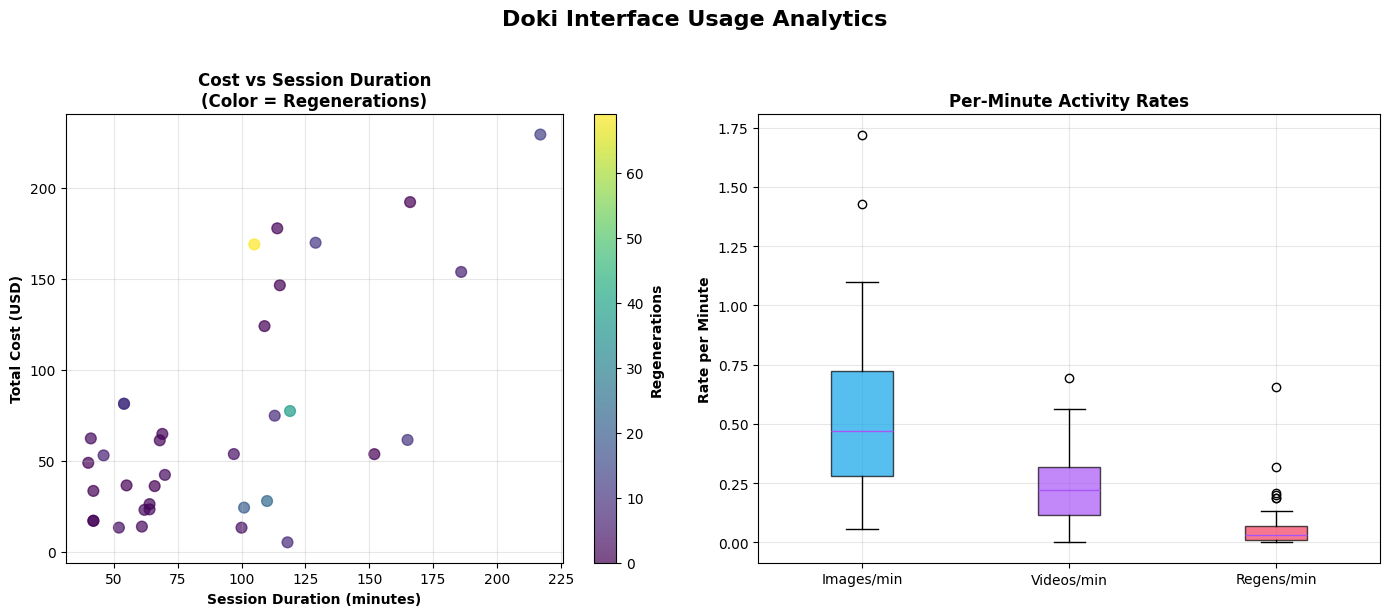
- Acknowledged per-asset costs (e.g., $3.20/clip,$0.04/image), but no modeling of total cost/latency for realistic projects or strategies for budget-aware generation, caching, or reuse.
- Open question: scheduling policies that minimize cost while preserving continuity (e.g., batched regeneration after global edits).
- Audio authoring depth
- Bracketed text instructions delegated to video models with audio; no support for track-level mixing, timing control, ducking, voiceover/TTS, lip-sync, or separate stems.
- Open question: integrating a timeline-free yet precise audio model for SFX, music, and dialogue with controllable timing and levels.
- Interoperability and round-trip workflows
- Export options (video, zip, JSON) exist, but there is no support for industry exchange formats (e.g., OTIO/EDL/AAF), nor demonstrations of round-trip edits with professional NLEs.
- Open question: mapping Doki’s structured text to layered timelines and vice versa for hybrid workflows.
- Hybrid and compositing workflows
- The system assumes fully generative assets; it does not address mixing live footage with generated content, compositing, overlays, or VFX passes.
- Open question: how to express multi-layer, multi-track constructs (e.g., lower thirds, captions, split screens) in a text-native paradigm.
- Multimodal and multilingual robustness
- Limited discussion of non-English authoring or multilingual audio/text alignment; unclear how models and agents handle scripts, labels, and audio prompts in diverse languages.
- Accessibility considerations (screen-reader compatibility, keyboard-only use, cognitive accessibility) are not evaluated.
- Collaboration beyond human–AI
- The paper emphasizes human–AI collaboration but not multi-user, real-time collaboration, permissions, commenting, or version control/merge conflict resolution among human collaborators.
- Agent trust, safety, and edit provenance
- Risks of undesired or excessive agent-driven edits are not addressed; lacking fine-grained diffing, track changes, or rollback mechanisms for trust and accountability.
- Open question: explaining agent decisions, surfacing change provenance, and providing human-in-the-loop guardrails.
- Failure handling and predictability
- Limited discussion of failure modes (e.g., model errors, mismatched outputs, latency spikes) or UI strategies for recovery, retries, or fallback generation paths.
- Privacy, security, and IP
- No treatment of data governance for uploaded images/prompts sent to third-party APIs, copyright/licensing of references, or compliance with content provenance (e.g., watermarking).
- Open question: built-in disclosure, watermarking, or C2PA-style provenance for downstream distribution.
- Evaluation of the representation itself
- The “document as video, paragraph as sequence, sentence as shot” mapping lacks empirical comparison to alternatives (e.g., beat sheets, shot lists, script formats) for usability and expressiveness.
- Open question: when does textual segmentation map poorly to cinematic structure (e.g., overlapping actions, interleaved dialogue), and what augmentations are needed?
- Context resolution and prompt rewriting
- The pipeline (reference resolution → structured prompt → rewritten prompt) is described but not ablated; it’s unclear which stage contributes most to quality and consistency.
- Open question: formalizing and evaluating the prompt-rewriting policies, especially under conflicting or sparse references.
- Control of durations and pacing
- Users can trim clips post hoc, but there is no declarative way to specify target shot durations, tempo, or pacing constraints in text that the models must satisfy.
- Model dependence and portability
- Tight coupling to specific commercial models (Veo 3, Imagen 4, Gemini) raises questions about portability to open-source or on-prem models and resilience to API changes.
- Large-document usability and discoverability
- As documents grow, discoverability of definitions, scoping rules, and slash commands may degrade; no study of learnability, error rates, or strategies like linting, autocomplete, and schema hints.
- Objective measures of narrative coherence and quality
- Claims of improved coherence are self-reported; no automated or expert-rated metrics (e.g., identity consistency, style adherence, narrative continuity) are provided.
- Support for dialogue-driven scenes and lip-sync
- While transcript-based editors were contrasted, Doki’s support for dialogue, speaker turns, and accurate lip-sync through text alone is not demonstrated.
- Scheduling and regeneration strategy
- A generation-order algorithm is referenced (Appendix) but not evaluated; open questions remain on optimal ordering, parallelization, and selective regeneration after edits without breaking continuity.
- Cross-project asset management
- No facilities for shared asset libraries, versioned characters/environments across projects, or packaging assets for reuse while preserving references and provenance.
- Ethical bias and content safety
- The system’s handling of biased outputs, NSFW content, or harmful prompts is not described; open question: integrating safety filters and bias mitigation without hindering creativity.
Practical Applications
Immediate Applications
Below are concrete, deployable use cases enabled by the paper’s text‑native representation (document→video, paragraph→sequence, sentence→shot), parameterized definitions (@mentions, #hashtags), inline/side‑bar agents, staged text→image→video pipeline, scoped/global styles, and inline previews. Findings from the diary study (faster idea‑to‑draft, improved coherence, clearer narrative structure) support practicality.
- Rapid storyboarding and previsualization (Media/Entertainment, Software)
- Use the document as an executable storyboard: write scenes, insert shots, apply #cinematography tags, generate inline previews, export clips/JSON for NLEs.
- Tools/workflows: “Doc→Previz” authoring; variant shots for alt takes; JSON handoff to Premiere/Resolve; inline agent tweaks pacing.
- Assumptions/dependencies: Short-clip model limits (e.g., 8s shots); model predictability; API costs/latency; rights to generated media.
- Social content and micro‑video production (Marketing, SMBs, Creators)
- Draft TikTok/Reels/YouTube Shorts directly in text; global “#all” brand style and @logo ensure consistency; A/B test with shot variants.
- Tools/workflows: Brand templates as #Style packs; one‑click resizing to series; inline audio prompts [SFX: whoosh].
- Assumptions/dependencies: Brand compliance checks; content safety filters; platform watermark/disclosure policies; audio/music licensing.
- Corporate comms, trainings, and internal explainers (Enterprise/HR/Comms)
- Convert policy drafts or SOPs into videos using scoped definitions for teams/regions; maintain consistency with global #Style and @BrandKit.
- Tools/workflows: “Policy→Video” doc templates; approval checkpoints via JSON export; clapper/paintbrush handles to selectively regenerate.
- Assumptions/dependencies: Governance, review workflows, legal approvals; secure model access and data residency; audit logs.
- Classroom “write‑a‑video” assignments and lecture teasers (Education)
- Students/teachers write paragraphs that compile into explainer videos; reinforces narrative structure; novices benefit (as diary study suggests).
- Tools/workflows: LMS plug‑in; rubric tied to structure (paragraphs→sequences); definition libraries for historical periods or lab apparatus.
- Assumptions/dependencies: Budget for generation; content appropriateness; accessibility (captions, transcripts, color contrast).
- UX/product demo and motion spec videos (Software/Product Design)
- Turn PRDs into walkthrough videos; @screens/@components as mentions; #CloseUp/#Pan to emphasize flows; export for stakeholder review.
- Tools/workflows: “Executable PRD” with inline shots; reference frames from design tools; JSON to motion teams.
- Assumptions/dependencies: UI fidelity via reference images; IP considerations for unreleased designs; version control.
- Game narrative and cutscene prototyping (Gaming)
- Author cutscenes text‑first; keep @characters consistent across shots; quickly explore mood via #Style variants.
- Tools/workflows: Narrative doc→animatic; inline agent to “heighten tension” or “slow pacing”; JSON synced to game engine timeline.
- Assumptions/dependencies: Short‑form limits; art direction match; legal for placeholder audio.
- Localization and transcreation (Localization/Globalization)
- Use headings to scope region‑specific #Styles and @Scenes; sidebar agent adapts story to locale with consistent assets.
- Tools/workflows: Multi‑locale sections per heading; variant batches per language; glossary bound to definitions.
- Assumptions/dependencies: Cultural review; translation quality; region‑specific rights and SFX/music usage.
- Journalism and newsletter explainers (Media)
- Draft short explainers; parameterize recurring @figures/@places; consistent tone via #Style; quick updates via propagation.
- Tools/workflows: Newsroom “explainer doc” templates; quick turn on policy changes; JSON provenance for fact‑checking.
- Assumptions/dependencies: Editorial standards; fact‑checking; AI‑use disclosure; minimize hallucination via structured prompts.
- Accessibility for creators with motor limitations (Accessibility)
- Minimal UI and text‑centric control lowers interaction burden; keyboard‑centric creation with inline agents.
- Tools/workflows: Screen‑reader friendly editing mode; preset slash commands; accessible export (captions).
- Assumptions/dependencies: Full WCAG support for editor; model audio captioning; device performance.
- Government/public service announcements (Policy/GovComms)
- Draft PSAs in plain text; apply agency brand #Style globally; variants for different demographics or languages.
- Tools/workflows: Template library per program; approval gates; JSON archive for records.
- Assumptions/dependencies: Procurement of compliant AI services; content review; accessibility and disclosure mandates.
- Research and teaching in HCI/Media studies (Academia)
- Study human‑AI collaboration, parameterization for coherence, and dynamic document workflows using Doki‑like systems.
- Tools/workflows: Classroom labs; user studies; export datasets of doc→video provenance.
- Assumptions/dependencies: Model access for experiments; IRB considerations for participant content.
Long‑Term Applications
These rely on advances in model predictability, temporal expressivity, longer‑context conditioning, integrations, governance, and standardization.
- Professional‑grade, end‑to‑end generative editing (Media/Entertainment)
- Precise timeline controls, keyframing, and choreography integrated into document semantics; fine‑grained temporal edits beyond current limits.
- Tools/products: Hybrid NLE+document editors; “cinematography compiler” with constraints.
- Dependencies: Robust long‑range temporal models; deterministic controls; cost and latency reductions.
- Interoperable “video‑as‑document” standard (Software/Standards/Policy)
- A shared spec (like HTML/CSS) for structured video authoring with @assets and #styles; cross‑tool portability and model‑agnostic execution.
- Tools/products: Open schema, validators, linters, converters; industry consortium adoption.
- Dependencies: Community consensus; vendor buy‑in; mapping across model APIs.
- Personalization at scale in education (EdTech)
- Per‑learner explainer videos from the same document with scoped definitions for reading level, pace, and cultural context.
- Tools/products: LMS integrations; agent‑driven adaptation; assessment‑aware revisions.
- Dependencies: Data privacy (FERPA/GDPR); pedagogical validation; bias mitigation.
- Catalog‑to‑video automation for commerce (eCommerce/Advertising)
- Auto‑populate @Product, @UseCase, #BrandStyle from PIM/DAM; mass‑produce localized product videos with variants.
- Tools/products: “SKU→Video” pipelines; brand asset knowledge bases; API‑driven batch generation.
- Dependencies: Rights management; consistent character/scene continuity; QA of factual attributes.
- Newsroom pipelines with safe, localized variants (Media/Policy)
- Structured doc as provenance; automated style and language variants; embedded compliance checks via agents.
- Tools/products: Editorial guardrails, C2PA provenance; batch localization runners.
- Dependencies: Robust guardrails; misinformation risks; editorial oversight.
- Patient education and clinical explainers (Healthcare)
- Clinician‑directed, parameterized videos for procedures/aftercare; easy updates via definition propagation.
- Tools/products: Hospital‑hosted generation; medical review workflows; on‑prem models.
- Dependencies: Regulatory compliance (HIPAA, MDR); medical accuracy review; liability.
- Finance and regulatory training videos (Finance/Compliance)
- Convert policies/regulations into consistent training content; track lineage from doc to frames for audits.
- Tools/products: Compliance review bots; archival provenance; role‑based variants.
- Dependencies: Legal sign‑off; secure infrastructure; precise version control.
- Safety training in energy/utilities and manufacturing (Energy/Industrial)
- Procedure videos with parameterized #SafetyStyles and @Equipment; site‑specific scoping via headings.
- Tools/products: Digital SOPs→videos; hazard‑aware content checks.
- Dependencies: Domain validation; accurate depictions; union/worker council input.
- Interactive and adaptive video experiences (Software/EdTech/Advertising)
- Branching/conditional narratives encoded via document structure; runtime personalization driven by parameters.
- Tools/products: “Executable narrative” runtimes; stateful players mapping parameters to shot selection.
- Dependencies: Model latency for on‑the‑fly generation or large variant banks; content caching.
- Multi‑agent “co‑director” systems (Software/AI)
- Specialized agents for pacing, cinematography, continuity, and localization collaborating over the same document.
- Tools/products: Agent orchestration frameworks; conflict resolution policies; explainability UIs.
- Dependencies: Reliable tool‑use, function‑calling, and safety; observable agent plans.
- Provenance, auditing, and disclosure frameworks (Policy/Trust & Safety)
- Automatic lineage from text edits to frames; standardized disclosures; watermarks; auditor‑friendly JSON.
- Tools/products: C2PA binding for document→asset; audit dashboards; diff‑to‑frame mapping.
- Dependencies: Policy mandates; cross‑platform recognition; watermark robustness.
- Edge/on‑device authoring and playback (Software/Hardware)
- Low‑latency, private generation on mobile or workstation; offline drafting and selective cloud rendering.
- Tools/products: Distilled video models; split compute pipelines; federated learning.
- Dependencies: Efficient models; device capabilities; energy constraints.
- Marketplaces for styles and characters (Creators/Platforms)
- Licensed #Style packs and @Character libraries as reusable definitions; monetization for artists.
- Tools/products: Asset stores; licensing enforcement; variant management.
- Dependencies: IP frameworks; remuneration models; authenticity verification.
- Organization‑wide definition libraries (“brand bible as code”) (Enterprise)
- Shared, versioned libraries of @Assets and #BrandStyles across teams and campaigns.
- Tools/products: Git‑like repos for definitions; CI linters for narrative coherence; policy checks.
- Dependencies: Change management; governance; integration with DAM and identity systems.
Notes on assumptions and dependencies across applications
- Model capabilities: Temporal consistency, predictability, length, and audio sync remain limiting; costs and latency affect scale.
- Legal/ethical: Disclosure of AI use, rights to generated content, cultural sensitivity, bias mitigation, and domain accuracy (health/finance).
- Security/compliance: Data residency, access controls, audit trails for enterprise/government.
- Interoperability: Sustainable APIs and portable schemas (JSON export today; standards later).
- Human oversight: Editorial/subject‑matter review remains essential, especially in regulated and safety‑critical domains.
Glossary
- Additive workflows: An approach where assets are synthesized (e.g., from text) rather than edited from preexisting footage. "Some systems explore additive workflows where the tool synthesizes assets from text"
- Agentic revision: An AI-driven, document-wide edit initiated by a user prompt where the agent autonomously applies coherent changes. "for an agentic revision."
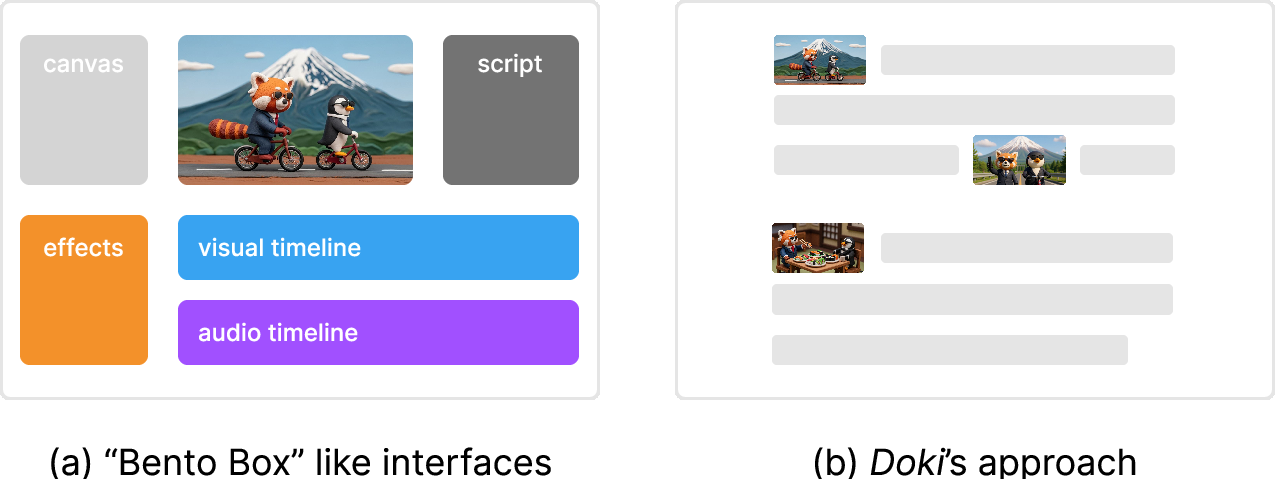
- Bento box interface: A multi-pane UI paradigm that distributes authoring across separate synchronized views. "what we refer to as a ``bento box'' interface"
- Cinematography: The techniques and conventions of camera work, shot composition, and movement used to craft visual storytelling. "Doki also provides a built-in cinematography library"
- Cognitive load: The mental effort required to process and manage information or interfaces. "increasing cognitive load"
- Compositional structures: Multiple, synchronized representational frames (e.g., canvas, script, storyboard, timeline) used together for creation. "multiple compositional structures"
- Conditioning: In generative models, supplying reference inputs (e.g., images) to guide and constrain outputs. "Conditioning on a few reference images"
- Context awareness: A model’s ability to maintain and use prior information across steps or shots. "models lacked context awareness"
- Context handling: System mechanisms for managing and passing relevant references and state throughout an authored document. "context handling"
- Context-switching: Frequent shifting between tools or views that can disrupt workflow and attention. "constant context-switching"
- Cross-shot consistency: Maintaining coherent characters, styles, and elements across multiple shots in a sequence. "cross-shot consistency"
- Diary study: A longitudinal method where participants log activities and reflections over time during real use. "diary study"
- Dynamic documents: Editable documents that can be progressively structured and executed, blending narrative with computation. "dynamic documents"
- Executable script: Text that doubles as a machine-executable set of instructions for production. "an executable script for video production"
- Heading-level scoping: Applying definitions or styles to a bounded section of a document based on its heading hierarchy. "heading-level scoping"
- Human-AI collaboration: Cooperative creation where humans and AI agents coordinate roles in the authoring process. "human-AI collaboration"
- In-the-wild evaluation: Studying a system in naturalistic settings with real users and workflows. "An in-the-wild evaluation of Doki."
- Inline Agent: An in-editor assistant that performs immediate, context-aware edits on selected text. "Inline Agent"
- Micro-temporal control: Fine-grained manipulation of timing and temporal details within or across shots. "micro-temporal control"
- Non-linear editors: Video editors that allow arbitrary arrangement and editing of media on timelines rather than fixed sequences. "non-linear editors"
- Parameterization: Representing elements with parameters to preserve and manage consistency across a project. "improved coherence through parameterization"
- Parametrized definitions: Reusable, parameter-driven constructs (e.g., characters, styles) that propagate consistently across a document. "Parametrized Definitions"
- Prompt engineering: Crafting and refining prompts to elicit specific outputs from generative models. "prompt engineering"
- Propagation: Automatic updating of all references when a definition changes, ensuring consistency. "with propagation and context handling"
- Reference frame: A specific image frame stored and reused to maintain visual consistency. "a reference frame"
- Reference images: Images supplied to generative models to guide generation and maintain consistency. "using reference images to guide generation"
- Reference resolution module: A component that resolves mentions/hashtags and gathers relevant assets to build a structured prompt. "reference resolution module"
- Rewritten prompt: A refined version of the user or structured prompt optimized for generation quality. "the rewritten prompt"
- Scoped definitions: Definitions that apply only within a specified document section rather than globally. "global and scoped definitions"
- Shot generation pipeline: The staged process that converts text into an image and then into a video shot. "Doki's shot generation pipeline"
- Sidebar Agent: A turn-based conversational assistant that can perform larger or multi-step document edits. "Sidebar Agent"
- Slash menu: A command palette invoked by typing “/” to insert shots, definitions, or audio. "slash menu"
- Split-attention costs: Cognitive penalties incurred when reconciling multiple views or representations at once. "split-attention costs"
- Staged pipeline: A sequential generation flow (e.g., text → image → video) that aids control and reduces cost. "This staged pipeline offers authors control"
- Storyboarding: Planning and visualizing a sequence of shots to outline narrative flow. "rapid ideation and storyboarding"
- Structured prompt: A prompt enriched with resolved references and context for more controlled generation. "the structured prompt"
- Structured text representation: A canonical text form that unifies scripts, prompts, visuals, audio, and timelines. "structured text representation"
- Subtractive workflows: Editing processes that start from existing footage and remove or rearrange material. "subtractive workflows"
- System Usability Scale: A standardized questionnaire producing a numeric score of perceived usability. "System Usability Scale"
- Temporal expressivity: The capacity of tools or representations to specify nuanced temporal dynamics. "temporal expressivity"
- Text-native interface: An interface where text is the primary medium for creating and controlling generative content. "text-native interface"
- Transcript-based editing: Editing video by manipulating its aligned text transcript so changes reflect on the timeline. "Transcript-based editing."
- Turn-based conversational assistant: An AI assistant that interacts via discrete conversational turns to carry out tasks. "turn-based conversational assistant"
Collections
Sign up for free to add this paper to one or more collections.