A Personalized and Adaptable User Interface for a Speech and Cursor Brain-Computer Interface
Abstract: Communication and computer interaction are important for autonomy in modern life. Unfortunately, these capabilities can be limited or inaccessible for the millions of people living with paralysis. While implantable brain-computer interfaces (BCIs) show promise for restoring these capabilities, little has been explored on designing BCI user interfaces (UIs) for sustained daily use. Here, we present a personalized UI for an intracortical BCI system that enables users with severe paralysis to communicate and interact with their computers independently. Through a 22-month longitudinal deployment with one participant, we used iterative co-design to develop a system for everyday at-home use and documented how it evolved to meet changing needs. Our findings highlight how personalization and adaptability enabled independence in daily life and provide design implications for developing future BCI assistive technologies.
Paper Prompts
Sign up for free to create and run prompts on this paper using GPT-5.
Top Community Prompts
Explain it Like I'm 14
What is this paper about?
This paper describes a new kind of computer interface made for people who can’t move or speak easily because of paralysis. It works with an implanted brain-computer interface (BCI), which reads brain signals and turns them into actions on a computer—like speaking typed words and moving a cursor. The big idea is that the interface is personalized and can adapt over time, so the user can communicate and use a computer more independently in daily life.
What questions were the researchers trying to answer?
They focused on three simple questions:
- How can a person with severe paralysis use a speech-and-cursor BCI in everyday life for a long time?
- What problems come up when using the system at home, and how can improving the design step-by-step fix them?
- What lessons can help designers build better BCI tools for more people in the future?
How did they do the study, in everyday terms?
Think of this like building a custom tool with the person who will use it every day:
- The team worked with one man (called “T15”) who has ALS, which causes paralysis and speech problems. He had tiny sensors implanted in the part of the brain that controls speech. These sensors send brain signals to a computer.
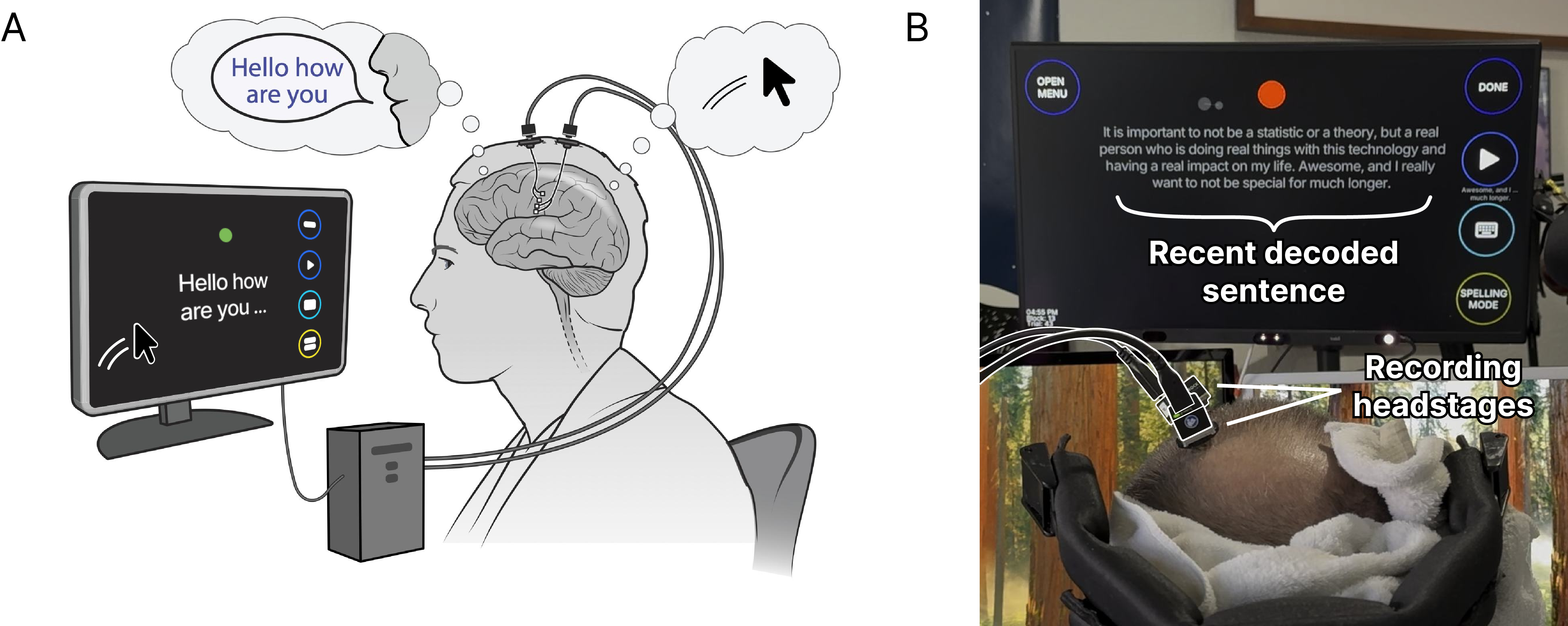
- The computer “decodes” those brain signals—like translating thoughts of talking or moving into words on a screen and mouse movements.
- The researchers and T15 co-designed the interface over 22 months. That means they talked often, tried new features, kept what worked, and changed what didn’t. This happened at home, in real life, not just in a lab.
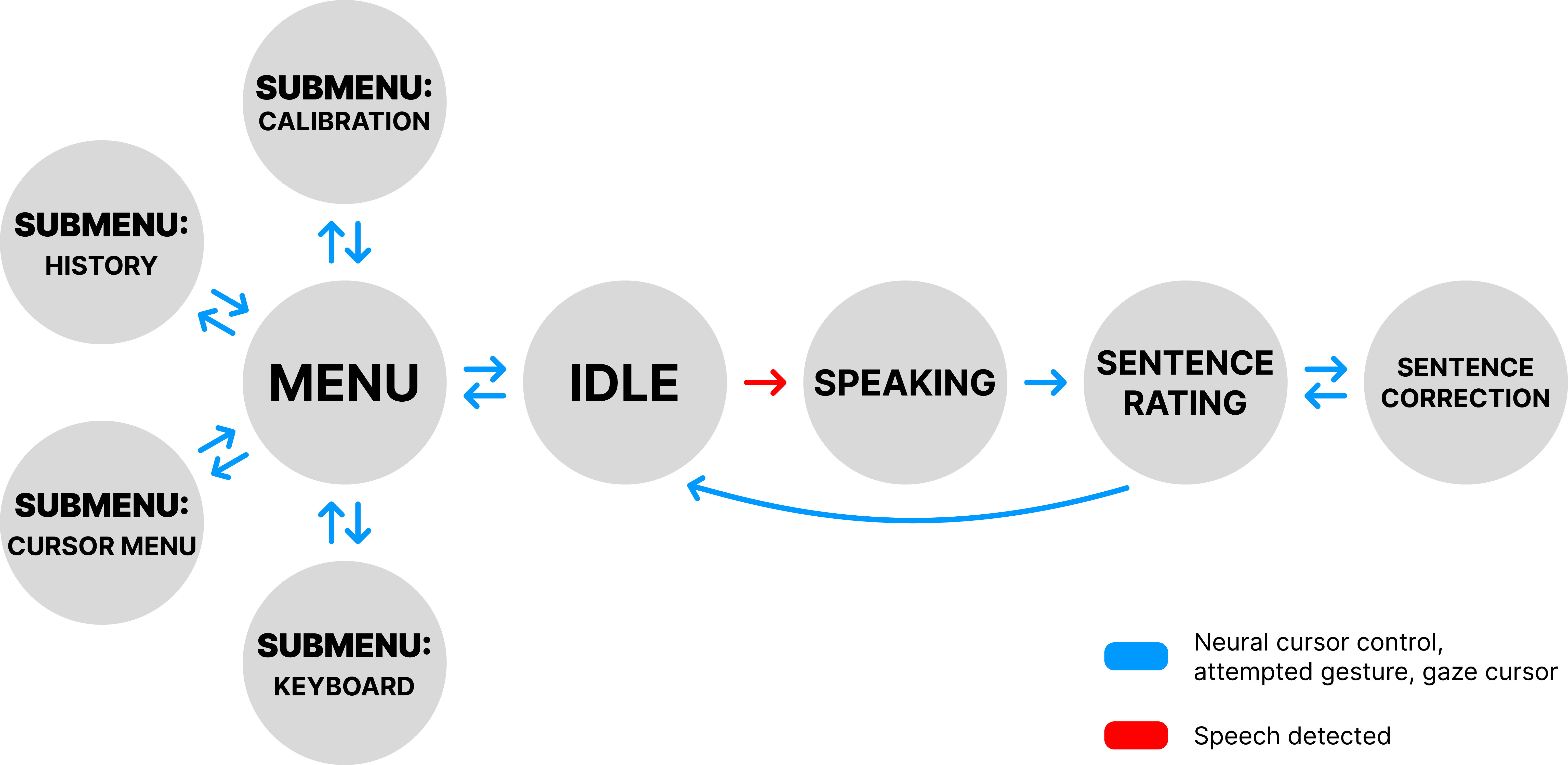
- The interface had different “modes” or “screens,” like:
- Idle: shows the last sentence and quick actions
- Speaking: shows words appearing in real time as T15 tries to speak
- Correction: lets T15 fix mistakes easily without repeating the whole sentence
- Menus: for calibration (tuning), privacy, history, and switching control modes
- Control options were flexible. T15 could:
- “Speak” via brain signals that the system turns into text
- Move a cursor using brain signals (a “neural cursor”)—like moving a mouse by thinking
- Use eye tracking to point and click by looking at things on the screen
- Use simple brain “gestures” (like an intentional “click” thought)
- The system could also type the decoded words into any app on T15’s personal computer and control the mouse there.
- Behind the scenes, the app had a “logic brain” (decides what mode it’s in) and a “visual face” (what you see on the screen). Separating these made it easier to add features and run the interface on other devices like an iPad or a Mac.
What did they find, and why does it matter?
Over 22 months, T15 used the system at home for more than 4,000 hours—sometimes up to 19 hours a day. He used it to talk with family, do his job, write emails, browse the web, and more. Here are the key takeaways and why they’re important:
- Personalization led to independence:
- Once a caregiver set up the hardware, T15 could do almost everything himself using the interface. He reported high independence during use.
- He even kept full-time employment and chatted with his child using the system.
- Multiple ways to control the computer made it reliable:
- Eye tracking worked great for the BCI’s big, easy-to-press buttons.
- The neural cursor worked better on his personal computer’s smaller, standard buttons.
- Being able to switch methods meant the system still worked in different lighting, positions, or when one method was tiring or less accurate.
- Smart error correction was essential:
- Speech decoding isn’t perfect, so easy fixing was crucial.
- The team built a powerful correction screen: T15 could swap a single word, delete, insert, refresh suggestions, or type a word with an on-screen keyboard.
- Most corrected sentences (91% of them) were fixed using word-by-word editing. This took longer than picking a full sentence suggestion, but it made the final result more accurate—especially for longer sentences.
- The interface grew with the user’s needs:
- Features like privacy mode, sentence history, calibration anytime, and a “magnetized” gaze cursor (that helps snap to buttons) made daily life smoother.
- The same core system ran on other devices (like iPad and Mac), showing it can be adapted for different setups.
- Consistently positive feedback:
- Regular surveys showed strong satisfaction, ease of use during daily tasks, and a clear sense that T15’s feedback shaped the design.
What does this mean for the future?
This work shows that brain-computer technology isn’t just about accurate decoding—it’s about designing the whole experience around the person using it. A few big implications:
- Make it personal and flexible: People’s abilities and needs change over time, especially with conditions like ALS. Interfaces should offer multiple control options and easy calibration so users stay independent.
- Prioritize easy corrections: Let users fix just the parts that are wrong. That saves time and frustration.
- Build systems that can adapt and spread: Separating the “logic brain” from the “visual face” makes it easier to move the interface to new devices and to tailor it for different users.
- Real-life testing matters: Long-term, at-home use with continuous feedback reveals what truly helps, beyond lab tests.
One limitation: this was tested deeply with one person who had implanted sensors, which requires surgery and is currently available mostly in clinical trials. Still, the design lessons are valuable and can guide future BCIs and other assistive technologies as they become more available.
In short, the study shows that with the right, user-centered design, brain-computer interfaces can help people with paralysis communicate and use computers independently in everyday life.
Knowledge Gaps
Knowledge gaps, limitations, and open questions
Below is a concise, actionable list of what remains missing, uncertain, or unexplored in the paper, intended to guide future research and development.
- Generalizability beyond a single participant: validate the UI and design implications across a larger, diverse cohort (ALS with varying dysarthria/anarthria, SCI, stroke, mixed etiologies), including different ages, cognitive profiles, and home environments.
- Comparative benchmarking: conduct controlled studies comparing this BCI UI against state-of-the-art AAC systems (eye gaze, head-mouse, EEG BCI) on speed, accuracy, throughput (bits/s), error rates, correction efficiency, fatigue, satisfaction, and task completion times.
- Setup independence: develop and evaluate procedures and tooling that enable users to self-initiate and complete system setup (including donning equipment, calibration, safety checks) without caregiver assistance; quantify reductions in setup time and errors.
- Context-aware modality switching: design and test automatic switching policies (e.g., based on lighting, line-of-sight, drift, pointer error, user fatigue) between gaze, neural cursor, and gestures; measure benefits vs. user control costs.
- Performance-adaptive UI: implement and evaluate real-time adaptation of UI parameters (button size, magnetization strength, timeouts, layout density) based on measured performance and error/confidence signals from decoders.
- Optimization of correction workflows: formalize heuristics or models to recommend sentence-level vs. word-level corrections dynamically; A/B test designs to minimize total correction time while maximizing final accuracy.
- Error taxonomy–driven UI: analyze decoder error types (substitutions, insertions, deletions, homophones, named entities) and use this to tailor correction suggestions, UI affordances, and LLM re-ranking strategies.
- Longitudinal robustness and drift handling: quantify performance drift in speech and cursor decoders over disease progression and daily variability; evaluate automatic, passive, or opportunistic recalibration schemes that minimize user burden.
- Calibration burden and scheduling: report frequency, duration, and cognitive effort of speech/cursor/gaze calibrations; design and test methods for reducing calibration frequency (e.g., continual learning, background calibration).
- Multilingual and dialectal coverage: extend and evaluate the language pipeline across multiple languages, dialects, code-switching, and specialized vocabularies (technical jargon, proper nouns); quantify personalization gains and error profiles.
- LLM rescoring risks and bias: assess the influence of rescoring (OPT 6.7b, ModernBERT) on accuracy, bias, hallucinations, and domain drift; compare alternative models and on-device vs. edge compute trade-offs.
- Confidence-aware auto-correction: explore automatic correction proposals triggered by low decoder confidence and evaluate user acceptance, error cost, and trust calibration mechanisms.
- Ergonomics of prolonged use: measure musculoskeletal strain, visual fatigue, and eye strain for multi-hour daily usage; derive guidelines for monitor placement, font sizes, color contrast, dwell times, and lighting conditions.
- Quantifying caregiver workload: systematically measure caregiver time, training needs, and burden for setup and maintenance; test remote support tools (telemetry, guided setup flows) to reduce dependence.
- Safety and fail-safe mechanisms: characterize and mitigate failure modes (false speech triggers, unintended clicks, loss of network/decoder malfunction); implement and test safe states, kill-switches, and recovery workflows.
- Privacy and security: move beyond “privacy mode” to a full threat model, data retention policies, encryption at rest/in transit, access controls, audit logs, and regulatory compliance (e.g., HIPAA) for at-home deployments.
- Interoperability and resilience: evaluate stability across OS updates and common apps, latency/jitter on commodity home networks, and performance under connectivity loss; define robust update/rollback and recovery strategies.
- Cross-platform UI parity: formally evaluate iPad/macOS implementations for performance, usability, and feature parity with the primary UI; identify platform-specific optimizations and constraints (e.g., Bluetooth latency).
- Resource and cost constraints: document compute, GPU, power, and thermal requirements for home use; investigate low-cost, portable hardware configurations without sacrificing performance.
- Inclusion of non-speaking users: assess UI usability for fully anarthric users and integrate alternative decoders (e.g., handwriting, phoneme-level spellers, EMG) within the same FSM architecture; measure outcomes.
- Ethical and regulatory considerations: report adverse events, infection risks (percutaneous leads), home monitoring protocols, and how UI design supports alerts, compliance workflows, and incident documentation.
- Standardized usability metrics: incorporate validated instruments (e.g., SUS, QUEST, NASA-TLX, ISO 9241), Fitts’ law tasks for cursor throughput, and publish protocols to enable cross-study comparison.
- Magnetization parameterization: quantify the impact of button magnetization on dwell selection speed, error rates, and unintended selection; derive optimal parameters and user-adjustable settings.
- Decision rules for modality partitioning: define and validate threshold-based policies for when gaze is sufficient vs. when neural cursor is necessary on mainstream UIs; compare pointer error distributions and throughput.
- Multi-modal fusion: explore simultaneous fusion of gaze and neural cursor (e.g., gaze for coarse target selection, neural cursor for fine-grained control) and evaluate gains over single-modality use.
- Environmental robustness: test performance across varied lighting (outdoor/indoor), glare, screen distances, and posture changes; derive adaptive strategies for interface contrast, pointer gain, and magnetization.
- Learning curves and training curricula: measure time-to-proficiency, error reduction over sessions, and efficacy of adaptive tutorials and on-UI guidance; personalize training paths.
- Generalizable co-design artifacts: systematize the co-design process (personas, requirement templates, iteration logs) and test its replicability with multiple users/sites; quantify development time and iteration effectiveness.
- Remote maintenance and diagnostics: design secure remote telemetry, health dashboards, and user-facing diagnostics to support at-home reliability; evaluate user comprehension and actionability.
- Integration with mainstream accessibility frameworks: study interoperability with OS accessibility APIs, text editors, and communication platforms; create guidelines for accessible app design compatible with BCI control.
- Scaling correction to longer texts: investigate workflows for paragraph/document-level editing (batch corrections, macros, grammar tools) and integration with word processors; evaluate gains in productivity.
- Dataset and tooling availability: release anonymized UI interaction logs, correction outcomes, and benchmark tasks to catalyze reproducible research while ensuring privacy; provide open-source UI components/templates.
- Commodity pathway: explore pathways to non-surgical or minimally invasive alternatives and how UI designs should adapt; assess feature subsets viable for consumer-grade BCIs.
Practical Applications
Immediate Applications
The following applications can be deployed now using the paper’s UI design patterns, workflows, and tooling, especially within AAC and BCI research/clinical environments. They are broadly applicable even beyond surgically implanted BCIs when adapted to existing input modalities (eye tracking, head mouse, switches).
- Personalized correction workflows for speech interfaces
- Sector: healthcare (AAC), software
- Application: integrate sentence- and word-level correction with candidate suggestions, add/delete words, refresh alternatives, and an on-screen keyboard into existing speech recognition or gaze-typing AACs to boost accuracy for long-form communication (reports, email).
- Tools/products: UI modules for “sentence rating,” “candidate sentences,” “word-level corrections,” and inline on-screen keyboards; local LLM rescoring where feasible.
- Assumptions/dependencies: availability of LLMs (e.g., ModernBERT-class) and resource-constrained local inference; existing selection input (gaze/head mouse/switch); user training for correction flow.
- Magnetized gaze targets and large circular controls for dwell selection
- Sector: software/HCI, healthcare (AAC), consumer electronics
- Application: update UI components to “magnetize” buttons (gaze pointer snaps to target center within proximity) and increase target size to reduce errors and fatigue for eye-tracking users.
- Tools/products: accessibility UI kits and design guidelines for magnetized dwell controls; OS accessibility updates; kiosk/smart TV overlays.
- Assumptions/dependencies: eye-tracking hardware; tunable magnetization parameters; consistent lighting/line-of-sight.
- Multimodal redundancy in accessibility interfaces (gaze + head mouse/switch/gesture)
- Sector: healthcare (AAC), software
- Application: offer easy switching between gaze, head mouse, switch scanning, or decoded gestures within the same UI to handle day-to-day variability or environmental changes.
- Tools/products: input modality toggles and status indicators; conflict management; per-modality calibration flows.
- Assumptions/dependencies: supported alternative input devices; calibration persistence and recovery.
- Self-serve calibration menus for sustained independent use
- Sector: healthcare (AAC), software
- Application: provide user-initiated calibration for all control modalities (gaze, cursor, clicks, speech) from a central menu to reduce caregiver dependence.
- Tools/products: calibration tasks, visual feedback modules, per-modality profiles and saving.
- Assumptions/dependencies: reliable calibration procedures; storage of profiles; UI affordances understandable by end users.
- Privacy mode and sentence history for transparency and control
- Sector: software, healthcare
- Application: add explicit privacy mode (suspend logging) and accessible sentence history (last N utterances) to AAC and speech UIs for auditability and user trust.
- Tools/products: logging controls; audit UIs; configurable history length.
- Assumptions/dependencies: compliant data handling; clear UX affordances for privacy and history.
- Desktop bridge to control the personal computer (text pasting and cursor)
- Sector: software, productivity
- Application: a companion desktop app to paste decoded text into any app and programmatically move/click the cursor, enabling everyday tasks (email, browsing, messaging).
- Tools/products: OS-level accessibility APIs (Windows/Mac/Linux), secure IPC; hotkeys; per-app profiles.
- Assumptions/dependencies: appropriate OS permissions; low-latency control; user training for workflows.
- Co-design workflow for assistive technology teams
- Sector: academia, industry R&D, clinical rehab
- Application: adopt longitudinal participatory co-design (regular check-ins, rapid prototyping, in-home deployment) to surface real needs and refine features for sustained use.
- Tools/products: co-design playbooks; survey instruments used in the paper; schedule templates.
- Assumptions/dependencies: committed participants and caregivers; IRB/ethics processes where clinical; resourcing for iterative development.
- Modular FSM-based UI architecture decoupling logic and graphics
- Sector: academia (BCI research), software
- Application: use a finite-state machine logic node and swappable graphics node to accelerate prototyping, testing, and cross-platform UI deployment.
- Tools/products: Python UI templates (e.g., pyglet), message-passing nodes (BRAND-like), state diagrams; test harnesses for latency/jitter.
- Assumptions/dependencies: distributed node framework; internal networking; developer familiarity.
- Immediate daily-life empowerment for current AAC/BCI users
- Sector: healthcare (AAC), daily life
- Application: deploy improved UI features in existing AAC setups to support independent communication, work-from-home tasks, social interactions, and leisure (web/video).
- Tools/products: integrated correction UI, multimodal control, calibration menus, desktop bridge.
- Assumptions/dependencies: compatible input devices; caregiver setup for hardware mounting; user training.
- Cross-platform companion interfaces (e.g., iPad/macOS clients)
- Sector: software
- Application: lightweight clients that mirror the core UI states over a local network for flexible viewing/control (bedroom/office/bedside).
- Tools/products: networked UI clients; Bluetooth cursor/keyboard support on tablets; secure LAN configuration.
- Assumptions/dependencies: reliable local networking; synchronized state management; platform-specific accessibility APIs.
Long-Term Applications
The following applications require further research, scaling, clinical validation, productization, or policy development before broad deployment.
- Commercial intracortical speech-and-cursor BCI assistive system with personalized UI
- Sector: healthcare, medical devices
- Application: end-to-end, at-home BCI therapy enabling fast communication (up to 60 wpm) and full computer access with adaptable UI.
- Tools/products: implanted microelectrode arrays, surgical workflows, home-use hardware/software kits, training programs.
- Assumptions/dependencies: regulatory approval (FDA/EMA), surgical capacity, long-term reliability and infection control, reimbursement pathways.
- Context-aware, automatic modality switching and adaptation
- Sector: software/AI, OS accessibility
- Application: systems that sense lighting, posture, fatigue, and performance to proactively switch between gaze/cursor/switch and adjust UI targets and dwell timings.
- Tools/products: performance monitoring, environment sensing, adaptive policies; “Ability-based” auto-tuning engines.
- Assumptions/dependencies: sensing hardware, robust models; user consent; safety constraints.
- Performance-driven personalization and on-device learning
- Sector: AI/software
- Application: dynamic adaptation of correction suggestions, target magnetization, and calibration parameters based on longitudinal user performance to reduce effort and errors.
- Tools/products: local incremental learning; personalization pipelines; model governance.
- Assumptions/dependencies: sufficient on-device compute; private datasets; transparent controls.
- Reduced caregiver reliance via simplified/automated setup
- Sector: hardware/robotics
- Application: wireless/fully implanted systems with automated docking, self-checks, and guided setup wizards to minimize caregiver time.
- Tools/products: wireless headstages, auto-alignment mounts, setup bots, AR guidance.
- Assumptions/dependencies: hardware advances; safety validation; human factors testing.
- Workplace accommodation frameworks for BCI-enabled employees
- Sector: policy, HR/compliance
- Application: guidelines on privacy, accessibility, and reasonable accommodations for implanted BCI users (e.g., text entry speed, meeting participation, secure device use).
- Tools/products: policy templates; employer training; IT security protocols for assistive apps.
- Assumptions/dependencies: legal clarity (ADA/EEOC), union/insurer buy-in; enterprise IT integration.
- Insurance reimbursement and coding for implanted BCI assistive tech
- Sector: health policy, payers
- Application: coverage decisions, CPT/HCPCS codes for implantation, maintenance, and home-use support; outcomes-based payment models.
- Tools/products: cost-effectiveness studies; patient-reported outcomes; registries.
- Assumptions/dependencies: clinical evidence at scale; stakeholder consensus.
- Clinical and educational curricula for BCI/AAC teams
- Sector: healthcare education
- Application: standardized training for clinicians, speech-language pathologists, and engineers in co-design, calibration, multimodal redundancy, and long-term support.
- Tools/products: certification modules; simulation labs; practice guidelines.
- Assumptions/dependencies: accrediting bodies; multi-institution collaboration.
- Broader adoption in non-implantable BCIs and mainstream accessibility software
- Sector: consumer AAC, research
- Application: port the paper’s UI innovations (correction workflows, magnetization, FSM) to EEG-based BCIs and mainstream accessibility apps for wider reach.
- Tools/products: UI libraries; open-source samples; vendor integrations.
- Assumptions/dependencies: mapping to lower SNR inputs; user testing across populations.
- Smart home and IoT control via adaptable BCI UI
- Sector: IoT, smart home
- Application: controlling lights, thermostats, door locks, and media systems using the multimodal UI and desktop bridge paradigms.
- Tools/products: IoT hubs; accessibility scenes; device-specific APIs.
- Assumptions/dependencies: secure integrations; latency constraints; safety features.
- Open standards for node-based BCI UI interoperability
- Sector: academia/industry standards
- Application: standardize message-passing and state definitions between decoders and UIs to enable plug-and-play components across vendors.
- Tools/products: specs, open-source reference implementations, conformance tests.
- Assumptions/dependencies: consortium leadership; IP considerations; versioning.
- EHR integration for patient self-report and communication
- Sector: healthcare IT
- Application: allow BCI/AAC users to author notes, complete PROMs, and message care teams directly via secure channels using the UI workflow.
- Tools/products: FHIR integrations; audit trails; consent UX; accessibility middleware.
- Assumptions/dependencies: health system IT buy-in; privacy and security compliance.
- Safety-certified control of mobility devices and robotics
- Sector: robotics/mobility
- Application: extend neural cursor and multimodal UI to powered wheelchairs or robotic aids with layered safety (supervised autonomy, geofencing).
- Tools/products: certified control stack; redundancy; risk management frameworks.
- Assumptions/dependencies: regulatory approvals; extensive safety testing; liability coverage.
Notes on Key Assumptions and Dependencies Across Applications
- Surgical implants (intracortical arrays) are currently limited to clinical trials; many immediate applications target non-implantable AACs by reusing the UI design patterns.
- Reliable input hardware (eye trackers/head mice/switches) and stable environmental conditions (lighting, positioning) are required for optimal performance.
- Local LLM pipelines improve privacy but depend on device compute and curated corpora; remote/cloud alternatives introduce privacy and latency trade-offs.
- Caregiver support is still often needed for hardware setup; UI features can maximize independence once the system is running.
- Networking and OS-level accessibility APIs are critical for cross-platform companion apps and desktop bridges; enterprise environments may require added security review.
Glossary
- Ability-based design principles: Human–computer interaction guidelines that prioritize adapting systems to users’ abilities rather than requiring users to adapt. "Wobbrock et al.âs ability-based design principles"
- Amyotrophic lateral sclerosis (ALS): A progressive neurodegenerative disease affecting motor neurons, often leading to paralysis and speech impairments. "late-stage amyotrophic lateral sclerosis (ALS)"
- Augmentative and alternative communication (AAC): Methods and devices that supplement or replace speech/writing for individuals with communication impairments. "alternative and augmentative communication (AAC) devices"
- Brain-computer interface (BCI): Systems that decode brain activity to control external devices, bypassing impaired pathways. "brain-computer interfaces (BCIs) may be a viable AAC option"
- BrainGate2 clinical trial: A clinical research program evaluating implanted BCI systems in humans. "enrolled in the BrainGate2 clinical trial (ClinicalTrials.gov number, NCT00912041)"
- BRAND software platform: A distributed software framework enabling real-time BCI control via multiple processes ("nodes"). "the BRAND software platform"
- Click decoder: A classifier that maps neural signals to probabilities of click vs. no-click actions. "a cursor decoder and a click decoder"
- Co-design: A participatory design approach where end-users collaborate throughout iterative development. "we used iterative co-design to develop a system"
- Cursor decoder: A model that translates neural signals into cursor movement commands (e.g., velocities). "The cursor decoder is a linear model that maps neural signals to 2-D cursor velocities."
- Dysarthria: A motor speech disorder resulting in impaired articulation and intelligibility. "severe dysarthria due to ALS"
- Electroencephalography (EEG): Noninvasive recording of brain activity from scalp electrodes, used in many BCIs. "electroencephalography (EEG)"
- Eye gaze tracking: Technology that estimates where a person is looking to control an interface. "Eye gaze tracking provides an alternative means of interacting with the systemâs interface."
- Eye tracker button magnetization: A UI technique that pulls the gaze cursor toward button centers to ease dwell selection. "Eye tracker button magnetization"
- Gyroscopic head mouse: A hands-free pointing device using head-mounted gyroscopes to move the cursor. "gyroscopic head mice or eye tracker based devices"
- Intracortical microelectrode arrays: Implanted grids of electrodes that record neural activity from within the cortex. "intracortical microelectrode arrays"
- Jitter: Variability in timing/latency in real-time systems that can affect performance. "measuring system latency and jitter"
- LLM (OPT 6.7b): A high-capacity neural LLM used to improve decoding outputs. "a LLM (OPT 6.7b) for additional rescoring"
- Likert-scale: A survey response format (e.g., 1–5) used to measure attitudes or perceptions. "Likert-scale questions"
- ModernBERT: A BERT-derived LLM used to generate word-level correction suggestions. "generated by ModernBERT"
- N-gram LLM: A probabilistic model that predicts sequences based on fixed-length word histories. "An n-gram LLM then generates the most likely word sequences"
- Neural cursor control: Controlling a computer cursor using decoded neural activity associated with intended movement. "Neural cursor control enables BCI users to directly translate neural activity associated with attempted motor movements into precise cursor movements"
- Neural recording headstages: Hardware modules that interface implanted electrodes with amplification/recording systems. "highlighting the neural recording headstages"
- Percutaneous wires: Wires that pass through the skin to connect implanted devices to external hardware. "Neural information is transmitted through percutaneous wires to a computer system"
- Phoneme probabilities: Probabilistic outputs over speech sound units used in neural speech decoding. "convert neural signals to phoneme probabilities"
- P300-based spellers: BCIs that use the P300 event-related potential to select characters for communication. "P300-based spellers"
- Precentral gyrus: A region of the frontal lobe associated with motor control; site of array implantation for speech. "left precentral gyrus"
- Rescoring: Re-ranking candidate outputs using a secondary model to improve accuracy. "for additional rescoring"
- Speech motor cortex: Cortical area controlling muscles involved in speech production. "Microelectrode arrays are surgically placed into the speech motor cortex."
- Steady-state visually evoked potential (SSVEP): A brain response to periodic visual stimulation used for BCI control. "steady-state visually evoked potential (SSVEP)"
- Technology probe: A deployed prototype used to explore real-world use and gather design insights. "using our ongoing prototype as a technology probe"
- Tetraplegia: Paralysis affecting all four limbs. "tetraplegia and severe dysarthria due to ALS"
- Text-to-speech: Technology that synthesizes spoken audio from text. "play via text-to-speech"
- Transformer-based decoder: A deep learning model using self-attention to decode sequences from neural signals. "Speech decoding uses a transformer-based decoder to convert neural signals to phoneme probabilities"
Collections
Sign up for free to add this paper to one or more collections.