Strategic Self-Improvement for Competitive Agents in AI Labour Markets
Abstract: As AI agents are deployed across economic domains, understanding their strategic behavior and market-level impact becomes critical. This paper puts forward a groundbreaking new framework that is the first to capture the real-world economic forces that shape agentic labor markets: adverse selection, moral hazard, and reputation dynamics. Our framework encapsulates three core capabilities that successful LLM-agents will need: \textbf{metacognition} (accurate self-assessment of skills), \textbf{competitive awareness} (modeling rivals and market dynamics), and \textbf{long-horizon strategic planning}. We illustrate our framework through a tractable simulated gig economy where agentic LLMs compete for jobs, develop skills, and adapt their strategies under competitive pressure. Our simulations illustrate how LLM agents explicitly prompted with reasoning capabilities learn to strategically self-improve and demonstrate superior adaptability to changing market conditions. At the market level, our simulations reproduce classic macroeconomic phenomena found in human labor markets, while controlled experiments reveal potential AI-driven economic trends, such as rapid monopolization and systemic price deflation. This work provides a foundation to further explore the economic properties of AI-driven labour markets, and a conceptual framework to study the strategic reasoning capabilities in agents competing in the emerging economy.
Paper Prompts
Sign up for free to create and run prompts on this paper using GPT-5.
Top Community Prompts
Explain it Like I'm 14
Overview
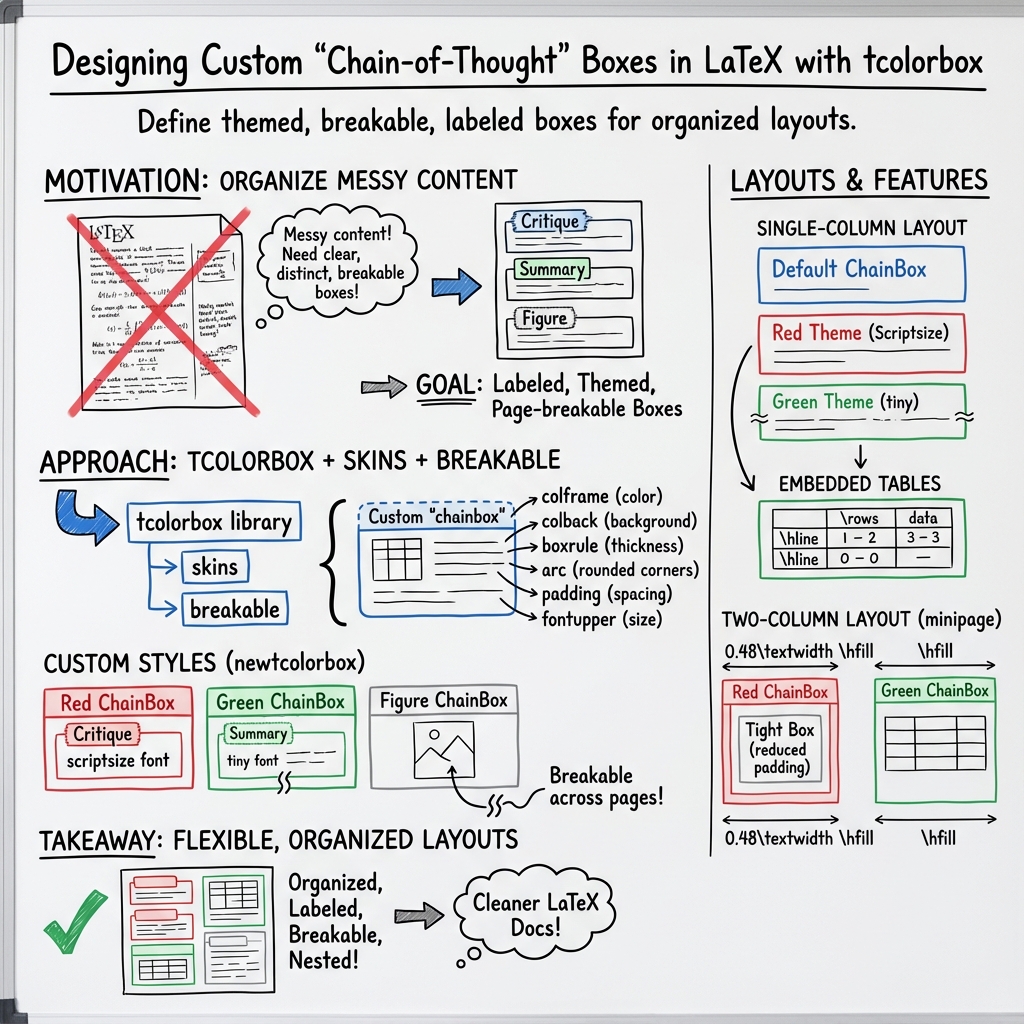
This paper is a how-to guide for making neat, colored “boxes” in a document using LaTeX, a tool people use to write professional papers. These boxes help organize information, add titles, include tables, and even split across pages. The paper shows examples of using these boxes in one column and in two side-by-side columns.
Key Objectives
The paper aims to:
- Show how to create and style colored content boxes (like red and green note boxes) in LaTeX.
- Demonstrate how to put tables inside these boxes.
- Explain how to arrange boxes in a single column or in two columns next to each other.
- Teach how to adjust spacing, borders, and text size inside the boxes.
Methods and Approach
The authors use LaTeX with a package called “tcolorbox.” Think of tcolorbox like a toolkit for building decorated containers (boxes) around text.
Here’s what they do, in everyday terms:
- They define different box styles (red, green, and figure boxes) with options like border color, background color, rounded corners, and padding (padding is the empty space inside the box around the text).
- They show a “chainbox” that can include titles, different text sizes, and tables. “Breakable” boxes can continue onto the next page if they get too long—like a paragraph that flows from one page to the next.
- To make two columns, they use “minipage,” which is like placing two small pages side by side on one big page. Each minipage gets its own box and content.
- They adjust details like:
- boxrule: the thickness of the box border
- arc: how rounded the corners are
- left/right/top/bottom: the inner space around text (padding)
- font size: making text inside the box smaller or tiny
They also show how to put tables inside the boxes and use “hline” to draw horizontal lines in the table.
Main Findings and Why They Matter
What the paper demonstrates:
- You can easily make colored, titled boxes that look clean and professional.
- Boxes can contain different kinds of content, including tables.
- Boxes can be set to split across pages without breaking the layout.
- It’s straightforward to place boxes in one column or side-by-side two columns.
- You can fine-tune the look (tight padding, thin borders, small text) to fit lots of information neatly.
Why this is important:
- Clear layout makes documents easier to read and understand.
- Organized boxes help highlight summaries, critiques, or key points.
- Two-column layouts save space and let readers compare content side by side.
Implications and Impact
This guide helps students, teachers, and researchers build better-looking documents. Using these box styles, you can:
- Create study notes that stand out.
- Write papers with clear sections for summaries, critiques, or data tables.
- Design tutorials or reports where important information is easy to find.
Overall, the paper shows practical tools to make information clearer and more visually appealing—skills that are useful for homework, projects, and professional writing.
Knowledge Gaps
Knowledge gaps, limitations, and open questions
Below is a concise list of missing, uncertain, or unexplored aspects that future work could address:
- The
chainboxenvironment and style keys (e.g.,chainbox-base,chainbox-red) are used but not defined or sourced; provide the package(s), macros, or style files required to compile a minimal working example (MWE). - Package dependencies and version constraints are unspecified (e.g., exact
tcolorboxversion, required libraries beyondskins, breakable); include a reproducible setup (engine, class, packages, versions). - The sample
tabularsyntax appears incorrect (e.g., use of\ \hlineinstead of proper row endings); supply corrected code and confirm compilation with a log or CI check. - No demonstration of the behavior of “breakable” boxes under long content (page breaks, widows/orphans, overfull boxes); systematically test and document page-breaking behavior.
- The two-column layout uses
minipageas a workaround; evaluate compatibility and trade-offs withtwocolumn,multicol, andparacolenvironments, including spacing, page breaks, and float handling. - Interactions with floats are unexplored: show how figures, captions, and tables behave inside these boxes (e.g., with
figurechainbox), including cross-references and placement rules. - Accessibility is not addressed: assess color contrast compliance (e.g., WCAG 2.1), screen-reader friendliness, semantic labeling, and alternatives for users with color vision deficiencies.
- Internationalization is untested: verify behavior with RTL scripts (Arabic, Hebrew), CJK languages, hyphenation patterns, and font handling under XeLaTeX/LuaLaTeX.
- Hyperlinks and metadata are not discussed: integrate
hyperref(anchors, bookmarks, PDF outlines) and evaluate how box titles and labels appear in navigation. - Box numbering, cross-referencing, and a “list of boxes” mechanism are absent; design and document a robust strategy for labeling and referencing boxes across the document.
- Spacing and typography inside boxes (baseline alignment,
parskip, vertical glue) are not characterized; provide guidelines and parameters to match surrounding text and prevent layout anomalies. - Performance and robustness under stress (deeply nested boxes, many boxes, heavy content) are unknown; benchmark compile time, memory usage, and error cases across TeX engines.
- Table support inside boxes is limited to a simple
tabular; evaluatetabularx,longtable,array, and multi-page tables within breakable boxes, including column width management. - Thematic semantics and customization are unclear (e.g., meaning of red vs. green themes); propose a consistent naming scheme, palette definitions, and a style API for users to extend.
- Error handling and fallbacks are unspecified: define behavior when certain options (colors, breakable) aren’t available or conflict with other packages; document known incompatibilities.
- Integration with document classes beyond
article(e.g.,beamer,memoir,IEEEtran) is not explored; test and provide class-specific recommendations or wrappers. - No empirical evaluation of readability/usability: conduct user studies or heuristic evaluations to measure comprehension, cognitive load, and visual clarity of boxed content.
- Print/PDF production considerations (PDF/A compliance, overprint settings, grayscale/black-and-white rendering) are not addressed; supply guidance for production pipelines.
- Automation hooks are missing: explore defining environments/commands to auto-generate consistent titles, indexing, and style selection (e.g.,
\newenvironment{critiquebox}{...}). - Licensing, citation, and provenance of the concepts (e.g., the “chain-of-thought” box notion) are not provided; add attribution, license terms, and references for reuse and extension.
Practical Applications
Practical, Real-World Applications of the Paper’s Methods and Layout Innovations
Immediate Applications
The following items are actionable uses that can be deployed now with standard LaTeX workflows (e.g., Overleaf), leveraging tcolorbox with the shown color themes and two-column layouts.
- Structured academic documents with labeled “Summary” and “Critique” sections for clarity and review
- Sector: Academia, Publishing
- Tools/Workflow: LaTeX +
tcolorbox(skins, breakable), Overleaf templates; minipage for side-by-side comparisons - Assumptions/Dependencies: Availability of the
tcolorboxlibrary; definitions for thechainboxenvironment and style keys (e.g.,chainbox-base,chainbox-red) must exist or be ported; color printing or color-aware digital viewing
- Course materials and worksheets that visually separate instructions, worked examples, and feedback
- Sector: Education
- Tools/Workflow: Course handouts with red/green themed boxes for “Critique” and “Summary”; breakable boxes for multi-page content
- Assumptions/Dependencies: Accessibility-aware color palettes; consistent font sizing for readability across devices
- Design review and engineering decision records with two-column side-by-side comparisons (e.g., alternatives vs. trade-offs)
- Sector: Software, Robotics, Energy, Manufacturing
- Tools/Workflow: Minipage two-column layouts; “tight” box variants for dense technical content; embedded tables for metrics
- Assumptions/Dependencies: Proper table formatting and pagination; organizational style guides allowing LaTeX PDFs
- Policy briefs and internal memos with clearly labeled key points, risks, and recommendations
- Sector: Policy, Government, NGOs
- Tools/Workflow: Color-coded boxes to emphasize sections; breakable boxes to ensure clean page flow; table summaries
- Assumptions/Dependencies: Color contrast compliance for accessibility; acceptance of PDF distribution formats
- Clinical or lab protocols with boxed steps, safety notes, and result summaries
- Sector: Healthcare, Life Sciences
- Tools/Workflow: Red boxes for warnings/critique, green boxes for summaries/procedures; structured tables for parameters
- Assumptions/Dependencies: Institutional compliance (e.g., SOP formatting rules); print-friendly layouts for lab benches
- Research reproducibility checklists embedded in manuscripts or supplementary materials
- Sector: Academia, R&D
- Tools/Workflow: Labeled boxes for data availability, code, and experimental conditions; concise tables inside boxes
- Assumptions/Dependencies: Availability of the
tcolorbox“breakable” feature to handle multi-page checklists
- Product specification sheets and customer-facing documentation with “Highlights” and “Known Issues” boxes
- Sector: Software, Hardware
- Tools/Workflow: Themed boxes per content type; tables for features/specs; minipage for parallel views (features vs. constraints)
- Assumptions/Dependencies: Branding alignment (colors/fonts); PDF distribution or printable formats
- Personal note-taking and daily planning with visually distinct sections (tasks, reflections, summaries)
- Sector: Daily Life, Professional Productivity
- Tools/Workflow: Simple LaTeX template with red/green boxes; tight padding for compact notes
- Assumptions/Dependencies: Comfort with LaTeX; access to PDF viewer and printer if needed
Long-Term Applications
The following items require further development, packaging, integration, or scaling before broad deployment.
- A formal LaTeX package (CTAN) for “chainbox” components with documented style keys, presets, and themes
- Sector: Academia, Publishing, Software
- Tools/Workflow: Packaged class/style; versioning; documentation and test suite
- Assumptions/Dependencies: Maintainer support; compatibility across LaTeX engines; robust examples and guides
- A web component library (HTML/CSS/JS) that mirrors the LaTeX box themes for unified cross-platform documentation
- Sector: Software, Education, Knowledge Management
- Tools/Workflow: Design tokens; CSS variables; theming; responsive layouts; print CSS for PDFs
- Assumptions/Dependencies: Accessibility (contrast, keyboard navigation); RTL and localization support
- WYSIWYG editor plugins (Overleaf extension, VS Code, Typst plugin) for point-and-click insertion of styled boxes
- Sector: Publishing Tools, Developer Tools
- Tools/Workflow: GUI palettes for themes; snippets; auto-generated titles/labels
- Assumptions/Dependencies: Vendor APIs; usability testing; cross-editor compatibility
- Pandoc/Sphinx filters for round-tripping markdown “boxes” (e.g., :::chainbox) to LaTeX and HTML with consistent styling
- Sector: Technical Writing, Documentation
- Tools/Workflow: Pandoc filters, Sphinx extensions; CI pipeline integration
- Assumptions/Dependencies: Stable schema for box metadata; maintenance of filters across versions
- Automated document assembly pipelines that populate “Summary” and “Critique” boxes from structured data or model outputs
- Sector: R&D, Finance, Compliance
- Tools/Workflow: ETL pipelines; templating (Jinja2 + Pandoc); programmatic LaTeX generation
- Assumptions/Dependencies: Reliable data sources; governance over generated content; template version control
- LLM-assisted authoring that creates or updates boxed sections (e.g., executive summaries, risk critiques) with audit logs
- Sector: Knowledge Management, Policy, Finance
- Tools/Workflow: Prompt engineering; guardrails; content provenance; optional suppression of sensitive reasoning
- Assumptions/Dependencies: Organizational policies on AI-assisted writing; bias/accuracy monitoring; privacy and IP controls
- Accessibility-first variants with high-contrast palettes, semantic tags, and screen-reader-friendly exports
- Sector: Education, Government, Public Health
- Tools/Workflow: Alt text patterns; tagged PDFs; WCAG-compliant color sets
- Assumptions/Dependencies: Toolchain support for tagged PDFs; testing across assistive technologies
- A cross-institution style guide and governance model for consistent use of labeled boxes in official documents
- Sector: Academia, Enterprise, Government
- Tools/Workflow: Style repositories; linter to enforce patterns (e.g., headings, padding); training materials
- Assumptions/Dependencies: Stakeholder buy-in; change management; versioned policy documents
Glossary
- arc: tcolorbox option setting the corner radius of a box. "arc=2pt"
- boxrule: tcolorbox option specifying the thickness of a box’s border line. "boxrule=0.5pt"
- breakable: tcolorbox option allowing the box content to break across pages. "enhanced, breakable, colframe=red!70!black, colback=red!6, boxrule=0.5pt, arc=2pt, left=3mm,right=3mm,top=3mm,bottom=3mm, fontupper=#1"
- chainbox: A custom boxed environment (based on tcolorbox) for styled content. "\begin{chainbox}[red] [Critique] [\scriptsize]"
- chainbox-base: A predefined tcolorbox style used to inherit base settings for nested boxes. "\begin{tcolorbox}[chainbox-base,chainbox-red, title={Tight}, fontupper=\scriptsize, left=0.5mm,right=0.5mm,top=0.5mm,bottom=0.5mm, boxrule=0.4pt]"
- chainbox-red: A predefined tcolorbox style variant applying a red-themed configuration. "\begin{tcolorbox}[chainbox-base,chainbox-red, title={Tight}, fontupper=\scriptsize, left=0.5mm,right=0.5mm,top=0.5mm,bottom=0.5mm, boxrule=0.4pt]"
- colback: tcolorbox option setting the background color of the box. "colback=red!6"
- colframe: tcolorbox option setting the frame color of the box. "colframe=red!70!black"
- documentclass: LaTeX command that selects the overall document class. "\documentclass{article}"
- enhanced: tcolorbox option enabling extended features (e.g., advanced skins and drawing). "enhanced, breakable, colframe=red!70!black, colback=red!6, boxrule=0.5pt, arc=2pt, left=3mm,right=3mm,top=3mm,bottom=3mm, fontupper=#1"
- fontupper: tcolorbox option specifying the font used for the box’s content area. "fontupper=\scriptsize"
- hfill: TeX command inserting stretchable horizontal space. "\end{minipage}\hfill"
- hline: LaTeX command drawing a horizontal rule in a table. "Header A & Header B \ \hline"
- minipage: Environment creating a miniature page for side-by-side content (columns). "\begin{minipage}[t]{0.48\textwidth}"
- newtcolorbox: Command defining a new tcolorbox environment with options. "\newtcolorbox{redchainbox}[1] [\scriptsize]{"
- noindent: LaTeX command that suppresses indentation of the following paragraph. "\noindent"
- scriptsize: LaTeX font size command smaller than \small. "fontupper=\scriptsize"
- section: Unnumbered sectioning command. "\section{Single-column examples}"
- small: LaTeX font size command smaller than the default size. "default \small font inside."
- tabular: Environment for creating tables with aligned columns. "\begin{tabular}{ll}"
- tcbuselibrary: Command to load specific tcolorbox libraries. "\tcbuselibrary{skins,breakable}"
- tcolorbox: Environment for colored, framed boxes with rich styling options. "\begin{tcolorbox}[chainbox-base,chainbox-red, title={Tight}, fontupper=\scriptsize, left=0.5mm,right=0.5mm,top=0.5mm,bottom=0.5mm, boxrule=0.4pt]"
- textwidth: LaTeX length representing the width of the text block. "\begin{minipage}[t]{0.48\textwidth}"
- tiny: LaTeX font size command smaller than \scriptsize. "Green theme; content is \tiny."
- title: tcolorbox option setting the title displayed in the box header. "title={Tight}"
- verb: LaTeX command for inline verbatim text. "\verb|\hline|"
- xcolor mix notation: Color specification syntax mixing colors by percentage using exclamation marks. "colframe=red!70!black"
Collections
Sign up for free to add this paper to one or more collections.