In-Video Instructions: Visual Signals as Generative Control
Abstract: Large-scale video generative models have recently demonstrated strong visual capabilities, enabling the prediction of future frames that adhere to the logical and physical cues in the current observation. In this work, we investigate whether such capabilities can be harnessed for controllable image-to-video generation by interpreting visual signals embedded within the frames as instructions, a paradigm we term In-Video Instruction. In contrast to prompt-based control, which provides textual descriptions that are inherently global and coarse, In-Video Instruction encodes user guidance directly into the visual domain through elements such as overlaid text, arrows, or trajectories. This enables explicit, spatial-aware, and unambiguous correspondences between visual subjects and their intended actions by assigning distinct instructions to different objects. Extensive experiments on three state-of-the-art generators, including Veo 3.1, Kling 2.5, and Wan 2.2, show that video models can reliably interpret and execute such visually embedded instructions, particularly in complex multi-object scenarios.


Paper Prompts
Sign up for free to create and run prompts on this paper using GPT-5.
Top Community Prompts
Explain it Like I'm 14
A simple explanation of “In-Video Instructions: Visual Signals as Generative Control”
1) What is this paper about?
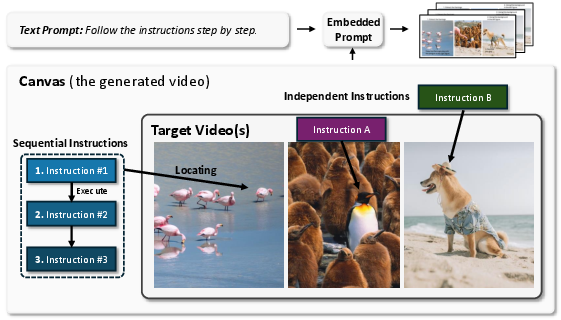
This paper shows a new, simple way to tell an AI video generator what to do by drawing simple hints directly on the first frame of a video. Instead of typing a long prompt like “make the blue car turn right,” you can put short words and arrows on the picture itself. The AI then “reads” those visual hints and continues the video accordingly.
Think of it like putting sticky notes and arrows on a photo to tell each object where to go or what action to take.
2) What questions are the researchers asking?
They ask:
- Can today’s video AIs understand instructions that are drawn inside the picture (like “jump” near a person, with an arrow showing the direction)?
- Is this better than normal text prompts when you need precise control, especially with many objects in the scene?
- Can the AI follow multiple steps (like “1) stand up, 2) walk left, 3) wave”)?
- Can it control both object motion (what things do) and camera motion (how the viewpoint moves)?
3) How did they do it?
They tested big video generation models (Veo 3.1, Kling 2.5, Wan 2.2) in an “image-to-video” mode: you give the first frame (a picture), and the model creates the next frames to make a video.
What they changed is how they gave instructions:
- They put simple cues on the first frame:
- Short text near an object (like “turn right,” “fly away”)
- Arrows or curves to show where or how to move (direction, rotation, path)
- They kept the typed prompt very simple: “Follow the instructions step by step.”
- The AI then used the drawn notes and arrows as part of the scene and continued the motion in later frames.
Helpful mini-definitions:
- Image-to-video: starting from a single picture, the AI “imagines” and generates following frames to form a video.
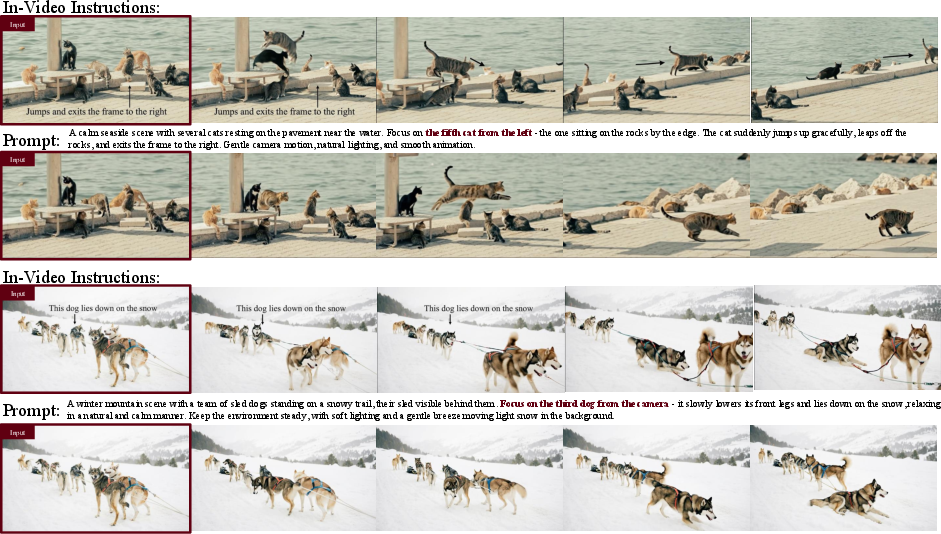
- Spatial grounding: making sure an instruction is clearly linked to the right place or object in the scene (for example, an arrow pointing at the exact bird you want to move).
They also compared this approach to regular text-only prompts and used a video “report card” (a benchmark called VBench) to check quality and motion.
4) What did they find, and why does it matter?
Main takeaways:
- The AI can read on-image text and understand arrows. It doesn’t need extra training to do this.
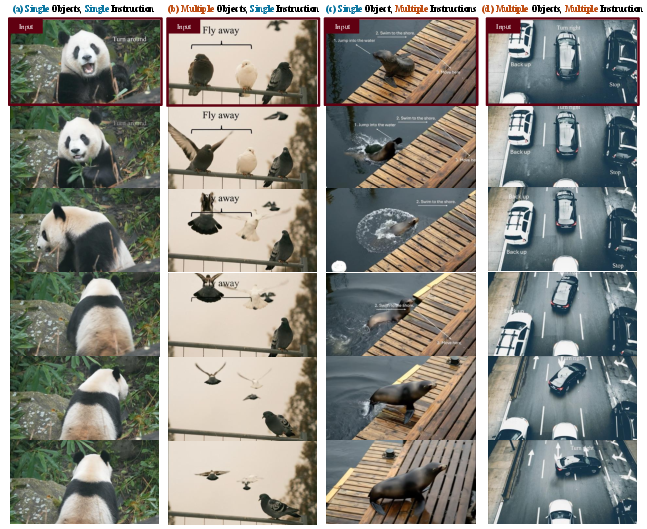
- Visual instructions are especially strong when you need precise control in busy scenes:
- It’s easier to tell the AI “this exact object should do this” by placing text/arrows near that object.
- With multiple objects, the AI reliably assigns the right action to the right thing (less confusion than only using typed descriptions like “the second object from the left”).
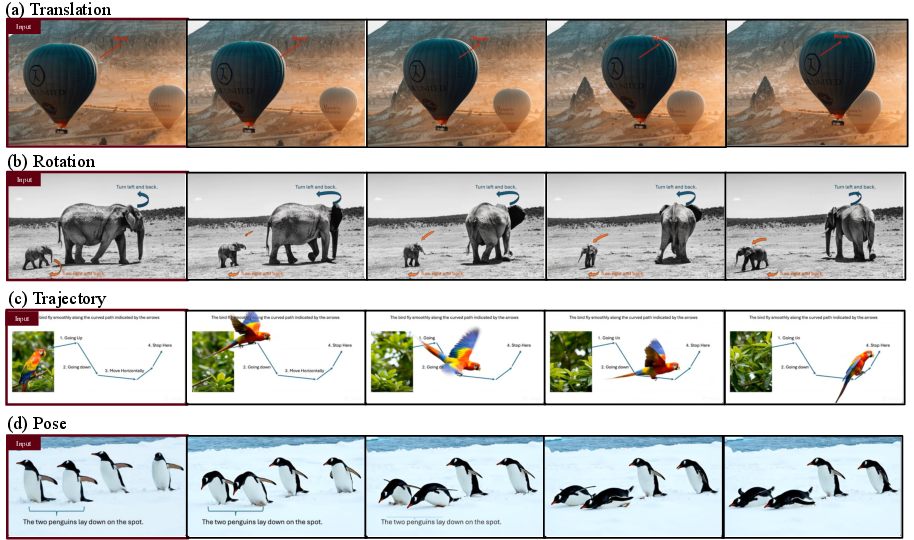
- The method controls different motion types well:
- Straight movement (translation) with arrows for direction
- Rotation with curved arrows
- Complex paths (trajectories) by drawing a curve
- Pose changes (e.g., adjust posture)
- Camera motion (pan, tilt, zoom) using simple on-image text also works
- Multi-step and multi-object tasks are handled cleanly:
- You can number steps (1, 2, 3) to make a sequence
- You can give different objects different commands at the same time
- In human tests, this visual method often had higher success rates than text-only prompts in complex scenes
- On general video quality tests (like sharpness or aesthetics), on-image instructions scored slightly lower than plain text prompts, which is expected because reading text from an image is harder than reading typed text. But the scores were close.
Why this matters:
- It gives creators a simple, direct way to “draw what they want” instead of writing long, careful prompts.
- It’s clearer and less ambiguous, especially when you have many objects or complicated moves.
5) What’s the impact and what are the limits?
Potential impact:
- Easier, more precise control for artists, educators, game designers, and filmmakers—just draw arrows and write short notes on the first frame.
- No extra training is needed; it works with existing strong video models.
- Could inspire tools where you annotate a photo and instantly get a controlled, believable video.
Limits to keep in mind:
- The drawn notes and arrows can appear in the video and may need editing out afterward (though sometimes the model naturally “covers” them).
- The study mostly shows visual demos; more systematic testing would help in the future.
- All instructions were manually added. A cool next step is seeing if models can follow natural signs already in scenes (like traffic lights or road signs) as instructions.
In short, the paper introduces a “draw-to-direct” approach: put tiny, clear hints inside the picture, and let the video AI follow them. It’s simple, works across different models, and shines when you need accurate, object-specific control.
Knowledge Gaps
Knowledge Gaps, Limitations, and Open Questions
Below is a single, consolidated list of gaps and open questions that remain unresolved and could guide future research:
- Lack of standardized quantitative metrics for instruction compliance (e.g., instruction–object binding accuracy, trajectory adherence, temporal compliance, and camera-motion fidelity), beyond limited VBench dimensions and one small human evaluation.
- No systematic ablations on the design of visual instructions (arrow shape, curvature, thickness, length, color, opacity, placement proximity, numbering style), making it unclear which primitives or styles are most reliably interpreted.
- Unclear robustness of in-frame text comprehension across fonts, font sizes, handwriting vs. typed text, multilingual commands, non-Latin scripts, stylized typography, and low-contrast or noisy overlays.
- No evaluation of spatial grounding sensitivity to instruction placement (inside vs. outside object regions), distance between arrow and target, and in cluttered or overlapping configurations.
- Absence of long-horizon compliance testing (e.g., instruction following over hundreds of frames) to quantify temporal drift, failure modes, and consistency retention.
- Missing analysis of dynamic or time-varying instructions (updates mid-video, multiple instruction frames, or interactive streaming control), and how models reconcile changing guidance.
- No framework for resolving conflicting instructions (between objects or within multi-step sequences) or prioritization rules when commands are ambiguous or incompatible.
- Limited and qualitative treatment of multi-object scenes; scalability to dense scenes with dozens of entities, heavy occlusion, and frequent interactions is untested.
- Insufficient cross-model generalization and reproducibility: reliance on proprietary generators (Veo, Kling) with differing resolutions and capabilities; results may not transfer to broader open-source models or future architectures.
- Incomplete understanding of why models interpret embedded visual signals (mechanistic/explainability gap): how internal attention or OCR-like pathways parse text/arrows, and which latent features drive instruction compliance.
- No ablation on the fixed textual prompt (“Follow the instructions step by step”): unclear whether its presence, phrasing, or removal materially affects instruction adherence.
- Lack of evaluation in diverse real-world conditions (lighting changes, motion blur, extreme camera angles, severe occlusion, compression artifacts), which may degrade embedded signal legibility and localization.
- No comparative baselines against richer control modalities (bounding boxes, segmentation masks, color-coded tags, keypoints, depth, trajectories) in matched setups to quantify the added value of arrows/text over alternatives.
- Missing tests of instruction execution under physical constraints or priors (e.g., “back up” when another car is behind): need methods to reconcile or override learned commonsense physics when users intentionally request atypical actions.
- No method for automatic removal or masking of visual overlays in generated frames (post-processing, inpainting, content-aware erasure), and no evaluation of how such removal affects downstream video quality or artifacts.
- No exploration of “invisible” control channels (e.g., alpha-only layers, non-visible spectra, steganographic signals, metadata) that models could read but would not appear in outputs, potentially avoiding overlay persistence.
- Unclear failure taxonomy and reliability profile: the paper lacks systematic analysis of common error modes (subject misbinding, partial execution, direction misinterpretation, premature stopping) and conditions that trigger them.
- No measurement of instruction localization accuracy under heavy object similarity (near-identical instances) or dynamic re-identification as appearance changes over time.
- Limited camera-motion analysis: no quantitative benchmarking of camera-motion control vs. text prompts, and no testing of composite camera motions or camera–object motion coordination.
- No formal evaluation of multi-step sequencing (ordering, timing constraints, dwell times between steps); need metrics for stepwise correctness and temporal alignment.
- The “multiple seed frames” setup is demonstrated but not methodologically specified: unclear how cross-frame instructions are combined, weighted, and reconciled when they conflict.
- Potential prompt-engineering bias in textual baselines (e.g., “N-th object from the left”), with no systematic prompt library or fairness checks across multiple phrasings and referring expressions.
- No robustness analysis to adversarial or misleading overlays (decoy arrows, conflicting text, partial occlusion of commands) and potential security concerns (malicious signage).
- Missing user-interface and workflow considerations: how non-experts should design effective in-frame instructions, and how to provide live feedback or guidance to correct misinterpretations.
- No study of generalization to real-world embedded signals (traffic lights, road signs, UI affordances) or how models parse and act on naturally occurring visual cues without hand-crafted overlays.
- Limited resolution and duration settings (720p/480p) and no assessment at high-resolution, long-duration generation (e.g., 4K, minutes-long), where overlay legibility and temporal stability may differ.
- No discussion of ethical implications (hidden or deceptive in-video instructions), consent, or content safety when control signals can be embedded in scenes users may not expect.
Practical Applications
Immediate Applications
The following applications can be deployed with today’s image-to-video generators (e.g., Veo 3.1, Kling 2.5, Wan 2.2) using the paper’s training-free “In-Video Instructions” interface (short text + arrows overlaid on the first frame).
- Creative previsualization and animation blocking
- Sectors: media/entertainment, advertising, game development, education
- What it enables: Rapidly block camera moves (pan, tilt, zoom) and object motions (translate, rotate, follow path) by drawing arrows and brief commands on a key frame; multi-object, multi-step staging without prompt engineering.
- Tools/workflows:
- Plugins for Adobe After Effects/Premiere and Blender that convert on-canvas arrows and labels into a controlled video generation call.
- Unity/Unreal offline cutscene previsualization: screenshot a scene, annotate motions, generate animatics.
- Assumptions/dependencies: Access to a capable image-to-video model; post-processing to remove overlaid guides (inpainting/masking); occasional failure when instructions contradict strong physical priors.
- Marketing and product demo generation
- Sectors: advertising, e-commerce, consumer software
- What it enables: Precise, spatially grounded “move/rotate/show this part” demos by placing labels/arrows near product regions; produce variants quickly for A/B testing.
- Tools/workflows: Web app where a product still is annotated with arrows and step labels; batch-generate variants with different camera motions.
- Assumptions/dependencies: Visual overlays may persist without cleanup; ensure brand compliance and content authenticity labeling.
- Instructional and how-to video creation
- Sectors: education, technical documentation, customer support
- What it enables: Step-numbered, spatially localized actions (e.g., “1. unscrew,” “2. pull tab”) with object-specific arrows for unambiguous demonstrations.
- Tools/workflows: “Draw-to-Explain” authoring in LMS/knowledge base tools; template libraries of common motions and camera moves.
- Assumptions/dependencies: Generated content is illustrative (not a substitute for real procedures); quality varies with scene complexity and model.
- Sports play visualization and coaching clips
- Sectors: sports analytics, media
- What it enables: Convert whiteboard arrows and player-specific cues into short animated plays; multi-object control makes different players execute distinct paths.
- Tools/workflows: Tablet app for coaches to sketch routes on a still; export explainer videos for team briefings or broadcasts.
- Assumptions/dependencies: Synthetic scenes may deviate from real physics; ensure clarity about illustrative nature.
- Camera-direction tool for editors and educators
- Sectors: media production, education
- What it enables: Global camera motions (pan/tilt/zoom/dolly) controlled by simple on-frame captions; useful for stylizing static assets (photos, slides) into dynamic clips.
- Tools/workflows: “Virtual cinematographer” panel where camera moves are specified as text overlays on the first frame.
- Assumptions/dependencies: Text-in-image interpretation is slightly less robust than pure text prompts per VBench; simple moves are most reliable.
- Multi-object explainer videos for STEM and data storytelling
- Sectors: education, public communication, journalism
- What it enables: Assign different motions/interactions to multiple entities in one frame (e.g., molecules collide, vectors rotate, flows follow a path).
- Tools/workflows: Notebook or slide add-ins that render vector arrows/labels and call a video generator; quick STEM visuals for lectures.
- Assumptions/dependencies: Success drops when scenes are crowded or instructions conflict; overlays need removal or acceptance as on-screen annotations.
- Benchmarking and evaluation of video models via in-frame control
- Sectors: academia, AI evaluation
- What it enables: New evaluation protocols that test spatial grounding, multi-object disambiguation, and multi-step compliance using standardized in-frame instruction sets.
- Tools/workflows: VBench augmentation for “In-Video Instruction” tasks; human-in-the-loop success-rate assessments.
- Assumptions/dependencies: Requires curated suites of annotated frames; agreement metrics for object–instruction binding.
- Dataset bootstrapping with weak motion labels
- Sectors: computer vision research, ML tooling
- What it enables: Generate synthetic videos where overlaid arrows/labels double as weak supervision (motion vectors, targets, temporal order).
- Tools/workflows: Pipelines that archive the original annotated frame alongside the generated clip; parse arrows to produce pseudo-labels.
- Assumptions/dependencies: Label noise due to imperfect execution; biases from model priors; not suitable as sole source of supervision for safety-critical tasks.
- Social media and creator tools for casual users
- Sectors: consumer apps, creator economy
- What it enables: Mobile “arrow-to-action” editing—draw a quick arrow or write “spin” to make a short clip; meme templates with multi-object motion.
- Tools/workflows: Lightweight mobile UI layers over Wan/Kling endpoints; sticker-like instruction elements.
- Assumptions/dependencies: Cost and latency of cloud inference; moderation and authenticity/watermarking policies.
- Post-production utilities to clean guides from first frames
- Sectors: media software
- What it enables: Automatic detection and removal/inpainting of instruction overlays from the opening frames; maintain clean outputs while retaining control.
- Tools/workflows: Integrated “instruction layer” that is masked at render; automatic text/arrow mask generation.
- Assumptions/dependencies: Reliable detection of overlays; occasional artifacts in inpainting.
Long-Term Applications
These ideas are promising but require further research, productization, scaling, or integration with other systems.
- Visual signage as control for embodied agents and simulators
- Sectors: robotics, autonomous systems, simulation
- What it enables: Use embedded visual symbols (arrows, signs) as in-situ commands for agents in simulation; bridge between human sketches and agent behaviors.
- Tools/workflows: Sim2Sim training where agents and a video generator co-interpret on-frame signals; closed-loop control with visual affordances.
- Assumptions/dependencies: Transition from open-loop video generation to interactive control; sim-to-real gap; safety and verification requirements.
- Safety-critical synthetic data for driving and planning
- Sectors: autonomous driving, transportation
- What it enables: Compose multi-vehicle maneuvers (e.g., “car A reverse, car B turn right, car C stop”) to generate corner-case training and test clips with precise spatial grounding.
- Tools/workflows: Scenario authoring tools that annotate seed frames from real scenes; batch generation for rare events.
- Assumptions/dependencies: Generated videos must be validated against physical plausibility; provenance tracking; not a replacement for real data without rigorous validation.
- Medical and surgical training animations with complex, sequential steps
- Sectors: healthcare education, medical device training
- What it enables: Step-ordered, spatially localized manipulations in illustrative procedures; multi-instrument coordination in simulated scenes.
- Tools/workflows: Authoring systems that import diagrams/renders, overlay numbered steps, and produce instructional clips.
- Assumptions/dependencies: Strict disclaimers (non-diagnostic); expert review; domain-specific terminology and realism tuning.
- Interactive, in-canvas video editing as a standard NLE modality
- Sectors: professional video software
- What it enables: A new “instruction layer” track in NLEs where creators paint motion vectors, trajectories, and per-object directives that drive generative fills, retimings, and camera moves.
- Tools/workflows: Hybrid timeline + canvas interfaces; bidirectional linking between instruction strokes and generated segments; reversible edits.
- Assumptions/dependencies: Robust object binding and version control; deterministic regeneration; GPU/edge acceleration.
- Game engine integration for procedural cutscenes and previews
- Sectors: game development
- What it enables: From a paused game frame, designers sketch motions for multiple NPCs and camera; engine calls a generator to produce a preview/cinematic.
- Tools/workflows: Editor plugins for Unity/Unreal with instruction overlays; tools to convert generated motion back into engine-level animations.
- Assumptions/dependencies: Round-tripping between generated video and engine assets is nontrivial; consistency across shots.
- Human–AI co-creation with multi-frame compositing and scene assembly
- Sectors: media, advertising, education
- What it enables: Combine several seed frames (e.g., different products/characters) and coordinate interactions via cross-frame instructions to synthesize coherent scenes.
- Tools/workflows: Multi-canvas storyboard editors; constraint solvers that reconcile object scales and lighting before generation.
- Assumptions/dependencies: Cross-frame identity and style consistency; better controls for lighting, occlusion, and depth.
- Standards and policy for transparent instruction overlays and provenance
- Sectors: policy/regulation, platform governance
- What it enables: Guidelines for marking, logging, and watermarking in-frame instructions used during generation; audit trails for content provenance and edits.
- Tools/workflows: Sidecar metadata formats that serialize instruction geometry and text; platform policies for disclosure.
- Assumptions/dependencies: Industry consensus on metadata schemas; UX that balances transparency and creator privacy.
- Education platforms with generative assessment of spatial reasoning
- Sectors: EdTech
- What it enables: Students draw vectors/paths to demonstrate understanding (physics, geometry); system generates and assesses motion consistency against rubrics.
- Tools/workflows: Interactive worksheets where student strokes become in-video instructions; automated scoring on trajectory adherence.
- Assumptions/dependencies: Reliable measurement of instruction compliance; alignment with curricula and accessibility needs.
- Scientific visualization and communication
- Sectors: science communication, research dissemination
- What it enables: Turn annotated figures into dynamic explanatory videos (e.g., flows, rotations, multi-step transformations) with object-specific controls.
- Tools/workflows: Figure-to-video pipelines in tools like Figma/Illustrator/LaTeX that export instruction layers.
- Assumptions/dependencies: Fidelity to underlying phenomena; avoidance of misleading visuals; peer review.
- Multimodal benchmarks and datasets centered on spatially grounded control
- Sectors: academia, AI evaluation
- What it enables: Large-scale, standardized corpora where instructions are embedded visually and ground truth object–instruction bindings are known; measure multi-step adherence and disambiguation.
- Tools/workflows: Annotation UIs to author instruction overlays; automatic metrics for binding accuracy, motion smoothness, and step compliance.
- Assumptions/dependencies: Agreement protocols for human labels; cross-model comparability; licensing of seed imagery.
Cross-cutting assumptions and dependencies
- Model capabilities: Requires access to image-to-video models that can read on-image text and interpret visual symbols; results vary by model and resolution.
- Quality trade-offs: In-video instructions are slightly less robust than pure text for some metrics; performance degrades with clutter and conflicting priors.
- Artifact management: Overlays may persist or be occluded; plan for automated masking/inpainting or embrace overlays as part of the explainer style.
- Ethics and safety: Clearly label synthetic content; avoid deploying outputs in safety-critical contexts without validation; respect IP and privacy.
- Cost and latency: Real-time or mobile use cases need optimization or edge acceleration; batch workflows are more feasible today.
Glossary
- Actionable signals: Signals embedded in the input that the model interprets as instructions to influence generation. "implicitly treats them as actionable signals."
- Aesthetic Quality: A VBench metric assessing the visual appeal of generated videos. "Aesthetic Quality"
- Bounding boxes: Rectangular regions used to localize objects as control or annotation. "bounding boxes"
- Canny edges: Edge maps derived from the Canny detector used as a conditioning modality. "canny edges"
- Compositional reasoning: The ability to combine multiple conditions or concepts to produce coherent outputs. "enhance compositional reasoning and creative flexibility."
- Depth maps: Per-pixel distance information used to guide generation. "depth maps"
- Dynamic Degree: A VBench metric quantifying how much motion is present in the generated video. "Dynamic Degree"
- Image-to-video generation: Generating a video conditioned on an initial image or frame. "controllable image-to-video generation"
- Inference pipeline: The standard sequence of steps the model follows during test-time generation. "standard inference pipeline"
- In-Video Instruction: A paradigm that encodes user intent directly within input frames as visual signals for controllable video generation. "In-Video Instruction"
- Motion Smoothness: A VBench metric evaluating continuity and lack of jitter in motion across frames. "Motion Smoothness"
- Multimodal inputs: Conditioning that combines multiple modalities (e.g., text and image) for generation. "multimodal inputs in image-to-video models"
- Pan: Horizontal camera rotation/movement across the scene. "pan left"
- Pose: The configuration or posture of an object that can be controlled or adjusted over time. "pose adjustments"
- Pretrained video generative model: A video generator trained in advance and used without additional finetuning. "pretrained video generative model"
- Prompt-based control: Controlling generation behavior via textual prompts. "prompt-based control"
- Spatial grounding: Aligning instructions with specific locations or regions in the visual frame. "explicit spatial grounding"
- Spatial localization: Identifying and targeting specific objects or positions in the image for control. "Spatial Localization Ability of In-Video Instructions."
- Spatiotemporal semantics: Semantics that involve both spatial and temporal relationships in video. "complex spatiotemporal semantics."
- Temporal coherence: Consistency of visual content across time in a video sequence. "temporally coherent"
- Temporal Flickering: A VBench metric indicating perceptual instability or flicker across frames. "Temporal Flickering"
- Temporal logic: Correct ordering and dependencies of actions or events over time. "correct temporal logic"
- Trajectory control: Guiding object motion along specified paths or curves. "Trajectory control represents a more complex form of motion"
- Tilt: Vertical camera rotation/movement up or down. "tilt down"
- VBench: A benchmark suite for evaluating video generative models across diverse metrics. "VBench benchmark"
- Visual domain: The pixel-based space where visual information and signals reside, as opposed to text. "encoded into the visual domain"
- Visual grounding: Binding instructions to visual entities using spatial cues for precise control. "visual grounding provides a powerful mechanism"
- Zero-shot: Performing tasks without task-specific training or finetuning. "zero-shot manner"
- Zoom: Changing camera focal length to enlarge or reduce the apparent scale of the scene. "zoom in"
Collections
Sign up for free to add this paper to one or more collections.