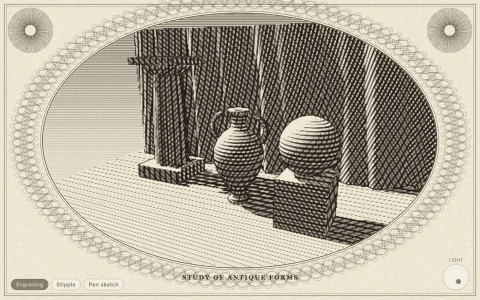
A simulated rose engine lathe cuts banknote-fine guilloche, one pass at a time.
On a rose engine the work spins while a rosette, a disc with a wavy edge, rocks the headstock against a rubber, so a fixed graver cuts a circle whose radius follows the cam: r = r0 + A cam(N t + phase). Each band of the dial is dozens of such passes with the phase or radius stepped a little each time, so they interfere into woven barleycorn, rippling wave stacks, chains of loops (a prolate trochoid wrapped round the circle) and nested rosettes, with sine, pointed, square and double cam profiles and a slow pumping cam that swells the amplitude. The plate is cut at twice screen resolution and scaled down, so the hairlines stay crisp. In intaglio the ink line swells with the cam like a banknote plate; on silver, midnight and rose gold the color of every few samples is set by how the cut's facet faces the light, which is what makes a real dial shimmer.
Try it. Click a band on the dial or in the list, then drag on the dial: sideways twists the phase step and up and down sets the cam depth, previewed in red and recut when you let go. The buttons (or the arrow keys and C) change lobes, cam and phase, N cuts a new dial, F cycles the finish, and Space pauses the lathe.
Paste this into Claude Code, Codex or any coding agent to get a simple version running, then take it wherever you like.
Build a guilloche generator, the fine engraved patterns on banknotes and watch dials, with JavaScript and the HTML canvas element. Put everything in a single index.html file with no libraries or build step, so I can open it directly in a browser.

Start simple:
- Make a canvas that fills the window and stays sharp on high-DPI screens (scale by devicePixelRatio). Draw a cream disc in the middle on a dark background.
- Write a function for one curve, in polar coordinates: r(t) = r0 + A * sin(N * t + phase), for t from 0 to 2 pi, with about 1,000 samples. This is what a rose engine lathe cuts: the rosette cam rocks the work so the radius follows its wavy edge.
- Draw a band as a family of these curves: keep r0, A and N fixed and step the phase a little for each of 30 curves. Thin dark green lines (about 0.6 pixels) on the cream disc. Overlapping phase-shifted curves weave into a lattice.
- Stack three or four bands at different radii with different lobe counts N, and draw a thin circle between each pair.

Once that works, make it beautiful:
- Animate the cutting: draw each curve progressively onto an offscreen canvas, a few curves per frame, with a small bright tool tip at the point being cut.
- Add more band types: step the radius instead of the phase for rippling waves, and add a tangential wobble (t + sin(N t) * 1.3 / N) so each lobe ties a loop, like the border of a banknote.
- Vary the line width with the cam value so lines swell and thin, like an intaglio print.

Explain the key ideas in short code comments. When you're done, tell me how to open it and suggest three directions I could take it next, such as other cam shapes (pointed or square waves), a brushed silver finish whose lines shimmer with the light angle, or dragging to change the phase step live.