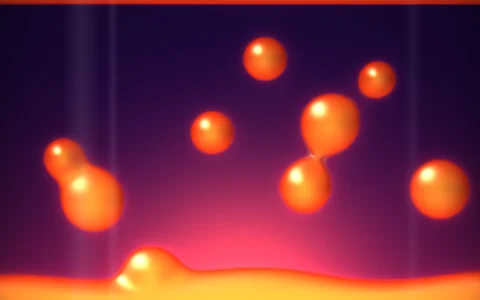
A wobbling liquid metal droplet with real reflections, rasterized by hand.
The blob is an icosphere of 5,120 triangles whose radius is pushed around by drifting 3D noise, a slow squash and stretch wobble, and a spring network: every vertex is tied to home by a spring and to its neighbors by a discrete Laplacian, so a poke spreads out as a ring that rings and settles like a struck drum. Each frame a software rasterizer fills the triangles into a z-buffered ImageData buffer, interpolating normals per pixel with perspective correction, reflecting the view ray and looking it up in a cube map painted procedurally in code. A per-channel Schlick Fresnel term turns the metal's own color toward white at grazing angles, and the oil slick finish adds thin film interference whose bands slide with thickness and angle. The backdrop is the same environment seen through a blurred copy of the cube map, with a contact shadow and the blob mirrored into the glossy floor, all in linear HDR through a filmic tone curve. Triangles that bend fast on screen fade their reflections toward the prefiltered map, a per triangle stand in for mip mapping, and a tent filter over the coverage edge keeps the bright Fresnel rim from stair stepping.
Try it. Click the blob to poke a dent into it, or press space. Drag (or use the arrow keys) to orbit. Switch between the neon room, the studio softboxes and a sunset beach with the buttons or keys 1, 2 and 3, and change the finish (chrome, gold, oil slick) with the buttons or M.
Paste this into Claude Code, Codex or any coding agent to get a simple version running, then take it wherever you like.
Build a morphing liquid chrome blob with JavaScript and the HTML canvas element, using a tiny software rasterizer I write myself instead of WebGL. Put everything in a single index.html file with no libraries or build step, so I can open it directly in a browser.

Start simple:
- Make a canvas that fills the window and resizes with it. Render into a small offscreen canvas (about 320 pixels wide) through an ImageData buffer, then drawImage it scaled up to the screen.
- Build a sphere mesh: an icosahedron subdivided three or four times, with each vertex pushed out to radius 1.
- Write a small 3D noise function. Every frame, set each vertex's radius to 1 plus about 0.2 times the noise at its direction and the current time, then recompute vertex normals by summing the normals of the faces around each vertex.
- Orbit a camera around the blob, project the vertices with a perspective divide, skip back facing triangles, and fill each triangle with barycentric edge functions and a z-buffer.
- Interpolate the normal per pixel, reflect the view direction about it, and color the pixel from a simple environment function of the reflected direction: a dark gradient with a couple of bright rectangular softboxes and a gray floor.

Once that works, make it beautiful:
- Add Schlick Fresnel so the edges turn brighter, and tint the reflectance to switch between chrome and gold.
- Paint the environment once into a cube map (six small square images) and sample it with bilinear filtering, so you can afford a richer environment.
- Let a click make a dent: give every vertex a radial offset and velocity, pull it home with a spring and toward its neighbors' average, and watch the ripple spread.

Explain the key ideas in short code comments. When you're done, tell me how to open it and suggest three directions I could take it next, such as thin film iridescence, a glossy floor reflection, or tone mapping in linear HDR.