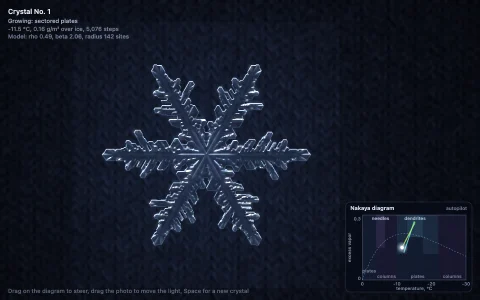
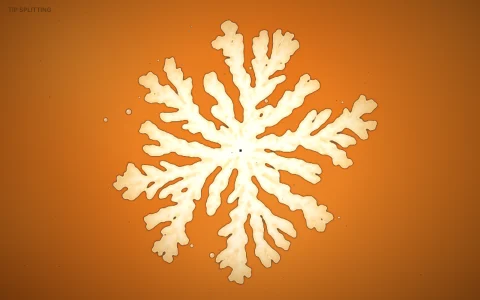
Supercooled melt freezes into branching dendrites, with latent heat glowing between arms.
Kobayashi's 1993 phase-field model on a square grid: a phase field runs from liquid to solid across a thin diffuse interface, coupled to a temperature field that starts below the melting point. Freezing releases latent heat that has to diffuse away before the solid can advance, so tips that poke into colder liquid outrun the flanks and every arm sprouts side branches (the Mullins-Sekerka instability). The surface energy depends on the interface direction with four-fold or six-fold anisotropy, computed from the gradient with double-angle identities, and each seeded grain carries its own lattice orientation, so neighboring crystals grow at different angles and compete for the same heat sink. The temperature field glows from violet to amber where latent heat collects, growing tips burn white, and the ice is shaded from a blurred height map so arms read as rounded ridges.
Try it. Click to seed a new crystal and hold to chill the melt with a cold finger. Switch between four-fold and six-fold symmetry (or press 4 and 6), drag the undercooling and anisotropy sliders (arrow keys work too), press P for polarized light that colors each grain by orientation, and Space for a fresh melt.
Paste this into Claude Code, Codex or any coding agent to get a simple version running, then take it wherever you like.
Simulate a supercooled melt freezing into dendrites with JavaScript and the HTML canvas element, using Kobayashi's phase-field model. Put everything in a single index.html file with no libraries or build step, so I can open it directly in a browser.

Start simple:
- Make a canvas that fills the window, stays sharp on high-DPI screens (scale by devicePixelRatio), and resizes with the window. Simulate on a 256 by 256 grid in Float32Arrays and draw it scaled up through an offscreen canvas.
- Keep two fields: phase p (0 liquid, 1 solid) and temperature T (0 is the cold melt, 1 is the melting point). Seed a small solid disk in the middle.
- Each step, with dx = 0.03 and dt = 0.0001: compute the gradient of p and its angle theta, set eps = 0.01 (1 + delta cos(j theta)) with j = 6 and delta = 0.02, and update tau dp/dt = div(eps^2 grad p) + the two rotational terms with eps eps' + p (1 - p) (p - 0.5 + m), where m = (0.9 / pi) atan(10 (1 - T)) and tau = 0.0003. Then dT/dt = laplacian(T) + K dp/dt with K = 1.6.
- Add a little random noise to the p update so side branches can start, and run several steps per frame.
- Draw solid as white and color the liquid by temperature.

Once that works, make it beautiful:
- Color the heat field with a dark violet to amber ramp so latent heat glows between the arms.
- Shade the solid as ice with a simple light direction from the gradient of a blurred copy of p.
- Click to seed new crystals, give each a random orientation offset in the cos term, and add sliders for K and delta.

Explain the key ideas in short code comments. When you're done, tell me how to open it and suggest three directions I could take it next, such as four-fold versus six-fold symmetry, a polarized light view that colors each grain by orientation, or a cold finger that chills the melt under the mouse.