THE CONSOLE, RECREATED
Emulator
An app that imitates an old game console. OpenEmu lets your Mac act like a Super Nintendo so it can run its games.
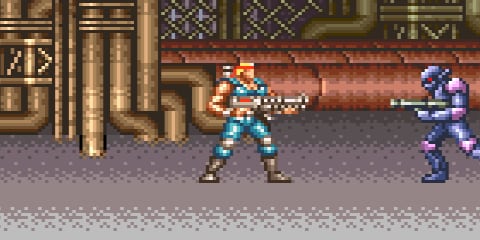
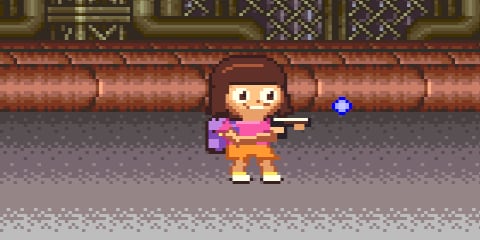
CONTRA III: THE ALIEN WARS · ORIGINAL GAME / DORA SPRITE MOD
A SMALL MOD. A VERY DIFFERENT ADVENTURE.
I asked AI to put Dora the Explorer into Contra III. Then I played it. Here's how we swapped the soldiers for Dora, and how to try it yourself, even if you've never heard of a ROM.
Let's make a mod BEGINNER FRIENDLY · MAC WALKTHROUGHMeet the idea. A sprite is the little picture that makes a character visible.
SEE THE MOD IN ACTION
Watch Dora take the soldiers' place in Contra III. Then follow the walkthrough below to try the modding process yourself.
Watch on YouTube ↗THE CONSOLE, RECREATED
An app that imitates an old game console. OpenEmu lets your Mac act like a Super Nintendo so it can run its games.
THE CARTRIDGE, AS A FILE
A file containing a game's data and code. For this SNES project, it ends in .sfc. The emulator is the player; the ROM is what you play.
THE CHARACTER'S LITTLE PICTURES
A small graphic drawn over the game world. Running, jumping, and aiming use different pictures called frames. A good swap changes all of them.
LEVEL 01 / EQUIP YOURSELF
You don't need an old console on your desk. You need an emulator to play the game and an AI coding assistant to help edit a copy of it.
OpenEmuThe emulator used here · Free · macOSDownload OpenEmu from its official site, open the download, and move the app into Applications. Open it and follow its setup instructions. A keyboard works; a compatible game controller works too.
OpenEmu's official user guide ↗We used Codex, an AI assistant that can inspect files, write code, and run checks. Create a folder such as Contra III with Dora on your computer. Put a copy of your ROM there and open that folder as a local project in Codex. Keep an untouched backup somewhere else.
A filename in a chat isn't enough: the assistant needs access to the actual file. Start a task in that local folder and paste the prompts below. If it needs a tool installed or file access, have it explain what it needs.
Get started with the desktop app and Codex ↗GET THE GAME FILE
This experiment used the USA Super Nintendo version. The exact version matters: a change built for one ROM may fail on another.
Get the Contra III USA ROM ↗The link opens the game's download page on WoWroms. If your download is a ZIP archive, unzip it first, then use the .sfc game file inside. Keep an untouched backup before making your mod.
Just want to play the official release? Konami's Contra Anniversary Collection ↗ includes Contra III.
LEVEL 02 / PRESS START
.sfc file into OpenEmu's library. Then open the game from the library.LEVEL 03 / CHANGE THE CAST
Name Dora, point the assistant to your Contra III file, and ask for an actual playable result. Optionally, attach a Dora reference image so it can compare her haircut, face, outfit, and backpack with the sprite it creates.
We've filled in Dora's signature details. Edit them to guide the result; your description updates the prompt below.
Paste this after the assistant can access your game file. Attach your character reference too.
I have a local Contra III USA ROM that I am authorized to modify. Create a separate version that replaces both playable soldier sprites with [YOUR CHARACTER]. Use the Dora reference image I provide. Make her recognizable through her haircut, face, outfit, and backpack. Inspect the actual ROM version and sprite format first. Preserve the original file and gameplay. Replace the full character across standing, running, jumping, aiming, prone, and overhead views, not just the colors. Show me an in-game preview. Return a clearly named modified ROM, the rebuild source, and a summary of what you tested and what remains unverified. If a step is blocked, explain the blocker rather than claiming it worked.
Old games store graphics in different ways, sometimes compressed or split into tiny tiles. The assistant may need to investigate the format and write tools before it can replace them. Ask it to show its work in the running game.
LEVEL 04 / THE SECOND DRAFT IS THE GOOD PART
Import the newly named ROM into OpenEmu and open that version. Start a new game. An old save state is a snapshot of the game's memory and can bring the old graphics back, even with the new file.
Attach an in-game screenshot and point to specific details. Replace the bracketed instruction.
Here is a screenshot of the current result and my character reference. Compare the silhouette, face, proportions, colors, hands, and accessories. The details I want changed are: [DESCRIBE WHAT LOOKS WRONG]. Improve those details across the relevant animation frames. Show me the next version in-game, including movement and both facing directions. Keep the previous version so I can compare them.
Ask for a clear test report. An attractive screenshot doesn't prove every animation works.
Validate the new ROM in an emulator from a fresh start, not an old save state. Check both players, standing, running, jumping, aiming, prone, overhead stages, and special vehicle poses. Check that the original file is unchanged and the ROM checksum is valid. If you provide a patch, verify that applying it to the matching original reproduces your output exactly. Tell me what passed, what failed, and what you could not test. Give me simple instructions to open the result in OpenEmu.
If you receive a .sfc, that's the game file to open. An IPS patch is a file of changes to apply to a matching original ROM; it isn't playable by itself. Ask the assistant to explain which file it gave you and how to use it.
BONUS ROUND
You can start with plain-language instructions. The assistant handles the code, but you still choose the design, provide the file, follow setup instructions, and judge the result. Some games require more reverse engineering than the assistant can finish in one attempt.
It might have the wrong colors, missing animation frames, or pieces arranged incorrectly. Send a screenshot and describe the exact action: for example, "the head disappears when I aim up." Ask the assistant to fix the actual game graphics and recheck that pose.
Make sure you imported and opened the new ROM, then start fresh without loading an old save state. If it still happens, give the assistant the file name and an in-game screenshot.
This page documents our fan-made Dora experiment. Sharing a tutorial or a gameplay clip is different from distributing a modified ROM. Check the relevant permissions before sharing game files, extracted artwork, or patches. This is an independent project, not an official collaboration.